Ordergroove (Edge)
On This Page
Edge Pipeline is now available for Public Review. You can explore and evaluate its features and share your feedback.
Ordergroove is a subscription management platform that helps businesses manage recurring purchases, subscription lifecycles, and billing for their online stores. It enables merchants to create and manage subscription programs, apply discounts and promotions, and support ongoing customer purchases.
Hevo uses Ordergroove’s REST APIs to replicate data from your account into the Destination of your choice. This allows you to analyze your data using analytics and reporting tools. To ingest data, you must provide Hevo with an API key to authenticate to your Ordergroove account.
Ordergroove Environments
Ordergroove provides separate environments for testing purposes and production use:
-
Staging: This environment is used for pre-production testing and validation with data models that closely resemble production. A staging environment is accessed using URLs that include identifiers such as
stgorstaging. For example,https://rc3.stg.ordergroove.com/. -
Production: This environment is used for live business operations and contains real customer data, which is typically required for reporting and analysis. A production environment is accessed using standard Ordergroove URLs without staging identifiers. For example,
https://rc3.ordergroove.com/.
Hevo supports replicating data from both staging and production environments.
Supported Features
| Feature Name | Supported |
|---|---|
| Capture deletes | Yes |
| Data blocking (skip objects and fields) | Yes |
| Resync (objects and Pipelines) | Yes |
| API configurable | Yes |
| Authorization via API | Yes |
Prerequisites
-
An active Ordergroove account exists in the Production or Staging environment from which data is to be ingested.
-
An API key with bulk data access permissions is available to provide Hevo access to your Ordergroove account data.
Obtain the API Key
To connect Hevo to your Ordergroove account, you must provide an API key. You can either use an existing API key or create one if required.
If you want to ingest staging data, the API key must be created in the Staging environment. Similarly, to ingest production data, the key must be created in the Production environment. Ordergroove API keys do not expire and can be reused across all your Pipelines.
Perform the following steps to obtain the API key:
-
Log in to your Ordergroove account as a user with permission to create API keys, such as an Account Manager Admin.
-
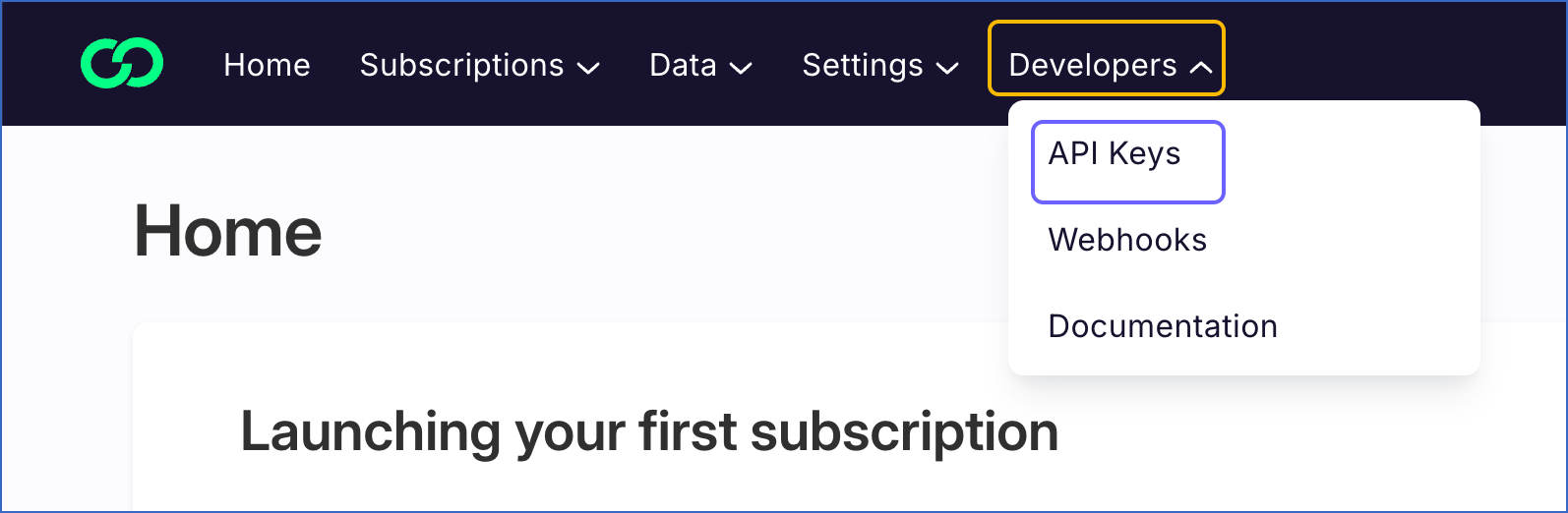
In the top navigation bar, hover over Developers and click API Keys.
-
On the API Keys page, do one of the following:
-
If you have an existing API key with the Bulk queries setting enabled, click the copy (
 ) icon to copy the key. Use this key while configuring your Ordergroove Source in the Hevo Pipeline.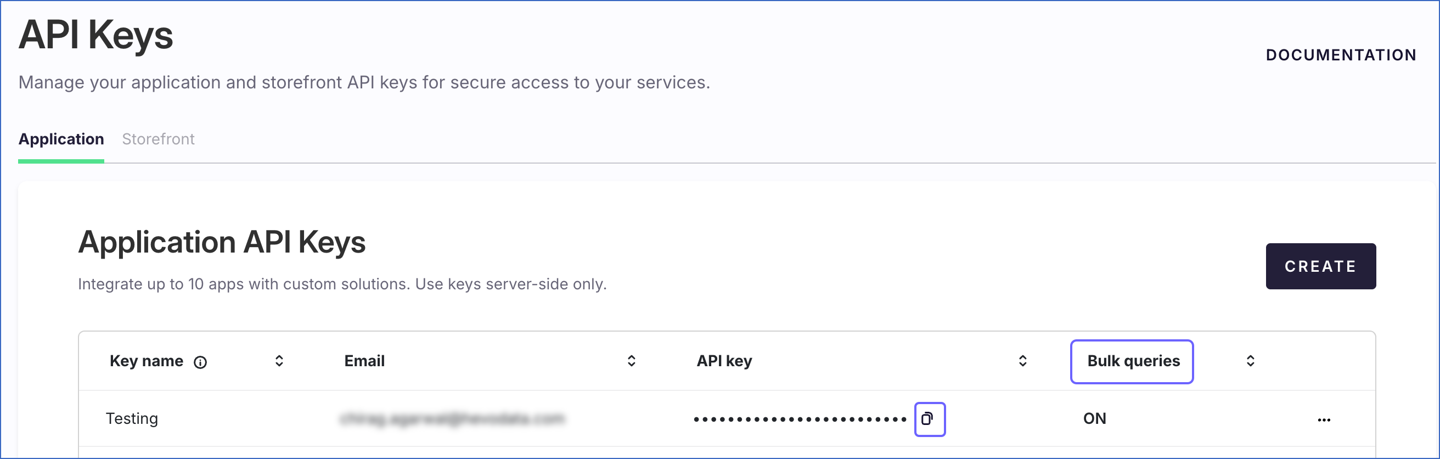
-
To create an API key, perform the following steps:
Note: You can create up to 10 API keys per account.
-
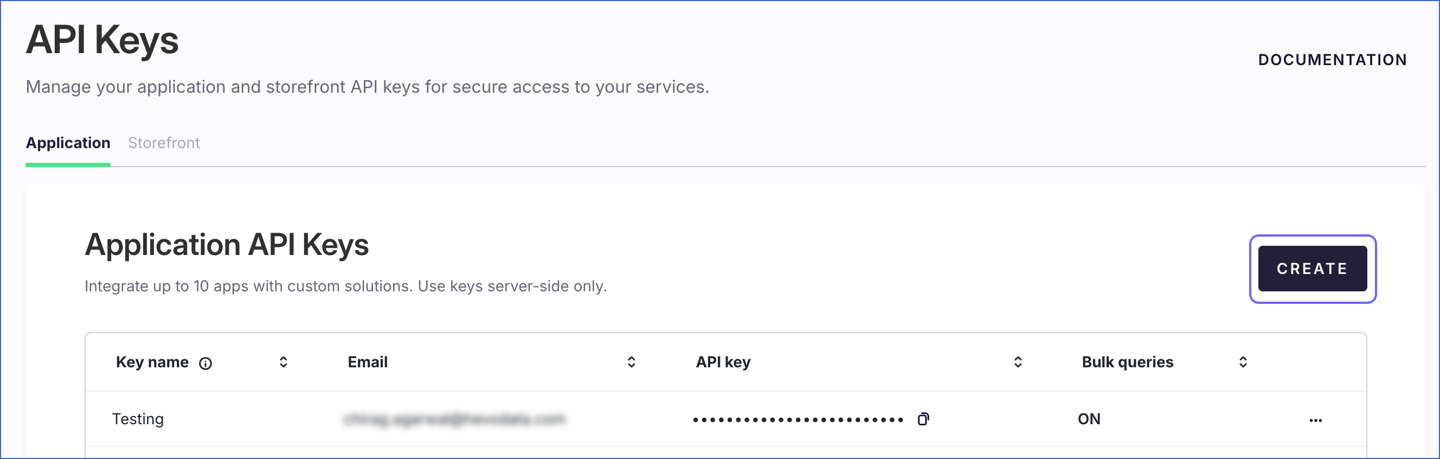
Click CREATE.
-
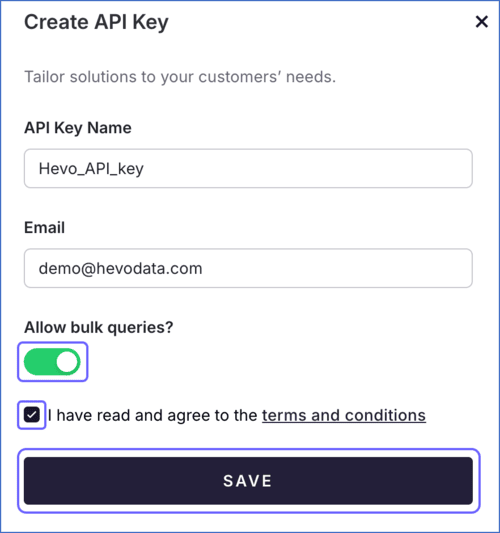
On the Create API Key slide-in page, do the following:
-
Specify the following:
-
API Key Name: A unique name to identify the API key.
-
Email: The email address you want to associate with the API key.
-
-
Enable the Allow bulk queries? setting.
-
Select the acknowledgment check box, and then click SAVE.
-
You can now view the newly created API key on the API Keys page. Click the copy (
) icon to copy the key, and use it while configuring your Ordergroove Source in the Hevo Pipeline.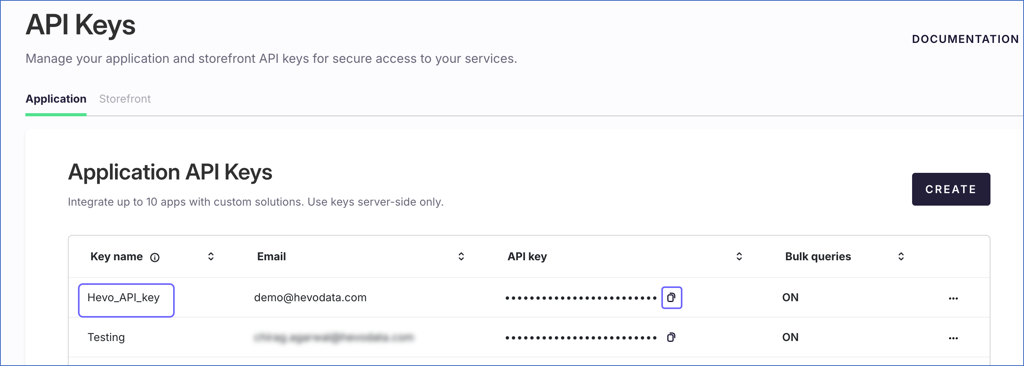
-
-
If the API key configured in the Pipeline is revoked manually from your Ordergroove account, Hevo cannot authenticate with the Source. As a result, all active jobs for the Pipeline fail, and no data is replicated. To resume data replication, modify the Source configuration in the Pipeline with a valid API key. Once the updated key is saved, Hevo re-authenticates the Source, and data ingestion resumes from the last saved offset.
Configure Ordergroove as a Source in your Pipeline
Perform the following steps to configure your Ordergroove Source:
-
Click Pipelines in the Navigation Bar.
-
Click + Create Pipeline in the Pipelines List View.
-
On the Select Source Type page, select Ordergroove.
-
On the Select Destination Type page, select the type of Destination you want to use.
-
In the Configure Source screen, specify the following:
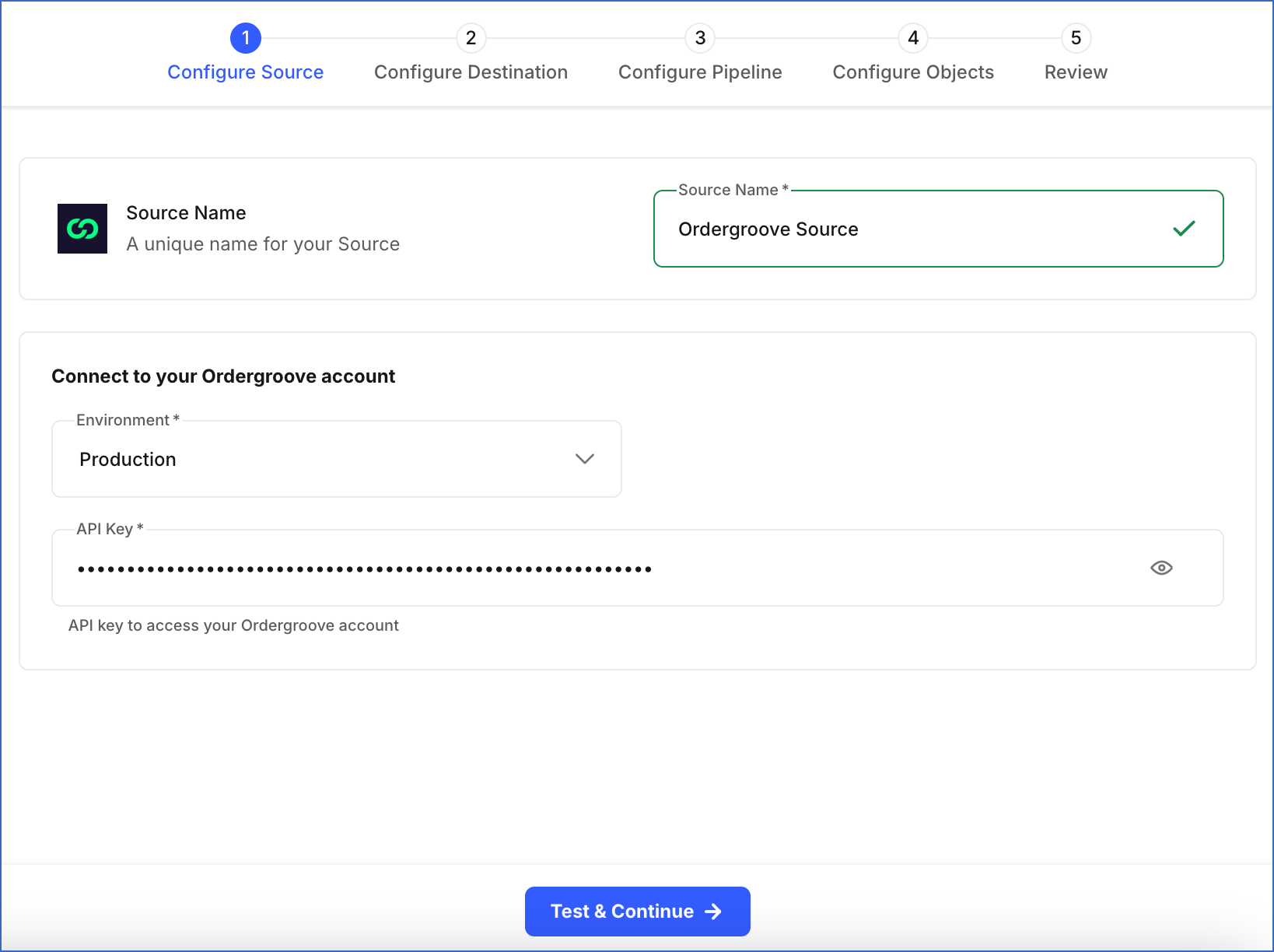
-
Source Name: A unique name for your Source, not exceeding 255 characters. For example, Ordergroove Source.
-
In the Connect to your Ordergroove account section, from the drop-down, select the Environment from which you want Hevo to ingest data. This can be Production or Staging.
-
API Key: The API key that you obtained from your Ordergroove account.
-
-
Click Test & Continue to test the connection to your Ordergroove Source. Once the test is successful, you can proceed to set up your Destination.
Data Replication
Hevo replicates data for all the objects selected on the Configure Objects page during Pipeline creation. By default, all supported objects and their available fields are selected. However, you can modify this selection while creating or editing the Pipeline.
Selecting a parent object automatically includes all its associated child objects for replication. Child objects cannot be selected or deselected individually.
Hevo ingests the following types of data from your Source objects:
-
Historical Data: The first run of the Pipeline ingests all available historical data for the selected objects and loads it into the Destination.
-
Incremental Data: Once the historical load is complete, new and updated records for objects are ingested as per the sync frequency.
For the following objects, Hevo ingests only the incremental data in subsequent Pipeline runs:
Incremental changes are detected using timestamp fields:
-
Orders and Subscription: updated
-
Item: order_updated_start_date and order_updated_end_date
For all other objects, Hevo ingests the entire data during each Pipeline run.
Ordergroove currently enforces a rate limit of 6000 API requests per IP per minute. If this limit is exceeded, a rate limit exception occurs. To understand how Hevo handles such scenarios, read Handling Rate Limit Exceptions.
Note: You can create a Pipeline with this Source only using the Merge load mode. The Append mode is not supported for this Source.
Schema and Primary Keys
Hevo uses the following schema to upload the records in the Destination. For a detailed view of the objects, fields, and relationships, click the ERD.
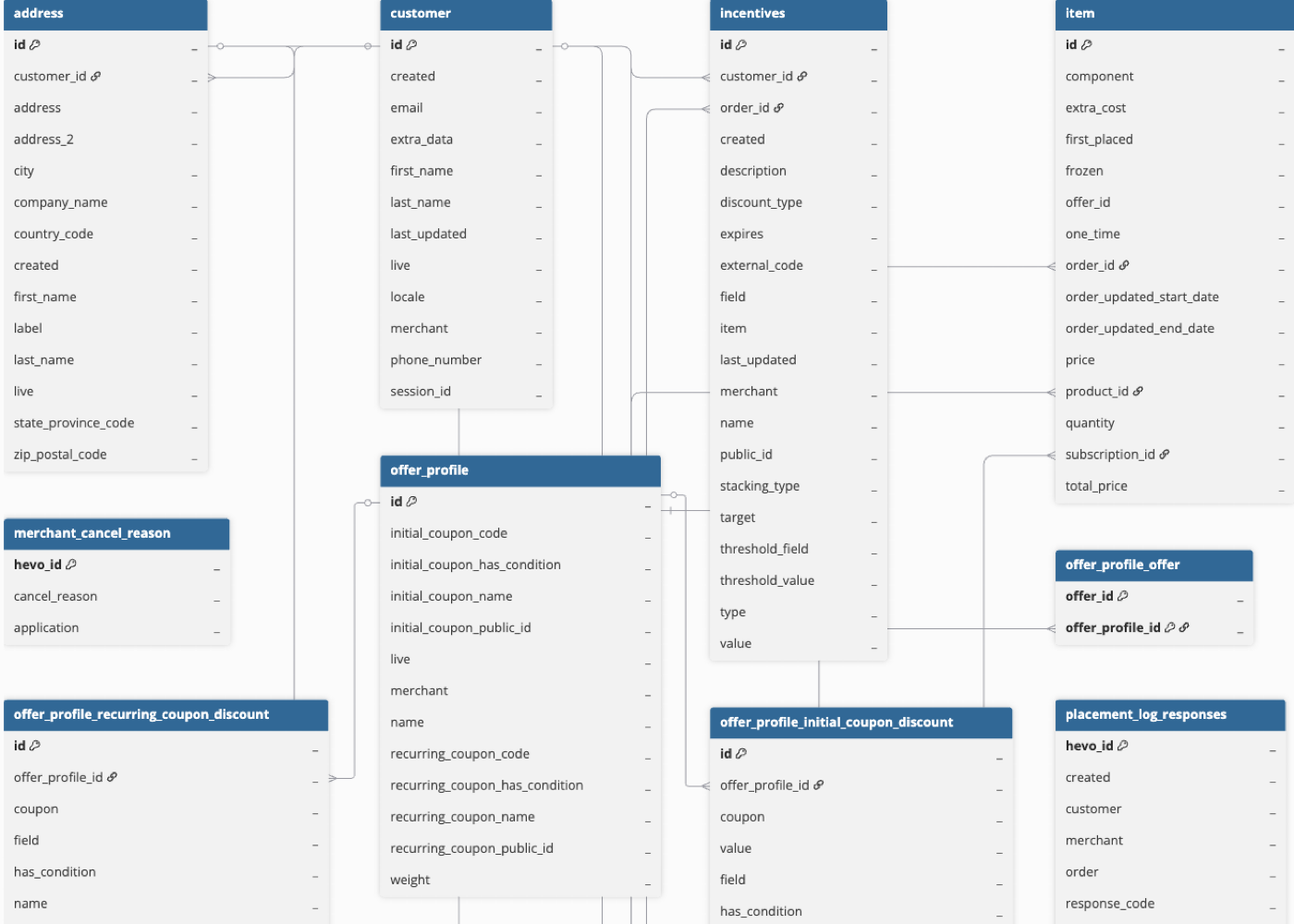
Data Model
The following is the list of tables (objects) that are created at the Destination when you run the Pipeline:
| Object | Description |
|---|---|
| Address | Contains customer address information, such as street, city, state or province, country, and postal code. These addresses are used for delivering orders and subscription-based items. |
| Customer | Contains details of customers, including name, contact information, and account status. Each record represents an individual associated with subscriptions and orders. |
| Incentives | Contains details about discounts and promotional offers applied to customers, subscriptions, or orders. It includes the incentive type, values, conditions, and validity period. |
| Item | Contains details of individual items within an order, including product information, quantity, pricing, and discounts. |
| Merchant Cancel Reason | Contains the list of cancellation reasons defined by the merchant. |
| Offer Profile | Represents how one or more discounts are grouped and applied to subscriptions or orders. This includes information about initial and recurring discounts, along with their conditions and applicability. This object has the following child objects: - Offer Profile Initial Coupon Discount - Offer Profile Offer - Offer Profile Recurring Coupon Discount |
| Offer Profile Initial Coupon Discount | Contains details of coupon-based discounts applied on the first purchase through an offer profile. This includes coupon information, along with discount values and conditions. |
| Offer Profile Offer | Represents the relationship between an offer profile and the offers associated with it. |
| Offer Profile Recurring Coupon Discount | Contains details of coupon-based discounts applied to recurring purchases through an offer profile. This includes coupon information, along with discount values and conditions. |
| Orders | Contains information about orders, including status, pricing breakdowns, applied discounts, taxes, shipping information, and associated customer details. Each order represents a single purchase transaction and may include one or more items. |
| Payment | Contains payment-related information for a customer, including billing information, payment method, card details, and payment status. These records are used to process and manage payments for subscriptions and orders. |
| Placement Log Responses | Contains responses generated during order placement attempts, including response codes, messages, and associated order and customer details. These records help track and analyze order placement outcomes and errors. |
| Product | Contains details of products available for purchase, including pricing information, availability status, and configuration settings used for subscriptions and orders. This object has the following child objects: - Product Group - Product Relationships - Product Selection Rule - Product Selection Rule Element |
| Product Group | Represents groups of products categorized together for specific purposes, such as eligibility or incentives. |
| Product Relationships | Contains details of the relationship between two linked products. |
| Product Selection Rule | Contains details of the rules used to select or group products for subscriptions. |
| Product Selection Rule Element | Contains details of individual rule elements that control product selection behavior, along with the date from which the rule applies. |
| Resources | Contains information about resources defined for a merchant, including their name, description, and timestamps indicating when the resource was created or last updated. |
| Subscription | Contains details of customer subscriptions, including subscribed products, pricing, payment and shipping information, and the current subscription status. This object has the following child objects: - Subscription Component - Subscription Discount |
| Subscription Component | Contains details of the products included in a subscription along with the quantity of each product. |
| Subscription Discount | Contains details of discounts applied to a subscription, including the discount name and the subscription ID. |
Additional Information
Read the detailed Hevo documentation for the following related topics:
Configure Webhooks for Capturing Delete Events
For Item and Orders objects, Hevo captures delete events through webhooks. To enable this, you must configure webhooks in your Ordergroove account using the webhook URL generated for your Pipeline. Once configured, whenever records for these objects are deleted, Hevo sets the metadata column __hevo__marked_deleted to true for the corresponding records in the Destination.
Perform the following steps to configure webhooks for capturing delete events:
Obtain the Webhook URL for your Pipeline
Perform the following steps to obtain the webhook URL generated by Hevo for your Pipeline:
-
In the Pipeline’s toolbar, click Pipeline Setup.

-
Scroll down to the Configure Pipeline section and copy the URL displayed in the Webhook URL field.

Create a Webhook in your Ordergroove account
Perform the following steps to create a webhook in your Ordergroove account to capture delete events for Item and Orders objects:
-
Log in to your Ordergroove account as a user with permission to create webhooks, such as an Account Manager Admin.
-
In the top navigation bar, hover over Developers, and then click Webhooks.
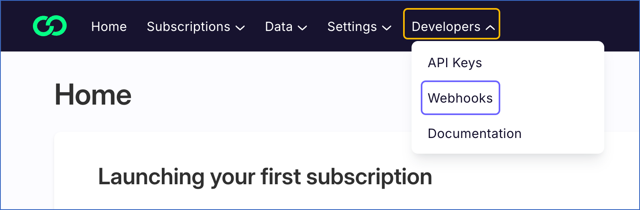
-
On the Webhooks page, do one of the following:
-
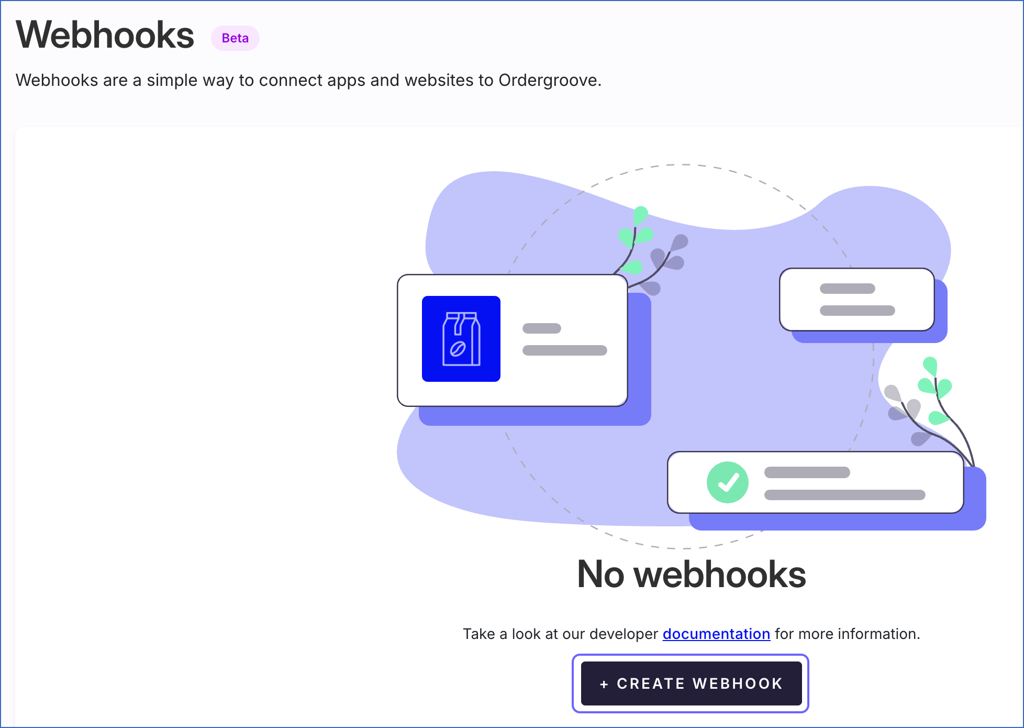
If no webhooks are currently configured in your Ordergroove account, click + CREATE WEBHOOK to create one.
-
If webhooks are already configured, click + CREATE to create one.

-
-
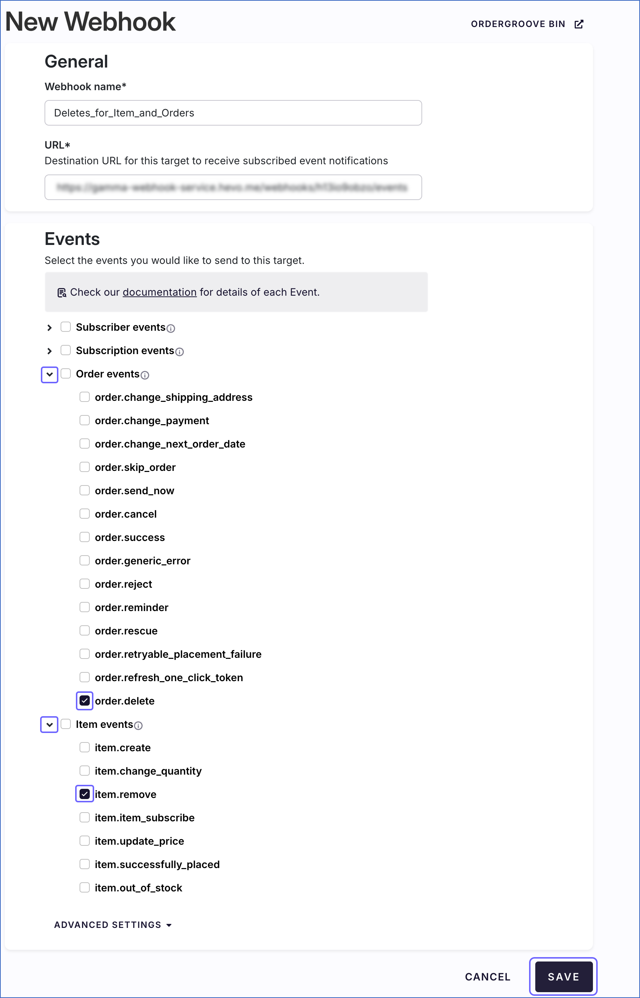
On the New Webhook page, do the following:
-
In the General section, specify the following:
-
Webhook name: A unique name to identify the webhook.
-
URL: The webhook URL that you obtained from your Pipeline.
-
-
In the Events section, do the following:
-
Click the expand icon next to Order events, and select the check box for order.delete event.
-
Click the expand icon next to Item events, and select the check box for item.remove event.
Note: If you select any additional events, Ordergroove may send notifications for those events to the configured webhook URL. However, Hevo ignores these notifications, and they do not affect data ingestion.
-
-
Click SAVE to create the webhook.
-
You can now view the newly created webhook on the Webhooks page.

Handling of Deletes
Ordergroove does not explicitly mark records as deleted in its REST API responses. When a record is deleted, it is no longer returned in subsequent API responses.
Hevo uses a full data refresh approach to capture delete actions for parent objects. During each Pipeline run, Hevo compares the data fetched from the Source object with the data present in the Destination table. If a record exists in the Destination but is no longer returned by the Source, the record is marked as deleted by setting the value of the metadata column __hevo__marked_deleted to True. This applies only to the following objects, for which the complete data is ingested during each sync.
-
Address
-
Customer
-
Incentives
-
Merchant Cancel Reason
-
Offer Profile
-
Payment
-
Placement Log Responses
-
Product
-
Resources
For Item and Orders objects, where only new and updated records are ingested after the first Pipeline run, Hevo captures delete events through webhooks. To enable this, you must configure webhooks in your Ordergroove account. Once configured, Hevo receives a notification when records for such objects are deleted and marks them as deleted in the Destination table.
For child objects, during each sync, Hevo removes the existing data from the corresponding Destination tables and loads them with the latest data ingested from the Source. As a result, if any records are deleted for child objects, those records are not present in the Destination after the next Pipeline run.
Revision History
Refer to the following table for the list of key updates made to this page:
| Date | Release | Description of Change |
|---|---|---|
| Jan-20-2026 | NA | New document. |