Release Version 2.52
On This Page
The content on this site may have changed or moved since you last viewed it. As a result, some of your bookmarks may become obsolete. Therefore, we recommend accessing the latest content via the Hevo Docs website.
This release note also includes the fixes provided in all the minor releases since 2.51.
To know the complete list of features available for early adoption before these are made generally available to all customers, read our Early Access page.
In this Release
New and Changed Features
Pipelines
Support for Resyncing Multiple Objects with a Single Action (Edge)
NewHevo now lets you select multiple objects in the Objects tab of your Pipeline and resync their data in a single action, instead of resyncing them one at a time. You can also choose to drop and re-create the Destination tables for the selected objects as part of the resync.
Managing Objects →Sources
Support for Amazon Ads as a Source (Edge)
NewHevo now supports Amazon Ads as a Source for creating Pipelines. Amazon Ads is Amazon’s advertising platform that lets you create and manage ads to promote your products across Amazon and third-party sites. You can replicate data from your Amazon Ads account, including profile and portfolio details, Sponsored Products and Sponsored Display campaigns, ad groups, and targeting details, into your Destination.
Amazon Ads →Support for StackAdapt as a Source (Edge)
NewHevo now supports StackAdapt as a Source for creating Pipelines. StackAdapt is an AI-powered advertising platform that helps advertisers, agencies, and brands plan, execute, and optimize multi-channel ad campaigns across various digital channels. You can replicate data from your StackAdapt account, including advertiser, campaign, and ad details, along with delivery and campaign insight reports, into your Destination.
StackAdapt →Support for TikTok Ads as a Source (Edge)
NewHevo now supports TikTok Ads as a Source for creating Pipelines. TikTok Ads is TikTok’s advertising platform that helps you create, manage, and measure ad campaigns across the TikTok app. You can replicate data from your TikTok Ads account, including campaign, ad group, ads, and performance reports, into your Destination.
TikTok Ads →Support for Amazon Selling Partner as a Source (Edge)
NewHevo now supports Amazon Selling Partner as a Source for creating Pipelines. Amazon Selling Partner (Seller Central) is Amazon’s platform for third-party sellers to list, price, fulfill, and manage products sold across Amazon’s marketplaces worldwide. You can replicate data from your Amazon Selling Partner account, including orders, financial events, inventory and fulfillment details, catalog information, and sales and traffic reports, into your Destination.
Amazon Selling Partner →Support for Instagram Business as a Source (Edge)
NewHevo now supports Instagram Business as a Source for creating Pipelines. Instagram Business is Meta’s platform for content creators and businesses to manage Instagram professional accounts, publish posts, stories, and reels, and track engagement and performance metrics. You can replicate data from your Instagram Business account, including media posts, comments, and account and media performance insights, into your Destination.
Instagram Business →Support for Xero as a Source (Edge)
NewHevo now supports Xero as a Source for creating Pipelines. Xero is a cloud-based accounting platform that helps small and medium-sized businesses manage invoicing, bank reconciliation, fixed assets, payroll, and project tracking from a single place. You can replicate data from your Xero organization, including invoices, contacts, bank transactions, payments, payroll, and project details, into your Destination.
Xero →Support for LinkedIn Ads as a Source (Edge)
NewHevo now supports LinkedIn Ads as a Source for creating Pipelines. LinkedIn Ads is LinkedIn’s self-serve advertising platform that lets you create and manage ad campaigns to reach professional audiences through Sponsored Content, Sponsored Messaging, Text Ads, and Dynamic Ads. You can replicate data from your LinkedIn Ads account, including account, campaign, and creative details, ad analytics and conversion reports, Lead Gen Form responses, and Company Page statistics, into your Destination.
LinkedIn Ads →Support for Microsoft Ads as a Source (Edge)
NewHevo now supports Microsoft Ads as a Source for creating Pipelines. Microsoft Ads is Microsoft’s advertising platform that helps you create and manage search, display, and shopping campaigns across the Microsoft Search Network, Microsoft Audience Network, and partner networks. You can replicate data from your Microsoft Ads account, including account, campaign, ad group, ad, and keyword details, along with performance and audience reports, into your Destination.
Microsoft Ads →Support for Commerce Hub and Additional CRM Objects in HubSpot (Edge)
EnhancedHevo now supports ingesting data from additional Source objects, including Commerce Hub objects such as carts, discounts, invoices, and subscriptions, as well as Customer Relationship Management (CRM) objects such as courses, listings, orders, and projects. This provides a more complete view of sales, billing, and account activity in your Destination, enabling better analysis and insights into customer activity, transactions, and revenue.
HubSpot →Support for Historical Sync Duration in HubSpot (Edge)
NewHevo now lets you configure the historical sync duration for the HubSpot Source, giving you control over the period of data ingested during the historical load. The default duration is 3 months, and you can also change it after creating the Pipeline.
HubSpot →Support for v24 of the Google Ads API
NewEffective August 05, 2026, Hevo has upgraded its Google Ads integration to support API v24. As part of this upgrade:
- Certain fields and metrics are no longer supported and will not be ingested. As a result, corresponding Destination columns are not updated.
- New fields have been added to certain reports, ensuring that all the newly introduced attributes, metrics, and segments are available in your reports.
The upgrade process was seamless, with no downtime for your Pipelines. This change applies to all new and existing Pipelines.
Google Ads →User Experience
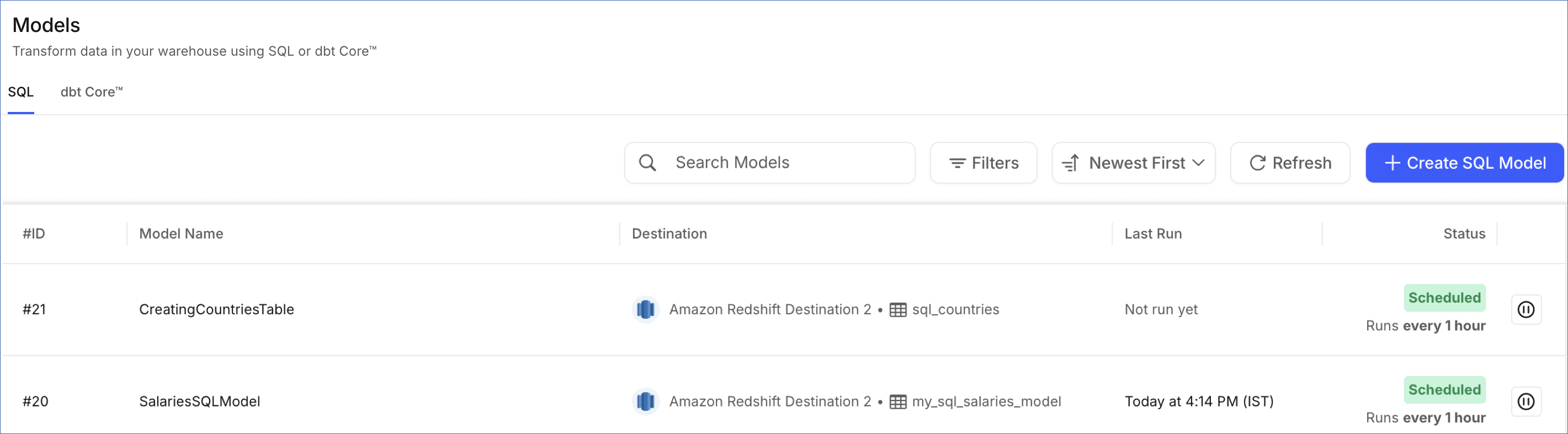
Updated SQL Models List View UI
EnhancedThe SQL Models List View has been redesigned into a tabular format, giving you a clearer view of all your SQL Models, including their Destination, output table, last run, and status, all on a single page. This increases navigability and makes it easier to find and manage your Models.
Warning Banners for Replication Slot Management in PostgreSQL Pipelines (Edge)
NewHevo now displays warning banners in the Disable, Enable, and Delete Pipeline dialogs for Pipelines created with any PostgreSQL Source variant using logical replication. These banners inform you that Hevo does not automatically drop the replication slot when you disable or delete a Pipeline, and that an unused slot continues to retain WAL files, causing storage consumption on your Source database. The banners also provide the commands required to drop and recreate the replication slot.
Managing Replication Slot when Disabling, Enabling, or Deleting a Pipeline →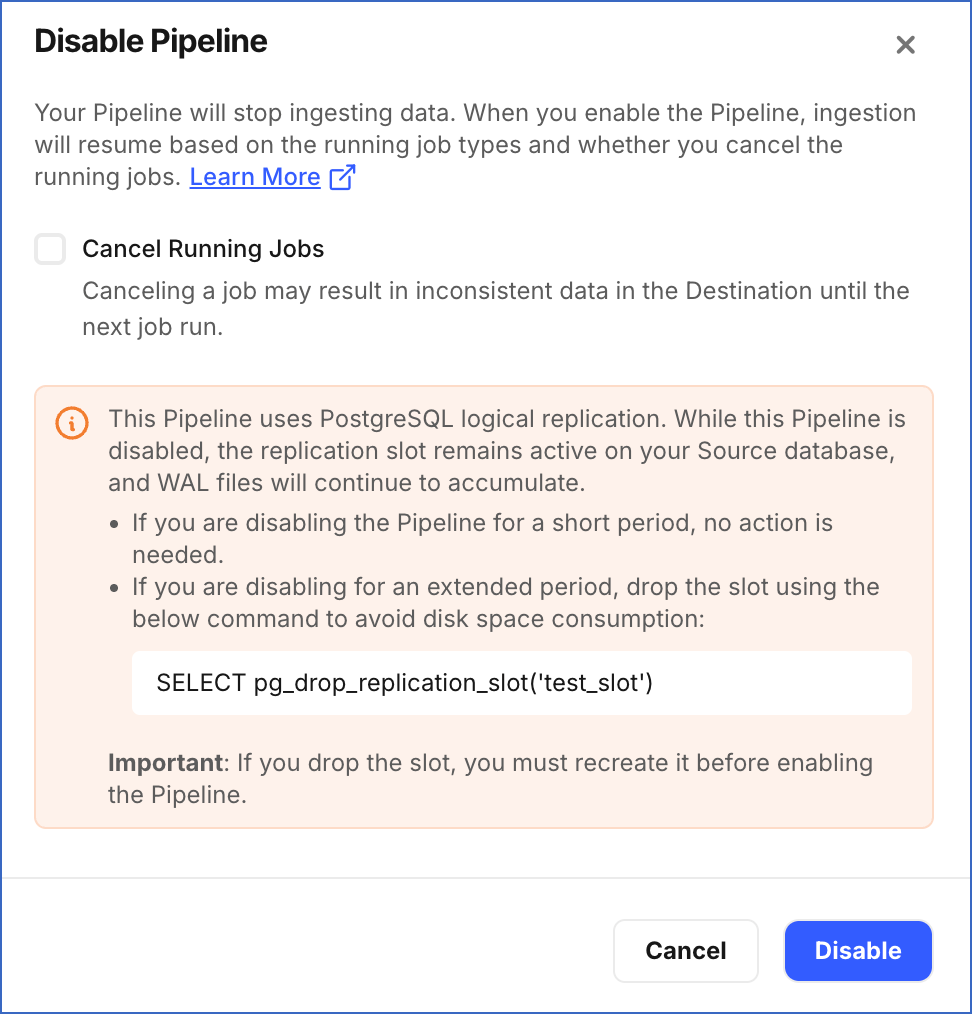
Fixes and Improvements
Sources
Handling Duplicate Data Ingestion Issue in HubSpot
Fixed an issue where the same records were repeatedly ingested during incremental loads, resulting in increased Event quota consumption. This issue occurred because Hevo did not correctly move the offset forward after each poll, causing it to retrieve the same set of records again on every subsequent poll instead of picking up only new and updated ones.
With this fix, Hevo now correctly updates the offset, ensuring subsequent polls retrieve only new and updated records. This fix applies to all new and existing Pipelines.
Note: Records that were already duplicated in the Destination tables before the fix are not automatically removed. If required, manually remove them from the Destination.