Stripe (Edge)
On This Page
This Source is generally available for Standard Pipelines. However, for Edge Pipelines, it is currently in BETA. You can contact Hevo Support or your account executive to enable it for your team.
Stripe is a payments platform that enables businesses to accept and manage online and in-person payments. It connects applications with banks and payment networks to securely process transactions and manage subscriptions, refunds, and payouts.
Stripe Environments
Stripe provides two separate environments for testing purposes and production use:
-
Sandbox: This environment is used for development and validation. You can simulate payments, refunds, and other activities without processing real transactions. Data created in a sandbox environment is isolated from live data and does not impact actual business operations.
-
Live mode: This environment is used for real payment processing and contains actual customer and transaction data. Live mode is typically used for reporting, reconciliation, and business analysis.
Hevo supports data replication from both live and sandbox modes. You can connect to the environment from which you want to ingest data by providing the API key associated with that environment.
Supported Features
| Feature Name | Supported |
|---|---|
| Capture deletes | Yes |
| Data blocking (skip objects and fields) | Yes |
| Resync (objects and Pipelines) | Yes |
| Authorization via API | Yes |
| API configurable | Yes |
Prerequisites
-
An active Stripe account with either an Administrator or a Developer role. Read Teams and user roles.
-
A restricted or secret API key that allows Hevo to read your Stripe data.
Obtain the API Key
To connect Hevo to your Stripe account, you must provide an API key. You can use an existing key or create a new one.
-
To ingest test data, create or use an API key in Sandbox mode.
-
To ingest production data, create or use an API key in Live mode.
Stripe API keys do not expire and can be reused across Pipelines.
You can share either of the following keys with Hevo:
-
Restricted API Key: Allows you to grant access only to specific objects.
-
Standard Secret Key: Allows access to all objects without any restrictions.
Choose the key type based on your security and access control requirements.
If you have an Administrator or Developer role, you can access your API keys from the Stripe Dashboard. Read Stripe’s documentation on API keys.
Note: Hevo can ingest only the objects that have Read permission in the API key. Objects without read permission cannot be selected while creating the Pipeline.
Do one of the following:
-
Create a Restricted API Key:
-
Log in to the Developer Dashboard.
-
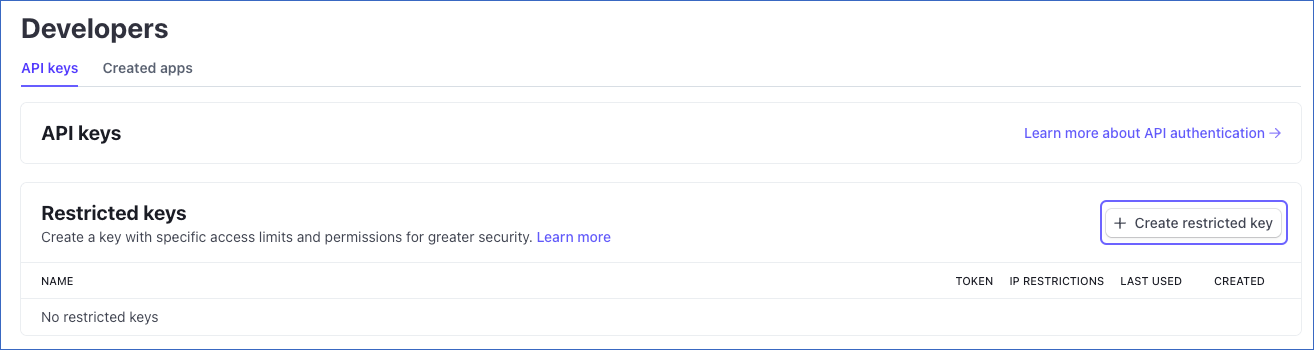
On the API keys page, under the Restricted keys section, click + Create restricted key.
-
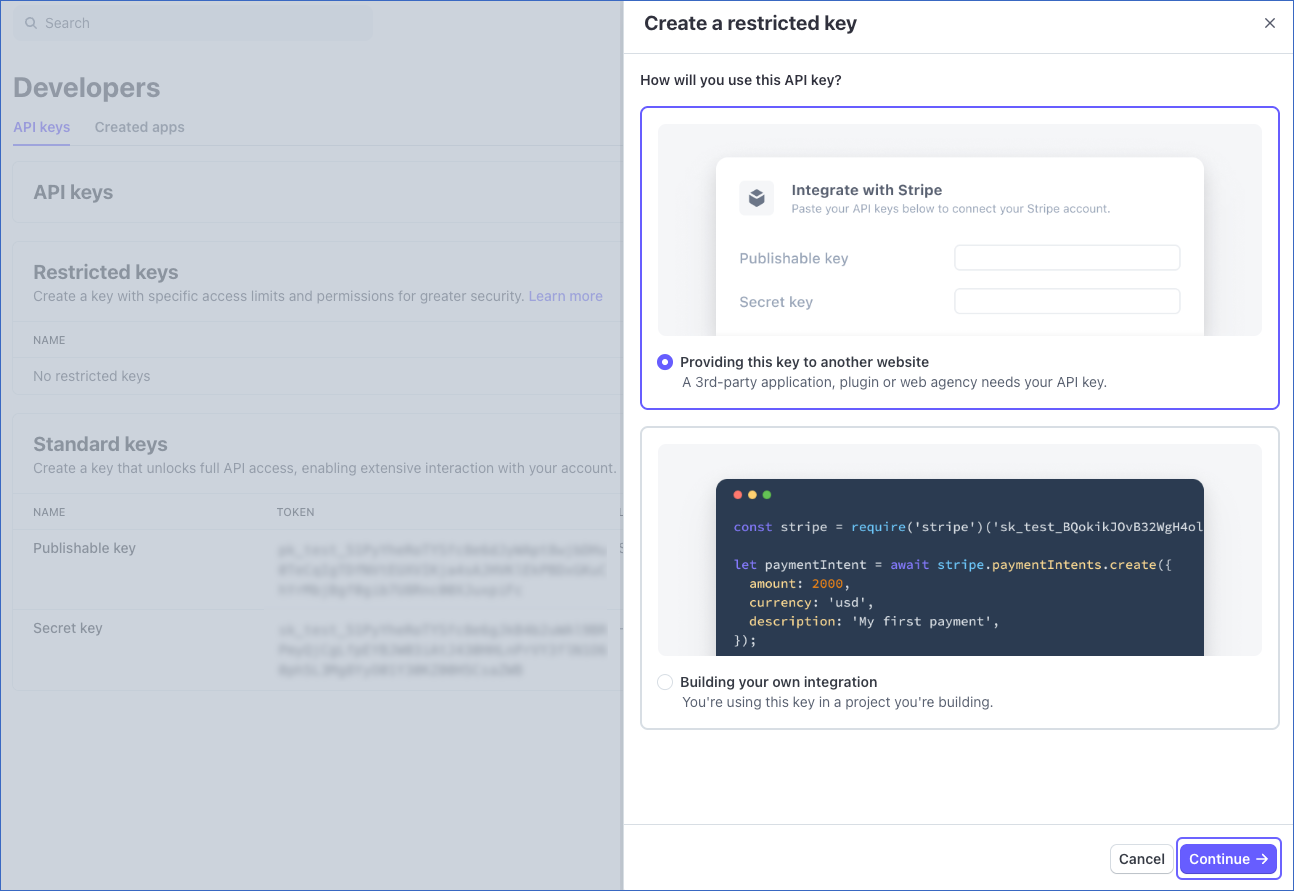
On the Create a restricted key slide-in page, select Providing this key to another website option, and then click Continue.
-
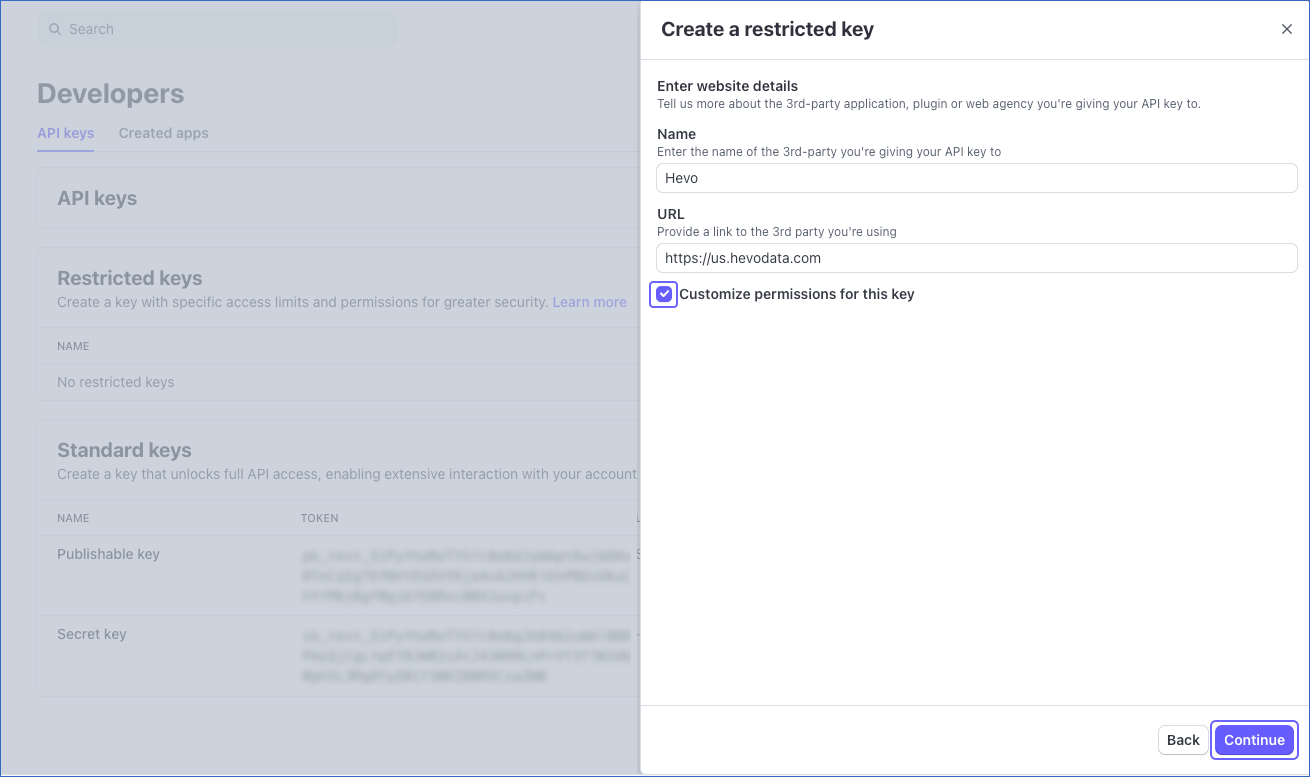
In the Enter website details section, in the Name and URL fields, enter Hevo and the app URL of your Hevo account region, respectively.
-
Select the Customize permissions for this key check box, and then click Continue.
-
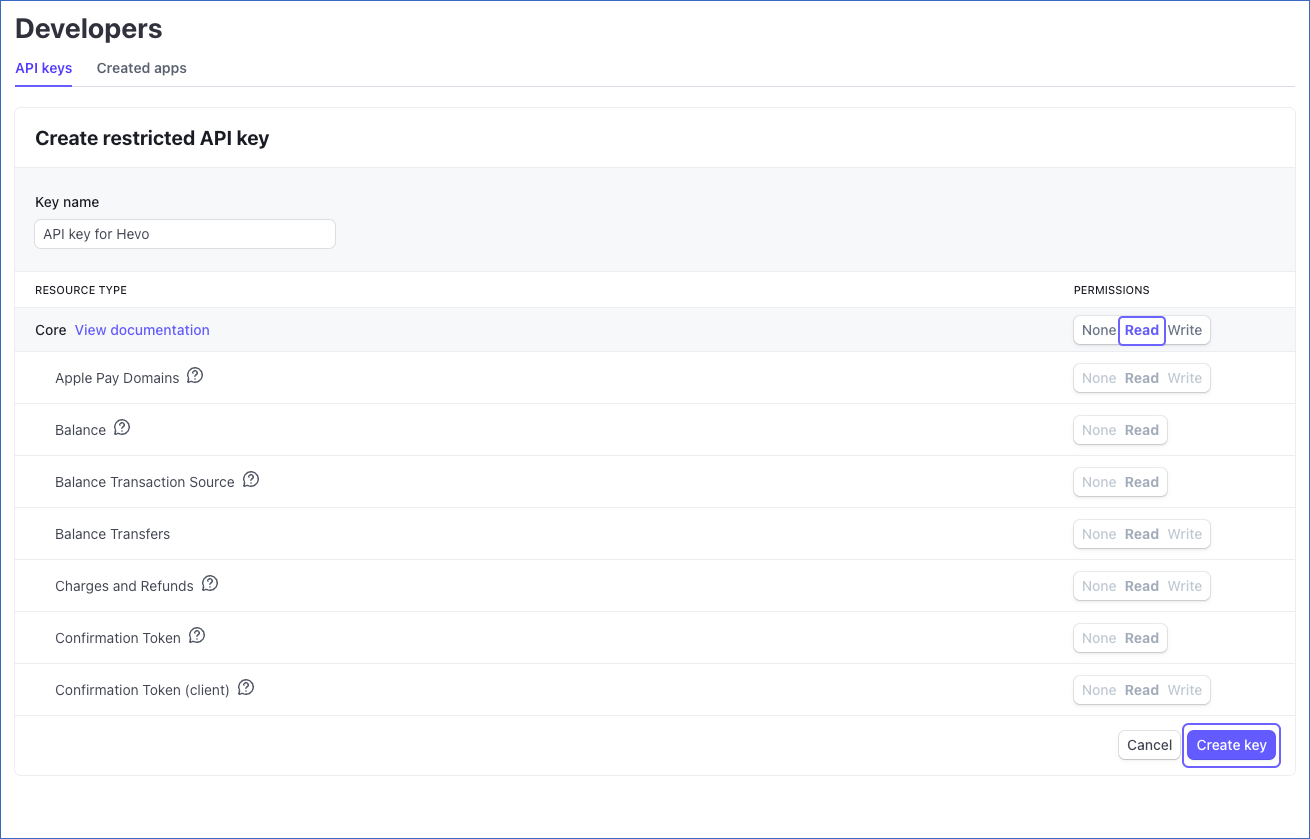
On the Create restricted API key page, specify a unique Key name for this API key, such as API key for Hevo.
-
Under the PERMISSIONS column, select the Read permission corresponding to the following resource types:
-
All Core resources
-
All Billing resources
-
All Checkout resources
-
All Connect resources
-
All Orders resources
-
All Issuing resources
-
-
Scroll to the bottom of the page, and click Create key. You will be redirected to the API keys page.
-
In the Restricted keys section, click to copy the API key under TOKEN and save it securely like any other password.
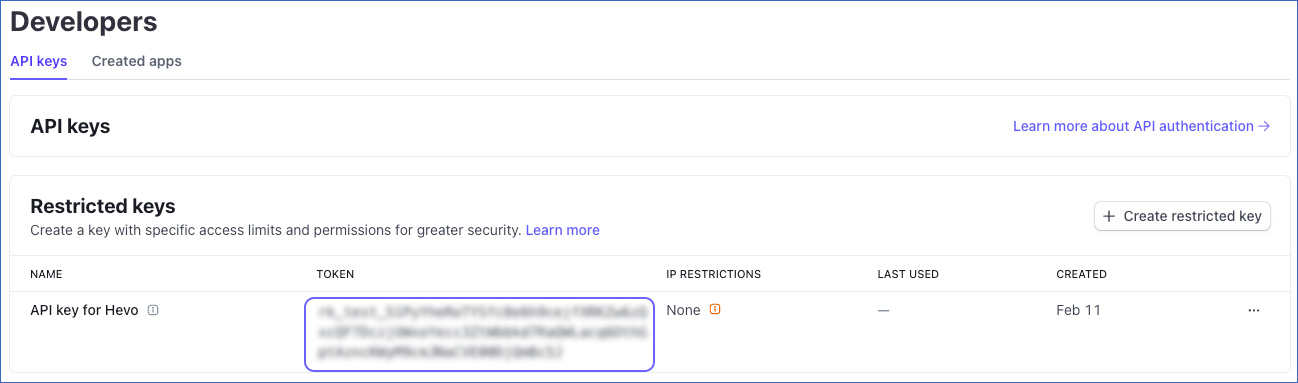
You can use this key while configuring your Hevo Pipeline.
-
-
Obtain the Standard Secret Key:
-
Log in to the Developer Dashboard.
-
On the API keys page, under the Standard keys section, click to copy the secret key and save it securely like any other password.
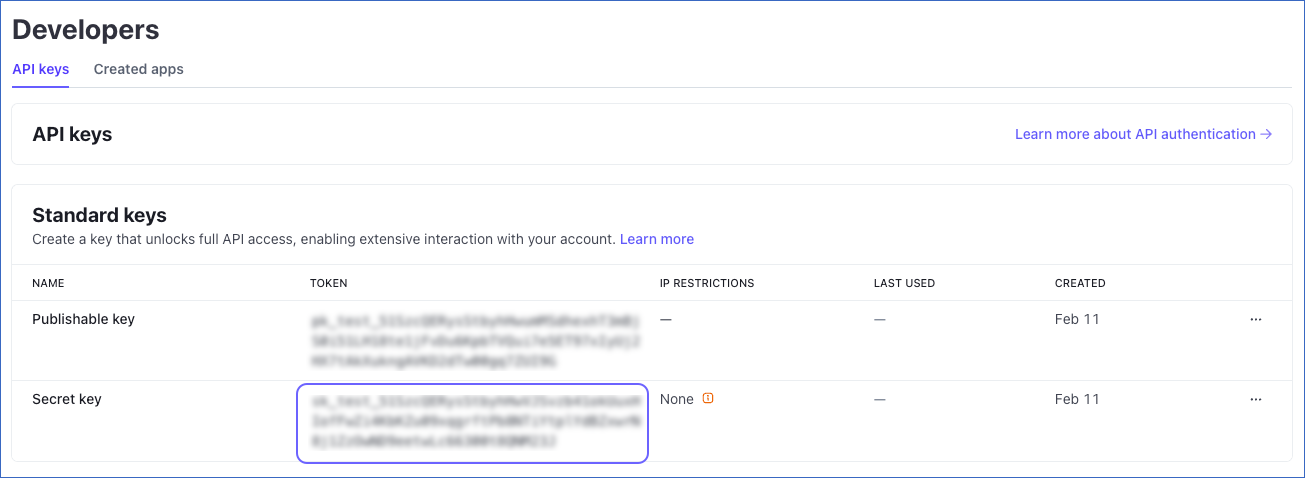
Use this key while configuring your Hevo Pipeline.
-
Configure Stripe as a Source in your Pipeline
Perform the following steps to configure your Stripe Source:
-
Click Pipelines in the Navigation Bar.
-
Click + Create Pipeline in the Pipelines List View.
-
On the Select Source Type page, select Stripe.
-
On the Select Destination Type page, select the type of Destination you want to use.
-
On the Select Pipeline Type page, click Edge, and then click Continue.
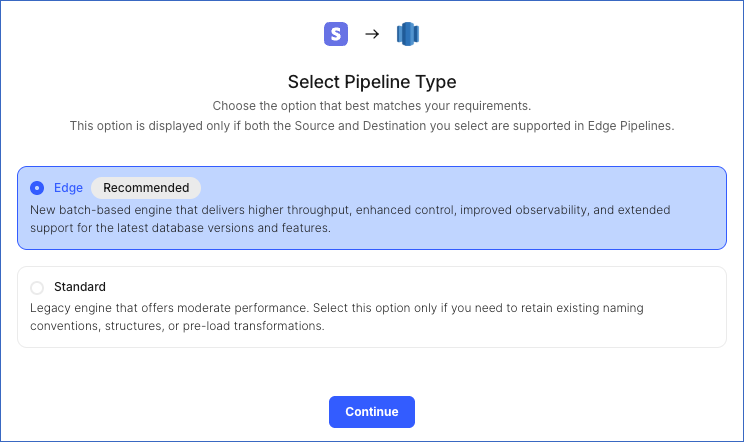
This page appears only if the selected Destination type is supported in Edge and your team has an existing Stripe Pipeline with the same Destination type. Otherwise, you can proceed to create an Edge Pipeline.
-
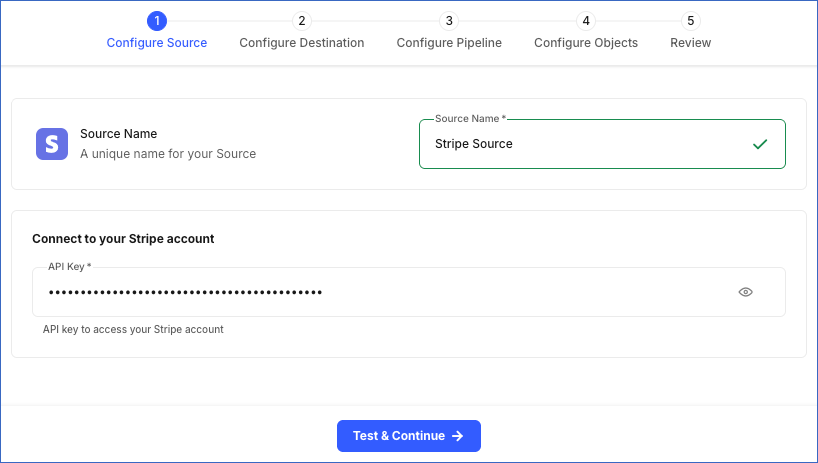
In the Configure Source screen, specify the following:
-
Source Name: A unique name for your Source, not exceeding 255 characters. For example, Stripe Source.
-
API Key: The API key that you obtained from your Stripe account.
-
-
Click Test & Continue to test the connection to your Stripe Source. Once the test is successful, you can proceed to set up your Destination.
Data Replication
Hevo replicates data for all the objects selected on the Configure Objects page during Pipeline creation. By default, all supported objects and their available fields are selected. However, you can modify this selection while creating or editing the Pipeline.
Selecting a parent object automatically includes all its associated child objects for replication. Child objects cannot be selected or deselected individually.
Hevo ingests the following types of data from your Source objects:
-
Historical Data: The first run of the Pipeline ingests all available historical data for the selected objects and loads it into the Destination.
-
Incremental Data: Once the historical load is complete, new and updated records for objects are ingested as per the sync frequency.
Immutable Objects
Some Stripe objects cannot be updated after they are created. Once a record is created, Stripe does not allow any modifications to it. Since updates for these objects are not possible, Hevo ingests only new records for them during incremental Pipeline runs.
The following objects are immutable:
-
Balance Transaction
-
File
-
File Link
-
Payout Balance Transaction
-
Quote Computed Upfront Line Item
For the following objects, Hevo ingests the entire data during each Pipeline run:
-
Account
-
Apple Pay Domain
-
Plan
-
Tier
-
Shipping Rate
For all other supported objects, Hevo ingests the new and updated records using the Stripe Events API.
Schema and Primary Keys
Hevo uses the following schema to upload the records in the Destination. For a detailed view of the objects, fields, and relationships, click the ERD.
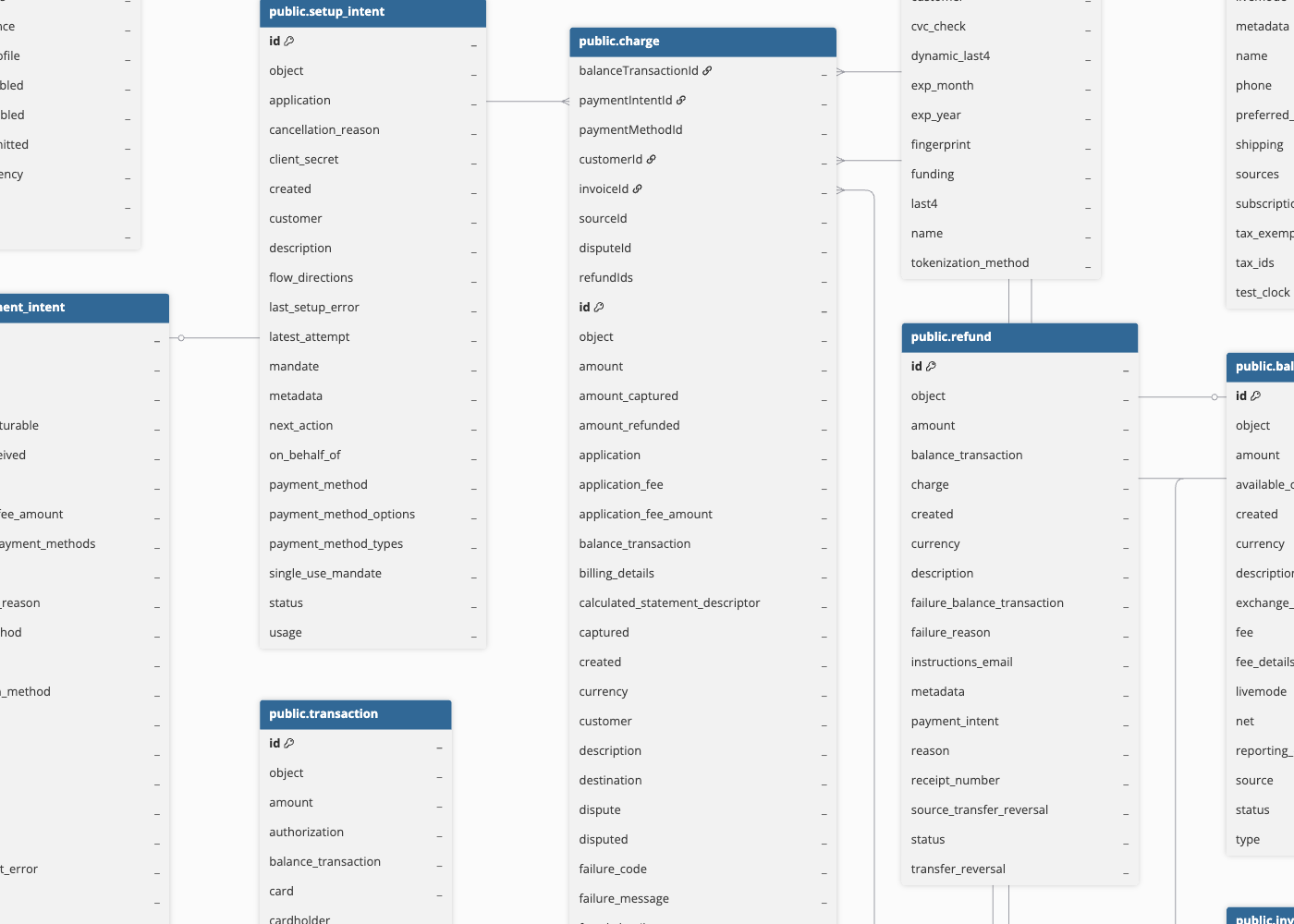
Data Model
The following is the list of tables (objects) that are created at the Destination when you run the Pipeline:
| Object | Description |
|---|---|
| Account | Contains details of a Stripe account, such as its current email address and whether the account is enabled to make live charges. |
| Apple Pay Domain | Contains the Apple Pay eligibility status of a registered domain, indicating whether the domain is verified and enabled to accept Apple Pay payments. |
| Application Fee | Contains the transaction fee amount collected in addition to a charge made to a user. |
| Authorization | Contains the information that must be approved for any card purchase to be completed successfully. |
| Balance Transaction | Contains the details of funds moving through a Stripe account. A balance transaction is created whenever funds enter or leave the account. |
| Cardholder | Contains details of the individual or business entity to whom a card is issued, such as name, email, and phone number. |
| Charge | Contains the details of a charge made on a credit or debit card. You can retrieve and refund individual charges or list all charges. Each charge is identified by a unique, random ID. |
| Coupon | Contains information about a percentage-based or fixed-amount discount that can be applied to subscriptions, invoices, checkout sessions, or quotes. |
| Credit Note | Contains the details of an adjustment made to a finalized invoice without recreating the invoice. |
| Customer | Contains customer details, including name, email, default payment method, and delinquency status. |
| Dispute | Contains the details of a customer dispute raised with their card issuer for a charge, including information about the disputed transaction and related evidence. |
| Early Fraud Warning | Contains details about early fraud warnings sent by the card issuer to Stripe for a transaction. |
| File | Contains details about files hosted on Stripe’s servers, including their purpose, type, size, and access URL. |
| File Link | Contains a URL that allows retrieval of a file’s contents without authentication. |
| Issuing Card | Contains details of physical or virtual cards issued to cardholders, including expiration month and year. |
| Issuing Dispute | Contains details of customer disputes about charges they do not recognise or suspect may be fraud. |
| Issuing Transaction | Contains details of funds entering or leaving a Stripe account. A transaction object is created whenever an issued card is used to make a purchase or issue a refund. |
| Payment Intent | Contains the guide for the process of collecting a payment from your customer during a particular session. Read How intents work to know more about the payment flow followed at Stripe. |
| Payout | Contains the details of funds transferred from Stripe to a connected bank account or debit card. |
| Plan | Contains pricing details for recurring purchases, including base price, currency, and billing cycle, used for defining pricing options for different service levels. |
| Price | Contains details such as unit cost, currency, and billing cycle for recurring and one-time purchases of the products you offer to your customers. For example, a standard or premium version of your service. |
| Promotion Code | Contains the details of a customer-redeemable code associated with a promotion. Multiple promotion codes can be linked to a single promotion. |
| Quote | Contains the details of a pricing proposal provided to a customer. Once accepted, it automatically creates an invoice, subscription, or subscription schedule. |
| Refund | Contains the details of a refund issued for a previously created charge. The refunded amount is returned to the original credit or debit card used for the payment. |
| Review | Contains human-added information to supplement automated fraud detection cases. |
| Setup Intent | Contains the guide for the process of saving a customer’s payment credentials for future payments. |
| Shipping Rate | Contains the details of the shipping charges applied to products being delivered to customers. |
| Tax Rate | Contains the details of the tax rates applied to the invoices, subscriptions, and checkout sessions to collect tax. |
| Top-up | Contains the amount customers wish to add to their Stripe account balance. |
Additional Information
Read the detailed Hevo documentation for the following related topics:
Handling of Deletes
During each Pipeline run, Hevo compares the data fetched from the Source object with the data present in the Destination table. If a record exists in the Destination but is no longer returned by the Source, Hevo marks the record as deleted by setting the metadata column __hevo__marked_deleted to True. This applies only to the following objects, for which the complete data is ingested during each sync:
-
Account
-
Apple Pay Domain
-
Plan
-
Tier
-
Shipping Rate
For the following objects, deletes are captured via Stripe’s Events API. In such cases, Hevo marks the __hevo__marked_deleted column to True in the Destination.
| Object Category | Objects |
|---|---|
| Billing | Credit Note, Quote |
| Connect | Application Fee, Person, Top-up |
| Core Resources | Balance Transactions, Charge, Customer, Customer Tax, Dispute, File, File Link, Payment Intent, Payout, Refund, Setup Intent |
| Fraud | Early Fraud Warning, Review |
| Issuing | Authorization, Cardholder, Issuing Card, Issuing Dispute, Issuing Transaction |
| Payment Methods | Cash Balance Transaction |
| Products | Coupon, Price, Promotion Code, Tax Rate |
For all child objects except Person, Cash Balance Transaction, Customer Tax, and Tier, during each sync, Hevo removes the existing data from the corresponding Destination tables and loads them with the latest data ingested from the Source. As a result, if any records are deleted for child objects, they are automatically removed from the Destination after the next sync.
Source Considerations
-
Pausing a Pipeline for more than 30 days can lead to data loss because the Events API tracks updates and deletes for only the past 30 days. After that period, older changes are no longer available, and Hevo cannot retrieve them.
-
Metadata fields in Stripe consist of custom key-value pairs added to objects to store additional information. However, Stripe does not update the Events API when only metadata is updated. As Hevo relies on Stripe events to track incremental changes for objects such as Charge, Customer, and Subscription, metadata-only changes are not captured. These changes are synced only when a non-metadata field on the same object is updated.
For example, if you update only the
order_idin the metadata of a Charge, Stripe does not generate an event. As a result, Hevo does not update theorder_idin the Destination table. The updated metadata is synced only after a non-metadata field, such asdescription, is changed and triggers acharge.updatedevent.
Limitations
- Hevo does not support ingesting data from connected accounts created using the Connect platform. If your Account object includes both connected and non-connected accounts, Hevo does not ingest any data for that object. To capture incremental data only from your non-connected Stripe accounts, you must resync the Account object.
Revision History
Refer to the following table for the list of key updates made to this page:
| Date | Release | Description of Change |
|---|---|---|
| Mar-05-2026 | NA | New document. |