Release Version 2.45
On This Page
The content on this site may have changed or moved since you last viewed it. As a result, some of your bookmarks may become obsolete. Therefore, we recommend accessing the latest content via the Hevo Docs website.
This release note also includes the fixes provided in all the minor releases since 2.44.
To know the complete list of features available for early adoption before these are made generally available to all customers, read our Early Access page.
In this Release
New and Changed Features
Hevo API
-
Key Pair Authentication Support for Snowflake Destinations
-
Enhanced the Hevo API v2.0 to support key pair authentication while adding new Snowflake Destinations or modifying existing ones.
-
Sources
-
Deprecation of Unsupported Facebook Pages Insights Metrics
-
Effective November 15, 2025, Meta deprecated several Facebook Pages and Post Insights metrics. To align with these changes, Hevo has updated the Facebook Pages integration to stop querying deprecated metrics and use supported alternatives where available.
As part of this update,
-
Deprecated Page and Post Insights metrics, such as page impressions, page fans, and post impressions are no longer fetched.
-
Destination tables and columns based on these deprecated metrics are no longer updated.
-
Supported replacement metrics, such as page follows and media views are now used where applicable.
Read Facebook Page Insights for more information on the affected metrics.
The upgrade process was seamless, with no downtime for your Pipelines. This change applies to all new and existing Pipelines.
-
-
-
Enhanced Support for Shopify Custom Apps (Added in Release 2.44.2)
-
Hevo now supports Shopify custom apps created using the Shopify Dev Dashboard. This update aligns with Shopify’s platform changes effective January 1, 2026, after which the creation of legacy custom apps can no longer be created.
With this update, you can create and manage new Shopify apps using the dev dashboard and use them to create Hevo Pipelines.
For existing Pipelines, Hevo will continue to replicate data using the previously configured legacy custom apps, without requiring any user action.
-
-
Improved Historical Data Ingestion for Amazon DynamoDB (Added in Release 2.44.2)
-
Enhanced historical data ingestion for tables that contain more than 1 Million records. During ingestion, Hevo divides such tables into 10 segments and creates separate ingestion tasks for each segment. These tasks run in parallel, enabling faster data ingestion by processing multiple segments of the table simultaneously.
This enhancement applies to all new and existing Pipelines.
Note: If you want to change the record threshold or the number of segments used for historical data ingestion, contact Hevo Support.
-
-
Support for Ticket Object in Intercom (Added in Release 2.44.3)
-
Added support for ingesting data from the Ticket object and the child objects associated with it. These objects contain information about customer support tickets, including their status, updates, assigned users, and contacts. This helps you understand and analyze how tickets are created, handled, and resolved.
As part of this enhancement, the following child objects of Ticket are supported:
-
Ticket Admin
-
Ticket Contact
-
Ticket Link
-
Ticket Part
-
Ticket Part Attachment
-
Ticket State
-
Ticket Team
-
Ticket Type
-
Ticket Type Attribute
For a detailed view of the objects, fields, and relationships, refer to the ERD in the Schema and Primary Keys section. This enhancement applies to all new and existing Pipelines.
Note: In existing Pipelines, the Ticket object is automatically added to the Objects section of the Pipeline Detailed View in the SKIPPED state. To start ingesting data, include the object in the Pipeline.
-
-
User Experience
-
Alerts for DynamoDB Tables Without Streams Enabled
-
Hevo now displays a warning when DynamoDB streams are not enabled for a Source table. This warning appears next to the object on the Select Objects page.
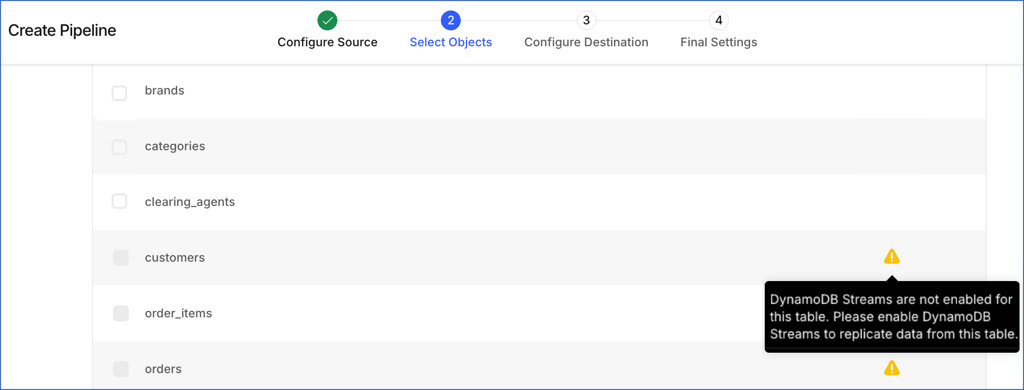
Previously, such tables could be selected for ingestion while creating the Pipeline. However, data ingestion for those objects was deferred in subsequent Pipeline runs.
With this enhancement, tables without streams enabled cannot be selected for ingestion in the Pipeline. This helps you identify configuration issues early and complete the required setup before creating the Pipeline.
This enhancement applies to all new Pipelines created with Amazon DynamoDB as the Source.
-
Fixes and Improvements
Pipelines
-
Handling Change Position Issues for Pipeline Objects (Fixed in Release 2.44.1)
-
Fixed an issue where Hevo was unable to change the position of objects configured with the Unique Incrementing Append Only mode in Pipelines created using any JDBC Sources.
Earlier, when a long value was provided as the new ingestion position, Hevo treated it as an integer. If the value exceeded the integer limit, 2,147,483,647, the offset could not be updated, causing the action to fail.
With this fix, Hevo correctly handles long values, allowing the Change Position action to complete successfully for such objects. This fix applies to all new and existing Pipelines created with JDBC Sources.
-
Sources
-
Handling Data Mismatch Issues in Facebook Ads
-
Fixed an issue where, in some cases, all click attribution field values for the Ads Insights reports were incorrectly replicated as NULL in the Destination instead of the actual Source values. This issue occurred because Hevo was unable to interpret the format in which the API response returned data for these fields.
With this fix, Hevo now correctly parses click attribution field values, ensuring that Source values are accurately replicated to the Destination. This fix applies to all new and existing Pipelines. For existing Pipelines, if you observe such mismatches in your Destination tables, restart the historical load for the report.
-
User Experience
-
Handling Test Connection Failures in Amplitude Analytics Source (Fixed in Release 2.44.3)
-
Fixed an issue where, in some cases, Test Connection and Test & Save buttons were unresponsive while editing the Source configuration for existing and draft Pipelines. In these cases, no validation was triggered, preventing users from verifying or saving updated Source credentials.
This issue did not affect the new Pipeline creation workflow.
With this fix, the buttons now work as expected for all existing and draft Pipelines using this Source.
-
Documentation Updates
The following pages have been created, enhanced, or removed in Release 2.45:
Sources
-
-
Troubleshooting Amazon DynamoDB
-