- Introduction
-
Getting Started
- Creating an Account in Hevo
- Subscribing to Hevo via AWS Marketplace
- Subscribing to Hevo via Snowflake Marketplace
- Connection Options
- Familiarizing with the UI
- Creating your First Pipeline
- Data Loss Prevention and Recovery
- Upgrading Pipeline from Standard to Edge
-
Data Ingestion
- Types of Data Synchronization
- Ingestion Modes and Query Modes for Database Sources
- Ingestion and Loading Frequency
- Data Ingestion Statuses
- Deferred Data Ingestion
- Handling of Primary Keys
- Handling of Updates
- Handling of Deletes
- Hevo-generated Metadata
- Best Practices to Avoid Reaching Source API Rate Limits
-
Edge
- Data Ingestion
- Core Concepts
-
Pipelines
- Familiarizing with the Pipelines UI
- Creating an Edge Pipeline
- Working with Edge Pipelines
- Pipeline Overview
- Pipeline Job History
- Needs Attention
- Object and Schema Management
- Activity Log
-
Sources
- Connect AI
- PostgreSQL
- Oracle
- MySQL
- SQL Server
- Troubleshooting Database Sources
- CockroachDB
- MongoDB
- SharePoint
- Salesforce Bulk API V2
- Ordergroove
- BambooHR
- Stripe
- NetSuite SuiteAnalytics
- Shopify
- Slack
- ClickUp
- Monday.com
- Pipedrive
- Workable
- Fathom
- HubSpot
- Salesforce Marketing Cloud
- Google Analytics 4
- Google Ads
- Facebook Ads
- Microsoft Ads
- LinkedIn Ads
- Xero
- Instagram Business
- Amazon Selling Partner
- TikTok Ads
- StackAdapt
- Amazon Ads
- Pinterest Organic
- Zendesk Support
- Snapchat Ads
- TikTok Organic
- Google Search Console
- Klaviyo v2
- Braintree Payments
- Facebook Pages
- Tempo
- PayPal
- Auth0
- Pinterest Ads
- Apple Search Ads
- Permit.io
- Amplitude Analytics
- Customer.io
- Paddle
- Jira Cloud
- Fullstory
- GitHub
- WorkOS
- ActiveCampaign
- Campaign Monitor
- Infobip
- Mailgun Send
- Metaplane
- Notion
- Recharge
- sevdesk
- Statuspage
- Teamwork.com
- Workday RaaS
- Yotpo
- TikTok Shop Partner Center
- Linear
- Microsoft Dynamics 365 Business Central
- Checkout.com
- Pylon
- Increase
- Microsoft Teams
- Rollbar
- Toggl Track
- QuickBooks Online
- Zoho Desk
- Livestorm
- Attentive
- SendGrid
- Recurly
- Bitly
- Shortcut
- Buzzsprout
- Persona
- Mailjet
- Open Exchange Rates
- PagerDuty
- CircleCI
- SonarQube
- Chargebee
- Freshdesk
- Bing Webmaster Tools
- Rundeck
- Datadog
- Cal.com
- Mixpanel
- Matomo
- Walmart Marketplace
- Xray
- Reddit Ads
- Postmark
- Zoho Recruit
- HiBob
- Freshchat
- Zoho Books
- Marketo
- LaunchDarkly
- Outreach
- Airtable
- Attio
- Okta
- Zendesk Chat
- Bigin by Zoho CRM
- Brevo
- Harvest
- dbt Cloud
- Nium
- Zoho Campaigns
- Qualaroo
- SCORM Cloud
- Criteo
- Typeform
- Lob
- SMS Storetraffic
- Deputy
- OpenAI Ads
- Salesloft
- commercetools
- Adobe Analytics
- Helpjuice
- Front
- RevenueCat
- Highnote
- Naming Conventions for Source Data Entities
- Destinations
- Transformations
- Alerts
- Activate
- Custom Connectors
-
Data Loading
- Loading Data in a Database Destination
- Loading Data to a Data Warehouse
- Optimizing Data Loading for a Destination Warehouse
- Deduplicating Data in a Data Warehouse Destination
- Manually Triggering the Loading of Events
- Scheduling Data Load for a Destination
- Loading Events in Batches
- Data Loading Statuses
- Data Spike Alerts
- Name Sanitization
- Table and Column Name Compression
- Parsing Nested JSON Fields in Events
-
Pipelines
- Data Flow in a Pipeline
- Familiarizing with the Pipelines UI
- Working with Pipelines
- Managing Objects in Pipelines
- Pipeline Jobs
-
Transformations
-
Python Code-Based Transformations
- Supported Python Modules and Functions
-
Transformation Methods in the Event Class
- Create an Event
- Retrieve the Event Name
- Rename an Event
- Retrieve the Properties of an Event
- Modify the Properties for an Event
- Fetch the Primary Keys of an Event
- Modify the Primary Keys of an Event
- Fetch the Data Type of a Field
- Check if the Field is a String
- Check if the Field is a Number
- Check if the Field is Boolean
- Check if the Field is a Date
- Check if the Field is a Time Value
- Check if the Field is a Timestamp
-
TimeUtils
- Convert Date String to Required Format
- Convert Date to Required Format
- Convert Datetime String to Required Format
- Convert Epoch Time to a Date
- Convert Epoch Time to a Datetime
- Convert Epoch to Required Format
- Convert Epoch to a Time
- Get Time Difference
- Parse Date String to Date
- Parse Date String to Datetime Format
- Parse Date String to Time
- Utils
- Examples of Python Code-based Transformations
-
Drag and Drop Transformations
- Special Keywords
-
Transformation Blocks and Properties
- Add a Field
- Change Datetime Field Values
- Change Field Values
- Drop Events
- Drop Fields
- Find & Replace
- Flatten JSON
- Format Date to String
- Format Number to String
- Hash Fields
- If-Else
- Mask Fields
- Modify Text Casing
- Parse Date from String
- Parse JSON from String
- Parse Number from String
- Rename Events
- Rename Fields
- Round-off Decimal Fields
- Split Fields
- Examples of Drag and Drop Transformations
- Effect of Transformations on the Destination Table Structure
- Transformation Reference
- Transformation FAQs
-
Python Code-Based Transformations
-
Schema Mapper
- Using Schema Mapper
- Mapping Statuses
- Auto Mapping Event Types
- Manually Mapping Event Types
- Modifying Schema Mapping for Event Types
- Schema Mapper Actions
- Fixing Unmapped Fields
- Resolving Incompatible Schema Mappings
- Resizing String Columns in the Destination
- Changing the Data Type of a Destination Table Column
- Schema Mapper Compatibility Table
- Limits on the Number of Destination Columns
- File Log
- Troubleshooting Failed Events in a Pipeline
- Mismatch in Events Count in Source and Destination
- Audit Tables
- Activity Log
-
Pipeline FAQs
- Can multiple Sources connect to one Destination?
- What happens if I re-create a deleted Pipeline?
- Why is there a delay in my Pipeline?
- Can I change the Destination post-Pipeline creation?
- Why is my billable Events high with Delta Timestamp mode?
- Can I drop multiple Destination tables in a Pipeline at once?
- How does Run Now affect scheduled ingestion frequency?
- Will pausing some objects increase the ingestion speed?
- Can I see the historical load progress?
- Why is my Historical Load Progress still at 0%?
- Why is historical data not getting ingested?
- How do I set a field as a primary key?
- How do I ensure that records are loaded only once?
- Why can't I see my Pipelines after logging in?
- Events Usage
-
Sources
- Free Sources
-
Databases and File Systems
- Data Warehouses
-
Databases
- Connecting to a Local Database
- Amazon DocumentDB
- Amazon DynamoDB
- Elasticsearch
-
MongoDB
- Generic MongoDB
- MongoDB Atlas
- Support for Multiple Data Types for the _id Field
- Example - Merge Collections Feature
-
Troubleshooting MongoDB
-
Errors During Pipeline Creation
- Error 1001 - Incorrect credentials
- Error 1005 - Connection timeout
- Error 1006 - Invalid database hostname
- Error 1007 - SSH connection failed
- Error 1008 - Database unreachable
- Error 1011 - Insufficient access
- Error 1028 - Primary/Master host needed for OpLog
- Error 1029 - Version not supported for Change Streams
- SSL 1009 - SSL Connection Failure
- Troubleshooting MongoDB Change Streams Connection
- Troubleshooting MongoDB OpLog Connection
-
Errors During Pipeline Creation
- SQL Server
-
MySQL
- Amazon Aurora MySQL
- Amazon RDS MySQL
- Azure MySQL
- Generic MySQL
- Google Cloud MySQL
- MariaDB MySQL
-
Troubleshooting MySQL
-
Errors During Pipeline Creation
- Error 1003 - Connection to host failed
- Error 1006 - Connection to host failed
- Error 1007 - SSH connection failed
- Error 1011 - Access denied
- Error 1012 - Replication access denied
- Error 1017 - Connection to host failed
- Error 1026 - Failed to connect to database
- Error 1027 - Unsupported BinLog format
- Failed to determine binlog filename/position
- Schema 'xyz' is not tracked via bin logs
- Errors Post-Pipeline Creation
-
Errors During Pipeline Creation
- MySQL FAQs
- Oracle
-
PostgreSQL
- Amazon Aurora PostgreSQL
- Amazon RDS PostgreSQL
- Azure PostgreSQL
- Generic PostgreSQL
- Google Cloud PostgreSQL
- Heroku PostgreSQL
- Upgrading Pipelines with PostgreSQL Sources to Use the pgoutput Plugin
-
Troubleshooting PostgreSQL
-
Errors during Pipeline creation
- Error 1003 - Authentication failure
- Error 1006 - Connection settings errors
- Error 1011 - Access role issue for logical replication
- Error 1012 - Access role issue for logical replication
- Error 1014 - Database does not exist
- Error 1017 - Connection settings errors
- Error 1023 - No pg_hba.conf entry
- Error 1024 - Number of requested standby connections
- Errors Post-Pipeline Creation
-
Errors during Pipeline creation
-
PostgreSQL FAQs
- Can I track updates to existing records in PostgreSQL?
- How can I migrate a Pipeline created with one PostgreSQL Source variant to another variant?
- How can I prevent data loss when migrating or upgrading my PostgreSQL database?
- Why do FLOAT4 and FLOAT8 values in PostgreSQL show additional decimal places when loaded to BigQuery?
- Why is data not being ingested from PostgreSQL Source objects?
- Troubleshooting Database Sources
- Database Source FAQs
- File Storage
- Engineering Analytics
- Finance & Accounting Analytics
-
Marketing Analytics
- ActiveCampaign
- AdRoll
- Amazon Ads
- Apple Search Ads
- AppsFlyer
- CleverTap
- Criteo
- Drip
- Facebook Ads
- Facebook Page Insights
- Firebase Analytics
- Freshsales
- Google Ads
- Google Analytics 4
- Google Analytics 360
- Google Play Console
- Google Search Console
- HubSpot
- Instagram Business
- Klaviyo v2
- Lemlist
- LinkedIn Ads
- Mailchimp
- Mailshake
- Marketo
- Microsoft Ads
- Onfleet
- Outbrain
- Pardot
- Pinterest Ads
- Pipedrive
- Recharge
- Segment
- SendGrid Webhook
- SendGrid
- Salesforce Marketing Cloud
- Snapchat Ads
- SurveyMonkey
- Taboola
- TikTok Ads
- Twitter Ads
- Typeform
- YouTube Analytics
- Product Analytics
- Sales & Support Analytics
- Source FAQs
-
Destinations
- Familiarizing with the Destinations UI
- Cloud Storage-Based
- Databases
-
Data Warehouses
- Amazon Redshift
- Amazon Redshift Serverless
- Azure Synapse Analytics
- Databricks
-
Google BigQuery
- Clustering in BigQuery
- Partitioning in BigQuery
- Structure of Data in the Google BigQuery Data Warehouse
- Loading Data to a Google BigQuery Data Warehouse
- Near Real-time Data Loading using Streaming
- Modifying BigQuery Destinations to Use Service Account Authentication
- Troubleshooting Google BigQuery
- Google BigQuery FAQs
- Hevo Managed Google BigQuery
- Snowflake
- Troubleshooting Data Warehouse Destinations
-
Destination FAQs
- Can I change the primary key in my Destination table?
- Can I change the Destination table name after creating the Pipeline?
- How can I change or delete the Destination table prefix?
- Why does my Destination have deleted Source records?
- How do I filter deleted Events from the Destination?
- Does a data load regenerate deleted Hevo metadata columns?
- How do I filter out specific fields before loading data?
- Transform
- Alerts
- Account Management
- Activate
- MCP Server
- Glossary
-
Releases-
2026 Releases
- Release 2.54 (September 21 – October 26, 2026)
- Release 2.53 (August 24 – September 21, 2026)
- Release 2.52 (July 27 – August 24, 2026)
- Release 2.51 (Jun 29 – July 27 , 2026)
- Release 2.50 (Jun 01–29, 2026)
- Release 2.49 (May 04-Jun 01, 2026)
- Release 2.48 (Apr 06-May 04, 2026)
- Release 2.47 (Mar 09-Apr 06, 2026)
- Release 2.46 (Feb 09-Mar 09, 2026)
- Release 2.45 (Jan 12-Feb 09, 2026)
-
2025 Releases
- Release 2.44 (Dec 01, 2025-Jan 12, 2026)
- Release 2.43 (Nov 03-Dec 01, 2025)
- Release 2.42 (Oct 06-Nov 03, 2025)
- Release 2.41 (Sep 08-Oct 06, 2025)
- Release 2.40 (Aug 11-Sep 08, 2025)
- Release 2.39 (Jul 07-Aug 11, 2025)
- Release 2.38 (Jun 09-Jul 07, 2025)
- Release 2.37 (May 12-Jun 09, 2025)
- Release 2.36 (Apr 14-May 12, 2025)
- Release 2.35 (Mar 17-Apr 14, 2025)
- Release 2.34 (Feb 17-Mar 17, 2025)
- Release 2.33 (Jan 20-Feb 17, 2025)
-
2024 Releases
- Release 2.32 (Dec 16 2024-Jan 20, 2025)
- Release 2.31 (Nov 18-Dec 16, 2024)
- Release 2.30 (Oct 21-Nov 18, 2024)
- Release 2.29 (Sep 30-Oct 22, 2024)
- Release 2.28 (Sep 02-30, 2024)
- Release 2.27 (Aug 05-Sep 02, 2024)
- Release 2.26 (Jul 08-Aug 05, 2024)
- Release 2.25 (Jun 10-Jul 08, 2024)
- Release 2.24 (May 06-Jun 10, 2024)
- Release 2.23 (Apr 08-May 06, 2024)
- Release 2.22 (Mar 11-Apr 08, 2024)
- Release 2.21 (Feb 12-Mar 11, 2024)
- Release 2.20 (Jan 15-Feb 12, 2024)
-
2023 Releases
- Release 2.19 (Dec 04, 2023-Jan 15, 2024)
- Release Version 2.18
- Release Version 2.17
- Release Version 2.16 (with breaking changes)
- Release Version 2.15 (with breaking changes)
- Release Version 2.14
- Release Version 2.13
- Release Version 2.12
- Release Version 2.11
- Release Version 2.10
- Release Version 2.09
- Release Version 2.08
- Release Version 2.07
- Release Version 2.06
-
2022 Releases
- Release Version 2.05
- Release Version 2.04
- Release Version 2.03
- Release Version 2.02
- Release Version 2.01
- Release Version 2.00
- Release Version 1.99
- Release Version 1.98
- Release Version 1.97
- Release Version 1.96
- Release Version 1.95
- Release Version 1.93 & 1.94
- Release Version 1.92
- Release Version 1.91
- Release Version 1.90
- Release Version 1.89
- Release Version 1.88
- Release Version 1.87
- Release Version 1.86
- Release Version 1.84 & 1.85
- Release Version 1.83
- Release Version 1.82
- Release Version 1.81
- Release Version 1.80 (Jan-24-2022)
- Release Version 1.79 (Jan-03-2022)
-
2021 Releases
- Release Version 1.78 (Dec-20-2021)
- Release Version 1.77 (Dec-06-2021)
- Release Version 1.76 (Nov-22-2021)
- Release Version 1.75 (Nov-09-2021)
- Release Version 1.74 (Oct-25-2021)
- Release Version 1.73 (Oct-04-2021)
- Release Version 1.72 (Sep-20-2021)
- Release Version 1.71 (Sep-09-2021)
- Release Version 1.70 (Aug-23-2021)
- Release Version 1.69 (Aug-09-2021)
- Release Version 1.68 (Jul-26-2021)
- Release Version 1.67 (Jul-12-2021)
- Release Version 1.66 (Jun-28-2021)
- Release Version 1.65 (Jun-14-2021)
- Release Version 1.64 (Jun-01-2021)
- Release Version 1.63 (May-19-2021)
- Release Version 1.62 (May-05-2021)
- Release Version 1.61 (Apr-20-2021)
- Release Version 1.60 (Apr-06-2021)
- Release Version 1.59 (Mar-23-2021)
- Release Version 1.58 (Mar-09-2021)
- Release Version 1.57 (Feb-22-2021)
- Release Version 1.56 (Feb-09-2021)
- Release Version 1.55 (Jan-25-2021)
- Release Version 1.54 (Jan-12-2021)
-
2020 Releases
- Release Version 1.53 (Dec-22-2020)
- Release Version 1.52 (Dec-03-2020)
- Release Version 1.51 (Nov-10-2020)
- Release Version 1.50 (Oct-19-2020)
- Release Version 1.49 (Sep-28-2020)
- Release Version 1.48 (Sep-01-2020)
- Release Version 1.47 (Aug-06-2020)
- Release Version 1.46 (Jul-21-2020)
- Release Version 1.45 (Jul-02-2020)
- Release Version 1.44 (Jun-11-2020)
- Release Version 1.43 (May-15-2020)
- Release Version 1.42 (Apr-30-2020)
- Release Version 1.41 (Apr-2020)
- Release Version 1.40 (Mar-2020)
- Release Version 1.39 (Feb-2020)
- Release Version 1.38 (Jan-2020)
-
2026 Releases
- Early Access New
Google Sheets (User Account) (Edge)
Activate is currently available for Early Access. Please contact your Hevo account executive or the Support team to enable it for your team. Alternatively, request for early access to try out one or more such features.
A Google Sheets (User Account) Target writes to your spreadsheets as your Google account, which you authorize when you create the Target. Activate can write to the spreadsheets that your Google account can edit.
Read Google Sheets for the sync behaviors, the field mapping reference, and more Target considerations.
Prerequisites
-
The spreadsheet and the tab to which you want to send data exist. Activate does not create spreadsheets or tabs.
-
The spreadsheet is a Google Sheets file, not an Excel file stored in Google Drive.
-
A Google account that can edit the spreadsheets that you want to send data to is available.
Configure Google Sheets (User Account) as a Target
Perform the following steps to configure Google Sheets (User Account) as a Target in Activate:
-
In the Navigation Bar, click Activate.
-
On the Activate page, click the Targets tab, and then click + Create Target.

-
On the Select Target Type page, click Google Sheets (User Account).
-
On the Configure Target page, specify a unique Target Name, such as Google Sheets Marketing. If you connect multiple Google accounts, name each Target after its account, so that you select the correct one when creating an Activation.

-
Click Authorize Access To Google Sheets (User Account), and then perform the following steps:
-
Select the Google account that can edit your spreadsheets, or log in to it. If Google asks you to confirm that you are signing back in to Hevo, click Continue.
-
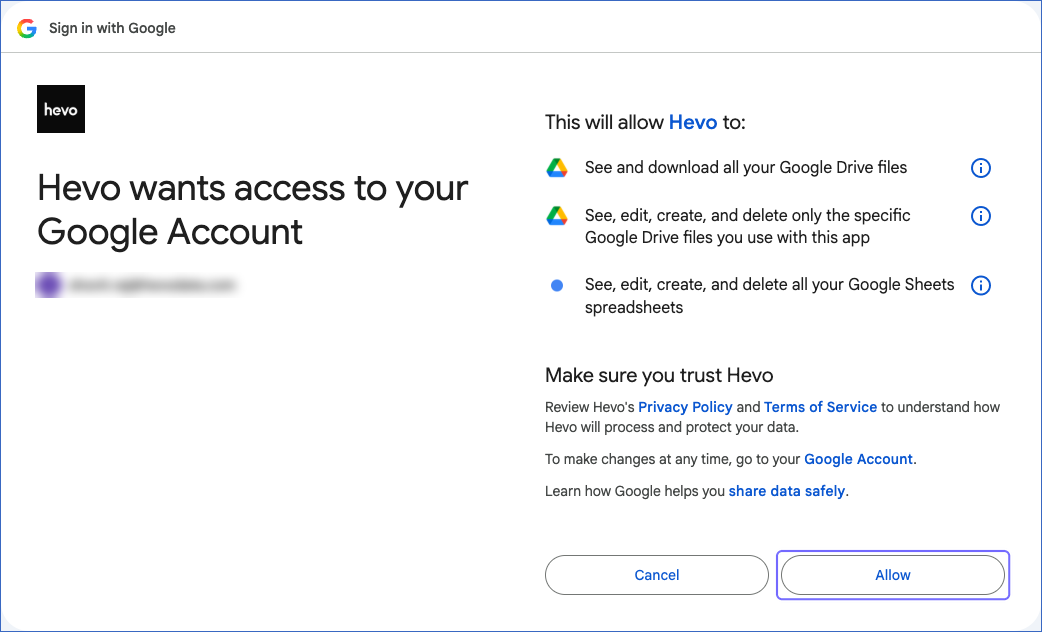
Review the permissions that Hevo requests, and click Allow. If Google displays a checkbox next to each permission, select all the checkboxes before you continue.
-
After authorization completes, you are redirected to the Targets List View, and the Target is created with the Active status. The Targets Detailed View displays the Google account under Connected Account.
Hevo requests permission to see and download your Google Drive files, edit the Google Drive files that you use with Hevo, and edit your Google Sheets spreadsheets. Activate uses the Google Drive access to list the spreadsheets that you can edit, and writes only to the tabs that you select in your Activations. If you do not grant these permissions, the Target is not created.
Data Model
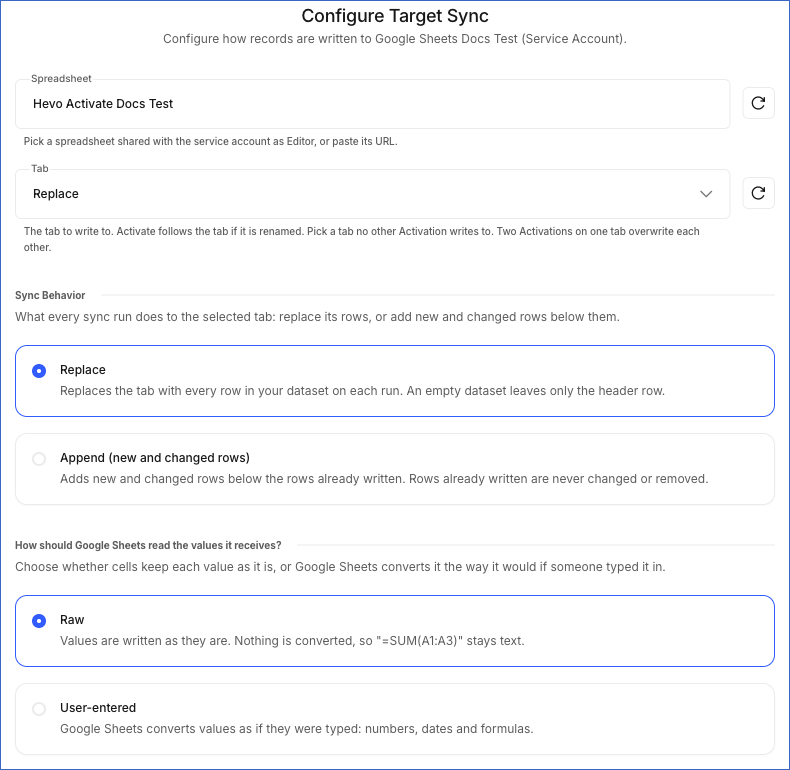
Each Activation writes to one tab of one spreadsheet. Instead of selecting a Target object, you specify the following on the Configure Target Sync page while creating the Activation:
-
Spreadsheet: The spreadsheet to write to. The drop-down lists, in alphabetical order, the Google Sheets files that your Google account can edit, including the files shared with it and the files in shared drives. It lists up to 10,000 spreadsheets. If a spreadsheet is not listed, paste its URL instead.
-
Tab: The tab of the spreadsheet to write to. Chart sheets are not listed. If someone renames the tab later, Activate continues to write to it.
-
Sync Behavior: The way each run writes to the tab, by replacing its rows or by adding rows below them. Read Sync Behaviors.
-
How should Google Sheets read the values it receives?: The way Google Sheets stores each value, as it is sent or converted. Read Target Field Mapping Reference.
The Activation lists its Target object as the name of the spreadsheet and the tab, for example, Sales Reports › Weekly.
Target Considerations
-
If Hevo can no longer access the Google account of the Target, for example, because the access is removed from the account, the Target fails. Reauthorize the Target. Read Reauthorizing a Target for the steps.
-
When you reauthorize the Target, select the same Google account. If you select another account, the next run of each Activation with the Append (new and changed rows) sync behavior adds every row of its dataset again.
Revision History
Refer to the following table for the list of key updates made to this page:
| Date | Release | Description of Change |
|---|---|---|
| Nov-27-2026 | 2.55 | New document. |