- Introduction
-
Getting Started
- Creating an Account in Hevo
- Subscribing to Hevo via AWS Marketplace
- Subscribing to Hevo via Snowflake Marketplace
- Connection Options
- Familiarizing with the UI
- Creating your First Pipeline
- Data Loss Prevention and Recovery
- Upgrading Pipeline from Standard to Edge
-
Data Ingestion
- Types of Data Synchronization
- Ingestion Modes and Query Modes for Database Sources
- Ingestion and Loading Frequency
- Data Ingestion Statuses
- Deferred Data Ingestion
- Handling of Primary Keys
- Handling of Updates
- Handling of Deletes
- Hevo-generated Metadata
- Best Practices to Avoid Reaching Source API Rate Limits
-
Edge
- Data Ingestion
- Core Concepts
-
Pipelines
- Familiarizing with the Pipelines UI
- Creating an Edge Pipeline
- Working with Edge Pipelines
- Pipeline Job History
- Needs Attention
- Object and Schema Management
- Activity Log
-
Sources
- Connect AI
- PostgreSQL
- Oracle
- MySQL
- SQL Server
- CockroachDB
- Troubleshooting Database Sources
- Salesforce Bulk API V2
- Ordergroove
- BambooHR
- Stripe
- NetSuite SuiteAnalytics
- Shopify
- Slack
- ClickUp
- Monday.com
- Pipedrive
- Workable
- Fathom
- HubSpot
- Salesforce Marketing Cloud
- Google Analytics 4
- Google Ads
- Facebook Ads
- Microsoft Ads
- LinkedIn Ads
- Xero
- Instagram Business
- Amazon Selling Partner
- TikTok Ads
- StackAdapt
- Amazon Ads
- Pinterest Organic
- Snapchat Ads
- TikTok Organic
- Google Search Console
- Klaviyo v2
- Braintree Payments
- Facebook Pages
- Tempo
- Naming Conventions for Source Data Entities
- Destinations
- Transformations
- Alerts
- Activate
- Custom Connectors
-
Releases
- Edge Release Notes - September 2026
- Edge Release Notes - August 2026
- Edge Release Notes - July 2026
- Edge Release Notes - June 2026
- Edge Release Notes - May 2026
- Edge Release Notes - April 2026
- Edge Release Notes - March 2026
- Edge Release Notes - February 2026
- Edge Release Notes - January 2026
- Edge Release Notes - December 2025
- Edge Release Notes - November 2025
- Edge Release Notes - October 2025
- Edge Release Notes - September 2025
- Edge Release Notes - August 2025
- Edge Release Notes - July 2025
- Edge Release Notes - November 2024
-
Data Loading
- Loading Data in a Database Destination
- Loading Data to a Data Warehouse
- Optimizing Data Loading for a Destination Warehouse
- Deduplicating Data in a Data Warehouse Destination
- Manually Triggering the Loading of Events
- Scheduling Data Load for a Destination
- Loading Events in Batches
- Data Loading Statuses
- Data Spike Alerts
- Name Sanitization
- Table and Column Name Compression
- Parsing Nested JSON Fields in Events
-
Pipelines
- Data Flow in a Pipeline
- Familiarizing with the Pipelines UI
- Working with Pipelines
- Managing Objects in Pipelines
- Pipeline Jobs
-
Transformations
-
Python Code-Based Transformations
- Supported Python Modules and Functions
-
Transformation Methods in the Event Class
- Create an Event
- Retrieve the Event Name
- Rename an Event
- Retrieve the Properties of an Event
- Modify the Properties for an Event
- Fetch the Primary Keys of an Event
- Modify the Primary Keys of an Event
- Fetch the Data Type of a Field
- Check if the Field is a String
- Check if the Field is a Number
- Check if the Field is Boolean
- Check if the Field is a Date
- Check if the Field is a Time Value
- Check if the Field is a Timestamp
-
TimeUtils
- Convert Date String to Required Format
- Convert Date to Required Format
- Convert Datetime String to Required Format
- Convert Epoch Time to a Date
- Convert Epoch Time to a Datetime
- Convert Epoch to Required Format
- Convert Epoch to a Time
- Get Time Difference
- Parse Date String to Date
- Parse Date String to Datetime Format
- Parse Date String to Time
- Utils
- Examples of Python Code-based Transformations
-
Drag and Drop Transformations
- Special Keywords
-
Transformation Blocks and Properties
- Add a Field
- Change Datetime Field Values
- Change Field Values
- Drop Events
- Drop Fields
- Find & Replace
- Flatten JSON
- Format Date to String
- Format Number to String
- Hash Fields
- If-Else
- Mask Fields
- Modify Text Casing
- Parse Date from String
- Parse JSON from String
- Parse Number from String
- Rename Events
- Rename Fields
- Round-off Decimal Fields
- Split Fields
- Examples of Drag and Drop Transformations
- Effect of Transformations on the Destination Table Structure
- Transformation Reference
- Transformation FAQs
-
Python Code-Based Transformations
-
Schema Mapper
- Using Schema Mapper
- Mapping Statuses
- Auto Mapping Event Types
- Manually Mapping Event Types
- Modifying Schema Mapping for Event Types
- Schema Mapper Actions
- Fixing Unmapped Fields
- Resolving Incompatible Schema Mappings
- Resizing String Columns in the Destination
- Changing the Data Type of a Destination Table Column
- Schema Mapper Compatibility Table
- Limits on the Number of Destination Columns
- File Log
- Troubleshooting Failed Events in a Pipeline
- Mismatch in Events Count in Source and Destination
- Audit Tables
- Activity Log
-
Pipeline FAQs
- Can multiple Sources connect to one Destination?
- What happens if I re-create a deleted Pipeline?
- Why is there a delay in my Pipeline?
- Can I change the Destination post-Pipeline creation?
- Why is my billable Events high with Delta Timestamp mode?
- Can I drop multiple Destination tables in a Pipeline at once?
- How does Run Now affect scheduled ingestion frequency?
- Will pausing some objects increase the ingestion speed?
- Can I see the historical load progress?
- Why is my Historical Load Progress still at 0%?
- Why is historical data not getting ingested?
- How do I set a field as a primary key?
- How do I ensure that records are loaded only once?
- Why can't I see my Pipelines after logging in?
- Events Usage
-
Sources
- Free Sources
-
Databases and File Systems
- Data Warehouses
-
Databases
- Connecting to a Local Database
- Amazon DocumentDB
- Amazon DynamoDB
- Elasticsearch
-
MongoDB
- Generic MongoDB
- MongoDB Atlas
- Support for Multiple Data Types for the _id Field
- Example - Merge Collections Feature
-
Troubleshooting MongoDB
-
Errors During Pipeline Creation
- Error 1001 - Incorrect credentials
- Error 1005 - Connection timeout
- Error 1006 - Invalid database hostname
- Error 1007 - SSH connection failed
- Error 1008 - Database unreachable
- Error 1011 - Insufficient access
- Error 1028 - Primary/Master host needed for OpLog
- Error 1029 - Version not supported for Change Streams
- SSL 1009 - SSL Connection Failure
- Troubleshooting MongoDB Change Streams Connection
- Troubleshooting MongoDB OpLog Connection
-
Errors During Pipeline Creation
- SQL Server
-
MySQL
- Amazon Aurora MySQL
- Amazon RDS MySQL
- Azure MySQL
- Generic MySQL
- Google Cloud MySQL
- MariaDB MySQL
-
Troubleshooting MySQL
-
Errors During Pipeline Creation
- Error 1003 - Connection to host failed
- Error 1006 - Connection to host failed
- Error 1007 - SSH connection failed
- Error 1011 - Access denied
- Error 1012 - Replication access denied
- Error 1017 - Connection to host failed
- Error 1026 - Failed to connect to database
- Error 1027 - Unsupported BinLog format
- Failed to determine binlog filename/position
- Schema 'xyz' is not tracked via bin logs
- Errors Post-Pipeline Creation
-
Errors During Pipeline Creation
- MySQL FAQs
- Oracle
-
PostgreSQL
- Amazon Aurora PostgreSQL
- Amazon RDS PostgreSQL
- Azure PostgreSQL
- Generic PostgreSQL
- Google Cloud PostgreSQL
- Heroku PostgreSQL
- Upgrading Pipelines with PostgreSQL Sources to Use the pgoutput Plugin
-
Troubleshooting PostgreSQL
-
Errors during Pipeline creation
- Error 1003 - Authentication failure
- Error 1006 - Connection settings errors
- Error 1011 - Access role issue for logical replication
- Error 1012 - Access role issue for logical replication
- Error 1014 - Database does not exist
- Error 1017 - Connection settings errors
- Error 1023 - No pg_hba.conf entry
- Error 1024 - Number of requested standby connections
- Errors Post-Pipeline Creation
-
Errors during Pipeline creation
-
PostgreSQL FAQs
- Can I track updates to existing records in PostgreSQL?
- How can I migrate a Pipeline created with one PostgreSQL Source variant to another variant?
- How can I prevent data loss when migrating or upgrading my PostgreSQL database?
- Why do FLOAT4 and FLOAT8 values in PostgreSQL show additional decimal places when loaded to BigQuery?
- Why is data not being ingested from PostgreSQL Source objects?
- Troubleshooting Database Sources
- Database Source FAQs
- File Storage
- Engineering Analytics
- Finance & Accounting Analytics
-
Marketing Analytics
- ActiveCampaign
- AdRoll
- Amazon Ads
- Apple Search Ads
- AppsFlyer
- CleverTap
- Criteo
- Drip
- Facebook Ads
- Facebook Page Insights
- Firebase Analytics
- Freshsales
- Google Ads
- Google Analytics 4
- Google Analytics 360
- Google Play Console
- Google Search Console
- HubSpot
- Instagram Business
- Klaviyo v2
- Lemlist
- LinkedIn Ads
- Mailchimp
- Mailshake
- Marketo
- Microsoft Ads
- Onfleet
- Outbrain
- Pardot
- Pinterest Ads
- Pipedrive
- Recharge
- Segment
- SendGrid Webhook
- SendGrid
- Salesforce Marketing Cloud
- Snapchat Ads
- SurveyMonkey
- Taboola
- TikTok Ads
- Twitter Ads
- Typeform
- YouTube Analytics
- Product Analytics
- Sales & Support Analytics
- Source FAQs
-
Destinations
- Familiarizing with the Destinations UI
- Cloud Storage-Based
- Databases
-
Data Warehouses
- Amazon Redshift
- Amazon Redshift Serverless
- Azure Synapse Analytics
- Databricks
-
Google BigQuery
- Clustering in BigQuery
- Partitioning in BigQuery
- Structure of Data in the Google BigQuery Data Warehouse
- Loading Data to a Google BigQuery Data Warehouse
- Near Real-time Data Loading using Streaming
- Modifying BigQuery Destinations to Use Service Account Authentication
- Troubleshooting Google BigQuery
- Google BigQuery FAQs
- Hevo Managed Google BigQuery
- Snowflake
- Troubleshooting Data Warehouse Destinations
-
Destination FAQs
- Can I change the primary key in my Destination table?
- Can I change the Destination table name after creating the Pipeline?
- How can I change or delete the Destination table prefix?
- Why does my Destination have deleted Source records?
- How do I filter deleted Events from the Destination?
- Does a data load regenerate deleted Hevo metadata columns?
- How do I filter out specific fields before loading data?
- Transform
- Alerts
- Account Management
- Activate
- Glossary
-
Releases- 2026 Releases
-
2025 Releases
- Release 2.44 (Dec 01, 2025-Jan 12, 2026)
- Release 2.43 (Nov 03-Dec 01, 2025)
- Release 2.42 (Oct 06-Nov 03, 2025)
- Release 2.41 (Sep 08-Oct 06, 2025)
- Release 2.40 (Aug 11-Sep 08, 2025)
- Release 2.39 (Jul 07-Aug 11, 2025)
- Release 2.38 (Jun 09-Jul 07, 2025)
- Release 2.37 (May 12-Jun 09, 2025)
- Release 2.36 (Apr 14-May 12, 2025)
- Release 2.35 (Mar 17-Apr 14, 2025)
- Release 2.34 (Feb 17-Mar 17, 2025)
- Release 2.33 (Jan 20-Feb 17, 2025)
-
2024 Releases
- Release 2.32 (Dec 16 2024-Jan 20, 2025)
- Release 2.31 (Nov 18-Dec 16, 2024)
- Release 2.30 (Oct 21-Nov 18, 2024)
- Release 2.29 (Sep 30-Oct 22, 2024)
- Release 2.28 (Sep 02-30, 2024)
- Release 2.27 (Aug 05-Sep 02, 2024)
- Release 2.26 (Jul 08-Aug 05, 2024)
- Release 2.25 (Jun 10-Jul 08, 2024)
- Release 2.24 (May 06-Jun 10, 2024)
- Release 2.23 (Apr 08-May 06, 2024)
- Release 2.22 (Mar 11-Apr 08, 2024)
- Release 2.21 (Feb 12-Mar 11, 2024)
- Release 2.20 (Jan 15-Feb 12, 2024)
-
2023 Releases
- Release 2.19 (Dec 04, 2023-Jan 15, 2024)
- Release Version 2.18
- Release Version 2.17
- Release Version 2.16 (with breaking changes)
- Release Version 2.15 (with breaking changes)
- Release Version 2.14
- Release Version 2.13
- Release Version 2.12
- Release Version 2.11
- Release Version 2.10
- Release Version 2.09
- Release Version 2.08
- Release Version 2.07
- Release Version 2.06
-
2022 Releases
- Release Version 2.05
- Release Version 2.04
- Release Version 2.03
- Release Version 2.02
- Release Version 2.01
- Release Version 2.00
- Release Version 1.99
- Release Version 1.98
- Release Version 1.97
- Release Version 1.96
- Release Version 1.95
- Release Version 1.93 & 1.94
- Release Version 1.92
- Release Version 1.91
- Release Version 1.90
- Release Version 1.89
- Release Version 1.88
- Release Version 1.87
- Release Version 1.86
- Release Version 1.84 & 1.85
- Release Version 1.83
- Release Version 1.82
- Release Version 1.81
- Release Version 1.80 (Jan-24-2022)
- Release Version 1.79 (Jan-03-2022)
-
2021 Releases
- Release Version 1.78 (Dec-20-2021)
- Release Version 1.77 (Dec-06-2021)
- Release Version 1.76 (Nov-22-2021)
- Release Version 1.75 (Nov-09-2021)
- Release Version 1.74 (Oct-25-2021)
- Release Version 1.73 (Oct-04-2021)
- Release Version 1.72 (Sep-20-2021)
- Release Version 1.71 (Sep-09-2021)
- Release Version 1.70 (Aug-23-2021)
- Release Version 1.69 (Aug-09-2021)
- Release Version 1.68 (Jul-26-2021)
- Release Version 1.67 (Jul-12-2021)
- Release Version 1.66 (Jun-28-2021)
- Release Version 1.65 (Jun-14-2021)
- Release Version 1.64 (Jun-01-2021)
- Release Version 1.63 (May-19-2021)
- Release Version 1.62 (May-05-2021)
- Release Version 1.61 (Apr-20-2021)
- Release Version 1.60 (Apr-06-2021)
- Release Version 1.59 (Mar-23-2021)
- Release Version 1.58 (Mar-09-2021)
- Release Version 1.57 (Feb-22-2021)
- Release Version 1.56 (Feb-09-2021)
- Release Version 1.55 (Jan-25-2021)
- Release Version 1.54 (Jan-12-2021)
-
2020 Releases
- Release Version 1.53 (Dec-22-2020)
- Release Version 1.52 (Dec-03-2020)
- Release Version 1.51 (Nov-10-2020)
- Release Version 1.50 (Oct-19-2020)
- Release Version 1.49 (Sep-28-2020)
- Release Version 1.48 (Sep-01-2020)
- Release Version 1.47 (Aug-06-2020)
- Release Version 1.46 (Jul-21-2020)
- Release Version 1.45 (Jul-02-2020)
- Release Version 1.44 (Jun-11-2020)
- Release Version 1.43 (May-15-2020)
- Release Version 1.42 (Apr-30-2020)
- Release Version 1.41 (Apr-2020)
- Release Version 1.40 (Mar-2020)
- Release Version 1.39 (Feb-2020)
- Release Version 1.38 (Jan-2020)
- Early Access New
Activate is currently available for Early Access. Please contact your Hevo account executive or the Support team to enable it for your team. Alternatively, request for early access to try out one or more such features.
HubSpot is a cloud-based Customer Relationship Management (CRM) platform that enables businesses to manage customer interactions, handle sales and marketing processes, and analyze customer data. In Activate, HubSpot acts as the Target that receives the data returned by your datasets.
Activate sends data to HubSpot through its REST APIs. You authenticate the HubSpot account with Hevo using Open Authorization (OAuth). After authorization, Activate can write records to the HubSpot objects supported by your account.
Prerequisites
-
An active HubSpot account exists to which data is to be sent.
-
You must be logged in as a Super Admin in your HubSpot account.
Configure HubSpot as a Target
Perform the following steps to configure HubSpot as a Target in Activate:
-
In the Navigation Bar, click Activate.
-
On the Activate page, click the Targets tab, and then click + Create Target.

-
On the Select Target Type page, click HubSpot.
-
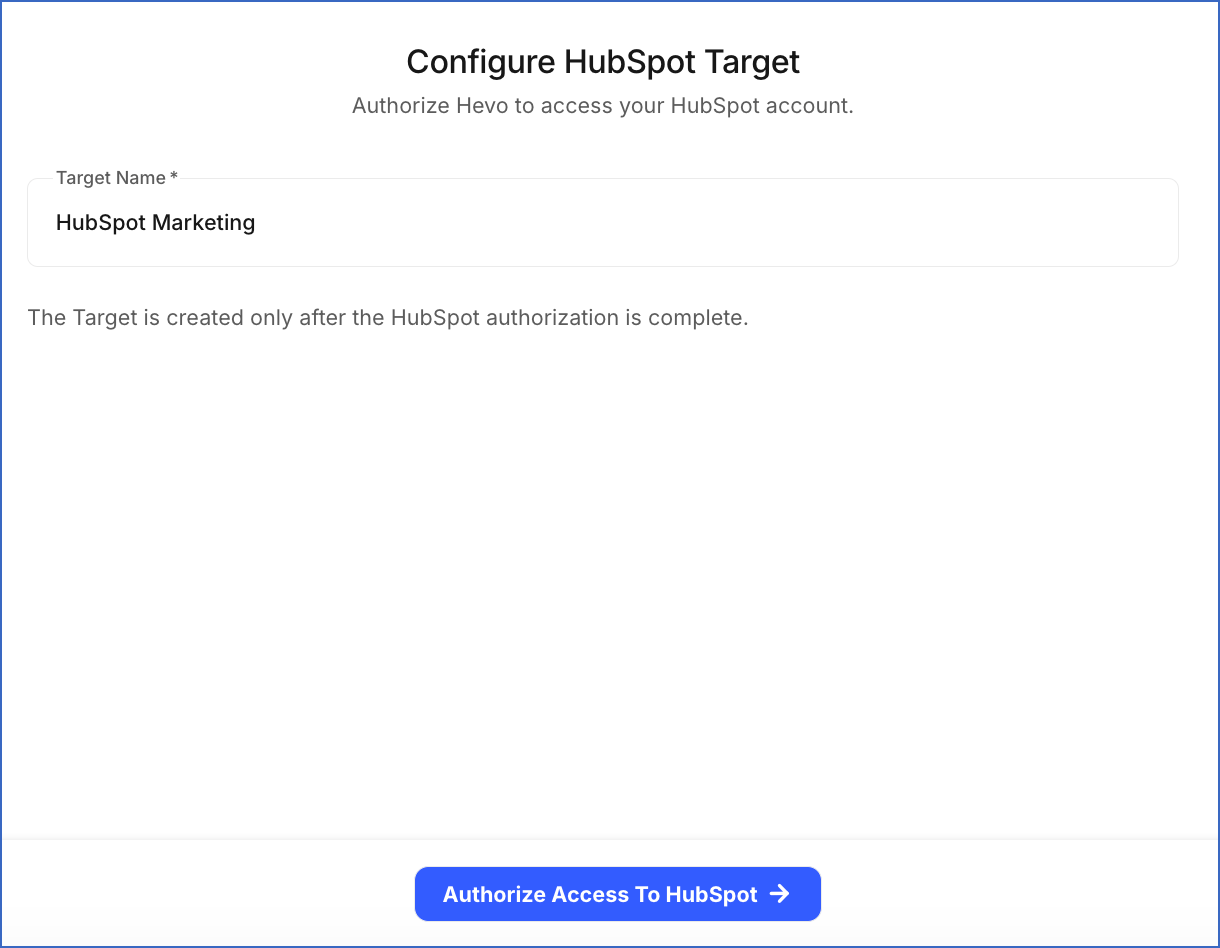
On the Configure HubSpot Target page, do the following:
-
Specify a unique Target Name, such as HubSpot Marketing. If you connect multiple HubSpot accounts, name each Target after the account it points to, so that you select the correct one when creating an Activation.
-
Click Authorize Access To HubSpot, and then perform the following steps:
-
If you are not already signed in to your HubSpot account, sign in when prompted. Otherwise, proceed to step 2.
-
Select the HubSpot account to which you want Hevo to send data, and then click Choose Account.
-
Select the acknowledgment check box, and then click Connect app to authorize Hevo to access your HubSpot account data.
-
After authorization completes, you are redirected to the Targets List View, and the Target is created with the Active status.
-
When you create an Activation with this Target, the Target Object drop-down on the Select Target Object page lists the HubSpot objects that Hevo can access. If an expected object is missing, the authorization granted to Hevo does not include access to it. Reauthorize the Target and grant access to that object. Read Reauthorizing a Target for the steps.
Data Model
Activate supports the following HubSpot objects. An Activation matches each row to a record using a sync key. The properties you can use as the sync key depend on the object you select, and always include the Record ID and any property that HubSpot marks as unique:
| Target object | Eligible sync keys | Description |
|---|---|---|
| Companies | Domain, Record ID, and any unique property | Stores information about businesses and organizations. |
| Contacts | Email, Record ID, and any unique property | Stores information about individuals. |
| Deals | Record ID, and any unique property | Stores information about revenue opportunities associated with a contact or company. |
| Tickets | Record ID, and any unique property | Stores information about customer requests for help or support. |
| Custom objects | Record ID, and any unique property | Stores information about the objects created in your HubSpot account for your specific business requirements. Note: Custom objects are available only on HubSpot’s Enterprise subscriptions. If your account does not include them, only the standard objects are listed when you select a Target object. |
Sync Behaviors
The sync behaviors available to an Activation depend on the Target object you select, because HubSpot’s API supports different operations on each one:
| Target object | Insert Only | Insert or Update | Update Only | Mirror | Delete Only |
|---|---|---|---|---|---|
| Contacts | Yes | Yes | Yes | Yes | Yes |
| Companies | No | Yes | Yes | Yes | No |
| Deals | Yes | Yes | Yes | Yes | No |
| Tickets | Yes | No | No | No | No |
| Custom objects | No | Yes | Yes | Yes | No |
Read Select the Target for what each sync behavior does.
Delete Behavior
Mirror and Delete Only are the two sync behaviors that remove records from HubSpot.
When either behavior removes a record, Activate calls the archive API endpoint. HubSpot archives the record instead of removing it. An archived record no longer appears in your lists, views, and reports, but HubSpot keeps it in the recycle bin of your HubSpot account for 90 days. You can restore it within that period. Read Restore deleted records for the steps to restore a record.
You must consider the following before you use a sync behavior that deletes records:
-
Archived records: Restoring records one at a time is slow, and HubSpot keeps a deleted record for only 90 days. Confirm that your dataset returns what you intend before running an Activation that deletes.
-
Permanent deletion: Activate does not perform a permanent deletion. If you need a record removed instead of archived, for example to satisfy a data subject erasure request, do it in HubSpot using its own permanent deletion tools.
-
Restored records: HubSpot decides what can be restored, so a restored record is not always identical to the original. Read the HubSpot documentation on the data lost when a record is deleted and on restoring deleted activities for more information.
Target Field Mapping Reference
When you map fields in an Activation, Activate reads the property list for the selected Target object directly from HubSpot. You must consider the following while mapping:
-
Required properties: Every HubSpot object has properties required to create a record. For example, a contact requires an email address. If you do not map a dataset column to a required property, those records fail when the Activation runs.
-
Read-only properties: HubSpot calculates some values itself, such as record creation dates and internal record IDs. Activate does not offer these for mapping, because it cannot write to them.
-
Contact email addresses: An email address that another contact already uses cannot be assigned to a second contact. If a sync sends an email address that is already in use, HubSpot does not update that property, but it may still update the record’s other mapped properties.
-
Property types: The value in the dataset must be compatible with the HubSpot property’s type. For example, a text value sent to a numeric property, or a date in an unexpected format, can cause the record to fail. Read Failed Records to see the reason reported for each failure.
You map fields while creating an Activation, after selecting the Target object and the sync behavior. Read Map Fields for the steps to set the sync key and map your dataset columns to HubSpot properties.
Target Considerations
-
Activate sends the sync key value with each row and HubSpot uses that value to find the matching record. For contacts, HubSpot treats the email address as the primary unique identifier, so using the email address as the sync key gives the most predictable results.
-
HubSpot limits the number of requests an application can send in a given period. When a sync reaches that limit, HubSpot rejects the request until the limit resets. Activate waits and tries again, so the sync takes longer to finish instead of stopping. Records are reported as failed only if those retries do not succeed.
Revision History
Refer to the following table for the list of key updates made to this page:
| Date | Release | Description of Change |
|---|---|---|
| Sep-22-2026 | NA | New document. |