Mixpanel (Edge)
On This Page
Activate is currently available for Early Access. Please contact your Hevo account executive or the Support team to enable it for your team. Alternatively, request for early access to try out one or more such features.
Mixpanel is a product analytics platform that helps you understand how users interact with your website or application. It records the actions that users take as events, and stores information about each user and each group of users, such as a company, as profiles. In Activate, Mixpanel acts as the Target that receives the data returned by your datasets.
Activate sends events to Mixpanel through the Import API, and creates or updates user profiles and group profiles through the User Profiles API and the Group Profiles API. It connects to your Mixpanel project using a service account, and uses the project token of that project to write profiles.
Prerequisites
-
An active Mixpanel project exists to which data is to be sent. The project stores its data in the United States (US) or the European Union (EU). Activate does not support projects that store their data in India.
-
A service account with the Owner or Admin role in the project is available. Read Create a Service Account.
-
The project ID and the project token of your Mixpanel project are available. Read Obtain your Project Details.
-
The Group Analytics add-on is enabled for your project, and the group key that you want to use is defined in your project settings. This applies only if you want to send group profiles.
(Optional) Create a Service Account
Note: If you are using an existing service account with the Owner or Admin role in the project, skip to the Obtain your Project Details section.
A service account lets Activate access your Mixpanel project without using the credentials of a person. You must have the Owner or Admin role in the project to create one.
Perform the following steps to create a service account:
-
Log in to your Mixpanel account, and select the project to which you want to send data.
-
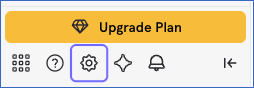
Click the Settings icon at the bottom of the left navigation pane.
-
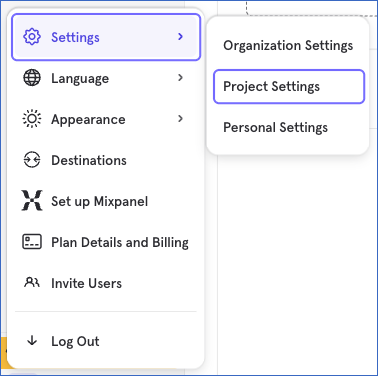
Click Settings, and then click Project Settings.
-
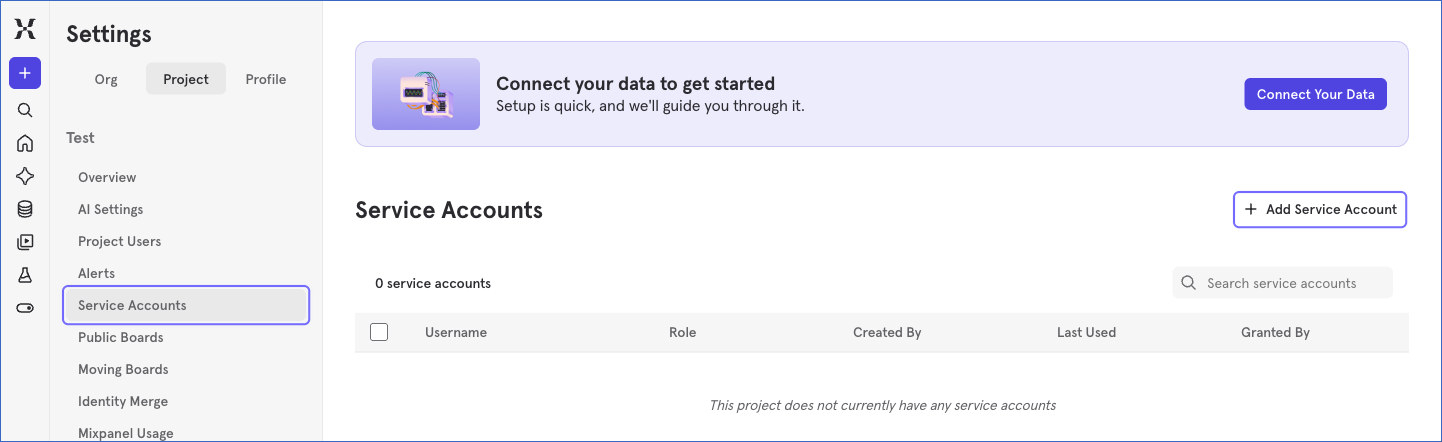
In the left pane, click Service Accounts, and then click + Add Service Account.
-
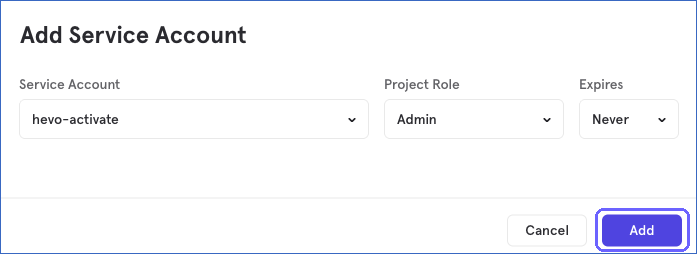
In the Add Service Account dialog, do the following:
-
In the Service Account field, specify a name for the service account, such as hevo-activate, and then click the Create new service account option.
-
In the Project Role drop-down, select Admin or Owner.
-
After you specify the name, the Expires drop-down is displayed. Select Never, or select Specify… to set when the service account expires. When the service account expires, your Activations that use it fail until you update the Target with a new service account.
-
Click Add.
-
-
If Mixpanel asks you to verify your identity, complete the verification.
-
Copy the Username and the Secret of the service account, and save them securely. Mixpanel displays the secret only once.
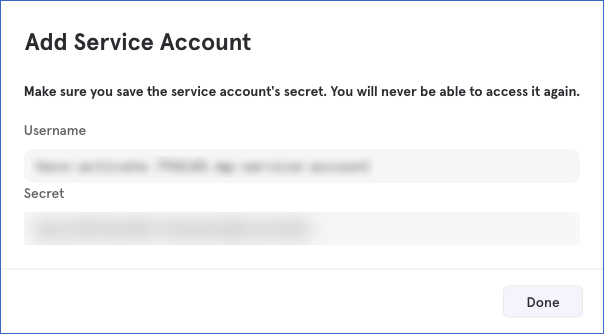
-
Click Done.
The service account is created and listed on the Service Accounts page. Use the username and secret while configuring your Target in Activate.
Obtain your Project Details
Activate needs the ID, the token, and the data residency region of your Mixpanel project. All three are displayed in the project settings.
Perform the following steps to obtain your project details:
-
Log in to your Mixpanel account, and select the project to which you want to send data.
-
Click the Settings icon at the bottom of the left navigation pane.
-
Click Settings, and then click Project Settings.
-
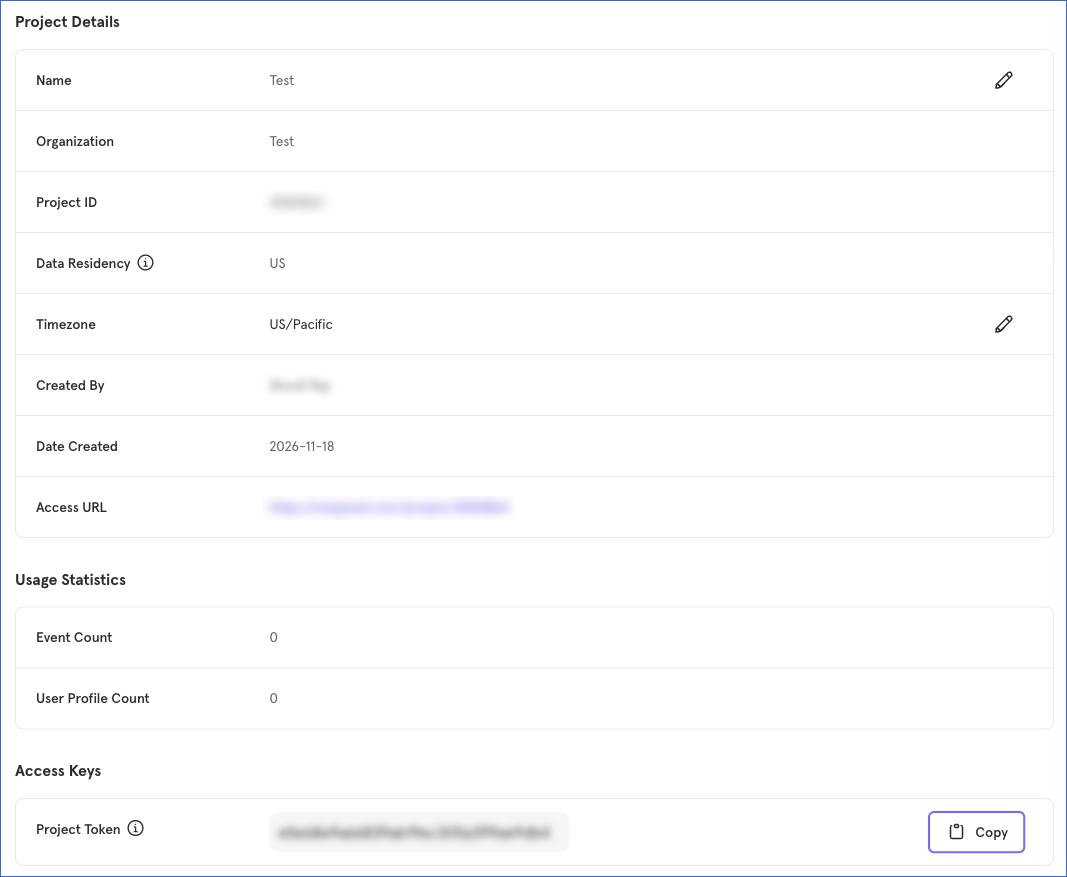
On the Overview page, do the following:
-
In the Project Details section, copy the Project ID, and note the Data Residency of the project. For example, Project ID 1234567 and Data Residency US.
-
In the Access Keys section, click Copy next to the Project Token.
-
Use these values while configuring your Target in Activate.
Configure Mixpanel as a Target
Perform the following steps to configure Mixpanel as a Target in Activate:
-
In the Navigation Bar, click Activate.
-
On the Activate page, click the Targets tab, and then click + Create Target.

-
On the Select Target Type page, click Mixpanel.
-
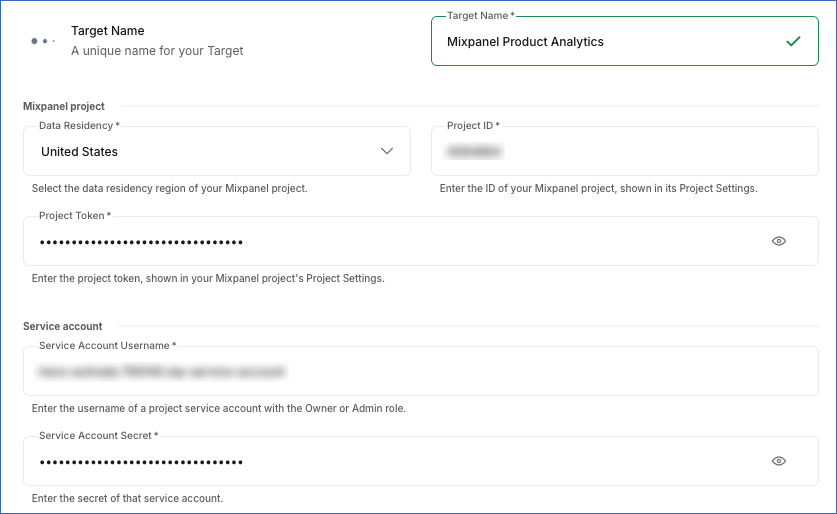
On the Configure Target page, specify the following:
-
Target Name: A unique name for your Target, such as Mixpanel Product Analytics. If you connect multiple Mixpanel projects, name each Target after its project, so that you select the correct one when creating an Activation.
-
In the Mixpanel project section:
-
Data Residency: The region in which your Mixpanel project stores its data, as displayed in the project settings. Select United States if the project settings display US, or European Union if they display EU. You cannot change this value after the Target is created.
-
Project ID: The ID of your Mixpanel project that you obtained in the Obtain your Project Details section. For example, 1234567. You cannot change this value after the Target is created.
-
Project Token: The project token of your Mixpanel project that you obtained in the Obtain your Project Details section.
-
-
In the Service account section:
-
Service Account Username: The username of the service account that you created in the Create a Service Account section, or an existing one. For example, hevo-activate.123456.mp-service-account.
-
Service Account Secret: The secret of the service account.
-
-
-
Click Test & Save. Activate tests the connection. The test confirms the following:
-
The service account can access a Mixpanel project with the specified project ID.
-
The service account has the Owner or Admin role in the project.
-
The data residency of the project matches the region that you selected in the Data Residency field.
-
After the connection test succeeds, you are redirected to the Targets List View, and the Target is created with the Active status.
The connection test does not check the project token, because Mixpanel accepts data sent with an incorrect token without returning an error. With an incorrect token, events reach your project, but the user and group profiles are not stored in it. The run reports these profiles as updated. Ensure that you copy the token of the same project whose ID you specify. If you correct the token later, resync your User Profiles and Group Profiles Activations to send the profiles again.
After you create the Target, you can change its Target Name, Project Token, Service Account Username, and Service Account Secret by clicking Edit in the Targets Detailed View. To send data to another project or region, create a new Target.
Troubleshooting the Connection Test
Destination authentication failed
Mixpanel did not accept the service account username or secret. Check that you copied both values of the same service account, and that the service account has not expired or been deleted. Mixpanel displays the secret only once, so if you no longer have it, create a new service account and use its credentials.
No access to the Mixpanel project
The service account cannot access a Mixpanel project with the specified project ID. Check the project ID in the project settings, or add the service account to the project with the Owner or Admin role. Read Create a Service Account for the steps.
Service account role not allowed
The service account has a role other than Owner or Admin in the project, such as Analyst or Consumer. In Mixpanel, on the Service Accounts page of the project settings, select Admin or Owner in the Role drop-down of the service account, and test the connection again.
Region does not match the project
The region you selected in the Data Residency field is not the region of your Mixpanel project. Select the region displayed in the project settings, and test the connection again.
Data Model
Activate can send data to the following Mixpanel objects:
| Target Object | Identified By | Description |
|---|---|---|
| Events | An Insert ID column that uniquely identifies each event. | Each row is sent as an event, an action that a user performed, such as signing up or completing an order. |
| User Profiles | A Distinct ID column that identifies the user. | Each row creates or updates the profile of a user. |
| Group Profiles | A Group ID column that contains the value of the group key. | Each row creates or updates the profile of a group, such as a company or an account, under the group key you specify. |
Activate does not delete events or profiles in Mixpanel, and does not send data to lookup tables.
Sync Behaviors
Each Mixpanel object supports one sync behavior:
| Target Object | Sync Behavior | Description |
|---|---|---|
| Events | Insert Only | Activate sends each row as an event once, identified by its Insert ID. A row whose Insert ID was already sent is not sent again, even if its other values, the dataset query, or the mappings of other fields change. If you map a different column to Insert ID, or that column is renamed or changes type, Activate sends every row again. Resyncing an Events Activation sends only the rows whose Insert ID was never sent, including the rows that failed before. To send an event again, give it a new Insert ID. |
| User Profiles and Group Profiles | Insert or Update | Activate creates the profile if it does not exist, or updates the mapped properties of the existing profile, for each new or changed row. When you change the dataset query or the field mappings, the next run sends every row again. |
Note: No other sync behaviors are available for Mixpanel.
Read Select the Target for what each sync behavior does.
Target Field Mapping Reference
When you map fields in an Activation, the Map Fields page asks you for the columns that identify each record of the selected Target object. You then map the other dataset columns that you want to send as properties.
Events
-
Insert ID: The column that uniquely identifies each event, sent as the $insert_id property. Mixpanel uses it to remove duplicate events. Activate sends a value of up to 36 letters, digits, or hyphens as it is, unless it is a placeholder that Mixpanel does not accept, such as null, none, or 0. For any other value, Activate sends a hash of the value, which identifies the event as uniquely.
-
Event Name: The name under which Mixpanel groups the events in its reports. Select Same name for every row and specify the name, such as Order Completed, if every row is the same event. Select Name from a column and select the column if the rows contain different events.
-
Distinct ID: The column that identifies the user who performed the event, sent as the distinct_id property. Mixpanel uses it to link the event to the user’s profile.
-
Time (optional): The column that contains the time at which the event occurred. If you do not map a column, Activate uses the start time of the run for every event. Activate reads date and timestamp values without a time zone as Coordinated Universal Time (UTC), text values in the ISO 8601 format, and numbers as Unix time in seconds or milliseconds. Events dated before 1971 or more than one hour in the future fail.
-
Event properties: Any other columns that you map are sent as event properties.
User Profiles
-
Distinct ID: The column that identifies the user. Activate creates or updates the profile with this ID.
-
Profile properties: The Target Field drop-down lists the reserved Mixpanel profile properties, which are Name, First Name, Last Name, Email, Phone, and Created. It also lists IP Address, Latitude, and Longitude, which Mixpanel uses to set the City, Region, Country Code, and Timezone properties of the profile instead of storing them. To send a column as a custom property, specify the property name instead.
Group Profiles
-
Group Key: The group key, such as company_id, that you specify on the Select Target Object page while creating the Activation. It must match a group key defined in your Mixpanel project settings. You cannot change the group key after the Activation is created.
-
Group ID: The column that contains each group’s value of the group key, such as a company ID. Activate creates or updates the group profile with this value.
-
Group properties: The Target Field drop-down lists the reserved Name property. To send a column as a custom property, specify the property name instead.
You must consider the following while mapping:
-
Property names: Activate sends each property under the name you give it, and Mixpanel property names are case-sensitive. Auto-Generate Mapping uses the column names as they appear in your dataset. For example, a Snowflake column PLAN is sent as the property PLAN. In User Profiles and Group Profiles, a column whose name matches the Mixpanel name of a reserved property, in any case, is mapped to that property. For example, EMAIL is mapped to Email, FIRST_NAME to First Name, and IP to IP Address. Rename the Target fields if you want different property names.
-
Identifying columns: A row fails if the column mapped to the Insert ID, Distinct ID, Event Name, Time, or Group ID has no value in that row. An event also fails if its Distinct ID is a placeholder that Mixpanel does not accept, such as null, unknown, or 0.
-
Null values: Activate does not send a property whose value is null. A null value in your dataset does not clear the existing value of a profile property in Mixpanel.
-
Date and time values: Activate sends date and timestamp values in UTC, in the ISO 8601 format, such as 2026-11-16T12:01:00.
-
JSON values: Activate sends JSON columns and semi-structured columns, such as Snowflake VARIANT or Amazon Redshift SUPER, as JSON objects or lists. A value that nests objects more than three levels deep fails.
-
Size limits: An event can have up to 254 properties, including the Insert ID, Distinct ID, and Time, and a profile up to 2,000 properties. An event of 1 MB or more, or a profile larger than 1 MB, fails. Read Failed Records to see the reason reported for each failure.
-
Text length: Mixpanel truncates event text values longer than 255 characters, and user profile property names longer than 255 characters. It also limits profile text values to 255 bytes, so a value with accented or non-Latin characters can have fewer than 255 characters. Mixpanel shortens these values without an error.
-
Large numbers: Mixpanel stores numbers as 64-bit floating-point values, so it can round integers larger than 9,007,199,254,740,992 that you send as properties, such as IDs with 18 or 19 digits. To keep them exact, convert them to text in your dataset.
You map fields while creating an Activation, after selecting the Target object and the sync behavior. Read Map Fields for the steps to map your dataset columns to Mixpanel properties.
Target Considerations
-
Activate repeats the connection test at the start of every run. If the service account is deleted, expires, or loses the Owner or Admin role, the run fails before it sends any data.
-
Activate does not verify the group key. If the group key is not defined in your project settings, the run succeeds and reports the group profiles as updated. Define the group key in your project settings before you create the Activation.
-
If a run cannot confirm that Mixpanel received some events, the next run sends them again. Mixpanel removes a duplicate event only when its event name, time, Distinct ID, and Insert ID all match. Map a Time column so that a resent event has the same time and is removed as a duplicate.
-
Mixpanel does not report which profiles were created and which were updated. In the run details of a User Profiles or Group Profiles Activation, every profile that is sent is counted as updated, including new profiles.
-
Activate retries a request automatically if Mixpanel limits the number of requests or is temporarily unavailable.
-
The events that Activate sends count toward the event volume of your Mixpanel plan.
Revision History
Refer to the following table for the list of key updates made to this page:
| Date | Release | Description of Change |
|---|---|---|
| Nov-27-2026 | 2.55 | New document. |