Amazon Selling Partner (Edge)
On This Page
Amazon Selling Partner (Seller Central) is Amazon’s platform for third-party sellers to list, price, fulfill, and manage products sold across Amazon’s marketplaces worldwide. It gives sellers tools to manage orders, inventory, advertising, financial settlements, and customer service, enabling businesses to scale their e-commerce operations while maintaining visibility into sales performance and fulfillment.
Hevo uses the Amazon Selling Partner API (SP-API) to replicate data from your Amazon Selling Partner account to the Destination of your choice. To ingest the data, you must authorize Hevo to access your Amazon Selling Partner account using Open Authorization (OAuth) 2.0.
Supported Features
| Feature Name | Supported |
|---|---|
| Capture deletes | Yes |
| History mode | No |
| Custom data (user-configured tables & fields) | No |
| Data blocking (skip objects and fields) | Yes |
| Resync (objects and Pipelines) | Yes |
| API configurable | No |
Prerequisites
-
An active Amazon Selling Partner (Seller Central) account exists from which data is to be ingested.
-
You must have administrative access to authorize third-party applications in Seller Central.
Configure Amazon Selling Partner as a Source in your Pipeline
Perform the following steps to configure your Amazon Selling Partner Source:
-
Click Pipelines in the Navigation Bar.
-
Click + Create Pipeline in the Pipelines List View.
-
On the Select Source Type page, select Amazon Selling Partner.
-
On the Select Destination Type page, select the type of Destination you want to use.
-
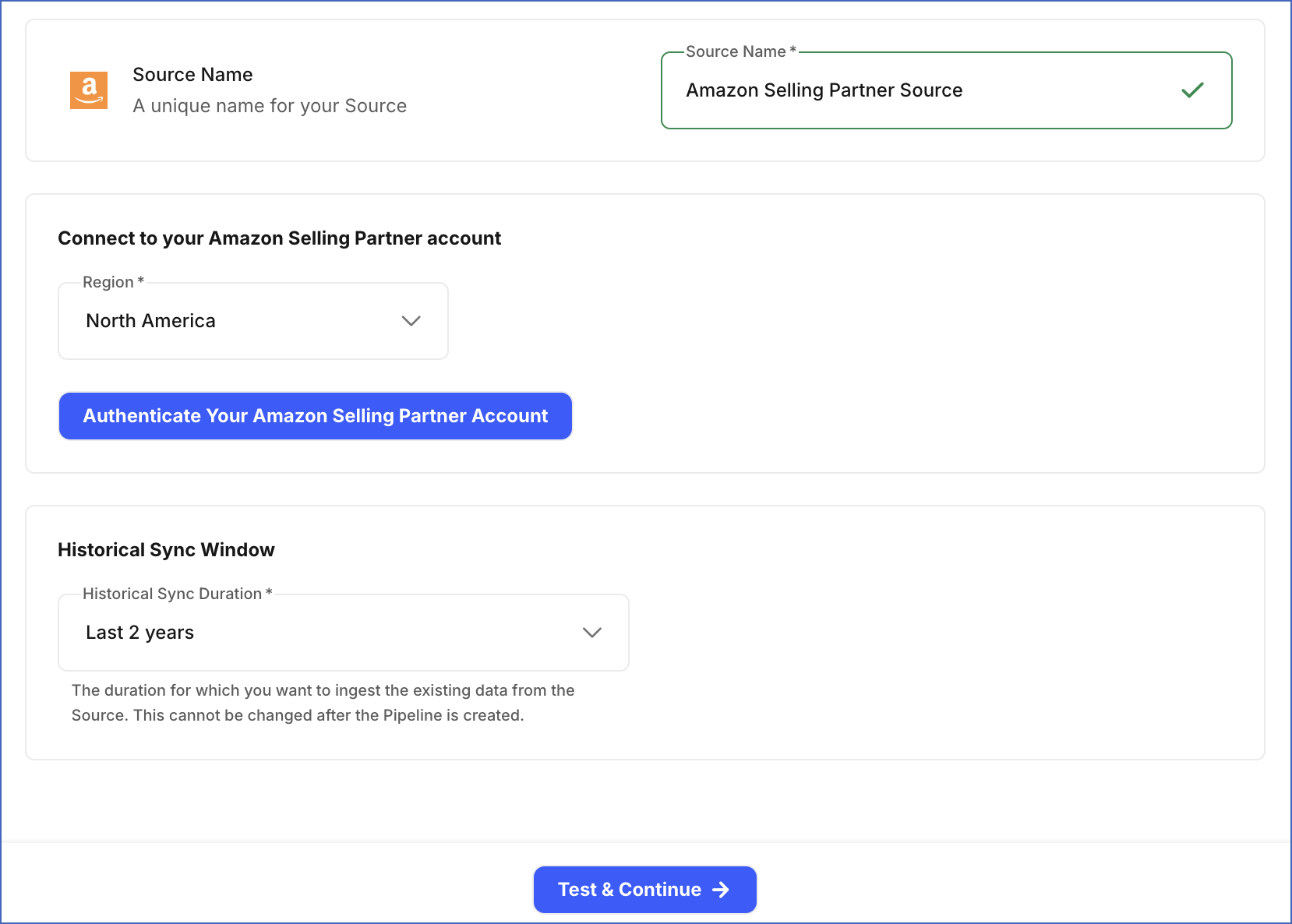
In the Configure Source screen, specify the following:
-
Source Name: A unique name for your Source, not exceeding 255 characters. For example, Amazon Selling Partner Source.
-
In the Connect to your Amazon Selling Partner account section, do the following:
-
From the Region drop-down, select the Amazon Selling Partner region for your seller account. This determines the Amazon Seller host and API endpoint Hevo uses to connect to your account. Default value: North America.
-
Click Authenticate Your Amazon Selling Partner Account, sign in, and grant Hevo access to your account.
-
-
In the Historical Sync Window section, from the Historical Sync Duration drop-down, select the duration for which you want to ingest existing data from the Source. This cannot be changed after the Pipeline is created. Default value: 2 Years.
Note: Amazon Selling Partners has low API rate limits, which can slow syncing large amounts of historical data. To speed up the initial sync, consider choosing a duration of 1 year or less.
-
-
Click Test & Continue to test the connection to your Amazon Selling Partner Source.
Data Replication
Hevo replicates data for all the objects selected on the Configure Objects page during Pipeline creation. By default, all supported objects and their available fields are selected. However, you can modify this selection while creating or editing the Pipeline.
Hevo ingests the following types of data from your Source objects:
-
Historical Data: The first run of the Pipeline ingests historical data for the selected objects based on the Historical Sync Duration specified when configuring the Source, and loads it into the Destination.
-
Incremental Data: Once the historical load is complete, new and updated records for objects are ingested as per the sync frequency.
For the following objects, Hevo ingests only the incremental data in subsequent Pipeline runs:
| Object Category | Objects |
|---|---|
| Orders | Orders, Order Item, Order Item Promotion ID, Order Item Serial Number, Order Regulated Info, Regulated Information Field, Marketplace Tax Classification, Payment Method Detail Item, Approval Support Data Element, Cash On Delivery (COD) Payment Execution Detail |
| Financial Events | Financial Event Group, Financial Shipment Event, Financial Shipment Event Item, Financial Shipment Event Item Promotion, Financial Shipment Direct Payment, Financial Fee Component, Financial Charge Component, Financial Adjustment Item, Financial Service Fee Event, Financial Product Ads Payment Event, Financial Retro Charge Event, Financial Coupon Payment Event, Financial Seller Assurance For E-commerce Transactions (SAFE-T) Reimbursement Event, Financial SAFE-T Reimbursement Item, Financial Removal Shipment Event, Financial Removal Shipment Item, Financial Removal Shipment Adjustment Event, Financial Removal Shipment Item Adjustment, Financial Pay With Amazon Event, Financial Solution Provider Credit Event, Financial Rental Transaction Event, Financial Loan Servicing Event, Financial Fulfillment by Amazon (FBA) Liquidation Event, Financial Seller Review Enrollment Payment Event, Financial Imaging Services Fee Event, Financial Seller Deal Payment Event, Financial Affordability Expense Event, Network Commingling Transaction Event, Financial Debt Recovery Event, Financial Debt Recovery Item, Financial Charge Instrument, Financial Adhoc Disbursement Event, Financial Failed Adhoc Disbursement Event, Financial Capacity Reservation Billing Event, Financial Value Added Service Charge Event, Financial Charge Refund Event, Financial Tax Deduction at Source (TDS) Reimbursement Event, Financial Tax Withholding Event, Financial Trial Shipment Event |
| FBA Inventory and Fulfillment | FBA Inventory Summary, FBA Inventory Researching Quantity Entry, Fulfillment Order |
| Reports | Orders Report |
For all other objects, Hevo ingests the entire data during each Pipeline run.
Amazon SP-API enforces per-operation usage plans and rate limits that vary by SP-API operation and Amazon store, and that can adjust dynamically based on your account’s business metrics. If this limit is exceeded, a rate limit exception occurs. To understand how Hevo handles such scenarios, read Handling Rate Limit Exceptions.
Note: You can create a Pipeline with this Source only using the Merge load mode. The Append mode is not supported for this Source.
Schema and Primary Keys
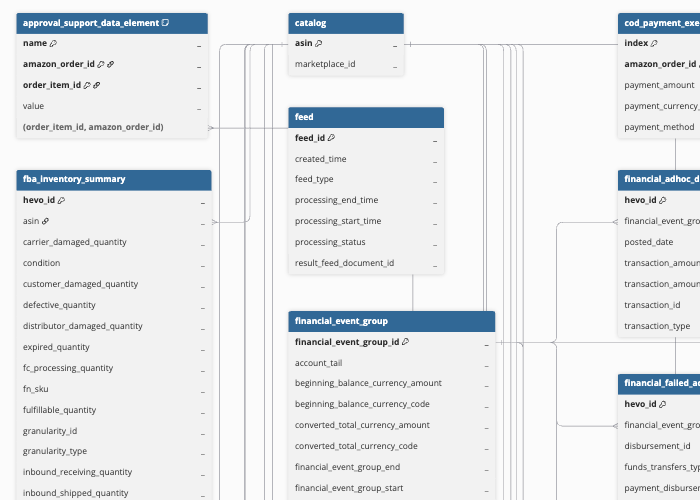
Hevo uses the following schema to upload the records to the Destination. For a detailed view of the objects, fields, and relationships, click the ERD.
Data Model
The following is the list of tables (objects) that are created at the Destination when you run the Pipeline:
| Object | Description |
|---|---|
| Orders | Contains details about purchases made on Amazon, including status, purchase date, fulfillment method, and shipping information. This object has the following child objects: - Approval Support Data Element - COD Payment Execution Detail - Marketplace Tax Classification - Order Item - Order Item Promotion ID - Order Item Serial Number - Order Regulated Info - Payment Method Detail Item - Regulated Information Field |
| Financial Event Group | Contains financial transactions grouped by payout cycle, including payments, fees, adjustments, and refunds. This object has the following child objects: - Financial Adhoc Disbursement Event - Financial Adjustment Item - Financial Affordability Expense Event - Financial Capacity Reservation Billing Event - Financial Charge Component - Financial Charge Instrument - Financial Charge Refund Event - Financial Coupon Payment Event - Financial Debt Recovery Event - Financial Debt Recovery Item - Financial Failed Adhoc Disbursement Event - Financial FBA Liquidation Event - Financial Fee Component - Financial Imaging Services Fee Event - Financial Loan Servicing Event - Financial Pay With Amazon Event - Financial Product Ads Payment Event - Financial Removal Shipment Adjustment Event - Financial Removal Shipment Event - Financial Removal Shipment Item - Financial Removal Shipment Item Adjustment - Financial Rental Transaction Event - Financial Retro Charge Event - Financial SAFE-T Reimbursement Event - Financial SAFE-T Reimbursement Item - Financial Seller Deal Payment Event - Financial Seller Review Enrollment Payment Event - Financial Service Fee Event - Financial Shipment Direct Payment - Financial Shipment Event - Financial Shipment Event Item - Financial Shipment Event Item Promotion - Financial Solution Provider Credit Event - Financial Tax Withholding Event - Financial TDS Reimbursement Event - Financial Trial Shipment Event - Financial Value Added Service Charge Event - Network Commingling Transaction Event |
| Fulfillment by Amazon (FBA) Inventory Summary | Contains stock details for each Stock Keeping Unit (SKU) held in Amazon’s fulfillment centers, including available, incoming, reserved, and unavailable quantities. This object has a child object, FBA Inventory Researching Quantity Entry. |
| Fulfillment Order | Contains details of orders fulfilled by Amazon, such as status, shipping speed, delivery window, and cash-on-delivery charge amounts. This object has the following child objects: - Fullfillment Order Feature Settings - Fullfillment Order Notification Email |
| Package Tracking Detail | Contains shipment tracking information for a package fulfilled by Amazon, such as the carrier, tracking number, and current delivery status. This object has a child object, Package Tracking Event. |
| Outbound Seller Feature | Contains the fulfillment programs and related capabilities that your seller account is eligible for in a marketplace. This object has a child object, Inventory Feature. |
| Catalog | Contains the top-level identifier for an item listed on Amazon, known as the Amazon Standard Identification Number (ASIN), scoped to a marketplace. This object has the following child objects: - Item Classification Sales Rank - Item Dimension - Item Display Group Sales Rank - Item Identifier - Item Image - Item Product Type - Item Relationship - Item Summary - Item Variation Theme |
| Competitive Price Type | Contains pricing details that Amazon uses to compare an item’s price against prices offered by other sellers. This object has the following child objects: - Competitive Price Type (CPT) Trade-In Value - Item Buy Box Price Type - Item Offer Count Type - Item Offer Detail - Item Offer Lowest Price Type - Item Offer Summary - Item Quantity Discount Price Type - Item Sales Rank Type |
| Listed Item | Contains your seller-specific details for a SKU, such as procurement cost. This object has the following child objects: - Item Fulfillment Availability - Listed Item Issue - Listed Item Offers - Listed Item Summary - Return Reason Code |
| Content Meta Data Record | Contains details of an enhanced product content page (Amazon’s A+ Content), such as its name, status, and the time it was last updated. This object has a child object, Content Badge Set. |
| Feed | Contains the submissions made to Amazon for processing, such as submission type, processing status, and processing start and end times. |
| Marketplace Participation | Contains the sales regions your account operates in, including the region name, country code, default currency, and default language. |
| Orders Report | Contains a summary of order and item-level details, such as order status, SKU, item price, shipping address, and promotion codes, generated from Amazon’s report of all orders since their last update. |
| Sales And Traffic Business Report Daily | Contains daily performance metrics for your account, such as product sales, units ordered, sessions, and Buy Box percentage. |
| Sales And Traffic Business Report Monthly | Contains monthly performance metrics for your account, such as product sales, units ordered, sessions, and Buy Box percentage. |
| Sales And Traffic Business Parent ASIN Report Daily | Contains daily performance metrics broken down by parent ASIN. |
| Sales And Traffic Business Parent ASIN Report Monthly | Contains monthly performance metrics broken down by parent ASIN. |
| Sales And Traffic Business Child ASIN Report Daily | Contains daily performance metrics broken down by child ASIN. |
| Sales And Traffic Business Child ASIN Report Monthly | Contains monthly performance metrics broken down by child ASIN. |
| Sales And Traffic Business SKU Report Daily | Contains daily performance metrics broken down by SKU. |
| Sales And Traffic Business SKU Report Monthly | Contains monthly performance metrics broken down by SKU. |
| Search Terms Report Daily | Contains daily data on the terms customers search for on Amazon, such as search frequency rank, click share, and conversion share for each term. |
| Search Terms Report Weekly | Contains weekly data on the terms customers search for on Amazon, such as search frequency rank, click share, and conversion share for each term. |
| Search Terms Report Monthly | Contains monthly data on the terms customers search for on Amazon, such as search frequency rank, click share, and conversion share for each term. |
| Search Terms Report Quarterly | Contains quarterly data on the terms customers search for on Amazon, such as search frequency rank, click share, and conversion share for each term. |
| Market Basket Analysis Report Daily | Contains daily data on items frequently purchased together with a given product, along with the frequency of the combination. |
| Market Basket Analysis Report Monthly | Contains monthly data on items frequently purchased together with a given product, along with the frequency of the combination. |
| Market Basket Analysis Report Quarterly | Contains quarterly data on items frequently purchased together with a given product, along with the frequency of the combination. |
| Repeat Purchase Report Weekly | Contains weekly data on customer repeat purchases for a product, such as unique customers, the percentage who purchased again, and revenue from repeat purchases. |
| Repeat Purchase Report Monthly | Contains monthly data on customer repeat purchases for a product, such as unique customers, the percentage who purchased again, and revenue from repeat purchases. |
| Repeat Purchase Report Quarterly | Contains quarterly data on customer repeat purchases for a product, such as unique customers, the percentage who purchased again, and revenue from repeat purchases. |
| FBA Returns Report | Contains details of customer returns for orders fulfilled by Amazon, such as the return date, reason, outcome, and any customer comments. |
| Fulfilled Shipments Data General Report | Contains detailed information for shipments completed through Amazon’s fulfillment service, such as item price, tax, shipping details, and carrier. |
| Fulfillment Removal Order Detail Report | Contains details of requests to remove inventory from Amazon’s fulfillment centers, such as the outcome, quantity requested and shipped, and any fees charged. |
| Reimbursements Report | Contains details of payments issued to sellers to compensate for lost or damaged inventory, such as the reason, amount, and quantity involved. |
| Storage Fee Charges Report | Contains the monthly charges for storing inventory in Amazon’s fulfillment centers per SKU, such as the average quantity on hand and the estimated fee for that month. |
| Long Term Storage Fee Charges Report | Contains the additional charges for inventory stored in Amazon’s fulfillment centers beyond a certain period, per SKU, such as the age tier of the surcharge and the amount charged. |
| Fulfillment Customer Shipment Promotion Report | Contains details of promotions applied to customer shipments fulfilled by Amazon. |
| Customer Shipment Sales Report | Contains item-level sales details for customer shipments fulfilled by Amazon, such as item price, tax, and shipping or gift-wrap charges. |
| Settlement Report | Contains details of payment transactions processed for your account, such as the period covered, deposit date, transaction type, and amount. |
| Fee Preview Report | Contains estimated fulfillment fees per SKU, such as the referral fee, pick-and-pack fee, and weight handling fee. |
Additional Information
Read the detailed Hevo documentation for the following related topics:
Handling of Deletes
Hevo uses a full data refresh approach to capture delete actions for the following objects. During each Pipeline run, Hevo compares the data fetched from the Source object with the data present in the Destination table. If a record exists in the Destination but is no longer returned by the Source, the record is marked as deleted by setting the value of the metadata column __hevo__marked_deleted to True:
-
Catalog
-
Item Summary
-
Item Identifier
-
Item Image
-
Item Product Type
-
Item Relationship
-
Item Sales Rank Type
-
Item Classification Sales Rank
-
Item Display Group Sales Rank
-
Item Variation Theme
-
Item Dimension
-
Item Offer Summary
-
Item Offer Detail
-
Item Offer Count Type
-
Item Offer Lowest Price Type
-
Item Buy Box Price Type
-
Item Quantity Discount Price Type
-
Competitive Price Type
-
CPT Trade-In Value
For all other objects, Hevo does not capture deletes.
Source Considerations
-
Amazon limits how far back Hevo can retrieve data for some objects, regardless of the Historical Sync Duration you select. For example, Settlement Report data is available for up to 90 days, while Orders and Financial Events data is available for up to 2 years.
-
Some objects require Amazon to grant a specific report role to your seller account before Hevo can access them. This applies to Brand Analytics reports, such as Search Terms, Market Basket Analysis, and Repeat Purchase, as well as some FBA reports. These objects are available only after Amazon approves the required report role for your account.
Limitations
-
Some Amazon SP-API objects require specific roles to access them. Hevo does not support the Professional Services (Restricted) and Direct-to-Consumer Shipping (Restricted) roles. As a result, the following objects are unavailable for selection when creating a Pipeline and are marked as Inaccessible on the Objects page:
-
Easy Ship Package
-
Easy Ship Package Item
-
Easy Ship Package Item Serial Number
-
Service Job
-
Service Job Appointment
-
Service Job Appointment Time
-
Technician
-
Revision History
Refer to the following table for the list of key updates made to this page:
| Date | Release | Description of Change |
|---|---|---|
| Aug-18-2026 | NA | New document. |