On This Page
Microsoft Ads (formerly Bing Ads) is a pay-per-click (PPC) advertising platform that helps you reach customers across the Microsoft Search Network, Microsoft Audience Network, and partner networks. You can use Microsoft Ads to create and manage search, display, and shopping campaigns, monitor campaign performance, manage budgets, and optimize ads using audience and demographic insights.
Hevo uses the Microsoft Advertising API to replicate data from your Microsoft Ads account. It uses the following APIs to ingest different types of data:
-
Bulk API: Ingests core objects.
-
Reporting API: Ingests report data.
-
Campaign Management API: Ingests the Audience object.
-
Customer Management API: Ingests the Account object.
Hevo supports the following authentication methods to connect to your Microsoft Ads account:
-
Open Authorization (OAuth): Allows Hevo to connect to your account through an authorization flow, where you sign in to Microsoft and grant Hevo access to your account data.
-
OAuth app: Allows Hevo to connect to your account using the client ID, client secret, developer token, and refresh token of an OAuth app that you create in Microsoft.
Note: To create a Pipeline with Microsoft Ads as the Source using an OAuth app, you must use the Create a Pipeline endpoint through the Hevo API. This method is not available in the Hevo UI. Read Creating a Pipeline with Hevo API for the steps to create the Pipeline.
Supported Features
| Feature Name | Supported |
|---|---|
| Capture deletes | Yes |
| History mode | No |
| Custom data (user-configured tables & fields) | Yes |
| Data blocking (skip objects and fields) | Yes |
| Resync (objects and Pipelines) | Yes |
| API configurable | Yes |
Prerequisites
-
An active Microsoft Ads account exists from which you want to ingest the data.
-
You have the required user role in your Microsoft Ads account to authorize Hevo’s access.
Configure Microsoft Ads as a Source in your Pipeline
Perform the following steps to configure your Microsoft Ads Source:
-
Click Pipelines in the Navigation Bar.
-
Click + Create Pipeline in the Pipelines List View.
-
On the Select Source Type page, select Microsoft Ads.
-
On the Select Destination Type page, select the type of Destination you want to use.
-
On the Select Pipeline Type page, click Edge, and then click Continue.
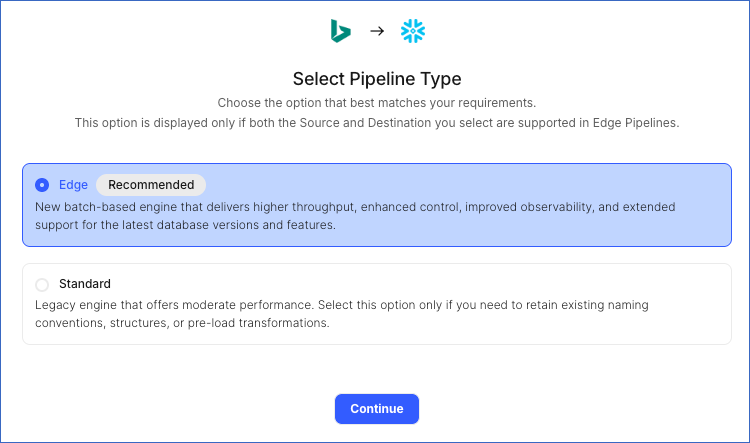
This page appears only if the selected Destination type is supported in Edge and your Team has an existing Microsoft Ads Pipeline with the same Destination type. Otherwise, you can proceed to create an Edge Pipeline.
-
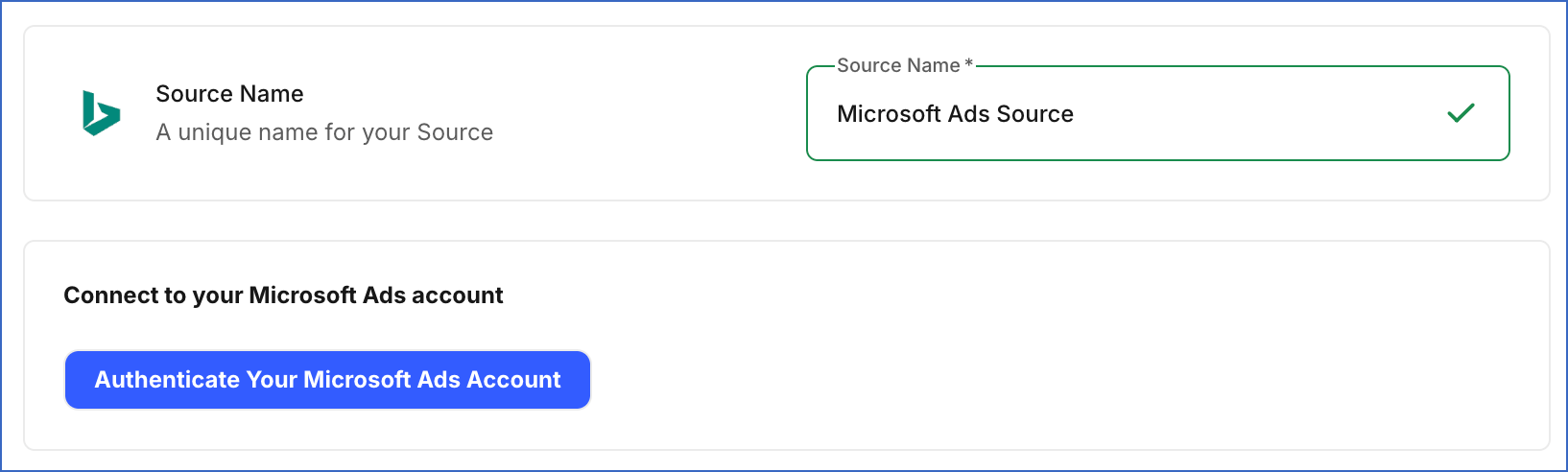
In the Connect to your Microsoft Ads account section, click Authenticate your Microsoft Ads account, log in to your Microsoft Ads account, and click Allow to grant Hevo access to your account.
-
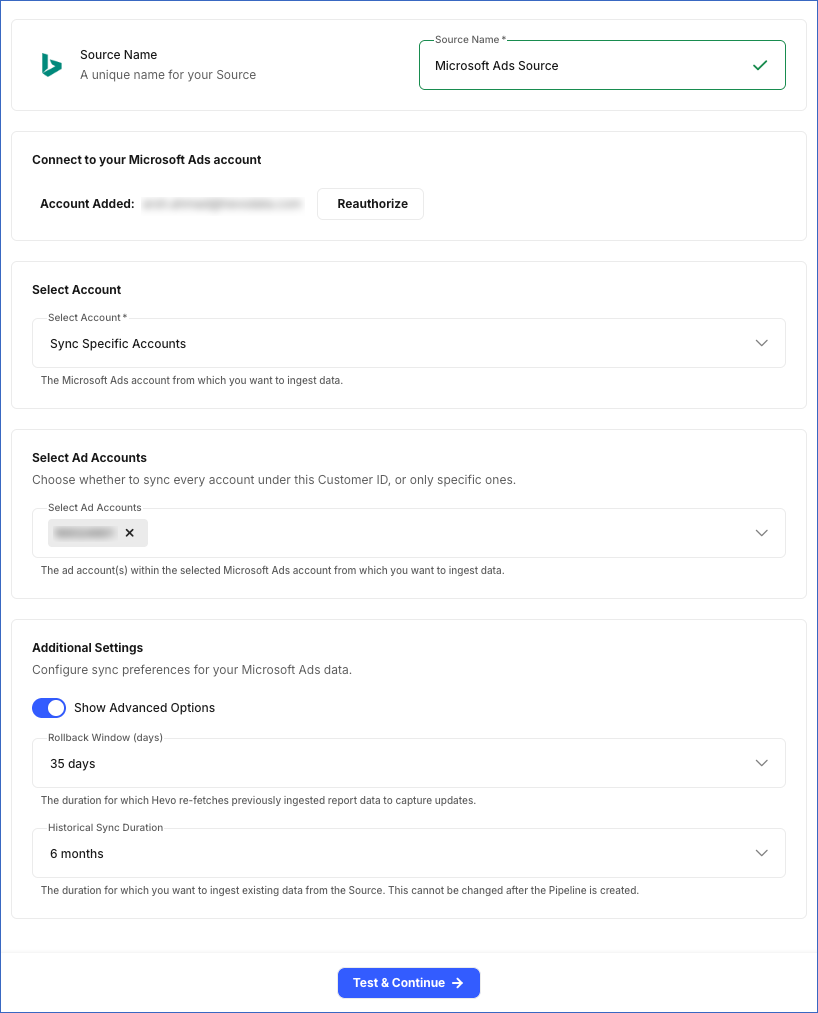
In the Configure Source screen, specify the following:
-
Select Account: Choose whether to sync data from all accessible accounts or only specific accounts.
- Sync All Accounts: Hevo syncs data for all ad accounts accessible to your authorized Microsoft Ads account, including any accounts added later.
- Sync Specific Accounts: Hevo ingests data only for the accounts you select from the Select Ad Accounts drop-down.
-
Additional Settings
-
Show Advanced Options: Enable this toggle to configure the following additional settings:
-
Rollback Window (days): Specify the number of days for which Hevo re-fetches previously ingested reports to capture updated report data within Microsoft Ads’s 30-day conversion-attribution window. Default: 35 days.
This value should be greater than the conversion window configured in your Microsoft Ads account.
-
-
-
Historical Sync Duration: The duration for which you want to ingest existing data from the Source. This can also be changed after the Pipeline is created. Default: 6 months.
-
-
Click Test & Continue to test the connection to your Microsoft Ads Source.
Configure Microsoft Ads as a Source Using the Hevo API
You can connect Hevo to your Microsoft Ads account with an OAuth app registered with Microsoft Entra ID. This method is available only through the Hevo API. Specify the credentials of the app in the request that creates the Pipeline, and Hevo uses them to authenticate with your account.
The following credentials are required to authenticate the connection:
-
Client ID: The unique identifier of your app. In Microsoft Entra ID, this identifier is the Application (client) ID.
-
Client Secret: The private key of your app. Hevo sends it with the client ID to authenticate the request.
-
Refresh Token: A long-lived token that your app receives the first time a Microsoft user authorizes it. Hevo exchanges this token for a short-lived access token when the Pipeline is created, and refreshes that token automatically, so the connection keeps working without anyone signing in again. Read Get access and refresh tokens for the steps to generate it.
-
Developer Token: A token that identifies your application to the Microsoft Advertising API. You obtain it from the Microsoft Advertising Developer Portal, and Microsoft associates it with a user in your account. Read Get a Developer Token for the steps to obtain it.
Register the app with Microsoft Entra ID with a multi-tenant account type, which Microsoft now calls Any Entra ID Tenant + Personal Microsoft accounts, and request the https://ads.microsoft.com/msads.manage and offline_access scopes. Hevo refreshes tokens through the /common endpoint, which a single-tenant application cannot use. If you register a single-tenant application, the request that creates the Pipeline fails with a message that the provider rejected the credentials. Read Register an application for the steps to register the app and for what each account type covers.
Prepare the Source Configuration
Before you build your request, retrieve the settings that the Microsoft Ads connector currently accepts. Refer to Read the Connector Configuration for the steps to retrieve them, and Using your own OAuth app for the keys that this method accepts.
In the response, the auth object describes the credentials of your own OAuth app. In the connector configuration response, Hevo returns the auth object under data.schema.properties.auth, and the connector settings under data.schema.properties.config. Only a connector that accepts an OAuth app has an auth property. Each credential carries "type": "string". Every credential except client_id also carries "format": "password" and "writeOnly": true. The following example shows part of the auth object:
{
  "auth": {
    "required": [
      "client_access"
    ],
    "properties": {
      "client_access": {
        "required": [
          "client_id",
          "client_secret"
        ],
        "properties": {
          "client_id": {
            "title": "Client ID"
          },
          "client_secret": {
            "title": "Client Secret"
          },
          "developer_token": {
            "title": "developer_token"
          }
        }
      },
      "refresh_token": {
        "title": "Refresh Token"
      },
      "access_token": {
        "title": "Access Token"
      }
    },
    "anyOf": [
      {
        "required": [
          "refresh_token"
        ]
      },
      {
        "required": [
          "access_token"
        ]
      }
    ]
  }
}
The anyOf block in the schema accepts either refresh_token or access_token, because that part of the schema is the same for every connector. For a Microsoft Ads Source, send refresh_token. Hevo needs the refresh token to keep the Source authorized, so a request that sends only an access token fails while the Pipeline is being created.
Send the developer token as auth.client_access.developer_token. Hevo does not check for this token when it reads the request, but the Source connection test fails without it. The request then returns an error, and no Pipeline is created.
By default Hevo syncs every account, because config.sync_mode defaults to ALL_ACCOUNTS. To sync only some of them, set it to SPECIFIC_ACCOUNTS and list the account IDs as strings in config.selected_accounts. The selected_accounts key does not appear in the connector configuration response.
Specify the credentials of your app in the auth object. The following example shows the source object for a Microsoft Ads Source:
{
  "name": "<source_name>",
  "connector_id": "microsoft_ads",
  "type": "MICROSOFT_ADS",
  "config": {
    "historical_sync_time_frame": "6 months"
  },
  "auth": {
    "client_access": {
      "client_id": "<client_id>",
      "client_secret": "<client_secret>",
      "developer_token": "<developer_token>"
    },
    "refresh_token": "<refresh_token>"
  }
}
Note: Replace the placeholder values in the example with your own. For example, <source_name> with My Microsoft Ads Account.
Specify this source object in the request that creates your Pipeline. Read Creating a Pipeline with Hevo API for the complete request and the remaining steps.
Hevo validates the credentials and tests the Source and Destination connections before it saves anything. To test the Source connection, Hevo uses the credentials in the auth object to generate an access token. If a credential is rejected or a test fails, the request returns an error, and no Pipeline is created. Hevo also deletes the access token that it generated.
Note: Hevo does not store these credentials in the Source configuration. It exchanges them for a token when the Pipeline is created and refreshes that token from then on. Hevo does not return them if you retrieve the Source configuration later. If you revoke the credentials in Microsoft, Hevo cannot authenticate with the Source. As a result, all active jobs for the Pipeline fail, and no data is replicated. To resume data replication, send the new credentials using the Modify Source Configuration in a Pipeline endpoint. Read Modifying the Source Configuration for the steps to send them.
Data Replication
Hevo replicates data for all the objects selected on the Configure Objects page during Pipeline creation. By default, all supported objects and their available fields are selected. However, you can modify this selection while creating or editing the Pipeline.
Hevo ingests the following types of data from your Source objects:
-
Historical Data: The first run of the Pipeline ingests historical data for the selected objects, based on the Historical Sync Duration specified when creating the Pipeline, and loads it into the Destination.
-
Incremental Data: Once the historical load is complete, new and updated records for objects are ingested as per the sync frequency.
For all objects, Hevo ingests only the incremental data in subsequent Pipeline runs:
-
For all core objects, Hevo detects incremental changes using the modified_time field.
-
For all reports, Hevo detects incremental changes using the date field.
For Report objects, Hevo also re-fetches data from the number of days specified in the Rollback Window (days) field during each sync. This captures any updates made to previously ingested report data and keeps your Destination up to date. Events ingested through data refresh are not billable.
Microsoft Ads enforces a rate limit on the number of calls that can be made to its APIs in a given time period. To understand how Hevo handles such scenarios, read Handling Rate Limit Exceptions.
Note: You can create a Pipeline with this Source only using the Merge load mode. The Append mode is not supported for this Source.
Schema and Primary Keys
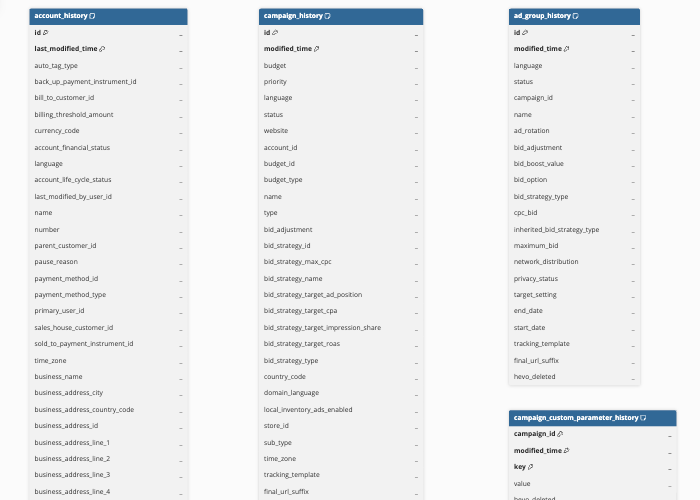
Hevo uses the following schema to upload the records to the Destination. For a detailed view of the objects, fields, and relationships, click the ERD.
Data Model
The following is the list of tables (objects) that are created at the Destination when you run the Pipeline:
Core Objects
| Object | Description |
|---|---|
| Account | Contains details of your Microsoft Ads accounts, including account name, number, currency code, time zone, financial status, and billing information. |
| Campaign | Contains details of your ad campaigns, including campaign name, status, budget, campaign type, bid strategy, network distribution, and tracking settings. This object has the following child objects: - Campaign Label - Campaign Custom Parameter |
| Ad Group | Contains details of the ad groups within your campaigns, such as the ad group name, status, bid settings, network distribution, and start and end dates. This object has the following child objects: - Ad Group Label - Ad Group Custom Parameter |
| Ad | Contains details of the ads within your ad groups, such as the ad copy (title and text), ad type, display and final URLs, and editorial status. This object has the following child objects: - Ad Label - Ad Custom Parameter - Ad Publisher Country - Ad Attribute |
| Keyword | Contains details of the keywords associated with your ad groups, such as the keyword text, match type, bid, destination URL, and editorial status. This object has the following child objects: - Keyword Label - Keyword Custom Parameter - Keyword Publisher Country |
| Label | Contains details of the labels you create to organize and categorize your campaigns, ad groups, ads, and keywords, such as the label name, color, and description. |
| Budget | Contains details of the shared budgets that can be applied to one or more campaigns, such as the budget amount, budget type, and name. |
| Conversion Goal | Contains details of the conversion goals configured in your account, such as the goal type, attribution model, conversion window, and revenue tracking settings. |
| Asset Group | Contains details of the asset groups used in Performance Max campaigns, such as the business name, final URL, call to action, and editorial status. This object has a child object, Asset Group Attribute. |
| Audience | Contains details of the remarketing and custom audiences configured in your account, such as the audience name, type, scope, and network size. Note: The Audience object includes multiple audience types. The Type field is used to identify which audience type each record belongs to. Hevo does not fetch CustomAudience, InMarketAudience, or ProductAudience types. |
| Tax Information | Contains account-level tax registration details, such as VAT, GST, or country-specific tax identifiers, such as CNPJ/CPF for Brazil or PanNumber/GSTINNumber for India, stored as key-value pairs for the account. |
Reports
Reports provide metrics about user activity and ad performance. To support both daily and hourly analysis, Hevo creates two Destination tables for each report.
| Object | Description |
|---|---|
| Account Performance Report | Contains performance metrics, such as, impressions, clicks, click-through rate (CTR), spend, conversions, and return on ad spend aggregated at the account level, broken down by device, network, and match type. |
| Campaign Performance Report | Contains performance and quality-score metrics, such as, impressions, clicks, spend, conversions, quality score, ad relevance, and landing page experience, aggregated at the campaign level. |
| Ad Group Performance Report | Contains performance metrics aggregated at the ad group level, broken down by device, network, language, and match type. |
| Ad Performance Report | Contains performance metrics aggregated at the individual ad level, broken down by device, network, language, and match type. |
| Keyword Performance Report | Contains performance metrics for individual keywords, broken down by device, network, language, and match type. |
| Account Impression Performance Report | Contains impression-share metrics aggregated at the account level. |
| Campaign Impression Performance Report | Contains impression-share metrics aggregated at the campaign level. |
| Ad Group Impression Performance Report | Contains impression-share metrics aggregated at the ad group level. |
| Search Query Performance Report | Contains performance metrics for the actual search terms that triggered your ads, mapped to the corresponding keyword, ad, ad group, and campaign. |
| Conversion Performance Report | Contains conversion and revenue metrics, such as, conversions, conversion rate, revenue, and return on ad spend aggregated at the account, campaign, ad group, and keyword level. |
| Age Gender Audience Report | Contains performance metrics broken down by the age group and gender of the audience viewing your ads, aggregated at the account, campaign, and ad group level. |
| Professional Demographics Audience Report | Contains performance metrics broken down by the company, industry, and job function of the professional audience viewing your ads, aggregated at the account, campaign, and ad group level. |
| Audience Performance Report | Contains performance metrics for the remarketing and custom audiences you have associated with your campaigns and ad groups, including the association status and bid adjustment applied. |
| Geographic Performance Report | Contains performance metrics broken down by the country, state, metro area, and city from which your ads received impressions and clicks. |
| User Location Performance Report | Contains performance metrics broken down by the physical location of the users who viewed or clicked your ads, as well as the location referenced in their search query. |
| Destination Url Performance Report | Contains performance metrics for the destination (landing) URLs used in your ads, aggregated at the account, campaign, ad group, and ad level. |
| Ad Extension Detail Report | Contains performance metrics for the ad extensions (such as sitelinks, callouts, and call extensions) associated with your ads, including the extension type and property values. |
| Ad Dynamic Text Performance Report | Contains performance metrics for ads that use dynamic text parameters, aggregated at the account, ad group, and ad level. |
| Product Dimension Performance Report | Contains performance metrics for Shopping and Performance Max campaigns, broken down by product attributes such as brand, condition, and custom labels. |
| Product Search Query Performance Report | Contains performance metrics for the search queries that triggered your Shopping ads, mapped to the corresponding product. |
| Product Partition Performance Report | Contains performance metrics for the product groups and partitions used to organize products within your Shopping campaigns. |
| Asset Group Performance Report | Contains performance metrics, such as impressions, clicks, CTR, spend, conversions, revenue, and return on ad spend, aggregated at the asset group level for Performance Max campaigns, broken down by account and campaign. |
| Budget Summary Report | Contains your monthly campaign budget, the amount spent so far, and whether spend is on pace to use the full monthly budget, aggregated at the campaign level. This report is available only at daily granularity. |
| DSA Auto Target Performance Report | Contains impressions, clicks, click-through rate, and average position for the auto-generated dynamic ad targets that triggered your Dynamic Search Ads, broken down by ad group and campaign. |
| DSA Category Performance Report | Contains impressions, clicks, click-through rate, and average position for the dynamic ad categories that triggered your Dynamic Search Ads, broken down by ad group and campaign. |
| DSA Search Query Performance Report | Contains impressions, clicks, click-through rate, and average position for the actual search terms that triggered your Dynamic Search Ads. |
| Goals and Funnels Report | Contains spend, revenue, assists, and conversion-funnel step data showing how far visitors progress through your site, broken down by account, ad group, campaign, keyword, and goal. This report does not apply to Shopping campaigns. |
| Negative Keyword Conflict Report | Lists keywords that conflict with negative keywords and are being blocked from showing, identifying whether the conflict occurs at the campaign or ad group level. This report is not split into daily and hourly tables. |
| Product Dimension Impression Performance Report | Contains impression-share metrics for Shopping and Performance Max campaigns, broken down by product attributes such as brand, condition, and custom labels. |
| Product Dimension Impression Performance Report (Performance Max) | Contains the same impression-share metrics as the Product Dimension Impression Performance Report, filtered to Performance Max campaigns only. |
| Product Dimension Performance Report (Performance Max) | Contains the same performance metrics as the Product Dimension Performance Report, filtered to Performance Max campaigns only. |
| Publisher Usage Performance Report | Contains impressions, clicks, spend, and conversions for the website URLs where your ads appeared, broken down by website URL, account, campaign, and ad group. |
| Search Campaign Change History Report | Records when and by which user changes were made to an account, such as campaign name, location targeting, or keyword bid changes, including both the old and new values. This report is not split into daily and hourly tables. |
| Share of Voice Report | Contains the percentage of impressions your keywords received and the impressions lost due to budget or bid. It also includes landing page experience and quality score. This report is available only at a daily level. |
Additional Information
Read the detailed Hevo documentation for the following related topics:
Handling of Deletes
Hevo uses a full data refresh approach to capture delete actions. During each Pipeline run, Hevo compares the data fetched from the Source object with the data present in the Destination table. If a record exists in the Destination but is no longer returned by the Source, the record is marked as deleted by setting the value of the metadata column __hevo__marked_deleted to True. This applies only to the following core objects:
-
Campaign
-
Ad Group
-
Ad
-
Keyword
-
Label
-
Campaign Label
-
Ad Group Label
-
Ad Label
-
Keyword Label
-
Budget
-
Conversion Goal
-
Asset Group
For all reports, Hevo does not support capturing deletes.
Source Considerations
-
Report data includes both attributes and performance metrics. By default, Hevo replicates all available attributes and metrics. If Microsoft Ads does not allow certain attributes and metrics to be used together in the same report, Hevo excludes only the conflicting attributes and continues to replicate all supported metrics. Read Column Restrictions to know about the conflicting columns in reports.
-
Microsoft Ads retains report data for different lengths of time depending on the report type and its granularity. Most daily and monthly reports are available for up to 36 months, while some reports and hourly data are retained for shorter periods. For more information, see Reporting Data Retention Period.
Revision History
Refer to the following table for the list of key updates made to this page:
| Date | Release | Description of Change |
|---|---|---|
| Oct-19-2026 | 2.54 | Added section, Configure Microsoft Ads as a Source Using the Hevo API. |
| Aug-10-2026 | NA | Updated section, Data Model to add information about newly supported objects. |
| Aug-03-2026 | NA | New document. |