On This Page
Activate is currently available for Early Access. Please contact your Hevo account executive or the Support team to enable it for your team. Alternatively, request for early access to try out one or more such features.
Salesforce is a cloud-based Customer Relationship Management (CRM) platform that helps businesses manage their sales, service, and marketing processes and the customer data behind them. In Activate, Salesforce acts as the Target that receives the data returned by your datasets.
Activate writes data to Salesforce through the Bulk API 2.0. You authenticate the Salesforce account with Hevo using Open Authorization (OAuth). After authorization, Activate can write records to the Salesforce objects that the authorizing user can access.
Prerequisites
-
An active Salesforce account exists to which data is to be sent. The account has API access, which is included in the Enterprise, Unlimited, Performance, and Developer Editions, and is available for the Professional Edition as an add-on.
-
The Salesforce user with which you authorize Hevo has the following permissions:
-
The object permissions on each object that you send data to, which are Create to insert records, Edit to update them, and Delete to delete them.
-
The View All Records object permission on each object that you send data to, or the View All Data system permission. Activate needs this permission to find the Salesforce records that match your rows. It checks for the permission on the following runs:
-
Every Insert Only run.
-
Every Delete Only run whose sync key is not the Salesforce record ID.
-
Every Mirror run that deletes records.
-
The first sync of an Insert or Update or Mirror Activation, and the first run after you change its dataset, field mappings, or sync behavior. For Insert or Update, this includes the first run after a resync.
Without this permission, the run fails before writing any records.
-
-
The View Setup and Configuration system permission. Activate uses it to read the permission sets of the user and confirm that the user has View All Records or View All Data.
-
The API Enabled system permission.
-
Read and edit access to the fields that you want to map, including the sync key field. For Delete Only, read access to the sync key field is enough.
-
-
The Hevo connected app, Hevo Data Inc, is installed in your Salesforce org, or the Salesforce user with which you authorize Hevo has the Approve Uninstalled Connected Apps permission. Since September 2025, Salesforce blocks most users from authorizing a connected app that is not installed in their org. If API Access Control is enabled in your org, the Hevo connected app must be installed and approved for the profile or permission set of the user.
Configure Salesforce as a Target
Perform the following steps to configure Salesforce as a Target in Activate:
-
In the Navigation Bar, click Activate.
-
On the Activate page, click the Targets tab, and then click + Create Target.

-
On the Select Target Type page, click Salesforce.
-
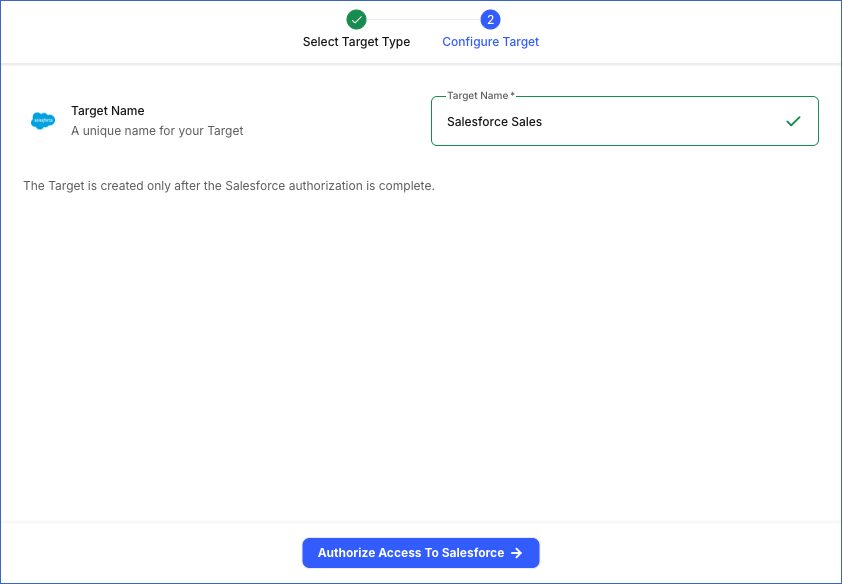
On the Configure Target page, do the following:
-
Specify a unique Target Name, such as Salesforce Sales. If you connect multiple Salesforce accounts, name each Target after its account, so that you select the correct one when creating an Activation.
Note: The Target is created only after the Salesforce authorization is complete.
-
Click Authorize Access To Salesforce, and then perform the following steps:
-
If you are not already logged in to your Salesforce account, log in with your Salesforce username and password when prompted. Otherwise, proceed to step 2.
-
On the Allow Access? page, click Allow to authorize Hevo to access your Salesforce account data.
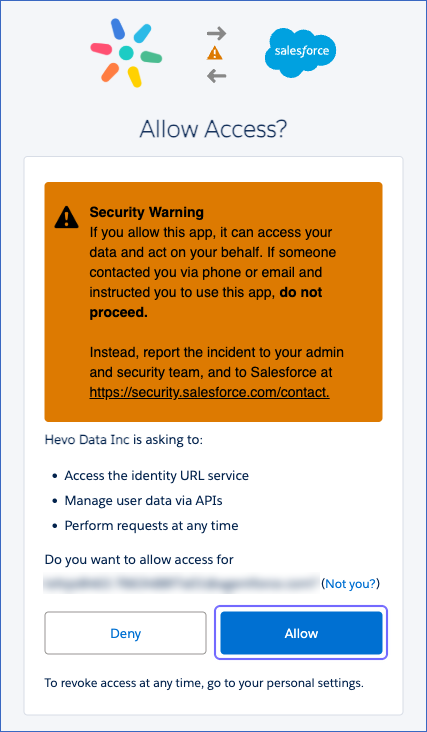
After authorization completes, you are redirected to the Targets List View, and the Target is created with the Active status.
-
-
Note: When you create an Activation with this Target, the Target Object drop-down on the Select Target Object page lists the Salesforce objects that the authorizing user can access. If an expected object is missing, check the user’s object permissions in Salesforce, and then click the refresh icon next to the drop-down.
Data Model
Activate supports the standard and custom Salesforce objects in which the authorizing user can create or delete records, and that Salesforce allows Activate to query. Custom settings and objects that Salesforce has deprecated are not listed. The Target Object drop-down lists the Account, Contact, Lead, Opportunity, and Case objects first, followed by the remaining objects in alphabetical order.
An Activation matches each row to a record using a sync key. The fields you can use as the sync key depend on the sync behavior:
| Sync Behavior | Eligible Sync Keys |
|---|---|
| Insert Only, Insert or Update, and Insert, Update, or Delete (Mirror) | A text, email, or number field that is marked as an External ID, or a standard field that Salesforce allows as a record identifier, such as Email on the Contact object. If the sync key field is not unique, such as Email, and more than one Salesforce record has the same sync key value as a row, the row fails. With Insert Only, the row is skipped instead. Use a field marked as External ID and Unique where you can. |
| Delete Only | Any field eligible for the other sync behaviors, a read-only field marked as an External ID, such as an auto-number field, or the Salesforce record ID (Id). |
If the object you select has no eligible field, create a custom Text field in Salesforce, such as Hevo_Activate_Key__c. Mark it as External ID and Unique, and select Treat “ABC” and “abc” as different values. Give the authorizing user read and edit access to the field, and then click Refresh Fields on the Map Fields page of the Activation.
Sync Behaviors
The sync behaviors available to an Activation depend on what the authorizing user can do on the Target object you select:
| Sync Behavior | Available When the User Can |
|---|---|
| Insert Only | Create records in the object. |
| Insert or Update | Create and edit records in the object. |
| Insert, Update, or Delete (Mirror) | Create, edit, and delete records in the object. |
| Delete Only | Delete records in the object. |
Note: The Update Only sync behavior is not available for Salesforce.
Read Select the Target for more information about each sync behavior.
Delete Behavior
Insert, Update, or Delete (Mirror) and Delete Only are the two sync behaviors that remove records from Salesforce. When these sync behaviors remove a record, Salesforce moves it to the Recycle Bin. By default, Salesforce keeps a deleted record in the Recycle Bin for 15 days, and you can restore it during that time. After that, Salesforce schedules the record for permanent deletion.
You must consider the following before you use a sync behavior that deletes records:
-
Dataset check: Confirm that your dataset returns what you intend before running an Activation that deletes records.
-
Empty dataset: If the dataset of a Mirror Activation returns no rows, the run deletes every record that the Activation synced.
-
Unmatched rows: With Delete Only, if no Salesforce record matches the sync key of a row, the run does not delete anything for that row and counts it as skipped in the run details. Read Skipped Records.
-
Records from other sources: Mirror deletes only the Salesforce records whose sync key value your dataset returned in an earlier run and no longer returns. This includes records created in Salesforce or by another Activation that have that sync key value. Records whose sync key value the dataset never returned are not deleted.
-
Changed configuration: When you change the dataset, sync key, field mappings, or sync behavior of a Mirror Activation, the records that the dataset no longer returns are not deleted.
Target Field Mapping Reference
When you map fields in an Activation, Activate reads the field list for the selected Target object directly from Salesforce. You must consider the following while mapping:
-
Read-only fields: Salesforce sets the values of some fields automatically, such as formula and auto-number fields. Activate does not offer these fields for mapping, because it cannot write to them.
-
Compound fields: Salesforce stores some values as compound fields that combine several fields. For example, the Mailing Address field of a Contact combines Mailing Street, Mailing City, Mailing State/Province, and other fields, and a geolocation field combines a latitude and a longitude. Activate does not offer compound address and geolocation fields for mapping. Map your dataset columns to the individual fields instead, for example, a city column to Mailing City.
-
Lookup fields: A lookup field connects a record to a record in another object, for example, a Contact to its Account. To set a lookup field, map a column of Salesforce record IDs to the lookup field, such as Account ID, or map a column to a field of the related object that is marked as an External ID. The field list displays these fields with the label of the lookup field followed by the label of the External ID field. To clear a lookup, map the lookup field itself. A lookup that can point to more than one object accepts only Salesforce record IDs.
-
Required fields: If a column mapped to a Salesforce field that cannot be empty returns NULL in any row, the whole run fails and no records are written, not even the rows that have a value. This includes fields that Salesforce fills in by default, such as Owner ID and the Status of a Lead. Ensure that the columns you map to required fields always return a value.
-
Empty values: With Insert Only, a NULL value or empty text leaves the field empty. If a field that can be empty has a default value, Salesforce fills in that value. With Insert or Update and Mirror, a NULL value clears the field in Salesforce, except checkbox fields and lookups set through an External ID, which keep their value. Empty text leaves the field unchanged.
-
Picklist fields: If a picklist accepts only its defined values, a record whose value does not exactly match an active value, including letter case, fails.
-
Array and JSON values: Activate sends array and JSON values, such as a Google BigQuery ARRAY column, as JSON text. For a multi-select picklist field, Activate sends the elements of an array as a list separated by semicolons, such as Gold;Silver. If an element of the array contains a semicolon, or is an array or an object, the row fails.
-
Date and time fields: Activate sends date and time values in Coordinated Universal Time (UTC). A timestamp without a time zone, such as a Snowflake TIMESTAMP_NTZ value, is treated as UTC.
-
Field types: The value in the dataset must be compatible with the Salesforce field type. For example, a text value sent to a number field causes the record to fail. Read Failed Records for more information about the reason reported for each failure.
You map fields while creating an Activation, after selecting the Target object and the sync behavior. Read Map Fields for the steps to set the sync key and map your dataset columns to Salesforce fields.
Target Considerations
-
Activate connects only to production Salesforce orgs. Salesforce sandbox orgs cannot be connected as a Target.
-
Salesforce does not apply lead and case assignment rules to the records that Activate inserts. To set the owner of a new record, map the Owner ID field.
-
When Activate matches a row to a Salesforce record, it ignores the letter case of the sync key value, unless the field is marked as Unique and case-sensitive. If more than one row in your dataset has the same sync key value, all of those rows fail.
-
With Insert Only, if a Salesforce record already matches the sync key of a row, the run does not insert the row and counts it as skipped in the run details. Read Skipped Records.
-
Before the first sync of an Activation that inserts records into an empty object, Activate also checks the Recycle Bin. If a record in the Recycle Bin has the same sync key value as a row in your dataset, the run fails. Restore the record or delete it permanently in Salesforce, and then run the Activation again. Activate needs the View All Data system permission to check the Recycle Bin. Without it, the run fails when the Recycle Bin has a matching record.
-
Salesforce limits the number of API requests and Bulk API records that an account can use in 24 hours. Before each run writes data, Activate checks how much of these limits remains. If the remaining limit is too low for the run, the run stops before it writes any records. When the limit runs out during a run, the run can stop after writing some records. Read API Request Limits and Allocations for the limits of your edition.
-
Salesforce allows up to five Hevo authorizations per Salesforce user, including those for Activate Targets and Pipelines. When the user authorizes a sixth time, Salesforce revokes the oldest authorization, and the Target or Pipeline that used it can no longer access Salesforce. To restore its access, reauthorize it with a Salesforce user that has fewer than five such authorizations.
-
If Hevo can no longer access your Salesforce account, for example because the authorizing user is deactivated or the access is revoked, reauthorize the Target. Read Reauthorizing a Target for the steps.
Revision History
Refer to the following table for the list of key updates made to this page:
| Date | Release | Description of Change |
|---|---|---|
| Nov-27-2026 | 2.55 | New document. |