Chargebee (Edge)
On This Page
Chargebee is a subscription billing and revenue management platform. Businesses use it to manage subscriptions, invoices, payments, and usage-based pricing.
Hevo uses the Chargebee API to replicate the customers, subscriptions, invoices, credit notes, transactions, quotes, orders, Product Catalog 2.0 items and prices, coupons, and events of your Chargebee site to the Destination of your choice. To ingest data, you must provide Hevo with an API key and the sub domain of your Chargebee site.
Supported Features
| Feature Name | Supported |
|---|---|
| Capture deletes | Yes |
| History mode | No |
| Custom data (user-configured tables & fields) | Yes |
| Data blocking (skip objects and fields) | Yes |
| Resync (objects and Pipelines) | Yes |
| API configurable | Yes |
Prerequisites
-
An active Chargebee site that uses Product Catalog 2.0, from which data is to be ingested.
-
Access to the API keys settings of your Chargebee site, to create an API key. Read Create a Read-Only API Key.
Create a Read-Only API Key
Hevo connects to your Chargebee site using an API key. Hevo only reads data from Chargebee, so a read-only key with access to all data is sufficient. Each Chargebee site has its own API keys, so create the key on the site whose data you want to ingest.
Perform the following steps to create a read-only API key:
-
Log in to your Chargebee account and open the site whose data you want to ingest.
-
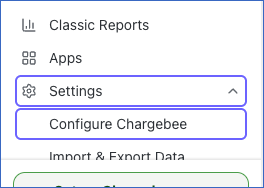
In the left navigation pane, click Settings, and then click Configure Chargebee.
-
In the API Keys and Events section, click API keys.

-
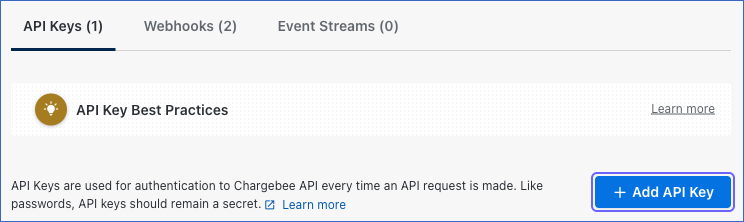
On the API Keys tab, click + Add API Key.
-
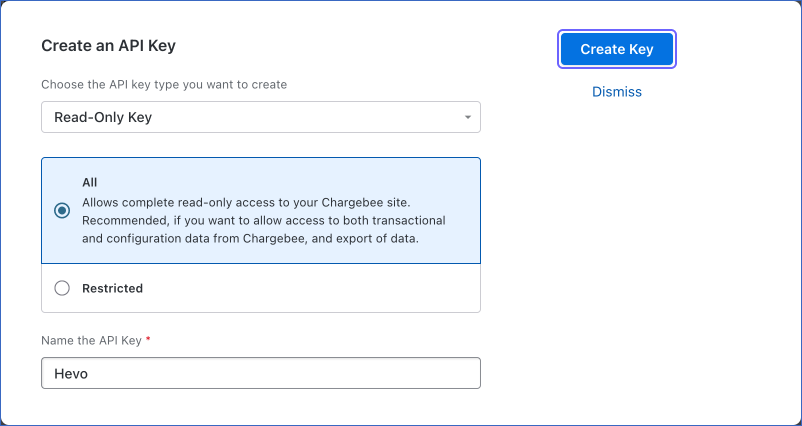
In the Create an API Key dialog, do the following:
-
Select Read-Only Key.
-
Select All, to give the key read-only access to all the transactional and configuration data of your site.
-
In the Name the API Key field, specify a name for the key. For example, Hevo.
-
Click Create Key.
-
-
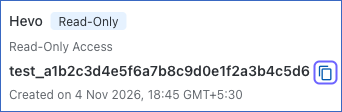
Click the copy icon next to the new key to copy it, and save it securely like any other password.
Configure Chargebee as a Source in your Pipeline
Perform the following steps to configure your Chargebee Source:
-
Click Pipelines in the Navigation Bar.
-
Click + Create Pipeline in the Pipelines List View.
-
On the Select Source Type page, select Chargebee.
-
On the Select Destination Type page, select the type of Destination you want to use.
-
On the Select Pipeline Type page, click Edge, and then click Continue.

This page appears only if the selected Destination type is supported in Edge. Otherwise, you can proceed to create an Edge Pipeline.
-
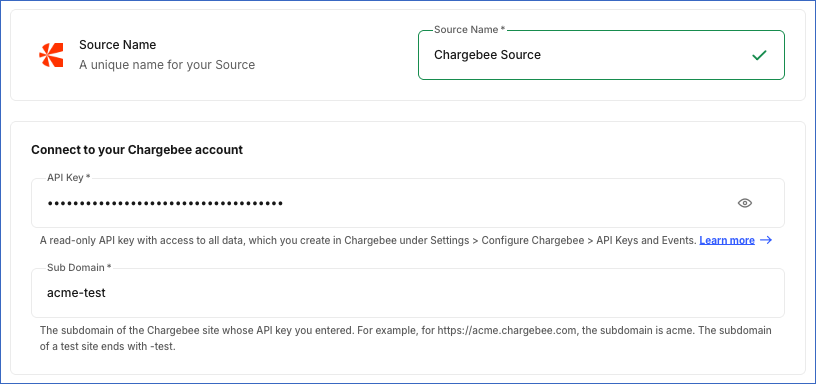
In the Configure Source screen, specify the following:
-
Source Name: A unique name for your Source, not exceeding 255 characters. For example, Chargebee Source.
-
In the Connect to your Chargebee account section, specify the following:
-
API Key: The API key that you created in Chargebee.
-
Sub Domain: The sub domain of your Chargebee site. For example, if your site URL is https://acme-test.chargebee.com, the sub domain is acme-test.
-
-
-
Click Test & Continue to test the connection to your Chargebee Source. Once the test is successful, you can proceed to set up your Destination.
Data Replication
Hevo replicates data for all the objects selected on the Configure Objects page during Pipeline creation. By default, all supported objects and their available fields are selected. However, you can modify this selection while creating or editing the Pipeline. To ingest a child object, you must also select its parent object. For example, to ingest the Invoice Line Item object, you must also select the Invoice object. The Data Model lists the child objects of each parent object.
The first run of the Pipeline ingests all the data of the selected objects. In the subsequent runs, as per the sync frequency, Hevo ingests data as follows:
| Ingestion | Parent Objects |
|---|---|
| New and updated records, based on the time each record was last updated | Coupon, Credit Note, Customer, Hosted Page, Invoice, Item, Item Family, Item Price, Orders, Payment Schedule, Payment Source, Quote, Ramp, Subscription, Transaction, Usage, and Virtual Bank Account |
| New records, based on the time each record was created | Comment and Event |
| All the records, in each run | Coupon Code, Coupon Set, Differential Price, Entitlement, and Gift |
Each time Hevo ingests a parent record, it also ingests the current data of the record’s child objects. In each run, Hevo also reads the records changed during the few minutes before the previous run, so that records changed while the previous run was in progress are not missed.
For a subscription, Hevo also saves each update as a new record in the Subscription History object and its child objects, so that you can see how the subscription changed over time. Hevo reads the entitlements of all the subscriptions, in the Subscription Entitlement object, only in the first run and when you resync the Subscription object.
Hevo loads the custom fields of the Coupon, Credit Note, Customer, Invoice, Item, Item Family, Item Price, Quote, Subscription, and Subscription History records as key-value pairs in the custom_fields column, in JSON format. For example, {“cf_region”:”EMEA”}.
You can resync all the objects except the child objects. Resyncing a parent object also resyncs its child objects.
Chargebee limits the number of API requests that each site can make in a minute: 150 for test sites, and 150, 1,000, or 3,500 for live sites on the Starter, Performance, and Enterprise plans, respectively. If Hevo exceeds this limit, it waits and retries the request. Read API Rate Limits.
Note: You can create a Pipeline with this Source only using the Merge load mode. The Append mode is not supported for this Source.
Schema and Primary Keys
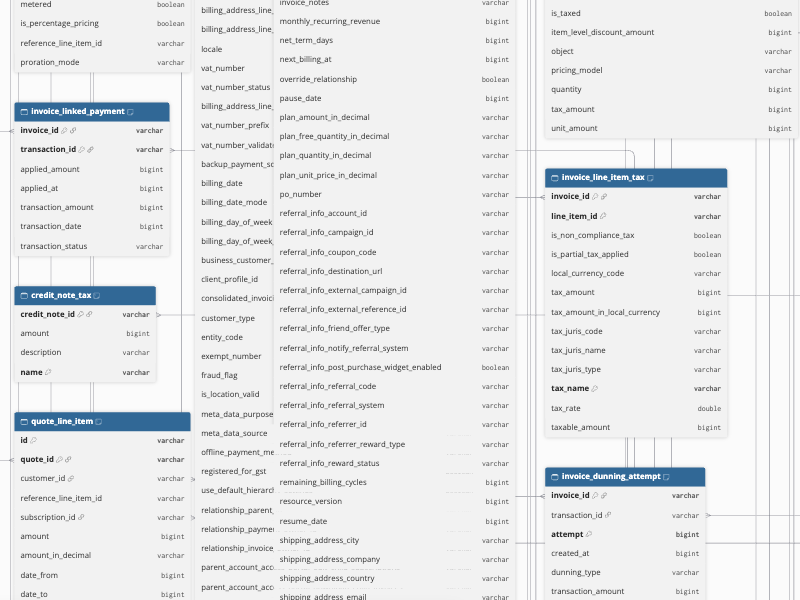
Hevo uses the following schema to upload the records in the Destination. For a detailed view of the objects, fields, and relationships, click the ERD.
Data Model
The following is the list of tables (objects) that are created at the Destination when you run the Pipeline:
| Object | Description |
|---|---|
| Applicable Item | Contains the addons and charges that can be applied to each plan. |
| Attached Item | Contains the addons and charges attached to each plan, including the type, quantity, and billing cycles. |
| Comment | Contains the comments added to records on your site, such as customers, subscriptions, and invoices, including the text, author, and the record that the comment is on. |
| Contract Term | Contains the contract terms of each subscription, including the status, start and end dates, billing cycles, and the action at the end of the term. |
| Coupon | Contains the coupons that you offer your customers, including the discount type and amount, duration, validity, and the item prices and periods they apply to. It includes the child objects, Coupon Applicable Item Family, Coupon Applicable Item Price, Coupon Applicable Price Period, Coupon Item Constraint, and Coupon Item Constraint Criteria. |
| Coupon Applicable Item Family | Contains the item families that each coupon applies to. |
| Coupon Applicable Item Price | Contains the item prices that each coupon applies to. |
| Coupon Applicable Price Period | Contains the billing periods that each coupon applies to. |
| Coupon Code | Contains the unique coupon codes created in your coupon sets, including the coupon, coupon set, and status. |
| Coupon Item Constraint | Contains the item types that each coupon applies to, and whether it applies to all, none, or specific items. |
| Coupon Item Constraint Criteria | Contains the criteria that select the items each coupon applies to. |
| Coupon Set | Contains the coupon sets that group coupon codes for a coupon, including the number of total, redeemed, and archived codes. |
| Credit Note | Contains the credit notes issued to your customers for refunds or adjustments, including the type, status, amounts, taxes, and the invoices they are allocated to. It includes the child objects, Credit Note Discount, Credit Note Invoice Allocation, Credit Note Line Item, Credit Note Line Item Discount, Credit Note Line Item Tax, Credit Note Line Item Tier, Credit Note Linked Refund, Credit Note Linked Tax Withheld Refund, and Credit Note Tax. |
| Credit Note Discount | Contains the discounts applied to each credit note. |
| Credit Note Invoice Allocation | Contains the invoices that each credit note is allocated to, including the allocated amount. |
| Credit Note Line Item | Contains the line items of each credit note. |
| Credit Note Line Item Discount | Contains the discounts applied to each credit note line item. |
| Credit Note Line Item Tax | Contains the taxes applied to each credit note line item. |
| Credit Note Line Item Tier | Contains the price tiers used for each credit note line item. |
| Credit Note Linked Refund | Contains the refunds linked to each credit note. |
| Credit Note Linked Tax Withheld Refund | Contains the refunds of tax withheld amounts linked to each credit note. |
| Credit Note Tax | Contains the taxes applied to each credit note. |
| Customer | Contains the customers of your Chargebee site, including their contact details, billing address, payment and auto-collection settings, tax details, and balances. It includes the child objects, Customer Balance, Customer Contact, Customer Entity Identifier, and Customer Referral URL. |
| Customer Balance | Contains the promotional credits, refundable credits, excess payments, and unbilled charges of each customer, by currency. |
| Customer Contact | Contains the additional contacts of each customer, including the name, email address, and the notifications they receive. |
| Customer Entity Identifier | Contains the identifiers of each customer, such as company or tax registration numbers, including the scheme and value. |
| Customer Referral URL | Contains the referral URLs of each customer from the referral program, including the referral system and sharing URL. |
| Differential Price | Contains the differential prices that set an addon or charge price based on the plan it is attached to, including the price and tiers. It includes the child objects, Differential Price Parent Period and Differential Price Tier. |
| Differential Price Parent Period | Contains the billing periods of the parent plans that each differential price applies to. |
| Differential Price Tier | Contains the price tiers of each differential price. |
| Entitlement | Contains the entitlements that link features to your items and item prices, including the feature and its value. |
| Event | Contains the events that Chargebee records when something changes on your site, such as a customer being created or an invoice being paid, including the event type, source, and time. It includes the child objects, Event Metadata and Event Webhook. |
| Event Metadata | Contains the metadata of each event, as key and value pairs. |
| Event Webhook | Contains the webhooks sent for each event, including the webhook and its delivery status. |
| Gift | Contains the gift subscriptions purchased on your site, including the gifter, receiver, status, and scheduled date. It includes a child object, Gift Timeline. |
| Gift Timeline | Contains the status changes of each gift, with the time of each change. |
| Hosted Page | Contains the hosted pages generated for your customers, such as checkout and update payment method pages, including the type, state, and expiry. It includes a child object, Hosted Page Transaction. |
| Hosted Page Transaction | Contains the transactions created through each hosted page. |
| Invoice | Contains the invoices raised for your customers, including the status, amounts, taxes, discounts, applied credits, payments, and dunning attempts. It includes the child objects, Invoice Adjustment Credit Note, Invoice Applied Credit, Invoice Discount, Invoice Dunning Attempt, Invoice Issued Credit Note, Invoice Line Item, Invoice Line Item Discount, Invoice Line Item Tax, Invoice Line Item Tier, Invoice Linked Order, Invoice Linked Payment, Invoice Linked Tax Withheld Refund, Invoice Note, and Invoice Tax. |
| Invoice Adjustment Credit Note | Contains the adjustment credit notes created for each invoice. |
| Invoice Applied Credit | Contains the credit notes applied to each invoice, including the applied amount. |
| Invoice Discount | Contains the discounts applied to each invoice. |
| Invoice Dunning Attempt | Contains the payment retry attempts made for each unpaid invoice. |
| Invoice Issued Credit Note | Contains the credit notes issued against each invoice. |
| Invoice Line Item | Contains the line items of each invoice, including the item price, quantity, amounts, and service period. |
| Invoice Line Item Discount | Contains the discounts applied to each invoice line item. |
| Invoice Line Item Tax | Contains the taxes applied to each invoice line item, including the tax name, rate, and amount. |
| Invoice Line Item Tier | Contains the price tiers used for each invoice line item. |
| Invoice Linked Order | Contains the orders linked to each invoice. |
| Invoice Linked Payment | Contains the payments linked to each invoice, including the applied amount. |
| Invoice Linked Tax Withheld Refund | Contains the refunds of tax withheld amounts linked to each invoice. |
| Invoice Note | Contains the notes added to each invoice. |
| Invoice Tax | Contains the taxes applied to each invoice. |
| Item | Contains the plans, addons, and charges in your Product Catalog 2.0, including the type, status, item family, and usage and shipping settings. It includes the child objects, Applicable Item, Attached Item, and Item Metadata. |
| Item Family | Contains the item families that group your items, including the name, description, and status. |
| Item Metadata | Contains the metadata of each item, as key and value pairs. |
| Item Price | Contains the prices defined for your items, including the pricing model, currency, billing period, price, and tiers. It includes the child objects, Item Price Metadata and Item Price Tier. |
| Item Price Metadata | Contains the metadata of each item price, as key and value pairs. |
| Item Price Tier | Contains the price tiers of each item price. |
| Order Line Item | Contains the line items of each order. |
| Order Line Item Discount | Contains the discounts applied to each order line item. |
| Order Line Item Tax | Contains the taxes applied to each order line item. |
| Order Linked Credit Note | Contains the credit notes linked to each order. |
| Orders | Contains the orders created for your invoices, including the status, fulfillment details, amounts, and line items. It includes the child objects, Order Line Item, Order Line Item Discount, Order Line Item Tax, Order Linked Credit Note, and Resent Order. |
| Payment Schedule | Contains the payment schedules that split an invoice amount into installments, including the scheme and the scheduled entries. It includes a child object, Payment Schedule Entry. |
| Payment Schedule Entry | Contains the installments of each payment schedule, including the date, amount, and status. |
| Payment Source | Contains the payment methods that your customers use, such as cards and bank accounts, including the type, status, and gateway. It includes a child object, Payment Source Mandate. |
| Payment Source Mandate | Contains the direct debit mandates of each payment source. |
| Quote | Contains the quotes created for your customers, including the status, validity, amounts, line items, and the subscription changes that each quote proposes. It includes the child objects, Quote Discount, Quote Line Item, Quote Line Item Discount, Quote Line Item Tax, Quote Line Item Tier, Quote Note, Quote Subscription, Quote Subscription Coupon, Quote Subscription Discount, Quote Subscription Item, Quote Subscription Item Tier, and Quote Tax. |
| Quote Discount | Contains the discounts applied to each quote. |
| Quote Line Item | Contains the line items of each quote. |
| Quote Line Item Discount | Contains the discounts applied to each quote line item. |
| Quote Line Item Tax | Contains the taxes applied to each quote line item. |
| Quote Line Item Tier | Contains the price tiers used for each quote line item. |
| Quote Note | Contains the notes added to each quote. |
| Quote Subscription | Contains the subscription that each quote creates or changes. |
| Quote Subscription Coupon | Contains the coupons in the subscription of each quote. |
| Quote Subscription Discount | Contains the discounts in the subscription of each quote. |
| Quote Subscription Item | Contains the item prices in the subscription of each quote. |
| Quote Subscription Item Tier | Contains the price tiers in the subscription of each quote. |
| Quote Tax | Contains the taxes applied to each quote. |
| Ramp | Contains the ramps that schedule future changes to a subscription, such as the items, coupons, and discounts to add, update, or remove on a date. It includes the child objects, Ramp Contract Term, Ramp Coupons To Add, Ramp Discounts To Add, Ramp Item Tier, Ramp Items To Add, Ramp Items To Update, and Ramp Status Transition Reason. |
| Ramp Contract Term | Contains the contract term that each ramp sets for the subscription. |
| Ramp Coupons To Add | Contains the coupons that each ramp adds to the subscription. |
| Ramp Discounts To Add | Contains the discounts that each ramp adds to the subscription. |
| Ramp Item Tier | Contains the price tiers of the item prices in each ramp. |
| Ramp Items To Add | Contains the item prices that each ramp adds to the subscription. |
| Ramp Items To Update | Contains the item prices that each ramp updates in the subscription. |
| Ramp Status Transition Reason | Contains the reason for the current status of each ramp, such as a failure. |
| Resent Order | Contains the orders that each order was resent as, including the reason. |
| Scheduled Subscription Change | Contains the changes scheduled for each subscription at the end of the current term. |
| Scheduled Subscription Change Item Price | Contains the item prices in the scheduled changes of each subscription. |
| Subscription | Contains the subscriptions of your customers, including the status, billing period, current term, item prices, discounts, coupons, and the contract terms and scheduled changes. It includes the child objects, Contract Term, Scheduled Subscription Change, Scheduled Subscription Change Item Price, Subscription Charged Item Price, Subscription Coupon, Subscription Discount, Subscription Entitlement, Subscription History, Subscription History Charged Item Price, Subscription History Coupon, Subscription History Discount, Subscription History Item Price, Subscription History Item Tier Price, Subscription Item Price, Subscription Item Tier Price, Subscription Renewal Estimate, and Subscription Renewal Estimate Invoice Line Item. |
| Subscription Charged Item Price | Contains the item prices already charged in each subscription, including the last charge time. |
| Subscription Coupon | Contains the coupons applied to each subscription, including the number of times each coupon was applied. |
| Subscription Discount | Contains the discounts applied to each subscription, including the type, amount, and duration. |
| Subscription Entitlement | Contains the feature entitlements of each subscription, including the feature, value, and whether it is enabled. |
| Subscription History | Contains a version of each subscription every time it is updated, keyed by the subscription ID and update time. |
| Subscription History Charged Item Price | Contains the charged item prices in each version of a subscription. |
| Subscription History Coupon | Contains the coupons in each version of a subscription. |
| Subscription History Discount | Contains the discounts in each version of a subscription. |
| Subscription History Item Price | Contains the item prices in each version of a subscription. |
| Subscription History Item Tier Price | Contains the price tiers in each version of a subscription. |
| Subscription Item Price | Contains the item prices in each subscription, including the quantity, unit price, amount, and billing period. |
| Subscription Item Tier Price | Contains the price tiers of the item prices in each subscription. |
| Subscription Renewal Estimate | Contains the estimated amounts of the next renewal invoice of each active subscription. |
| Subscription Renewal Estimate Invoice Line Item | Contains the line items of the estimated renewal invoice of each subscription. |
| Transaction | Contains the payment operations on your site, such as payments, authorizations, and refunds, including the amount, status, gateway, and the linked invoices and credit notes. It includes the child objects, Transaction Invoice, Transaction Linked Credit Note, Transaction Linked Payment, and Transaction Refund. |
| Transaction Invoice | Contains the invoices linked to each transaction, including the applied amount. |
| Transaction Linked Credit Note | Contains the credit notes linked to each transaction. |
| Transaction Linked Payment | Contains the payments linked to each refund transaction. |
| Transaction Refund | Contains the refunds made against each payment transaction. |
| Usage | Contains the usage records added to subscriptions for metered item prices, including the quantity and usage date. |
| Virtual Bank Account | Contains the virtual bank accounts that Chargebee creates for your customers to receive bank transfers, including the bank, account number, and scheme. |
Additional Information
Read the detailed Hevo documentation for the following related topics:
Handling of Deletes
Hevo captures the deletes of the parent objects as follows. When a record is deleted, Hevo sets the value of the metadata column __hevo__marked_deleted to True for the record in the Destination, and replaces its child records.
| Deletes Captured | Parent Objects |
|---|---|
| In each run |
Credit Note, Customer, Invoice, Orders, Payment Source, Quote, Ramp, Subscription, and Transaction, which Chargebee returns as deleted records. Coupon, Item, Item Family, Item Price, and Virtual Bank Account, which Hevo identifies from the delete events in Chargebee. |
| In each run, by comparing the data | Coupon Code, Coupon Set, Differential Price, Entitlement, and Gift. Hevo ingests all the records of these objects in each run, and marks the records that are no longer in Chargebee as deleted. |
| Only when you resync the object | Comment, Payment Schedule, and Usage. Chargebee does not report the deletes of these objects. |
Event and Hosted Page records are never deleted. Chargebee does not delete hosted pages, so Hevo keeps each hosted page with its last state.
Chargebee keeps events only for a limited time, about 90 days. If the Pipeline is paused for longer, resync the Coupon, Item, Item Family, Item Price, and Virtual Bank Account objects to capture the deletes made in the meantime.
Source Considerations
-
A Chargebee site and its API keys belong to either the test or the live environment. To ingest the data of your live site, create the API key on the live site and use its sub domain.
-
In the first run, Hevo ingests all the data of your site, including all the events. If your site has a large number of events or subscriptions, the first run may take a long time to complete.
-
Hevo reads the renewal estimate, scheduled changes, and contract terms of each subscription with a separate API request. As a result, the number of API requests in each run increases with the number of subscriptions that are updated.
Limitations
- Hevo supports only Chargebee sites that use Product Catalog 2.0.
Revision History
Refer to the following table for the list of key updates made to this page:
| Date | Release | Description of Change |
|---|---|---|
| Nov-05-2026 | 2.54 | New document. |