CircleCI (Edge)
On This Page
CircleCI is a continuous integration and continuous delivery (CI/CD) platform that software teams use to build, test, and deploy their code automatically each time they make a change.
Hevo uses the CircleCI API v2 to replicate the organizations, contexts, projects, pipelines, workflows, jobs, deploy components, and Insights metrics of your CircleCI account to the Destination of your choice. To ingest data, you must provide Hevo with a personal API token of your CircleCI user.
Supported Features
| Feature Name | Supported |
|---|---|
| Capture deletes | Yes |
| History mode | No |
| Custom data (user-configured tables & fields) | No |
| Data blocking (skip objects and fields) | Yes |
| Resync (objects and Pipelines) | Yes |
| API configurable | Yes |
Prerequisites
-
An active CircleCI account from which data is to be ingested.
-
Your CircleCI user is a member of the organizations and has access to the projects whose data you want to ingest. Hevo can access only the data that your user can view.
-
A personal API token of your CircleCI user is available. Project API tokens are not supported.
Create a Personal API Token
Hevo connects to your CircleCI account using a personal API token. The token acts as your CircleCI user, with the access level that you select when you create it. CircleCI displays the token only once.
Perform the following steps to create a personal API token:
-
Log in to your CircleCI account.
-
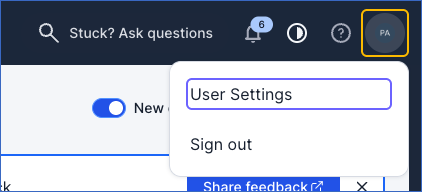
In the top-right corner, click your user avatar, and then click User Settings.
-
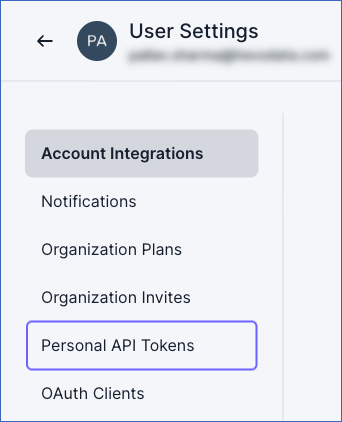
In the left navigation pane, click Personal API Tokens.
-
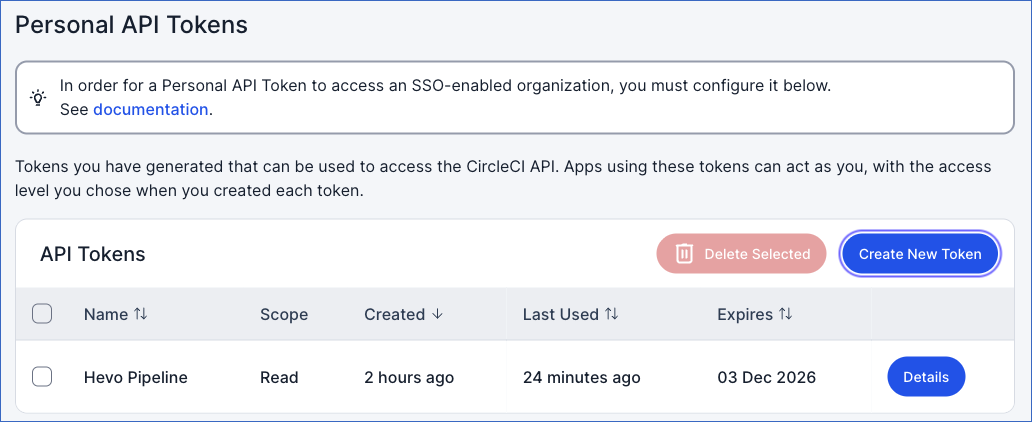
On the Personal API Tokens page, click Create New Token.
-
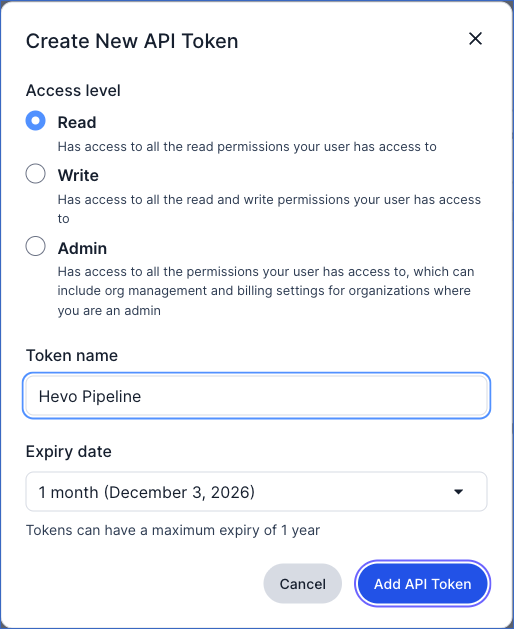
In the Create New API Token dialog, do the following:
-
Under Access level, select Read. Hevo only reads data from CircleCI, so the token needs only read access.
-
In the Token name field, specify a name for the token. For example, Hevo Pipeline.
-
In the Expiry date drop-down, select when the token must expire. Default value: 1 month. A token can be valid for up to 1 year. Once the token expires, Hevo cannot ingest data until you create a new token and update it in your Source configuration.
-
Click Add API Token.
-
-
Click Copy to copy the token, and save it securely like any other password.
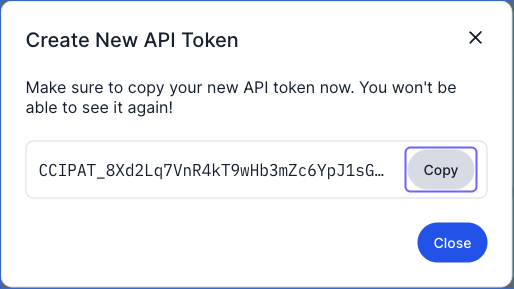
Note: If your CircleCI organization uses single sign-on (SSO), you must also authorize the token for the organization. Read Managing API tokens.
Configure CircleCI as a Source in your Pipeline
Perform the following steps to configure your CircleCI Source:
-
Click Pipelines in the Navigation Bar.
-
Click + Create Pipeline in the Pipelines List View.
-
On the Select Source Type page, select CircleCI.
-
On the Select Destination Type page, select the type of Destination you want to use.
-
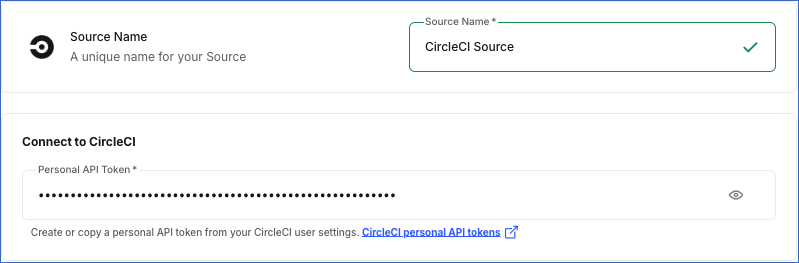
In the Configure Source screen, specify the following:
-
Source Name: A unique name for your Source, not exceeding 255 characters. For example, CircleCI Source.
-
In the Connect to CircleCI section, specify the following:
- Personal API Token: The personal API token that you created in CircleCI.
-
-
Click Test & Continue to test the connection to your CircleCI Source. Once the test is successful, you can proceed to set up your Destination.
Data Replication
Hevo replicates data for all the objects selected on the Configure Objects page during Pipeline creation. By default, all supported objects and their available fields are selected. However, you can modify this selection while creating or editing the Pipeline. To ingest a child object, you must also select its parent object. For example, to ingest the Jobs object, you must also select the Workflows object. The Data Model lists the child objects of each parent object.
In each run of the Pipeline, as per the sync frequency, Hevo ingests the entire data of the selected objects. This Source does not support incremental data.
Hevo finds the projects of each organization from the CircleCI Insights summary of the organization, and then ingests the pipelines of these projects, the workflows of each pipeline, and the jobs of each workflow. Read Projects ingested from CircleCI Insights.
You can resync all the objects except the child objects. Resyncing a parent object also resyncs its child objects.
CircleCI limits the number of API requests that each user can make. If Hevo exceeds this limit, CircleCI returns an error, and Hevo waits and retries the request.
Note: You can create a Pipeline with this Source only using the Merge load mode. The Append mode is not supported for this Source.
Schema and Primary Keys
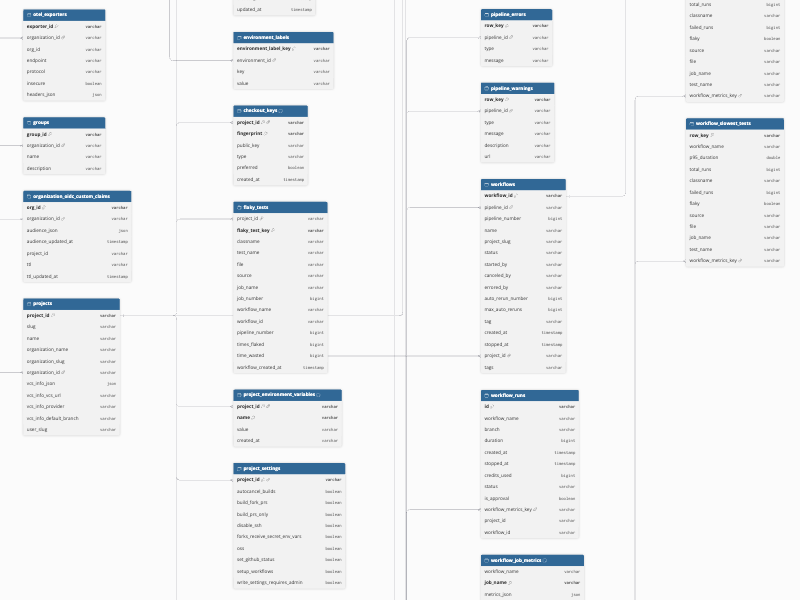
Hevo uses the following schema to upload the records in the Destination. For a detailed view of the objects, fields, and relationships, click the ERD.
Data Model
The following is the list of tables (objects) that are created at the Destination when you run the Pipeline:
| Object | Description |
|---|---|
| Checkout Keys | Contains the SSH keys that CircleCI uses to check out the code of each project, including the fingerprint, public key, key type, and whether the key is preferred. |
| Component Labels | Contains the labels assigned to each deploy component, as key and value pairs. |
| Components | Contains the deploy components of each organization, such as services or applications that you deploy, including the name, project, and number of releases. It includes a child object, Component Labels. |
| Context Restrictions | Contains the restrictions on the use of each context, such as the projects or expressions that can use the context, including the restriction type and value. |
| Contexts | Contains the contexts of each organization, which are shared sets of environment variables, including the name and creation time. It includes the child objects, Context Restrictions and Environment Variables. |
| Environment Labels | Contains the labels assigned to each deploy environment, as key and value pairs. |
| Environment Variables | Contains the names and the creation and update times of the environment variables in each context. The values of the variables are not ingested. |
| Environments | Contains the deploy environments of each organization, such as staging or production, including the name and description. It includes a child object, Environment Labels. |
| Flaky Tests | Contains the tests of each project that both passed and failed on the same code, including the test name, file, job, workflow, number of times the test flaked, and time wasted. |
| Groups | Contains the user groups of each organization, including the name and description. |
| Job Artifacts | Contains the files that each job stores as artifacts, including the path, node index, and download URL. |
| Job Contexts | Contains the contexts that each job uses. |
| Job Details | Contains the details of each job, including the status, web URL, executor type and resource class, parallelism, and the creation, queue, start, and stop times and duration. It includes the child objects, Job Contexts, Job Messages, and Job Parallel Runs. |
| Job Messages | Contains the messages that CircleCI reports for each job, such as warnings and errors, including the type, message, and reason. |
| Job Parallel Runs | Contains the status of each parallel run of a job. |
| Job Timeseries | Contains the metrics of the jobs of each workflow over time, including the time period and the job duration and run counts. |
| Jobs | Contains the jobs of each workflow, including the job number, name, type, status, dependencies, approver, and the start and stop times. It includes the child objects, Job Artifacts and Job Details. |
| Organization OIDC Custom Claims | Contains the custom claims of the OpenID Connect (OIDC) tokens of each organization, including the audience and token time-to-live (TTL). |
| Organization Summary Metrics | Contains the summary metrics of each organization for the last 90 days, including the total runs, duration, credits used, success rate, throughput, and their trends. |
| Organization Summary Project Metrics | Contains the summary metrics of each project in an organization for the last 90 days, including the total runs, duration, credits used, success rate, and their trends. |
| Organizations | Contains the organizations that your CircleCI user belongs to, including the name, slug, and version control system (VCS) type. It includes the child objects, Components, Contexts, Environments, OTel Exporters, and URL Orb Allow List Entries. |
| OTel Exporters | Contains the OpenTelemetry (OTel) exporters of each organization, including the endpoint and protocol. |
| Pipeline Definitions | Contains the pipeline definitions of each project, including the name, description, and the sources of the configuration and the code. It includes a child object, Triggers. |
| Pipeline Errors | Contains the errors of each pipeline, including the type and message. |
| Pipeline Warnings | Contains the warnings of each pipeline, including the type, message, and description. |
| Pipelines | Contains the pipelines of each project, including the number, state, trigger type and actor, and the VCS branch, revision, and commit details. It includes the child objects, Pipeline Errors and Pipeline Warnings. |
| Project Branch Names | Contains the names of the branches of each project for which CircleCI Insights has data. |
| Project Branches | Contains the projects for which CircleCI Insights has branch data. It includes a child object, Project Branch Names. |
| Project Environment Variables | Contains the environment variables of each project, including the name, the value as masked by CircleCI, and the creation time. |
| Project OIDC Audiences | Contains the audiences of the OIDC tokens of each project. |
| Project OIDC Custom Claims | Contains the custom claims of the OIDC tokens of each project, including the token TTL. It includes a child object, Project OIDC Audiences. |
| Project Settings | Contains the advanced settings of each project, such as building forked pull requests, auto-canceling redundant builds, and passing secrets to forked pull requests. |
| Project Summary All Branches | Contains the branches of each project that CircleCI Insights reports metrics for. |
| Project Summary All Workflows | Contains the workflows of each project that CircleCI Insights reports metrics for. |
| Project Summary Metrics | Contains the Insights summary of each project in a JSON field. It includes the child objects, Project Summary All Branches, Project Summary All Workflows, Project Summary Workflow Branches, and Project Summary Workflows. |
| Project Summary Workflow Branches | Contains the metrics and trends of each workflow of a project for each branch. |
| Project Summary Workflows | Contains the metrics and trends of each workflow of a project. |
| Projects | Contains the projects of each organization that have data in CircleCI Insights, including the name, slug, organization, and VCS repository details. It includes the child objects, Checkout Keys, Flaky Tests, Job Timeseries, Pipeline Definitions, Project Branches, Project Environment Variables, Project OIDC Custom Claims, Project Settings, Project Summary Metrics, Schedules, Webhooks, and Workflow Metrics. |
| Schedules | Contains the scheduled pipelines of each project, including the name, description, timetable, parameters, and the user who created the schedule. |
| Triggers | Contains the triggers of each pipeline definition, including the event, event source, the code and configuration references, and whether the trigger is disabled. |
| URL Orb Allow List Entries | Contains the URL prefixes from which each organization allows URL orbs to be used, including the name and authentication type. |
| Users | Contains the CircleCI user whose personal API token you use, including the login and name. |
| Webhook Events | Contains the events that trigger each webhook, such as a completed workflow or job. |
| Webhooks | Contains the outbound webhooks of each project, including the name, receiver URL, and whether TLS certificates are verified. It includes a child object, Webhook Events. |
| Workflow Job Metrics | Contains the metrics of each job of a workflow for the last 90 days, such as the success rate, duration, and credits used. |
| Workflow Metrics | Contains the metrics of each workflow of a project for the last 90 days, such as the success rate, duration, and credits used. It includes the child objects, Workflow Job Metrics, Workflow Runs, Workflow Summary Metrics, and Workflow Test Metrics. |
| Workflow Most Failed Tests | Contains the tests of each workflow that failed most often, including the test name, file, job, number of failed and total runs, and 95th percentile duration. |
| Workflow Runs | Contains the recent runs of each workflow, including the branch, status, duration, credits used, and the creation and stop times. |
| Workflow Slowest Tests | Contains the slowest tests of each workflow, including the test name, file, job, number of failed and total runs, and 95th percentile duration. |
| Workflow Summary Metrics | Contains the summary metrics and trends of each workflow. |
| Workflow Test Metrics | Contains the test metrics of each workflow, including the average number of tests and the total number of test runs. It includes the child objects, Workflow Most Failed Tests, Workflow Slowest Tests, and Workflow Test Runs. |
| Workflow Test Runs | Contains the test results of the recent runs of each workflow, including the pipeline number, success rate, and test counts. |
| Workflows | Contains the workflows of each pipeline, including the name, status, the users who started, canceled, or errored the workflow, the number of automatic reruns, and the creation and stop times. It includes a child object, Jobs. |
Additional Information
Read the detailed Hevo documentation for the following related topics:
Handling of Deletes
Hevo captures deletes by comparing the data ingested from the Source with the data present in the Destination in each run. If a record exists in the Destination but is no longer returned by the Source, Hevo marks it as deleted by setting the value of the metadata column __hevo__marked_deleted to True. The record remains in the Destination with all its data.
Source Considerations
-
Projects ingested from CircleCI Insights: Hevo ingests only the projects that have pipeline runs in the last 90 days, as reported by CircleCI Insights. CircleCI updates Insights data once a day, so a new project, or a project that runs again after 90 days, appears in the Destination after up to 24 hours. Hevo does not ingest the pipelines, workflows, jobs, or any other child data of the projects that are not ingested.
-
The Insights objects, such as Organization Summary Metrics, Workflow Metrics, and Workflow Job Metrics, contain the metrics of the last 90 days and may not include the runs of the last 24 hours. Read Using Insights.
-
In each run, Hevo ingests all the pipelines of each project, and the workflows and jobs of each pipeline. If your projects have many pipelines, each run makes a large number of API requests and may take longer to complete.
-
Your personal API token expires on the date that you select when you create it. Before it expires, create a new token and update it in your Source configuration.
Limitations
- Hevo does not ingest the step output and logs of jobs, the test results of individual jobs, or the usage, billing, and runner data of your CircleCI organizations.
Revision History
Refer to the following table for the list of key updates made to this page:
| Date | Release | Description of Change |
|---|---|---|
| Nov-03-2026 | 2.54 | New document. |