commercetools (Edge)
On This Page
commercetools is a headless commerce platform that businesses use to build and run their online stores across B2C and B2B channels. It enables teams to manage their product catalog, prices, discounts, inventory, customers, carts, orders, and payments through APIs, and to connect them to any storefront or application.
Hevo uses the commercetools HTTP API to replicate data from your commercetools project to the Destination of your choice. To connect to your project, you must provide Hevo with the client ID and client secret of an API client that you create in the commercetools Merchant Center, along with the project key and the region host of your project. Hevo uses these credentials to obtain an access token through the OAuth 2.0 client credentials flow.
Supported Features
| Feature Name | Supported |
|---|---|
| Capture deletes | Yes (for some objects) |
| History mode | No |
| Custom data (user-configured tables & fields) | Yes (custom fields of objects, loaded as JSON into the custom_fields column) |
| Priority-First Sync | Yes |
| Data blocking (skip objects and fields) | Yes |
| Resync (objects and Pipelines) | Yes |
| API configurable | Yes |
Prerequisites
-
An active commercetools project exists from which data is to be ingested.
-
You are a member of a team that has the View and edit all: Developer settings permission for your project in the Merchant Center, so that you can create an API client. Read User permissions.
-
The client ID, client secret, project key, and region host of an API client with the required view scopes are available to provide Hevo access to your commercetools project data.
Obtain the API Client Credentials
Hevo connects to your commercetools project using an API client. An API client belongs to one project, and its scopes define the data that Hevo can read. commercetools allows you to select the scopes of an API client only when you create it.
Perform the following steps to create an API client:
-
Log in to the Merchant Center of your commercetools project.
-
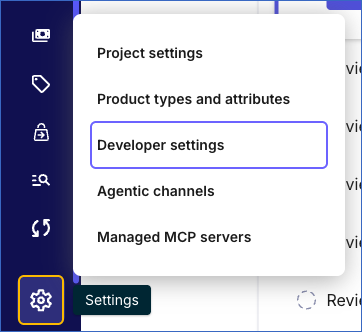
In the main menu, click Settings, and then click Developer settings.
-
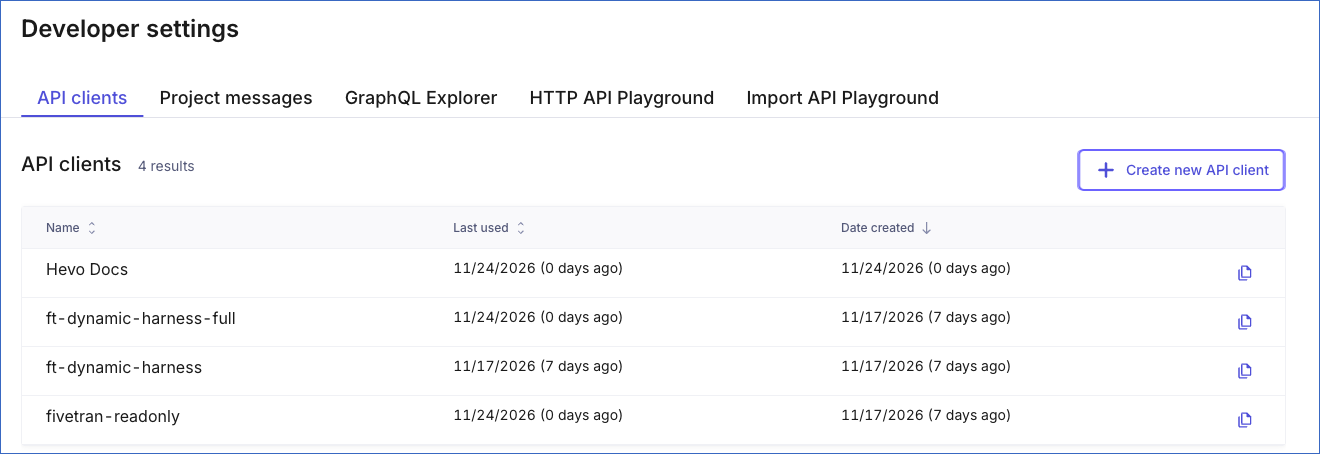
On the API clients tab, click Create new API client.
-
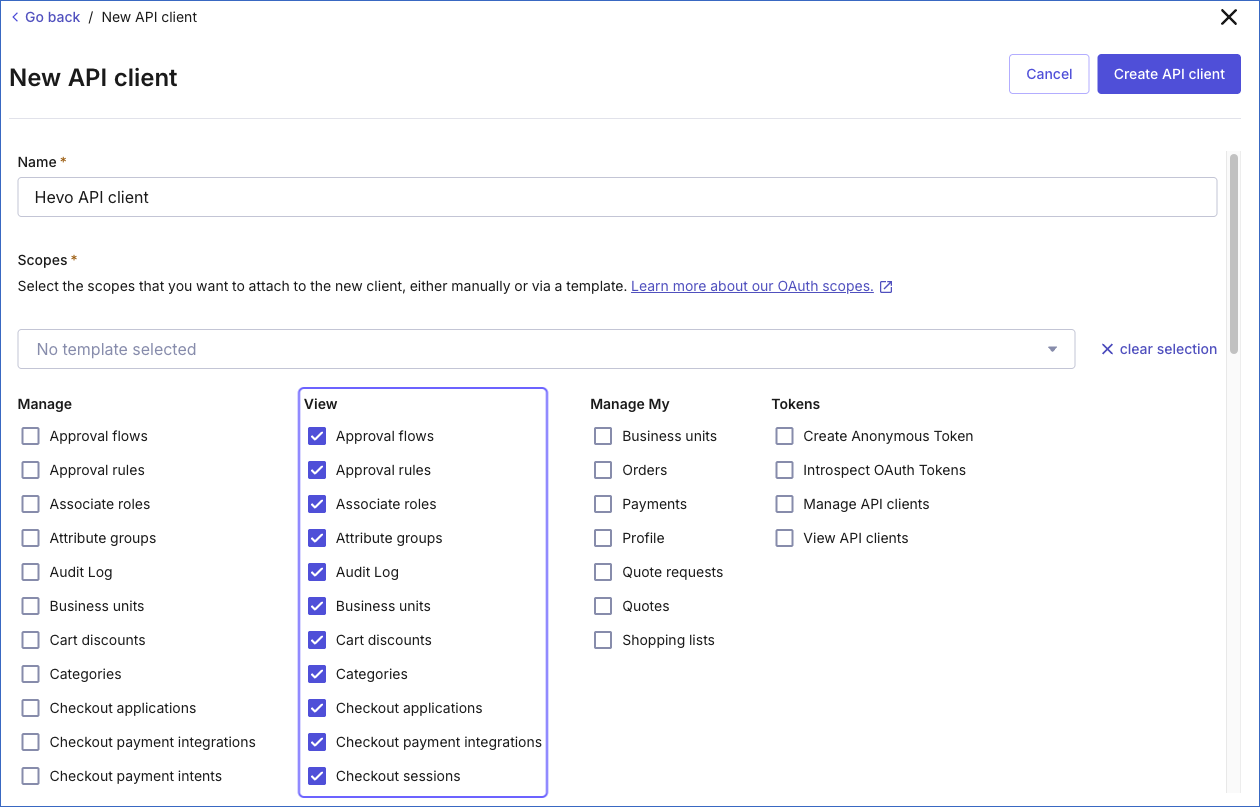
On the New API client page, do the following:
-
Specify a unique Name for the API client, such as Hevo API client.
-
Select the view scopes for the data that you want to replicate. To replicate all the supported objects, select all the scopes in the View section. Read Scopes Required by Hevo for the scope that each object needs.
Note: Do not select the store-specific scopes in Add scopes for store(s). Hevo reads the data of the entire project.
-
-
Click Create API client.

-
In the Client credential flow section, copy the project_key, client_id, and secret, and save them securely like any other password.
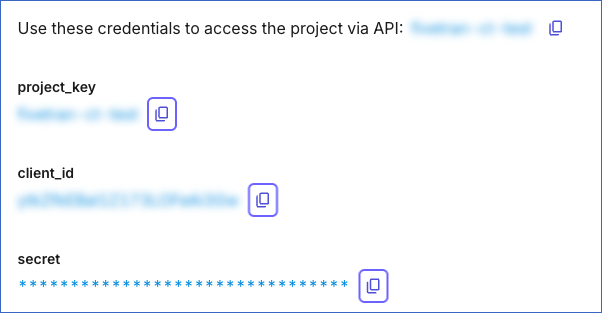
Note: The Merchant Center displays the secret only once. If you lose it, you must create another API client, for example, by duplicating the existing one.
-
Copy the API URL.

-
Note the region host of your project. This is the part of the API URL between
https://api.and.commercetools.com. For example, if the API URL ishttps://api.europe-west1.gcp.commercetools.com, the region host is europe-west1.gcp. Read Regions for the list of commercetools regions and their API URLs.
Use these credentials while configuring your commercetools Source in Hevo. If the API client configured in the Pipeline is deleted from your commercetools project, Hevo cannot authenticate with the Source. As a result, all active jobs for the Pipeline fail, and no data is replicated. To resume data replication, modify the Source configuration in the Pipeline with the client ID and client secret of a new API client that you create in the same project with the required scopes. Once the updated credentials are saved, Hevo re-authenticates the Source, and data ingestion resumes from the last saved offset.
Scopes Required by Hevo
commercetools grants access to each resource through a separate view scope. The following table lists the scopes that Hevo needs to read each object and its child objects:
| Object | Scope |
|---|---|
| Business Unit | view_business_units |
| Cart and Orders | view_orders |
| Cart Discount | view_cart_discounts |
| Category | view_categories |
| Channel | view_channels or view_products |
| Customer | view_customers |
| Customer Group | view_customer_groups |
| Discount Code | view_discount_codes |
| Inventory, Product, and Review | view_products |
| Payment | view_payments |
| Product Discount | view_product_discounts or view_products |
| Product Type | view_product_types or view_products |
| Shipping Method | view_shipping_methods |
| Shipping Zone | view_zones or view_orders |
| Shopping List | view_shopping_lists |
| Standalone Price | view_standalone_prices |
| Tax Category | view_tax_categories |
Hevo also needs the view_project_settings scope to display the name of your project after you authorize Hevo.
If the API client does not have the scope for any of these objects, the connection test fails. As commercetools does not allow you to add scopes to an existing API client, create a new API client with all the required scopes.
Configure commercetools as a Source in your Pipeline
Perform the following steps to configure your commercetools Source:
-
Click Pipelines in the Navigation Bar.
-
Click + Create Pipeline in the Pipelines List View.
-
On the Select Source Type page, select commercetools.
-
On the Select Destination Type page, select the type of Destination you want to use.
-
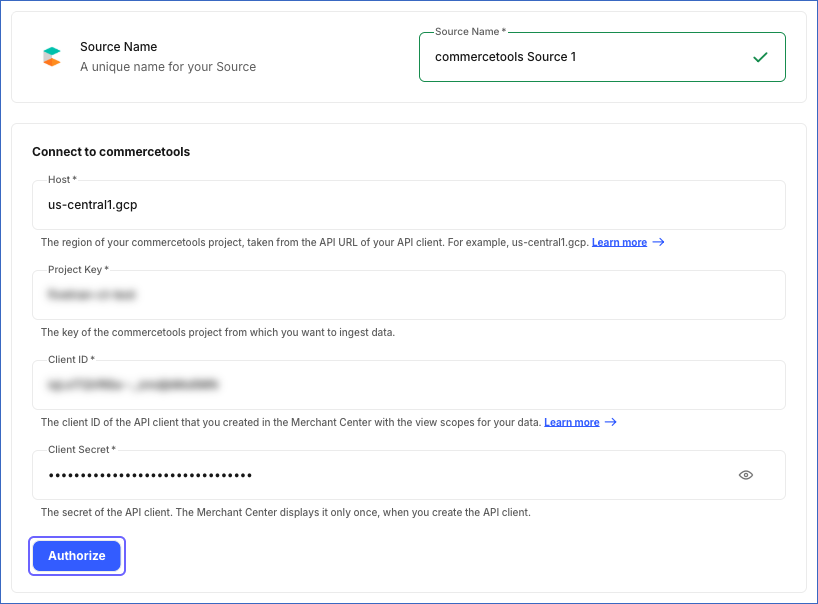
In the Configure Source screen, specify the following:
-
Source Name: A unique name for your Source, not exceeding 255 characters. For example, commercetools Source.
-
In the Connect to commercetools section, specify the following:
-
Host: The region host of your commercetools project. Specify only the region part of the API URL, without
https://, the path, or spaces. For example, europe-west1.gcp or us-central1.gcp. -
Project Key: The key of the commercetools project from which you want to ingest data.
-
Client ID: The client ID of the API client that you created in the Merchant Center.
-
Client Secret: The secret of the API client that you created in the Merchant Center.
-
Click Authorize. Hevo uses the host, project key, client ID, and client secret to obtain an access token from commercetools. Once the authorization is successful, Hevo displays the name of your commercetools project next to Account Added, and the Authorize button changes to Reauthorize.
-
-
-
Click Test & Continue to test the connection to your commercetools Source. Once the test is successful, you can proceed to set up your Destination.
When you click this button, Hevo reads one record from each of the supported resources in your project to check that the API client has all the required view scopes. The test fails if the API client does not have any of these scopes, the credentials are rejected, or the project key does not exist in the specified region. If a scope is missing, the error message lists all the view scopes that Hevo needs. As commercetools does not allow you to add scopes to an existing API client, if a scope is missing, create a new API client with all the required scopes, and update the Client ID and Client Secret.
Data Replication
Hevo replicates data for all the objects selected on the Configure Objects page during Pipeline creation. By default, all supported objects and their available fields are selected. However, you can modify this selection while creating or editing the Pipeline.
You can select or deselect the child objects individually. However, you cannot resync a child object individually. To resync a child object, resync its parent object, which also resyncs all the child objects of the parent.
Hevo ingests the following types of data from your Source objects:
-
Historical Data: The first run of the Pipeline ingests all available historical data for the selected objects and loads it into the Destination. Hevo uses priority-first sync to first load the data created or updated in the last 30 days for the Cart, Customer, Inventory, Orders, Payment, and Product objects and their child objects, and then loads the older data, starting in the same run and continuing in the next runs if needed. The child objects synced on a priority-first basis are:
-
Cart: Cart Custom Line Item, Cart Custom Line Item State, Cart Item Shipping Address, Cart Line Item, Cart Line Item State, and Cart Shipping.
-
Customer: Customer Address and Customer Store.
-
Orders: Order Custom Line Item, Order Custom Line Item State, Order Delivery, Order Delivery Item, Order Delivery Parcel, Order Delivery Parcel Item, Order Discount Code, Order Line Item, Order Line Item State, Order Payment Info, Order Return Info, Order Return Info Items, Order Shipping, and Order Sync Info.
-
Payment: Payment Interface Interaction and Payment Transaction.
-
Product: Master Variant, Master Variant Asset, Master Variant Asset Source, Master Variant Attribute, Master Variant Image, Master Variant Price, Master Variant Price Tier, Product Category, Product Variant, Product Variant Attribute, Product Variant Image, Product Variant Price Tier, and Product Variant Prices.
-
-
Incremental Data: Once the historical load is complete, new and updated records for objects are ingested as per the sync frequency.
Hevo ingests the objects as follows in the incremental runs:
| Object | Incremental data |
|---|---|
| Business Unit, Cart, Cart Discount, Category, Channel, Customer, Customer Group, Discount Code, Inventory, Orders, Payment, Product, Product Discount, Product Type, Review, Shipping Method, Shipping Zone, Shopping List, Standalone Price, and Tax Category | The records created or updated since the previous run. Incremental changes are detected using the last_modified_at field. Hevo also ingests the child objects of these records. |
In each incremental run, Hevo also reads the records updated in the five minutes before the previous run started, so that changes made while the previous run was in progress are not missed.
Hevo ingests the custom fields of an object as a JSON value in the custom_fields column, and the reference to the custom type that defines these fields in the custom_type column.
Hevo ingests the values of localized fields, such as the names, slugs, and descriptions of products and categories, into a separate column for each locale. The column is named <field name>_<locale>, for example, name_de_de for the German (Germany) name. Hevo creates these columns for each language configured in your commercetools project. If you add a language to your project, Hevo adds the corresponding columns to the Destination table.
Note: You can create a Pipeline with this Source only using the Merge load mode. The Append mode is not supported for this Source.
commercetools does not enforce a rate limit on production projects. However, it enforces a rate limit on non-production projects and responds with the 429 Too Many Requests error if a large number of requests is made in a short time. Read Rate limits for more information. If this limit is exceeded, a rate limit exception occurs. Hevo retries each such request up to five times, waiting for the duration that commercetools specifies, or 5 seconds, doubled for each retry. To understand how Hevo handles such scenarios, read Handling Rate Limit Exceptions.
Schema and Primary Keys
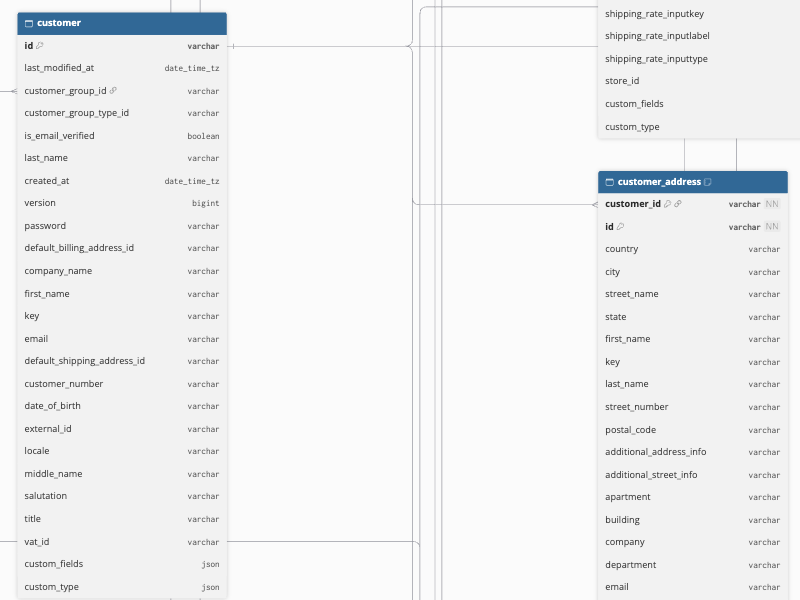
Hevo uses the following schema to upload the records in the Destination. For a detailed view of the objects, fields, and relationships, click the ERD.
Data Model
The following is the list of tables (objects) that are created at the Destination when you run the Pipeline:
| Object | Description |
|---|---|
| Business Unit | Contains the details of the companies and divisions that you sell to in a B2B setup, such as the business unit name, key, type, status, contact email, store mode, and parent and top-level units. It includes the following child objects: - Business Unit Address - Business Unit Associate - Business Unit Associate Role - Business Unit Store |
| Cart | Contains the details of the shopping carts in your project, such as the cart state, customer, total price, taxed price, tax and inventory modes, billing and shipping addresses, store, and origin. It includes the following child objects: - Cart Custom Line Item - Cart Custom Line Item State - Cart Item Shipping Address - Cart Line Item - Cart Line Item State - Cart Shipping |
| Cart Discount | Contains the details of the discounts applied to carts, such as the discount name, value, cart and target predicates, stacking mode, sort order, validity period, and whether a discount code is required. It includes a child object, Cart Discount Reference. |
| Category | Contains the details of the categories used to organize your products, such as the category name, slug, description, parent category, order hint, and assets. It includes a child object, Category Ancestor. |
| Channel | Contains the details of the channels in your project, such as the channel name, key, description, address, geolocation, and review rating statistics. A channel represents a source or destination of your products, such as a warehouse or a store. It includes a child object, Channel Role. |
| Customer | Contains the details of your customers, such as the name, email address, customer number, company name, date of birth, customer group, and default billing and shipping addresses. It includes the following child objects: - Customer Address - Customer Store |
| Customer Group | Contains the groups used to classify your customers, such as for customer-specific prices, including the group name and key. |
| Discount Code | Contains the details of the discount codes that customers can apply to their carts, such as the code, name, cart predicate, maximum number of applications, and validity period. It includes the following child objects: - Cart Discount Code - Discount Code Group - Discount Code Reference |
| Inventory | Contains the inventory entries for your product variants, such as the SKU, quantity on stock, available quantity, restocking time, and expected delivery date. |
| Orders | Contains the details of the orders placed in your project, such as the order number, order, payment, and shipment states, customer, total and taxed prices, billing and shipping addresses, shipping information, and completion time. It includes the following child objects: - Order Custom Line Item - Order Custom Line Item State - Order Delivery - Order Delivery Item - Order Delivery Parcel - Order Delivery Parcel Item - Order Discount Code - Order Line Item - Order Line Item State - Order Payment Info - Order Return Info - Order Return Info Items - Order Shipping - Order Sync Info |
| Payment | Contains the details of the payments made for carts and orders, such as the planned amount, payment method, payment service provider, payment status, and customer. It includes the following child objects: - Payment Interface Interaction - Payment Transaction |
| Product | Contains the published data of your products, such as the product name, slug, description, product type, tax category, category order hints, price mode, and review rating statistics, and whether the product has unpublished changes. It includes the following child objects: - Master Variant - Master Variant Asset - Master Variant Asset Source - Master Variant Attribute - Master Variant Image - Master Variant Price - Master Variant Price Tier - Product Category - Product Variant - Product Variant Attribute - Product Variant Image - Product Variant Price Tier - Product Variant Prices |
| Product Discount | Contains the details of the discounts applied to product prices, such as the discount name, value, predicate, sort order, validity period, and whether the discount is active. It includes a child object, Product Discount Reference. |
| Product Type | Contains the product types that define the structure of your products, including the name, key, and description. It includes a child object, Product Type Attribute. |
| Review | Contains the reviews written by customers, such as the title, text, rating, author name, locale, review target, and whether the review is included in the rating statistics. |
| Shipping Method | Contains the details of the shipping methods available in your project, such as the method name, description, tax category, predicate, and whether it is the default method. It includes the following child objects: - Shipping Method Zone Rate - Shipping Method Zone Shipping Rate |
| Shipping Zone | Contains the zones used to define shipping rates, such as the zone name, key, and description. It includes a child object, Shipping Zone Location. |
| Shopping List | Contains the shopping lists and wishlists of your customers, such as the list name, slug, description, customer, store, and retention period. It includes the following child objects: - Shopping List Line Item - Shopping List Text Line Item |
| Standalone Price | Contains the prices that are stored separately from products and linked to a product variant through its SKU, such as the value, country, customer group, discounted value, validity period, and whether the price is active. It includes a child object, Standalone Price Tier. |
| Tax Category | Contains the tax categories used to calculate taxes for products and shipping methods, including the name, key, and description. It includes a child object, Tax Category Rate. |
Additional Information
Read the detailed Hevo documentation for the following related topics:
Handling of Deletes
Hevo handles deleted records differently based on how data is ingested for an object.
Hevo handles the deleted records of child objects as follows:
-
All child objects: Whenever Hevo ingests a parent record, it replaces the child records of that parent in the Destination. As a result, the child records deleted in commercetools are removed from the Destination. For example, if a line item is removed from a cart, the corresponding record is removed from the Cart Line Item table in the next Pipeline run in which Hevo ingests the cart.
Note: The Cart Line Item State, Cart Custom Line Item State, Order Line Item State, and Order Custom Line Item State objects are replaced for each line item. If a line item is removed from its cart or order, its state records remain in the Destination.
The following objects do not support capturing deletes:
-
Business Unit
-
Cart
-
Cart Discount
-
Category
-
Channel
-
Customer
-
Customer Group
-
Discount Code
-
Inventory
-
Orders
-
Payment
-
Product
-
Product Discount
-
Product Type
-
Review
-
Shipping Method
-
Shipping Zone
-
Shopping List
-
Standalone Price
-
Tax Category
If a record of these objects is deleted in commercetools, it remains in the Destination, along with its child records.
Limitations
-
Hevo ingests only the published (current) data of your products. Changes that are staged but not yet published are not ingested. The has_staged_changes field indicates whether a product has unpublished changes.
-
Hevo does not ingest data from commercetools resources other than those listed in the Data Model section, such as stores, states, custom objects, quotes, and order edits.
Revision History
Refer to the following table for the list of key updates made to this page:
| Date | Release | Description of Change |
|---|---|---|
| Nov-26-2026 | NA | New document. |