On This Page
Google Search Console is Google’s free web service that helps you monitor, maintain, and troubleshoot your site’s presence in Google Search results. It provides Search performance analytics, such as search queries, clicks, impressions, and average ranking positions, along with tools to submit sitemaps, inspect URLs, and identify indexing issues, enabling you to improve your site’s visibility in Google Search.
Hevo uses the Google Search Console API to replicate data from your Google account to the Destination of your choice.
Hevo supports the following authentication methods to connect to your Google Search Console account:
-
Open Authorization (OAuth): Allows Hevo to connect to your account through an authorization flow, where you sign in to Google and grant Hevo access to your account data.
-
OAuth app: Allows Hevo to connect to your account using the client ID, client secret, and refresh token of an OAuth app that you create in Google.
Note: To create a Pipeline with Google Search Console as the Source using an OAuth app, you must use the Create a Pipeline endpoint through the Hevo API. This method is not available in the Hevo UI. Read Creating a Pipeline with Hevo API for the steps to create the Pipeline.
Supported Features
| Feature Name | Supported |
|---|---|
| Capture deletes | No |
| History mode | No |
| Custom data (user-configured tables & fields) | Yes |
| Data blocking (skip objects and fields) | Yes |
| Resync (objects and Pipelines) | Yes |
| API configurable | Yes |
Prerequisites
-
An active Google Search Console account with at least one verified property (site) to ingest data from.
-
You have Owner or Full user permission for the properties you want to sync, so that you can grant Hevo the required access during authentication.
Configure Google Search Console as a Source in your Pipeline
Perform the following steps to configure your Google Search Console Source:
-
Click Pipelines in the Navigation Bar.
-
Click + Create Pipeline in the Pipelines List View.
-
On the Select Source Type page, select Google Search Console.
-
On the Select Destination Type page, select the type of Destination you want to use.
-
On the Select Pipeline Type page, click Edge, and then click Continue.
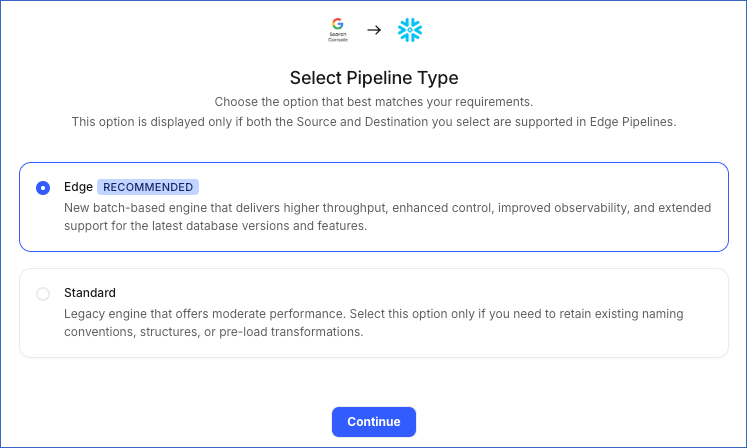
This page appears only if the selected Destination type is supported in Edge and your Team has an existing Google Search Console Pipeline with the same Destination type. Otherwise, you can proceed to create an Edge Pipeline.
-
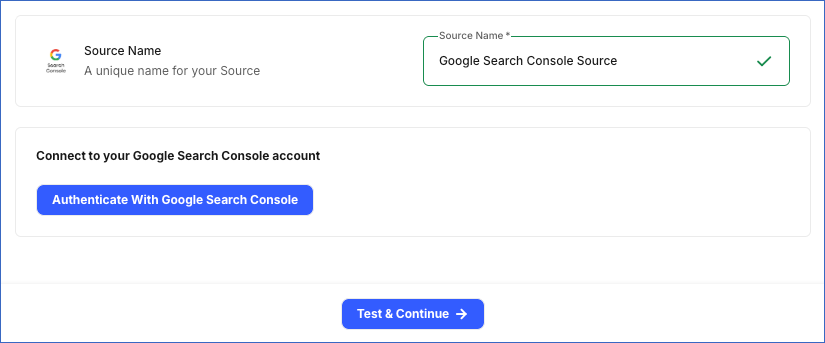
In the Configure Source screen, specify the following:
-
Source Name: A unique name for your Source, not exceeding 255 characters. For example, Google Search Console Source.
-
In the Connect to your Google Search Console account section, click Authenticate With Google Search Console, log in to your Google account, and grant Hevo access to your account.
-
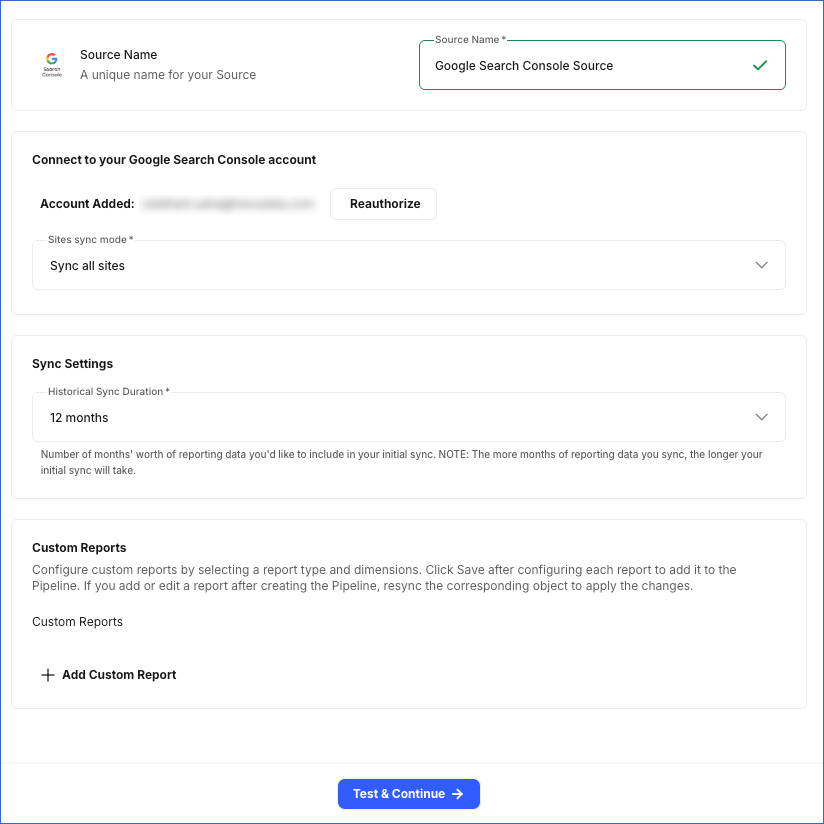
From the Sites sync mode drop-down, select whether Hevo syncs data for all sites accessible to the authenticated account, or only specific ones:
-
Sync all sites: Hevo syncs data for all properties accessible to your authorized Google account, including any properties added later.
-
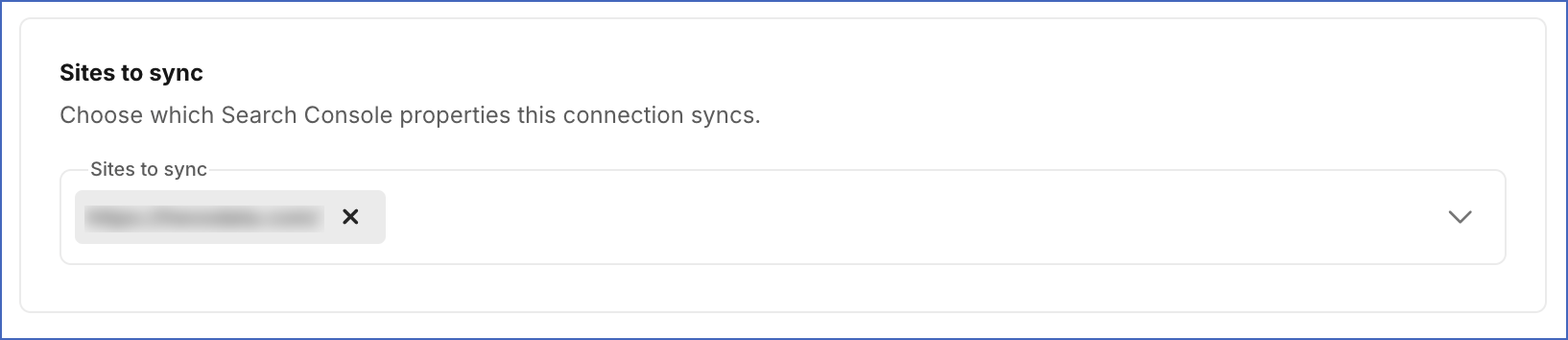
Sync specific sites: Hevo syncs data only for the properties you select from the Sites to sync drop-down.
-
-
Historical Sync Duration: From the drop-down, select the duration for which you want to ingest existing data from the Source. This cannot be changed after the Pipeline is created. Default value: 12 months.
-
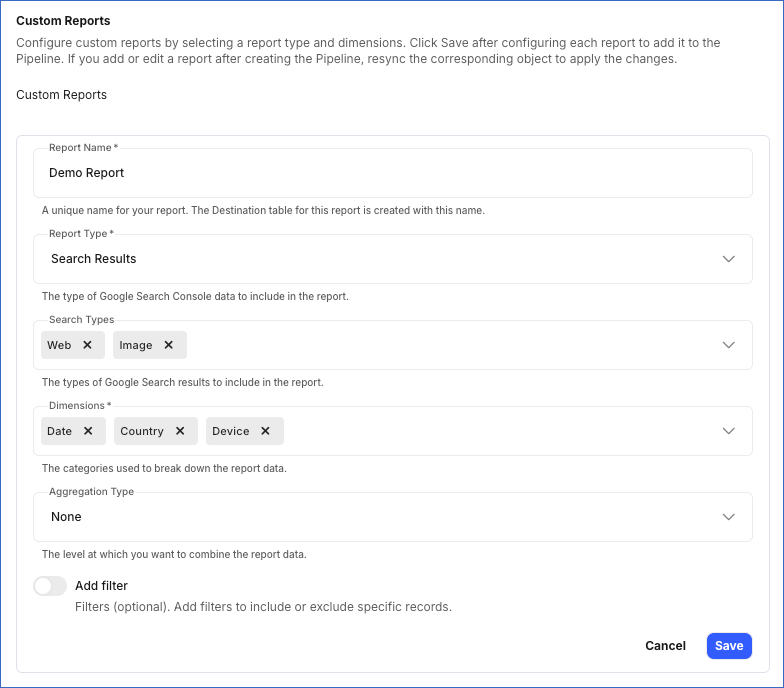
(Optional) In the Custom Reports section, click + Add Custom Report to define a custom report. Each report syncs to its own Destination table. For each report, specify the following:
-
Report Name: A unique name for your report. The Destination table for this report is created with this name.
-
Report Type: The type of Search Console report data you want to sync.
-
Search Types: The type of Google Search results you want to include in the report. This field is applicable only for the Search Results report type.
-
Dimensions: Categories used to break down your report data. The available dimensions depend on the selected Report Type value.
-
Aggregation Type (Optional): The level at which you want to group the report data. This field is applicable only for the Search Results report type. Default value: None.
-
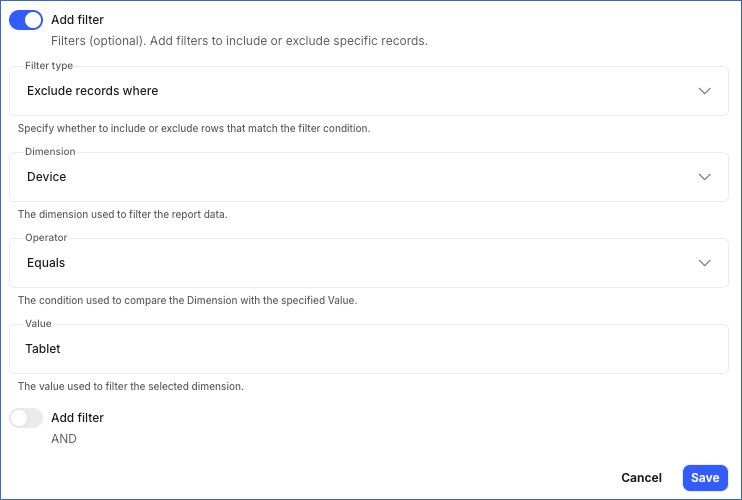
Add Filter (Optional): Enable this option to specify up to three filters to narrow down the report data. This is applicable only for the Search Results report type. If you add more than one filter, all filters are combined using AND. A row must match every filter to be included or excluded. For each filter, specify:
-
Filter Type: Determines whether rows that match the filter condition are included in or excluded from the report.
-
Dimension: The dimension used to filter the report data.
-
Operator: The condition used to compare the selected Dimension with the specified Value.
-
Value: The value or values to match for the selected Dimension.
-
Note:
-
Click Save after configuring each report. Reports that are not saved before you click Test & Continue are not included in the Pipeline.
-
If you add a new custom report or edit an existing one after the Pipeline is created, resync the corresponding object to apply the changes and load the data using the updated configuration.
-
-
-
Click Test & Continue to test the connection to your Google Search Console Source. Once the test is successful, you can proceed to set up your Destination.
Configure Google Search Console as a Source Using the Hevo API
You can connect Hevo to your Google Search Console account with an OAuth app created in Google Cloud Console. This method is available only through the Hevo API. Specify the credentials of the app in the request that creates the Pipeline, and Hevo uses them to authenticate with your account.
The following credentials from your OAuth app are required to authenticate the connection:
-
Client ID: The unique identifier of your app. Google displays it after you create the OAuth client. Read Manage OAuth Clients for more information.
-
Client Secret: The private key of your app. Hevo sends it with the client ID to authenticate the request.
-
Refresh Token: A long-lived token that your app receives the first time a Google user authorizes it. Hevo exchanges this token for a short-lived access token when the Pipeline is created, and refreshes that token automatically, so the connection keeps working without anyone signing in again. Read Using OAuth 2.0 to Access Google APIs for more information.
Perform the following steps to set up your OAuth app in Google Cloud Console:
-
Enable the Google Search Console API for your project. Read Enable and disable APIs for the steps to enable it.
-
Create the OAuth client in the same project. Read OAuth client ID credentials for the steps to create it.
-
Request the https://www.googleapis.com/auth/webmasters.readonly scope so that the app can read your Search Console data. Read OAuth 2.0 Scopes for Google APIs for more information about the scope.
-
Set the publishing status of the app to In production, or set its user type to Internal, which is available only for an app that your Google Workspace organization owns. If the user type of the app is External and its publishing status is still Testing, Google issues refresh tokens that expire after seven days. Google also revokes a refresh token that has not been used for six months, and when the user changes their password.
Prepare the Source Configuration
Before you build your request, retrieve the settings that the Google Search Console connector currently accepts. Refer to Read the Connector Configuration for the steps to retrieve them, and Using your own OAuth app for the keys that this method accepts.
In the response, the auth object describes the credentials of your own OAuth app. In the connector configuration response, Hevo returns the auth object under data.schema.properties.auth, and the connector settings under data.schema.properties.config. Only a connector that accepts an OAuth app has an auth property. Each credential carries "type": "string". Every credential except client_id also carries "format": "password" and "writeOnly": true. The following example shows part of the auth object:
{
  "auth": {
    "required": [
      "client_access"
    ],
    "properties": {
      "client_access": {
        "required": [
          "client_id",
          "client_secret"
        ],
        "properties": {
          "client_id": {
            "title": "Client ID"
          },
          "client_secret": {
            "title": "Client Secret"
          }
        }
      },
      "refresh_token": {
        "title": "Refresh Token"
      },
      "access_token": {
        "title": "Access Token"
      }
    },
    "anyOf": [
      {
        "required": [
          "refresh_token"
        ]
      },
      {
        "required": [
          "access_token"
        ]
      }
    ]
  }
}
The anyOf block in the schema accepts either refresh_token or access_token, because that part of the schema is the same for every connector. For a Google Search Console Source, send refresh_token. Hevo needs the refresh token to keep the Source authorized, so a request that sends only an access token fails while the Pipeline is being created.
By default Hevo syncs every site that the authorizing user can access, because config.sites_sync_mode defaults to ALL_SITES. To sync only some of them, set it to SPECIFIC_SITES and list the site URLs, exactly as Search Console shows them, in config.sites_to_sync. The sites_to_sync key does not appear in the connector configuration response.
Specify the credentials of your app in the auth object. The following example shows the source object for a Google Search Console Source:
{
  "name": "<source_name>",
  "connector_id": "google_search_console",
  "type": "GOOGLE_SEARCH_CONSOLE",
  "config": {
    "historical_sync_time_frame": "12 months"
  },
  "auth": {
    "client_access": {
      "client_id": "<client_id>",
      "client_secret": "<client_secret>"
    },
    "refresh_token": "<refresh_token>"
  }
}
Note: Replace the placeholder values in the example with your own. For example, <source_name> with My Google Search Console Account.
Specify this source object in the request that creates your Pipeline. Read Creating a Pipeline with Hevo API for the complete request and the remaining steps.
Hevo validates the credentials and tests the Source and Destination connections before it saves anything. To test the Source connection, Hevo uses the credentials in the auth object to generate an access token. If a credential is rejected or a test fails, the request returns an error, and no Pipeline is created. Hevo also deletes the access token that it generated.
Note: Hevo does not store these credentials in the Source configuration. It exchanges them for a token when the Pipeline is created and refreshes that token from then on. Hevo does not return them if you retrieve the Source configuration later. If the refresh token expires or is revoked, Hevo cannot authenticate with the Source. As a result, all active jobs for the Pipeline fail, and no data is replicated. To resume data replication, send the new credentials using the Modify Source Configuration in a Pipeline endpoint. Read Modifying the Source Configuration for the steps to send them.
Data Replication
Hevo replicates data for all the objects selected on the Configure Objects page during Pipeline creation. By default, all supported objects and their available fields are selected. However, you can modify this selection while creating or editing the Pipeline.
Hevo ingests the following types of data from your Source objects:
-
Historical Data: The first run of the Pipeline ingests historical data for the selected objects, based on the Historical Sync Duration specified when configuring the Source, and loads it into the Destination.
-
Incremental Data: Once the historical load is complete, new and updated records for objects are ingested as per the sync frequency.
For the Sitemap object, Hevo ingests the entire data in subsequent Pipeline runs. For all other objects, Hevo ingests only the incremental data in subsequent Pipeline runs.
Google Search Console enforces a rate limit on the number of calls that can be made to its API in a given time period. If these limits are exceeded, a rate limit exception occurs. To understand how Hevo handles such scenarios, read Handling Rate Limit Exceptions.
You can create a Pipeline with this Source only using the Merge load mode. The Append mode is not supported for this Source.
Schema and Primary Keys
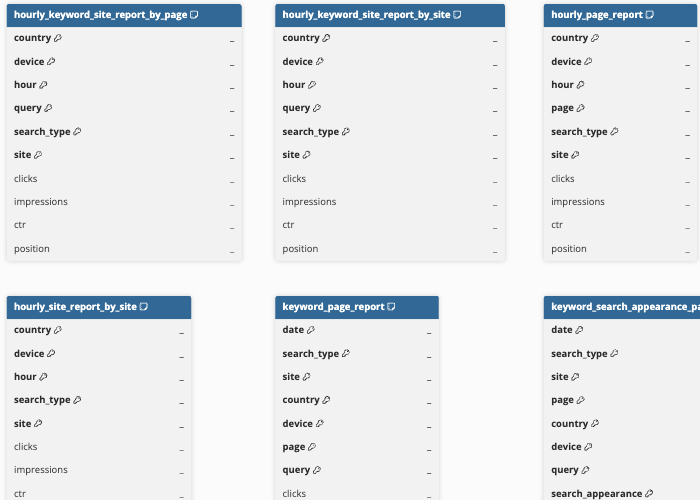
Hevo uses the following schema to upload the records to the Destination. For a detailed view of the objects, fields, and relationships, click the ERD.
Data Model
The following is the list of tables (objects) that are created at the Destination when you run the Pipeline:
| Object | Description |
|---|---|
| Hourly Keyword Page Report | Contains hourly search performance data for each keyword and page, including clicks, impressions, click-through rate, and average search position. |
| Hourly Keyword Site Report By Page | Contains hourly search performance data for each keyword, with metrics calculated separately for each page. |
| Hourly Keyword Site Report By Site | Contains hourly search performance data for each keyword, with metrics calculated for your entire site. |
| Hourly Page Report | Contains hourly search performance data for each page on your site, including clicks, impressions, click-through rate, and average search position. |
| Hourly Site Report By Page | Contains hourly search performance data for your site, with metrics calculated separately for each page. |
| Hourly Site Report By Site | Contains hourly search performance data for your site, with metrics calculated for the entire site. |
| Keyword Page Report | Contains daily search performance data for each keyword and page, including clicks, impressions, click-through rate, and average search position. |
| Keyword Search Appearance Page Report | Contains daily search performance data for each keyword and page, including the search result feature where the page appeared. |
| Keyword Search Appearance Site Report | Contains daily search performance data for each keyword and search result feature across your site. |
| Keyword Site Report By Page | Contains daily search performance data for each keyword, with metrics calculated separately for each page. |
| Keyword Site Report By Site | Contains daily search performance data for each keyword, with metrics calculated for your entire site. |
| Page Overview Report | Contains an overview of daily search performance data for each page on your site. |
| Page Report | Contains daily search performance data for each page on your site, including clicks, impressions, click-through rate, and average search position. |
| Pages | Contains information about pages on your site that have appeared in Search results. |
| Search Appearance Page Report | Contains daily search performance data for each page and the search result feature in which the page appeared. |
| Search Appearance Site Report | Contains daily search performance data for the search result features in which your site appeared. |
| Site Overview Report | Contains an overview of daily search performance data for your site. |
| Site Report By Page | Contains daily search performance data for your site, with metrics calculated separately for each page. |
| Site Report By Site | Contains daily search performance data for your entire site. |
| Sitemap | Contains information about the files that tell Google which pages are available on your site, including the sitemap path and type, the number of URLs submitted, any warnings or errors, and when the file was last submitted and downloaded by Google. |
Additional Information
Read the detailed Hevo documentation for the following related topics:
Source Considerations
- The data for most reports from Google Search Console usually becomes available to site owners after 2-3 days. This happens because reports in Google Search Console are not updated in real-time.
Revision History
Refer to the following table for the list of key updates made to this page:
| Date | Release | Description of Change |
|---|---|---|
| Oct-19-2026 | NA | Added section, Configure Google Search Console as a Source Using the Hevo API. |
| Sep-17-2026 | NA | Updated section, Configure Google Search Console as a Source in your Pipeline to add information about custom reports. |
| Sep-10-2026 | NA | New document. |