Highnote (Edge)
On This Page
Highnote is an embedded finance platform that enables businesses to launch and scale financial products, such as card issuing, acquiring, credit, money movement, and real-time ledgering. It provides a unified GraphQL API, real-time webhooks, and a Test environment that businesses can use to build, manage, and operate their card programs and payment services.
Hevo uses Highnote’s GraphQL API to replicate data from your Highnote account to the Destination of your choice. To ingest data, you must provide Hevo with an API key created in the Highnote environment from which you want to replicate data.
Highnote Environments
Highnote provides two separate environments for testing purposes and production use:
-
Test: This environment is used for exploring features, building your integration with the Highnote API, simulating transactions, and training your team. It must contain only dummy or test data.
-
Live: This environment is used to issue payment cards and process transactions for your launched card products, and contains your actual business data.
Hevo supports data replication from both the Test and Live environments. You can connect to the environment from which you want to ingest data by selecting it while configuring the Source and providing an API key created in that environment. Hevo has verified the connector against the Test environment.
Supported Features
| Feature Name | Supported |
|---|---|
| Capture deletes | Yes (for objects where the complete data is ingested during each Pipeline run) |
| History mode | No |
| Custom data (user-configured tables & fields) | No |
| Data blocking (skip objects and fields) | Yes |
| Resync (objects and Pipelines) | Yes |
| API configurable | Yes |
Prerequisites
-
An active Highnote account exists in the Live or Test environment from which data is to be ingested.
-
You are assigned the Admin role in the Highnote environment from which you want to ingest data. Only users with the Admin role can manage developer settings, such as API keys. Roles are assigned separately for the Test and Live environments. Read Roles and Permissions.
-
An API key is available to provide Hevo access to your Highnote account data.
Obtain the API Key
To connect Hevo to your Highnote account, you must provide an API key. API keys are specific to an environment. If you want to ingest data from the Test environment, the API key must be created in the Test environment. Similarly, to ingest data from the Live environment, the key must be created in the Live environment.
Perform the following steps to create an API key:
-
Log in to your Highnote Dashboard.
-
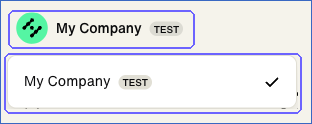
From the environment drop-down, select the environment, Test or Live, from which you want to ingest data.
-
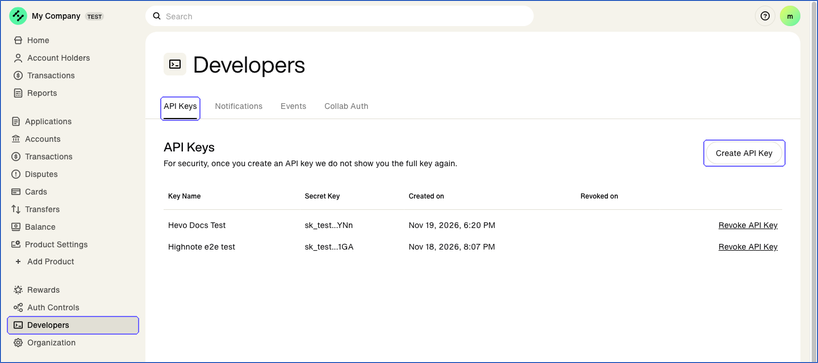
Click Developers.
-
On the API Keys tab, click Create API Key.
-
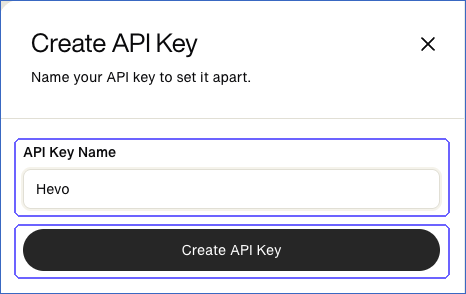
Specify an API Key Name, for example, Hevo, and click Create API Key.
-
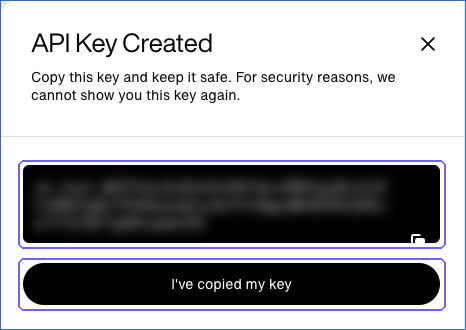
Copy the API key and save it securely like any other password. Use this key while configuring your Highnote Source in the Hevo Pipeline.
Note: For security reasons, Highnote does not display the API key again after you leave this screen.
-
Click I’ve copied my key.
If the API key configured in the Pipeline is revoked manually from your Highnote account, Hevo cannot authenticate with the Source. As a result, all active jobs for the Pipeline fail, and no data is replicated. To resume data replication, modify the Source configuration in the Pipeline with a valid API key. Once the updated key is saved, Hevo re-authenticates the Source, and data ingestion resumes from the last saved offset.
Configure Highnote as a Source in your Pipeline
Perform the following steps to configure your Highnote Source:
-
Click Pipelines in the Navigation Bar.
-
Click + Create Pipeline in the Pipelines List View.
-
On the Select Source Type page, select Highnote.
-
On the Select Destination Type page, select the type of Destination you want to use.
-
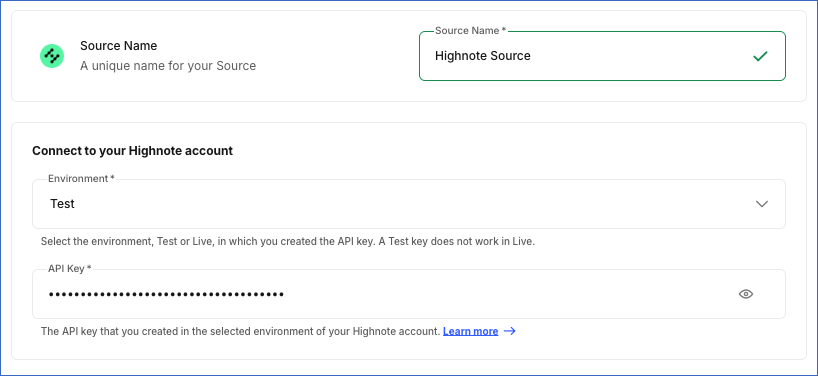
In the Configure Source screen, specify the following:
-
Source Name: A unique name for your Source, not exceeding 255 characters. For example, Highnote Source.
-
In the Connect to your Highnote account section:
-
Environment: From the drop-down, select the Highnote environment from which you want to ingest data. This can be Live or Test. Default value: Test. The API key must belong to this environment.
-
API Key: The API key that you created in the selected environment of your Highnote account. Create a dedicated API key for Hevo, as Highnote API keys cannot be limited to read-only access. Use a key that you can revoke, and rotate it every 90 days.
-
-
-
Click Test & Continue to test the connection to your Highnote Source. Once the test is successful, you can proceed to set up your Destination.
When you click this button, Hevo performs the following validations:
-
The Environment and API Key fields are specified.
-
Hevo can connect to the Highnote API of the selected environment using the API key. The test fails if the key does not exist, is revoked, or belongs to a different environment. For example, a key created in the Test environment does not work in the Live environment.
-
The API key can read data from your Highnote account.
-
Data Replication
Hevo replicates data for all the objects selected on the Configure Objects page during Pipeline creation. By default, all supported objects and their available fields are selected. However, you can modify this selection while creating or editing the Pipeline.
Hevo ingests the following types of data from your Source objects:
-
Historical Data: The first run of the Pipeline ingests all available historical data for the selected objects and loads it into the Destination.
-
Incremental Data: Once the historical load is complete, new and updated records for objects are ingested as per the sync frequency.
For the following objects, Hevo ingests only the incremental data in subsequent Pipeline runs:
-
Account Holder
-
Card Payment Dispute
-
Fee Transfer Event
-
Financial Account Activity
-
Flexible Credential Activity
-
Inter Financial Account Transfer
-
Ledger Entry
-
Notification Event
-
Transaction Event
Incremental changes are detected using timestamp fields:
-
Card Payment Dispute, Financial Account Activity, and Inter Financial Account Transfer: updated_at
-
Flexible Credential Activity: activity_updated_at
-
Ledger Entry and Notification Event: created_at
-
Account Holder, Fee Transfer Event, and Transaction Event: The time each record was last updated in Highnote. This timestamp is not available as a field in the Destination table.
For all other objects, including Previous Product Application, Hevo ingests the entire data during each Pipeline run.
Highnote currently enforces a rate limit of 200 requests and 5,000 query complexity points per 10 seconds for API keys in the Live environment. This limit is shared across all the API keys in your Highnote organization. By default, the Test environment has 50% of the rate limit of the Live environment. If this limit is exceeded, a rate limit exception occurs. To understand how Hevo handles such scenarios, read Handling Rate Limit Exceptions.
You can create a Pipeline with this Source using either the Merge or the Append load mode.
Schema and Primary Keys
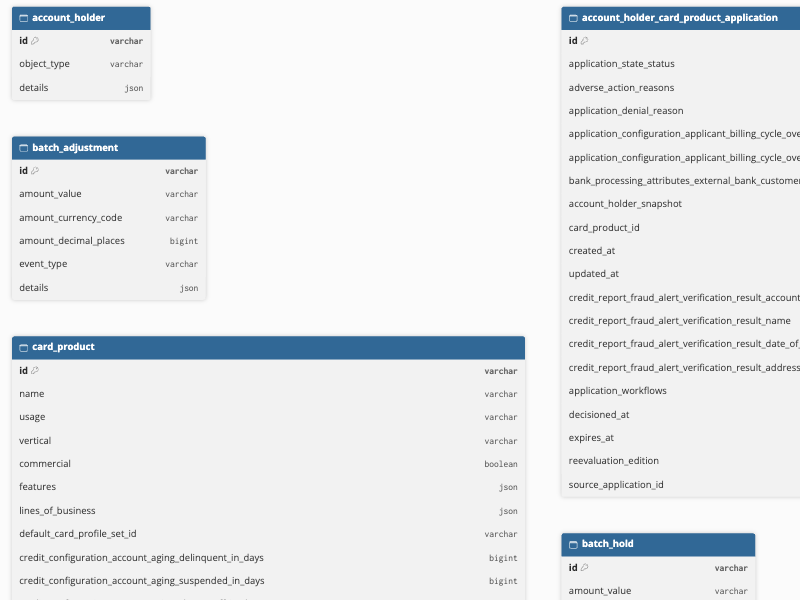
Hevo uses the following schema to upload the records in the Destination. For a detailed view of the objects, fields, and relationships, click the ERD.
Data Model
The following is the list of tables (objects) that are created at the Destination when you run the Pipeline:
| Object | Description |
|---|---|
| Account Holder | Contains the account holders associated with an entity in Highnote. The account holder type is stored in the object_type field, and its details are stored in the details field. |
| Account Holder Card Product Application | Contains the applications submitted by account holders for a card product, including the application status, adverse action and denial reasons, account holder snapshot, and credit report verification results. |
| Account Holder Card Product Application Offer | Contains the offers associated with account holder card product applications, including the offer name, status, and category. |
| Account Holder Card Product Application Snapshot | Contains the history of account holder card product applications, capturing the application status and account holder details at each point in time. |
| Account Review | Contains the account reviews performed on financial accounts, including the review type, details, and the creation, update, and closure timestamps. |
| API Key | Contains details of the API keys created in your Highnote organization, including the key name, a redacted form of the key, and the creation and revocation timestamps. |
| Application Contract | Contains the contracts on application products, including the effective dates, processing capabilities, contract reserves, permitted settlement currencies, and merchant identifiers. |
| Authorized Account Holder Relationship | Contains the relationships between account holders and the authorized persons or businesses associated with them. |
| Authorized User Card Product Application | Contains the applications submitted to add authorized users to a card product, including the application status, denial reasons, authorized user snapshot, and the related financial account. |
| Authorized User Card Product Application Snapshot | Contains the history of authorized user card product applications, capturing the application status and authorized user details at each point in time. |
| Batch Adjustment | Contains the permanent adjustments made on transaction batches, including the adjustment amount and details. |
| Batch Hold | Contains the temporary holds placed on transaction batches, including the hold amount and details. |
| Billing Cycle | Contains the billing cycles of credit products, including the current cycle state, the related statement, the delinquent days and amount, the state transition history, and repayments. |
| Business | Contains details of businesses, including profile details, such as name, description, type, addresses, and identification documents, and the services the business is set up for. |
| Business Account Holder | Contains details of business account holders in the US, including the primary authorized person, legal and doing-business-as names, business type, website, billing address, and credit risk attributes. |
| Business Relationship | Contains the relationships between businesses in Highnote. |
| Business Service | Contains the services a business is set up for in the payments ecosystem, such as account holder or merchant services. |
| Card Digital Wallet Token | Contains the digital wallet tokens created for payment cards, such as Apple Pay or Google Pay tokens, including the token status, requester, token type, and device information. |
| Card Digital Wallet Token State Transition | Contains the state transitions of card digital wallet tokens, including the new state and the reason for the transition. |
| Card Payment Dispute | Contains the disputes raised by card networks on acquiring payment transactions, including the dispute status, outcome, category, financial impact, network reason, stages, and response due date. |
| Card Product | Contains the shared configurations for groups of cards, including the card product name, usage, vertical, features, lines of business, and credit configuration settings, such as account aging and minimum payment rules. |
| Card Product Application | Contains the card product applications of all types, such as account holder and authorized user applications. The application type is stored in the object_type field, and its details are stored in the details field. |
| Card Profile Set | Contains the sets of card profiles selected for a card product, including the BIN details, network, and the physical, digital, and virtual card profiles. |
| Check Payment | Contains details of check payments, including the amount, status, recipient name and address, check type, check number, and shipping time. |
| Collaborative Authorization Endpoint | Contains details of the collaborative authorization endpoints configured in Highnote, including the name, URI, and status. |
| Credit Plan | Contains the credit plans that define the credit and interest terms of credit card products, including the plan type, balance type, interest policy, APR, and installment policy. |
| Credit Plan Template | Contains the templates that provide the base configuration for creating credit plans, including the plan type, balance type, interest policy, APR ranges, and installment policy. |
| Delivery Attempt | Contains the attempts made to deliver notification events to targets, including the target URI, the HTTP response status code, and the delivery attempt status. |
| External Financial Account | Contains the external financial accounts created for the external financial instruments of account holders. The account type is stored in the object_type field, and its details are stored in the details field. |
| Externally Initiated ACH Transfer | Contains the ACH transfers initiated externally for a financial account. The transfer type is stored in the object_type field, and its details are stored in the details field. |
| Feature Permission | Contains the feature permissions configured in Highnote, including whether the feature is enabled and who created or updated the permission. |
| Feature Permission Revision | Contains the revision history of feature permissions, capturing whether a feature was enabled and who changed it at each revision. |
| Fee Schedule | Contains the fee schedules, including the schedule name, memo, fee configurations, activation date, status, and attachment type. |
| Fee Schedule Attachment | Contains the attachments of fee schedules to entities, such as card products or financial accounts. |
| Fee Transfer Event | Contains the fee transfer events, which record the transfer of fees between financial accounts. |
| Financial Account | Contains details of financial accounts, which are used to move money into and within the Highnote platform, including the account name, owner, account holder, ledgers, features, and billing cycle configuration. |
| Financial Account Activity | Contains the activities of financial accounts, such as transfers and payment card transactions, including the pending and posted amounts, the sign, and whether the activity is complete. |
| Financial Account Balance Search Result | Contains the balances of financial accounts, along with the account owner and the related card product. |
| Financial Account Snapshot | Contains snapshots of financial accounts before a revision was applied, including the account status, attributes, and the user who updated it. |
| Financial Account Statement | Contains the statements generated for financial accounts, including the statement period, opening and closing dates, starting and ending balances, and the primary ledger details. |
| Financial Account Statement Entry | Contains the entries in financial account statements, including the credit and debit amounts, the balances after each entry, the post date, and the related ledger entry. |
| Flexible Credential | Contains the flexible credentials, which are single card numbers that route transactions to one of several backing financial accounts, including the status, primary payment card, member cards, and routing strategies. |
| Flexible Credential Activity | Contains the financial account activities within a flexible credential’s aggregated feed, along with the member financial account each activity belongs to. |
| Flexible Credential Statement | Contains the financial account statements within a flexible credential’s aggregated statement feed, along with the financial account each statement belongs to. |
| Global Note | Contains notes added to entities in Highnote, including the note message, the user who created it, and the entities the note is associated with. |
| Installment Agreement | Contains the agreements to convert transactions into installments, including the status, the credit plan, the total cost, principal, and fees, and the installment payment progress. |
| Integrator Initiated ACH Transfer | Contains the ACH transfers initiated by you as the integrator for a financial account. The transfer type is stored in the object_type field, and its details are stored in the details field. |
| Inter Financial Account Transfer | Contains the transfers of money between financial accounts within the Highnote platform, including the amount, status, purpose, memo, and the source and destination financial accounts. |
| Inter Financial Account Transfer Rule | Contains the rules applicable to inter-financial account transfers, including the rule name, version, and details. |
| Invoice | Contains the invoices issued to or from a business, including the billing parties, billing period, issue and due dates, and total amount. |
| Invoice Item | Contains the line items on invoices, including the description, item code, amount, and service period. |
| Ledger Entry | Contains the entries posted to financial account ledgers, including the journal entry, ledger details and balances, the amount, memo, and the related financial event. |
| Merchant | Contains the businesses enrolled as acquiring merchants, either directly or as submerchants of a payment facilitator, including the display name, status, and business account configurations. |
| Merchant Acceptor | Contains the merchant acceptors, which identify how a merchant’s transactions are routed and reported across processors and card networks, including the descriptor, address, and support contact details. |
| Merchant Payfac Relationship | Contains the relationships between merchants and payment facilitators (payfacs), optionally brokered by an independent sales organization (ISO). |
| Non Originated ACH Transfer | Contains the ACH transfers initiated by an external financial institution to push funds to or pull funds from a Highnote financial account, including the amount, type, status, hold status, trace number, and settlement date. |
| Notification Event | Contains the notification events triggered in the Highnote platform, including the event name, the related entity, and the creation and expiry timestamps. |
| Notification Target Status History | Contains the history of status changes for notification targets, including the previous and new status and the time of the change. |
| On Demand Pricing Charge | Contains the on-demand pricing charges created for businesses, including the amount, name, charge code, description, payer and payee, and the related invoice item. |
| Organization | Contains details of your Highnote organization, which controls a set of card programs, including its profile, display name, environment, region, business details, and onboarding information. |
| Organization Business Relationship | Contains the relationships between your organization and businesses in Highnote. |
| Originated ACH Transfer | Contains the ACH transfers initiated by Highnote to push funds to or pull funds from an external financial institution, including the amount, type, purpose, status, trace number, and processing dates. |
| Payfac ISO Partnership | Contains the partnerships between payment facilitators (payfacs) and independent sales organizations (ISOs). |
| Payment Card | Contains details of payment cards, including the BIN, last four digits, expiration date, network, status, form factor, the related card product and financial accounts, and the card personalization details. |
| Payment Card Snapshot | Contains snapshots of payment cards at the time of a transaction event or revision, including the card status, status change reason, usage, and form factor. |
| Payment Card Transaction Chargeback | Contains the chargebacks raised for payment card transaction disputes, including the requested and received amounts, status, credit status, and the card network details. |
| Payment Card Transaction Dispute | Contains the disputes raised on payment card transactions, including the disputed amount, status, category, customer claim and contact details, chargebacks, and credit history. |
| Payment Transaction | Contains the payment transactions processed for merchants, including the payment instrument, status, events, the authorized, captured, settled, disbursed, canceled, and refunded amounts, and the response codes. |
| Person Account Holder | Contains details of individual (person) account holders in the US, including name, email, phone numbers, billing address, date of birth, identification document details, credit risk attributes, and risk scores. |
| Physical Card Group Order | Contains the group orders placed for multiple physical payment cards, including the card product, the number of cards, shipping and delivery details, and order status. |
| Physical Payment Card Order | Contains the orders placed for physical payment cards, including the shipping method, delivery details, tracking information, and order status. |
| Previous Product Application | Contains the earlier applications that preceded a card product application. The application type is stored in the object_type field, and its details are stored in the details field. |
| Pricing Configuration | Contains the associations of pricing plans with payer and payee entities for a validity period. |
| Pricing Plan | Contains the pricing plans available for your organization, including the plan name, description, and status. |
| Pricing Rule | Contains the pricing rules within pricing plans, including the trigger, frequency, template, and parameter values. |
| Product Application | Contains the applications submitted for application products, such as acquiring products, including the application status, money movement capabilities, the related business, and the contract. |
| Realtime Risk Rule | Contains the real-time risk rules that run during the authorization of card transactions, including the rule name, version, and details. |
| Report | Contains details of the reports generated in Highnote, including the report type, status, the reporting period, and the creation and update timestamps. |
| Report Usage | Contains information about the current usage of each report type, including the usage limit, the remaining limit, and the end of the usage period. |
| Review Workflow Event | Contains the events representing the review process of transfers, including the review state, the related transfer, and the review item. |
| Reward Earn Rule | Contains the rules that define how transactions earn reward points. |
| Reward Points Transfer | Contains the transfers of reward points, including the points amount, status, source, memo, ledgers, and the related earn rule or redemption configuration. |
| Reward Redemption Configuration | Contains the configurations that define how reward points can be redeemed, including the redemption type and the reward point redemption rate. |
| Reward Redemption Configuration Attachment | Contains the attachments of reward redemption configurations to entities, along with the effective dates. |
| Reward Rule Attachment | Contains the attachments of reward earn rules to entities, along with the effective dates. |
| Scheduled Transfer | Contains the scheduled transfers between financial accounts, including the source and destination financial accounts and the schedule details. |
| Scheduled Transfer Event | Contains the events generated for scheduled transfers, including the event type, details, and timestamps. |
| Schema Changelog | Contains the changes made to the Highnote API schema, grouped by deploy timestamp. |
| Spend Rule | Contains the spend rules used to control card authorizations, including the rule name, version, user type, and rule details. |
| Transaction Batch | Contains the batches that group payment transactions for settlement and payout, including the debit, credit, and chargeback totals, holds, adjustments, disbursed amount, fees, and status. |
| Transaction Event | Contains the events of card transactions, such as authorizations, clearings, and reversals, including the approved amount, accounting direction, the payment card and card product, the response code, and the point-of-sale and network details. |
| Transaction Search Result | Contains a normalized view of transactions and transaction events with their common fields, such as the amount, status, and transaction type. |
| US Person Authorized User | Contains details of individuals in the US who are authorized users on another account holder’s card product, including name, email, phone numbers, billing address, and identification document details. |
| User | Contains details of the users of your Highnote organization, including their email address and the roles assigned to and available for them. |
| User Defined Field | Contains the user-defined (custom) field values associated with specific Highnote entities, along with the field definition and version. |
| User Defined Field Definition | Contains the configuration templates used to create user-defined (custom) fields, including the field name, description, data type, related entity types, and version. |
| User Defined Field Definition Revision | Contains historical snapshots of user-defined field definitions, capturing the definition’s name, data type, and version at a specific point in time. |
| User Defined Field Revision | Contains historical snapshots of user-defined field values, capturing the value and version at a specific point in time. |
| Velocity Inter Financial Account Transfer Rule | Contains the velocity rules for inter-financial account transfers, which are window-constrained transfer controls composed of conditional and cumulative transfer rules. |
| Velocity Inter Financial Account Transfer Rule Balance | Contains the balances tracked by velocity inter-financial account transfer rules, as either an amount or a count. |
| Velocity Rule | Contains the velocity rules, which are window-constrained authorization controls composed of spend rules, including the rule window, the cumulative rule, and the time zone settings. |
| Wallet | Contains the wallets that spend from financial accounts, including the end customer’s details, the account holder, the funding sources, and the payment methods. |
| Webhook Notification Target | Contains details of the webhook notification targets configured in Highnote, including the name, URI, contact email, subscribed events, and status. |
| Webhook Notification Target Event | Contains the notification events that are to be delivered to a webhook notification target based on its subscriptions, along with whether the event was delivered successfully. |
Additional Information
Read the detailed Hevo documentation for the following related topics:
Handling of Deletes
Highnote does not provide an API operation to delete records, and it does not explicitly mark records as deleted in its API responses. Hevo handles deleted records differently based on how data is ingested for an object.
Hevo uses a full data refresh approach to capture delete actions for the following objects, for which the complete data is ingested during each sync. During each Pipeline run, Hevo compares the data fetched from the Source object with the data present in the Destination table. If a record exists in the Destination but is no longer returned by the Source, the record is marked as deleted by setting the value of the metadata column _hevo_marked_deleted to True.
| Object Category | Objects |
|---|---|
| Organization and Platform | API Key, Collaborative Authorization Endpoint, Delivery Attempt, Feature Permission, Feature Permission Revision, Global Note, Notification Target Status History, Organization, Report, Report Usage, Schema Changelog, User, User Defined Field, User Defined Field Definition, User Defined Field Definition Revision, User Defined Field Revision, Webhook Notification Target, Webhook Notification Target Event |
| Account Holders and Applications | Account Holder Card Product Application, Account Holder Card Product Application Offer, Account Holder Card Product Application Snapshot, Account Review, Application Contract, Authorized Account Holder Relationship, Authorized User Card Product Application, Authorized User Card Product Application Snapshot, Business, Business Account Holder, Business Relationship, Business Service, Card Product Application, Organization Business Relationship, Person Account Holder, Product Application, US Person Authorized User |
| Card Products and Cards | Card Digital Wallet Token, Card Digital Wallet Token State Transition, Card Product, Card Profile Set, Flexible Credential, Flexible Credential Statement, Payment Card, Payment Card Snapshot, Physical Card Group Order, Physical Payment Card Order |
| Financial Accounts and Ledgers | Billing Cycle, Financial Account, Financial Account Balance Search Result, Financial Account Snapshot, Financial Account Statement, Financial Account Statement Entry, Wallet |
| Transactions and Disputes | Installment Agreement, Payment Card Transaction Chargeback, Payment Card Transaction Dispute, Transaction Search Result |
| Money Movement | Check Payment, External Financial Account, Externally Initiated ACH Transfer, Integrator Initiated ACH Transfer, Non Originated ACH Transfer, Originated ACH Transfer, Review Workflow Event, Scheduled Transfer, Scheduled Transfer Event |
| Spend and Transfer Rules | Inter Financial Account Transfer Rule, Realtime Risk Rule, Spend Rule, Velocity Inter Financial Account Transfer Rule, Velocity Inter Financial Account Transfer Rule Balance, Velocity Rule |
| Fees, Credit, and Rewards | Credit Plan, Credit Plan Template, Fee Schedule, Fee Schedule Attachment, Reward Earn Rule, Reward Points Transfer, Reward Redemption Configuration, Reward Redemption Configuration Attachment, Reward Rule Attachment |
| Acquiring and Billing | Batch Adjustment, Batch Hold, Invoice, Invoice Item, Merchant, Merchant Acceptor, Merchant Payfac Relationship, On Demand Pricing Charge, Payfac ISO Partnership, Payment Transaction, Pricing Configuration, Pricing Plan, Pricing Rule, Transaction Batch |
For the following objects, Hevo does not capture deletes. Records that are ingested into the Destination are not marked as deleted:
-
Account Holder
-
Card Payment Dispute
-
Fee Transfer Event
-
Financial Account Activity
-
Flexible Credential Activity
-
Inter Financial Account Transfer
-
Ledger Entry
-
Notification Event
-
Previous Product Application
-
Transaction Event
Source Considerations
-
Highnote enforces its rate limit across all the API keys in your Highnote organization. Hevo’s data-fetching requests and your own application’s requests draw from the same limit, even if you use a dedicated API key for Hevo. During periods of high data-fetching activity, such as a historical load, this shared limit can cause your own Highnote API calls to be rate-limited.
-
Highnote may not allow the API key to read some objects, for example, if the Highnote product or feature behind an object is not enabled for your Highnote account. As Highnote API keys do not have scopes, creating another API key does not change this. In such a case, only the affected object fails, and Hevo continues to ingest the other objects. To resolve this, check the product in your Highnote Dashboard or contact Highnote support, or deselect the object in the Pipeline.
Revision History
Refer to the following table for the list of key updates made to this page:
| Date | Release | Description of Change |
|---|---|---|
| Nov-26-2026 | NA | New document. |