Increase (Edge)
On This Page
Increase is a banking platform that provides APIs to open bank accounts, move money, and issue cards. Businesses use it to build financial products on real bank accounts and payment networks, such as ACH, wire, Real-Time Payments, FedNow, and checks.
Hevo uses the Increase API to replicate data from your Increase account to the Destination of your choice. To ingest data, you must provide Hevo with an API key of your Increase account.
Supported Features
| Feature Name | Supported |
|---|---|
| Capture deletes | Yes (for some objects) |
| History mode | No |
| Custom data (user-configured tables & fields) | No |
| Data blocking (skip objects and fields) | Yes |
| Resync (objects and Pipelines) | Yes (for some objects) |
| API configurable | No |
Prerequisites
-
An active Increase account in the Production or Sandbox environment from which data is to be ingested.
-
The Owner or Administrator role in the Increase Dashboard to create an API key.
Create an API Key
Hevo connects to your Increase account using an API key. An API key works only in the environment, Production or Sandbox, in which it is created.
Perform the following steps to create an API key:
-
Log in to the Increase Dashboard.
-
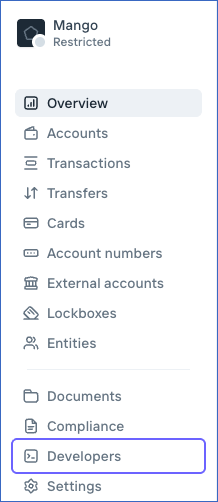
In the left navigation pane, click Developers.
-
On the API keys tab, click Create API key, and then click Create production key or Create sandbox key, based on the environment from which you want to ingest data.

-
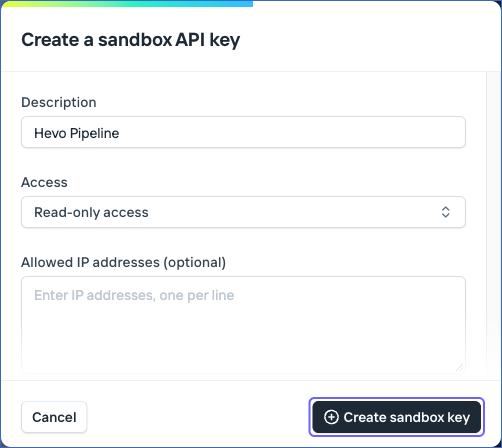
In the Create a sandbox API key or Create a production API key dialog, do the following:
-
In the Description field, specify a description for the key. For example, Hevo Pipeline.
-
In the Access drop-down, select Read-only access. Hevo only reads data from Increase, so the key needs only read access.
-
Leave the Allowed IP addresses field empty. If you specify IP addresses, Increase accepts the requests made with the key only from those IP addresses.
-
Click Create sandbox key or Create production key.
-
-
Copy the API key and save it securely like any other password.
Configure Increase as a Source in your Pipeline
Perform the following steps to configure your Increase Source:
-
Click Pipelines in the Navigation Bar.
-
Click + Create Pipeline in the Pipelines List View.
-
On the Select Source Type page, select Increase.
-
On the Select Destination Type page, select the type of Destination you want to use.
-
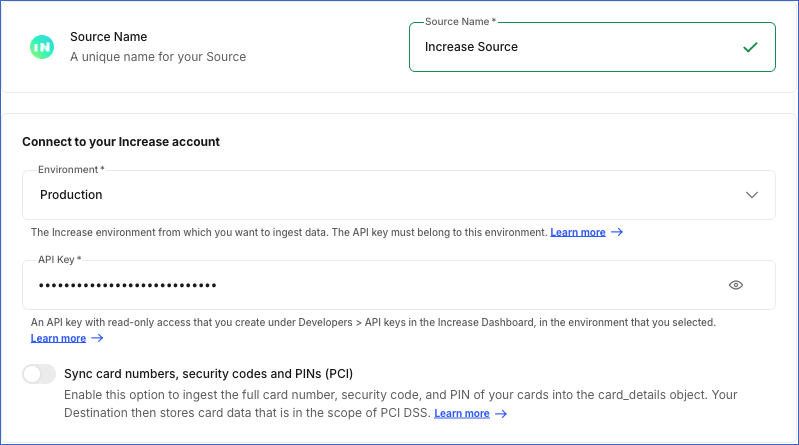
In the Configure Source screen, specify the following:
-
Source Name: A unique name for your Source, not exceeding 255 characters. For example, Increase Source.
-
In the Connect to your Increase account section, specify the following:
-
Environment: The Increase environment from which you want to ingest data. Select Production or Sandbox. Default value: Production. You cannot change the environment after you create the Pipeline. To ingest data from the other environment, create a new Pipeline.
-
API Key: The API key with read-only access that you created in the environment that you selected.
-
Sync card numbers, security codes and PINs (PCI): Enable this option to ingest the full card number, security code, and PIN of your cards into the card_details object. Default value: Disabled. If Increase does not allow your account to access these card details, Hevo displays the card_details object as inaccessible. If you enable this option, your Destination stores card data that is in the scope of the Payment Card Industry Data Security Standard (PCI DSS). Unless you need this data, block the primary_account_number, verification_code, and pin fields of the card_details object.
-
-
-
Click Test & Continue to test the connection to your Increase Source. Hevo checks the connection by reading the details of the Increase group to which the API key belongs. The test fails if Increase rejects the API key, for example, if the key belongs to the other environment. Once the test is successful, you can proceed to set up your Destination.
On the Configure Objects page, the objects that Increase does not allow your account to access, such as objects that need a feature that is not enabled for your account, are displayed as inaccessible, and you cannot select them.
Data Replication
Hevo replicates data for all the objects selected on the Configure Objects page during Pipeline creation. By default, all supported objects and their available fields are selected. However, you can modify this selection while creating or editing the Pipeline.
Hevo ingests the following types of data from your Source objects:
-
Historical Data: The first run of the Pipeline ingests all the data of the selected objects. For the events object, Hevo ingests the events of the last 30 days, as Increase retains events for 30 days. Hevo does not ingest any historical data for the real_time_decisions object.
-
Incremental Data: Once the historical load is complete, Hevo ingests data as per the sync frequency:
-
For the card_purchase_supplements, declined_transactions, digital_wallet_token_requests, events, files, and transactions objects, Hevo ingests the records created since the previous run. Increase does not change these records once they are created.
-
For the card_tokens, lockbox_recipients, and oauth_applications objects, Hevo ingests the records created since the previous run. In addition, every seven days, Hevo ingests the entire data of the lockbox_recipients and oauth_applications objects, and the card_token_capabilities data of all card tokens, to capture the changes to existing records. Changes to existing card_tokens records are not ingested.
-
For the inbound_wire_drawdown_requests object, Hevo ingests the records created since the previous run.
-
For the entity_onboarding_sessions object, Hevo ingests the records created since the previous run. In addition, once an hour, Hevo ingests the sessions created in the last 24 hours again to capture the changes to their status. As a result, a change to a session can be ingested up to an hour after the next scheduled run.
-
For the groups object, Hevo ingests the entire data in each run.
-
For the account_balance_snapshots object, Hevo reads the balance of each account that has new or changed transactions or pending transactions since the previous run. In addition, Hevo reads the balance of every open account once a day.
-
For the account_intrafi_balances object, Hevo reads the IntraFi balance of each enrolled account once a day.
-
For all the other objects, Hevo uses the events that Increase generates when a record is created or updated. Hevo reads the events created since the previous run, and then ingests the records that the events refer to. For the real_time_decisions object, Hevo ingests only the decisions made after the first run of the Pipeline.
Child objects, such as card_payment_elements, are ingested along with their parent object.
-
Increase retains events for 30 days. If a Pipeline does not run for more than 28 days, for example, because it is paused, the objects that Hevo ingests using events fail, as Hevo cannot read the events that were created while the Pipeline was not running. To resume ingesting data for these objects, resync them.
You cannot resync the account_balance_snapshots, account_intrafi_balances, and real_time_decisions objects. To resync a child object, resync its parent object.
If Hevo cannot ingest the account_intrafi_balances object, for example, because of a change to the permissions of your IntraFi enrollments, fix the permissions in Increase, and then deselect and select the object again. Hevo then ingests the current IntraFi balance of each enrolled account. The balances of the days that were missed cannot be ingested, as Increase does not keep the history of IntraFi balances. Do not drop the existing data of this object and load it again, as this deletes the balances of the earlier days.
Increase limits the number of API requests that a group can make. The limit is 100 requests per second in the Production environment and 20 requests per second in the Sandbox environment, and it is shared with the other API requests made to your Increase group. Read Rate limits. If a limit is reached, Hevo retries the request up to eight times, waiting for the duration that Increase specifies. If the limit is still exceeded, Hevo ingests the object in the next run.
Note: You can create a Pipeline with this Source using either the Merge or the Append load mode, and you can change the load mode for each object. Merge is the default load mode for all the objects except the following:
-
The card_purchase_supplements, declined_transactions, digital_wallet_token_requests, files, and transactions objects support only the Append load mode.
-
The account_balance_snapshots and card_tokens objects use the Append load mode by default.
-
If you select a child object after its parent object is loaded, Hevo ingests the parent object again. If the parent object uses the Append load mode, its records are added a second time. To avoid this, select the child objects together with their parent object. For the card_purchase_supplements object, which supports only the Append load mode, select the card_purchase_supplement_line_items object along with it.
If you resync an object that uses the Append load mode, choose to drop the existing data and load all the data again, to avoid duplicate records. Do not do this for the events object (see Source Considerations).
Schema and Primary Keys
Hevo uses the following schema to upload the records in the Destination. For a detailed view of the objects, fields, and relationships, click the ERD.
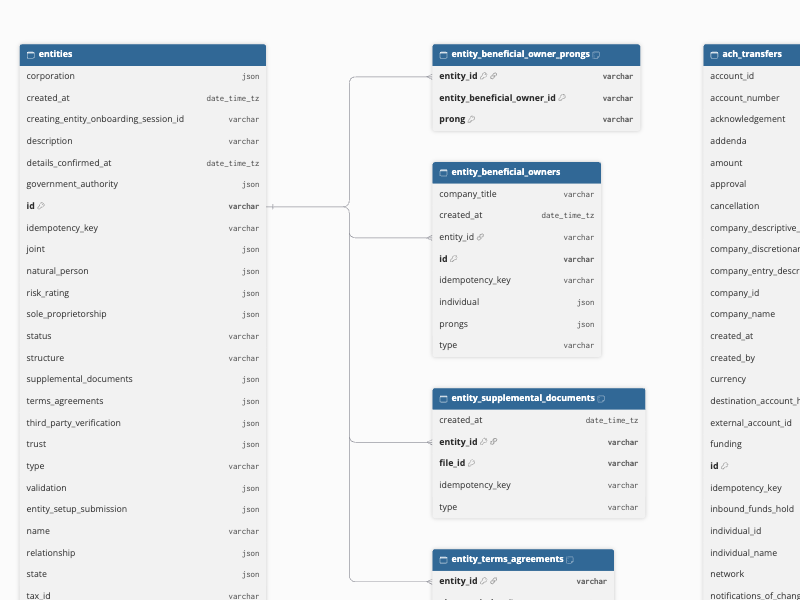
The primary key of most objects is id. The following objects use other primary keys:
-
account_balance_snapshots:
account_idandsnapshot_at. -
account_intrafi_balances:
account_idandeffective_date. -
ach_prenotification_notifications_of_change:
ach_prenotification_idandelement_index. -
ach_transfer_notifications_of_change:
ach_transfer_idandelement_index. -
card_details:
card_id. -
card_payment_elements:
card_payment_idandelement_index. -
card_renewals:
card_idandelement_index. -
card_token_capabilities:
card_token_idandroute. -
check_deposit_adjustments:
check_deposit_idandelement_index. -
digital_wallet_token_updates:
digital_wallet_token_idandelement_index. -
entity_beneficial_owner_prongs:
entity_id,entity_beneficial_owner_id, andprong. -
entity_supplemental_documents:
entity_idandfile_id. -
entity_terms_agreements:
entity_idandelement_index. -
event_subscription_selected_event_categories:
event_subscription_idandevent_category. -
fednow_transfer_returns:
fednow_transfer_idandelement_index. -
inbound_check_deposit_adjustments:
inbound_check_deposit_idandelement_index. -
inbound_mail_item_checks:
inbound_mail_item_idandelement_index.
Data Model
The following is the list of tables (objects) that are created at the Destination when you run the Pipeline:
| Object | Description |
|---|---|
| account_balance_snapshots | Contains the balance readings of your accounts. Each reading is identified by the account and the time at which the balance was read. |
| account_intrafi_balances | Contains the IntraFi balance of an account for an effective date, including the balances held at each participating bank. |
| account_numbers | Contains the account and routing numbers that are issued for your accounts and used to receive ACH and wire transfers. |
| account_statements | Contains the monthly statements generated for your accounts, including the statement period and the file that holds the statement. |
| account_transfers | Contains transfers of funds between two accounts in the same Increase group, including the amount, status, and approval and cancellation details. |
| accounts | Contains your Increase bank accounts, including the entity that owns each account, its funding type, currency, interest rate, and status. The balance and balances fields are always empty. To get the balance of an account, use the account_balance_snapshots object. |
| ach_prenotifications | Contains ACH prenotifications, which are zero-dollar ACH entries used to verify an account and routing number before a transfer is made. It includes a child object, ach_prenotification_notifications_of_change. |
| ach_transfers | Contains ACH transfers that you send from your accounts, including the amount, direction, status, and submission and return details. It includes a child object, ach_transfer_notifications_of_change. |
| card_disputes | Contains disputes that you raise against card transactions, including the dispute category, status, and the outcome of each stage. |
| card_payments | Contains card payments, which group the lifecycle of a card transaction, from authorization to settlement and reversal. It includes a child object, card_payment_elements. |
| card_purchase_supplements | Contains additional purchase data that card networks provide for a card settlement, including invoice and shipping details. It includes a child object, card_purchase_supplement_line_items. |
| card_push_transfers | Contains transfers that push funds to a card, including the recipient and sender details, amount, and status. |
| card_tokens | Contains tokens that represent the cards that you issue, as seen by the card networks. It includes a child object, card_token_capabilities. |
| card_validations | Contains card validations, which verify a card with the card network without moving funds, including the cardholder details and status. |
| cards | Contains the debit cards that you issue, including the cardholder name, billing address, status, and expiration details. It includes the following child objects: - card_details - card_renewals |
| check_deposits | Contains the checks that you deposit into your accounts, including the amount, status, and the front and back images of the check. It includes a child object, check_deposit_adjustments. |
| check_transfers | Contains check transfers that you send from your accounts, including the recipient, amount, fulfillment method, and status. |
| declined_transactions | Contains the transactions that were declined, along with the source of the decline and the reason for it. Increase never changes these records. |
| digital_card_profiles | Contains the profiles that define how your cards look and are described when they are added to a digital wallet, such as the issuer name and card description. |
| digital_wallet_token_requests | Contains requests to add a card to a digital wallet, along with the device details and the decision on the request. Increase never changes these records. |
| digital_wallet_tokens | Contains the digital wallet tokens that represent your cards in wallets such as Apple Pay, including the cardholder, device, and token status. It includes a child object, digital_wallet_token_updates. |
| entities | Contains the legal entities, such as individuals, corporations, trusts, and joint holders, that own your accounts, including their identification and address details. It includes the following child objects: - entity_beneficial_owner_prongs - entity_beneficial_owners - entity_supplemental_documents - entity_terms_agreements |
| entity_onboarding_sessions | Contains the hosted sessions that you create to onboard an entity, including the session status and expiry. |
| event_subscriptions | Contains the webhook subscriptions that you configured in Increase, including the URL and the status of each subscription. It includes a child object, event_subscription_selected_event_categories. |
| events | Contains the events that Increase generates when something changes in your group, such as the creation or update of a resource. Increase retains events for 30 days. |
| exports | Contains the exports that you request from Increase, such as account statements and transaction lists, including the category, status, and download link. |
| external_accounts | Contains the accounts at other banks that you save as counterparties for transfers, including the routing number, account holder type, and status. |
| fednow_transfers | Contains FedNow transfers that you send from your accounts, including the creditor and debtor details, amount, and status. It includes a child object, fednow_transfer_returns. |
| files | Contains the files that are stored in Increase, such as check images and statements, including the file name, purpose, and size. Increase never changes these records. |
| groups | Contains the Increase group that your API key belongs to, including its activation status and the time it was created. |
| inbound_ach_transfers | Contains ACH transfers that you receive into your accounts, including the originator and receiver details, amount, and status. |
| inbound_check_deposits | Contains the checks that other parties deposit against your accounts, including the amount, status, and the front and back images of the check. It includes a child object, inbound_check_deposit_adjustments. |
| inbound_fednow_transfers | Contains FedNow transfers that you receive into your accounts, including the creditor and debtor details, amount, and status. |
| inbound_mail_items | Contains the physical mail that Increase receives at your lockbox addresses, including the recipient and the status of the item. It includes a child object, inbound_mail_item_checks. |
| inbound_real_time_payments_requests_for_payment | Contains requests for payment that other parties send you over the Real-Time Payments network, including the creditor, debtor, and requested amount. |
| inbound_real_time_payments_transfers | Contains Real-Time Payments transfers that you receive into your accounts, including the creditor and debtor details, amount, and status. |
| inbound_wire_drawdown_requests | Contains wire drawdown requests that other parties send you, asking you to wire them funds, including the creditor, debtor, and requested amount. |
| inbound_wire_transfers | Contains wire transfers that you receive into your accounts, including the originator, beneficiary, amount, and status. |
| intrafi_account_enrollments | Contains the enrollments of your accounts in IntraFi, which spreads deposits across banks to extend FDIC insurance coverage, including the enrollment status. |
| intrafi_exclusions | Contains the banks that you exclude from receiving your IntraFi-swept deposits, including the exclusion status. |
| lockbox_addresses | Contains the mailing addresses that Increase assigns to receive checks for your accounts. |
| lockbox_recipients | Contains the recipients that are assigned to your lockbox addresses to receive checks and mail. |
| oauth_applications | Contains the OAuth applications that you register in Increase, including the name, client ID, and status. |
| oauth_connections | Contains the connections that other groups have established with your OAuth applications, including the status of each connection. This object contains data only if your API key belongs to the group that owns the OAuth applications. |
| pending_transactions | Contains transactions that have been initiated but have not yet settled and that affect the available balance of an account. |
| physical_card_profiles | Contains the profiles that define how your physical cards are printed, such as the card front and carrier artwork. |
| physical_cards | Contains the physical cards that are produced and shipped for your cards, including the cardholder, shipment details, and status. |
| programs | Contains the programs that define the bank and the terms under which your accounts are opened, including the interest rate and the default digital card profile. |
| real_time_decisions | Contains the real-time decisions that Increase asks you to make on card authorizations, balance inquiries, and digital wallet events. Hevo reads these from events only, so decisions made before the first sync are not loaded. |
| real_time_payments_requests_for_payment | Contains requests for payment that you send over the Real-Time Payments network, including the debtor, amount, and status. |
| real_time_payments_transfers | Contains Real-Time Payments transfers that you send from your accounts, including the creditor and debtor details, amount, and status. |
| sepa_instant_transfers | Contains the SEPA Instant transfers that you send from your accounts. Hevo ingests only the ID, the creation time, and the type of each transfer, as Increase does not document this object. |
| swift_transfers | Contains SWIFT transfers that you send from your accounts, including the creditor and debtor details, amount, and status. |
| transactions | Contains the transactions that have posted to your accounts, including the amount, currency, and the source that caused each transaction. Increase never changes these records. |
| uk_faster_payment_system_transfers | Contains the UK Faster Payments transfers that you send from your accounts. Hevo ingests only the ID, the creation time, and the type of each transfer, as Increase does not document this object. |
| wire_drawdown_requests | Contains wire drawdown requests that you send, asking another party to wire you funds, including the debtor, amount, and status. |
| wire_transfers | Contains wire transfers that you send from your accounts, including the beneficiary and originator details, amount, and status. |
Additional Information
Read the detailed Hevo documentation for the following related topics:
Handling of Deletes
Increase does not delete records. When an account, a card, or another object ends, Increase keeps the record and changes its status. Hevo marks such a record as deleted by setting the value of the metadata column __hevo__marked_deleted to True. The record remains in the Destination with all its data. Hevo captures deletes as follows:
-
Objects with an ending status: Hevo marks a record as deleted when its status changes to one of the following values:
Object Status accounts closed account_numbers canceled cards canceled digital_card_profiles archived digital_wallet_tokens deactivated entities archived event_subscriptions deleted intrafi_account_enrollments unenrolled intrafi_exclusions archived lockbox_addresses canceled lockbox_recipients canceled oauth_applications deleted oauth_connections inactive physical_card_profiles archived physical_cards canceled For the lockbox_recipients and oauth_applications objects, Hevo marks the records as deleted when it ingests the entire data of these objects, which happens every seven days. In addition, when you resync any of the objects listed above, Hevo marks the records that Increase no longer returns as deleted. For example, Increase does not return an event subscription after it is deleted. This applies only to objects that use the Merge load mode. If Increase returns no records for the object, or the resync stops because of a rate limit, Hevo does not mark any records as deleted.
-
Child objects: Hevo replaces the child records of a parent record when the parent record is ingested. Child records that are removed in Increase are removed from the Destination. If none of the parent records has any child records left in Increase, Hevo marks the earlier child records as deleted when you resync the parent object.
Hevo does not capture deletes for the other objects.
If an object uses the Append load mode, Hevo adds a new record with the __hevo__marked_deleted column set to True, and the existing records remain unchanged.
Source Considerations
-
Increase limits the number of API requests that your group can make, and this limit is shared with the other API requests made to your group. If your applications make a large number of requests to Increase, Hevo may take longer to ingest your data.
-
Changes to the records of the objects that Hevo ingests using events are ingested about 30 seconds after they are made. Records of the card_purchase_supplements, declined_transactions, digital_wallet_token_requests, events, files, and transactions objects are ingested five minutes after they are created. If Increase lists a record of the card_purchase_supplements, declined_transactions, digital_wallet_token_requests, files, or transactions object more than five minutes after it is created, Hevo does not ingest the record and displays a warning for the object. To ingest such records, resync the object.
-
For the lockbox_recipients and oauth_applications objects, and the card_token_capabilities child object, changes to existing records are ingested only when Hevo ingests the entire data of these objects, which happens every seven days.
-
Some objects need features that Increase must enable for your account, such as the private beta features of Increase, IntraFi, or international transfers. Until the feature is enabled, Hevo displays the object as inaccessible, or ingests no data for it. After Increase enables the feature, resync the object if it failed earlier.
-
The entity_beneficial_owners object and its entity_beneficial_owner_prongs child data are available only for entities that are corporations.
-
The oauth_connections object contains data only if you connect using the API key of the group that owns the OAuth applications.
-
Do not drop and reload the account_balance_snapshots object or the events object. Increase cannot return past balance readings, and it retains events for 30 days, so the data that is dropped cannot be loaded again.
-
If an object uses the Append load mode, Hevo adds a new copy of the records each time it ingests them again. For example, the records of the groups object are added in each run, and the child records of a parent record are added each time the parent record is updated.
-
Several objects contain personal data, such as names, addresses, and dates of birth, and the entity_onboarding_sessions object contains the URL of each onboarding session, which can be used to complete the onboarding. Hevo does not hash or block any fields. Use data blocking for the fields that you do not want to replicate.
Limitations
-
Hevo ingests only the
id,created_at, andtypefields of the sepa_instant_transfers and uk_faster_payment_system_transfers objects. -
The balance and balances fields of the accounts object are always empty. Use the account_balance_snapshots object to get the balances of your accounts.
-
Hevo does not ingest the fields that Increase adds to its API until the Source supports them.
Revision History
Refer to the following table for the list of key updates made to this page:
| Date | Release | Description of Change |
|---|---|---|
| Nov-03-2026 | 2.54 | New document. |