Matomo (Edge)
On This Page
Edge Pipeline is now available for Public Review. You can explore and evaluate its features and share your feedback.
Matomo is a privacy-focused web analytics platform. It tracks the visits, page views, and events on your websites and creates reports from them, while you retain ownership of your analytics data.
Hevo uses the Matomo Reporting API to replicate the site, event, visit time, visitor interest, and insight reports of your Matomo Cloud account to the Destination of your choice. To ingest data, you must provide Hevo with the subdomain of your Matomo Cloud account and an authentication token (Auth Token) created in your Matomo account.
Supported Features
| Feature Name | Supported |
|---|---|
| Capture deletes | Yes (for the Multi Site object) |
| History mode | No |
| Custom data (user-configured tables & fields) | No |
| Data blocking (skip objects and fields) | Yes |
| Resync (objects and Pipelines) | Yes |
| API configurable | Yes |
Prerequisites
-
An active Matomo Cloud account exists from which data is to be ingested. Self-hosted Matomo (Matomo On-Premise) is not supported.
-
The Matomo user who creates the Auth Token has at least View access to the sites whose data you want to ingest.
-
An Auth Token with View access is available.
-
The subdomain of your Matomo Cloud account is available. For example, if you access Matomo at https://acme.matomo.cloud, your subdomain is acme.
Obtain the Auth Token
Hevo connects to your Matomo Cloud account using an Auth Token. The token has the same access to sites as the Matomo user who creates it, up to the token access level that you select. Hevo ingests data only for the sites that the token can access. Hence, create the token as a user who has access to all the sites whose data you want to ingest.
Perform the following steps to create an Auth Token:
-
Log in to your Matomo Cloud account.
-
In the top-right corner of the page, click the Administration (gear) icon.

-
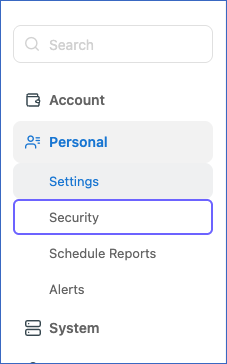
In the left navigation pane, under Personal, click Security.
-
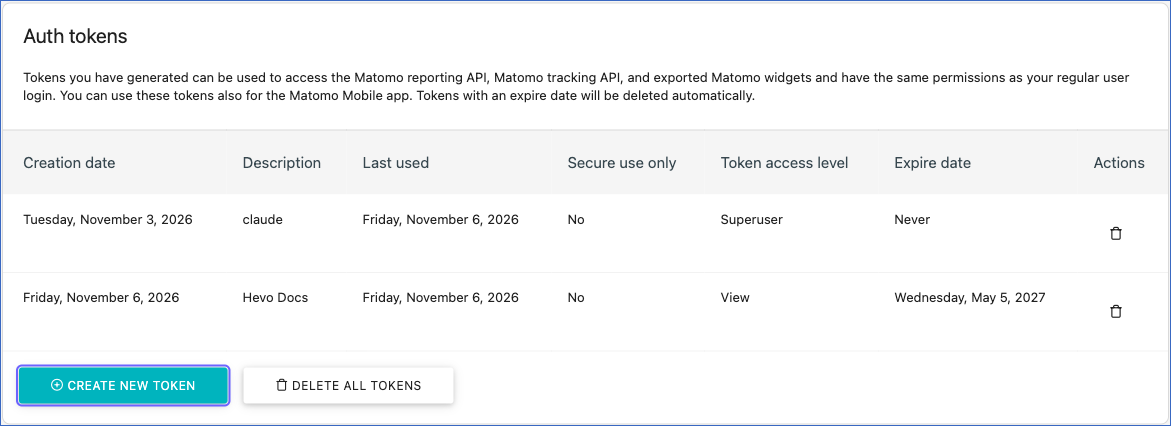
Scroll down to the Auth tokens section, and click CREATE NEW TOKEN. If prompted, enter your Matomo password and click CONFIRM.
-
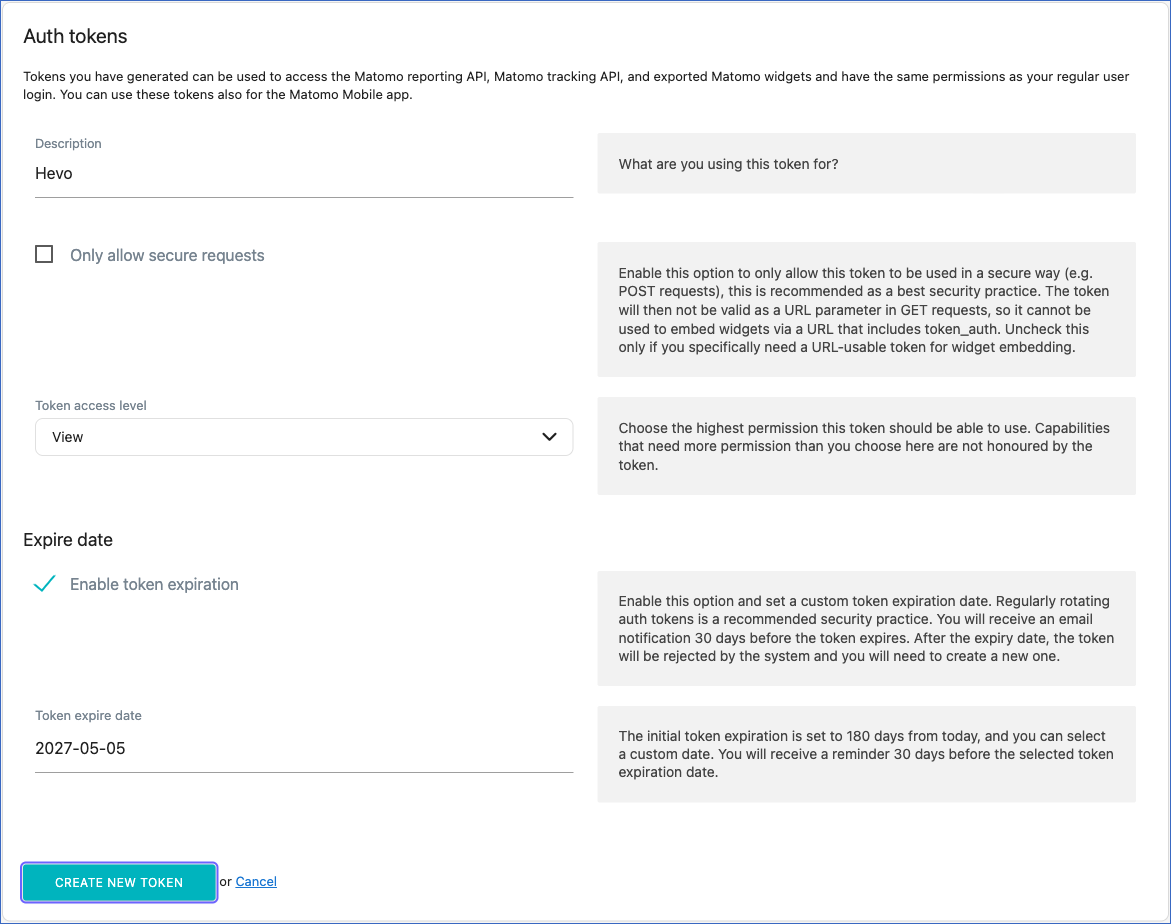
On the Auth tokens page, do the following:
-
In the Description field, enter a name for the token. For example, Hevo.
-
From the Token access level drop-down, select View. This access level is sufficient for Hevo to read your reports.
-
(Optional) In the Expire date section, set the Token expire date. By default, the token expires 180 days after it is created. To create a token that does not expire, clear the Enable token expiration check box.
-
Click CREATE NEW TOKEN.
-
-
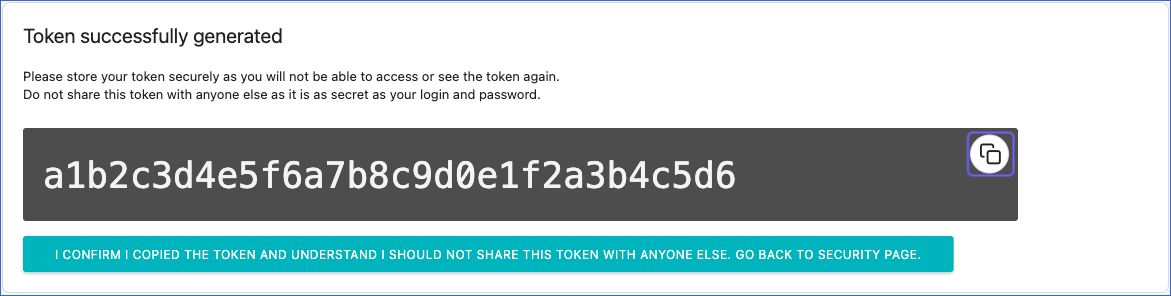
Click the copy icon to copy the token, and save it securely like any other password.
Note: Matomo displays the token only once. After you leave this page, you cannot view the token again.
Read What is the token_auth and where can I find this token to use in the API calls? for more information.
If the Auth Token expires or is deleted, or the Matomo user who created it is removed, Hevo cannot connect to your account, and the Pipeline fails. To resume data ingestion, modify the Source configuration in the Pipeline with a valid Auth Token.
Configure Matomo as a Source in your Pipeline
Perform the following steps to configure your Matomo Source:
-
Click Pipelines in the Navigation Bar.
-
Click + Create Pipeline in the Pipelines List View.
-
On the Select Source Type page, select Matomo.
-
On the Select Destination Type page, select the type of Destination you want to use.
-
In the Configure Source screen, specify the following:
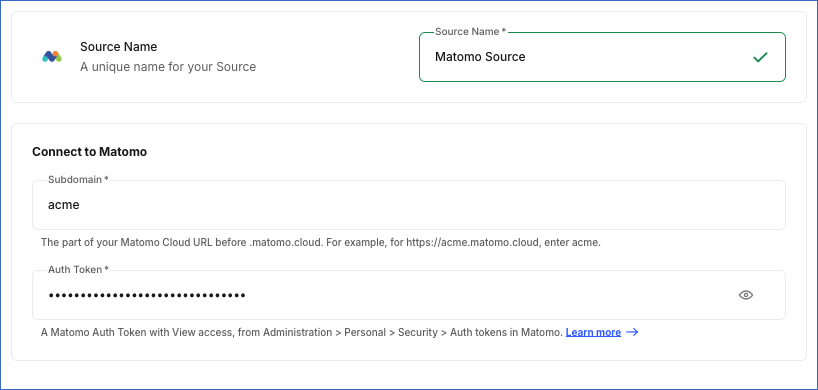
-
Source Name: A unique name for your Source, not exceeding 255 characters. For example, Matomo Source.
-
In the Connect to Matomo section, specify the following:
-
Subdomain: The part before .matomo.cloud in the URL of your Matomo Cloud account. For example, acme for https://acme.matomo.cloud. If you enter the full URL, Hevo uses only the subdomain from it. You cannot change this value after the Pipeline is created.
-
Auth Token: The Auth Token that you created in your Matomo account. You can change this value after the Pipeline is created.
-
-
-
Click Test & Continue to test the connection to your Matomo Source. Once the test is successful, you can proceed to set up your Destination.
When you click this button, Hevo checks that it can connect to the Matomo Reporting API of your account with the specified subdomain and Auth Token.
Data Replication
Hevo replicates data for all the objects selected on the Configure Objects page during Pipeline creation. By default, all supported objects and their available fields are selected. However, you can modify this selection while creating or editing the Pipeline.
Hevo ingests the following types of data from your Source objects:
-
Historical Data: The first run of the Pipeline ingests the reports of the last 365 days for each site in your Matomo account and loads them into the Destination.
-
Incremental Data: Once the historical load is complete, new and updated report data is ingested as per the sync frequency.
Hevo ingests incremental data for the objects as follows:
-
Event Action, Event Category, Event Name, and Visitor Interest: These objects contain daily reports. In each run, Hevo ingests the reports from the most recent date ingested for each site up to the current date. As a result, the report of the current day is updated in each run until the day ends.
-
Insight Overview and Visit Time: These objects contain reports for a date range, which is stored in the date field in the format start date,end date. The first run ingests the report for the last 365 days. Each subsequent run ingests the report for the range from the end date of the previous run to the current date. The records of earlier date ranges are retained in the Destination. Each record is the report for its own date range, so filter on a single date value when you query these objects, instead of adding up the records of different date ranges.
-
Multi Site: Hevo ingests the entire data of this object in each run. The visit, action, page view, and revenue values in this object are for the last 365 days.
Note: You can create a Pipeline with this Source only using the Merge load mode. The Append mode is not supported for this Source.
Currently, Matomo Cloud enforces a rate limit of 350 requests per minute or 2,000 requests every ten minutes, whichever is reached first, for each IP address. If this limit is exceeded, a rate limit exception occurs. To understand how Hevo handles such scenarios, read Handling Rate Limit Exceptions.
Schema and Primary Keys
Hevo uses the following schema to upload the records in the Destination. For a detailed view of the objects, fields, and relationships, click the ERD.
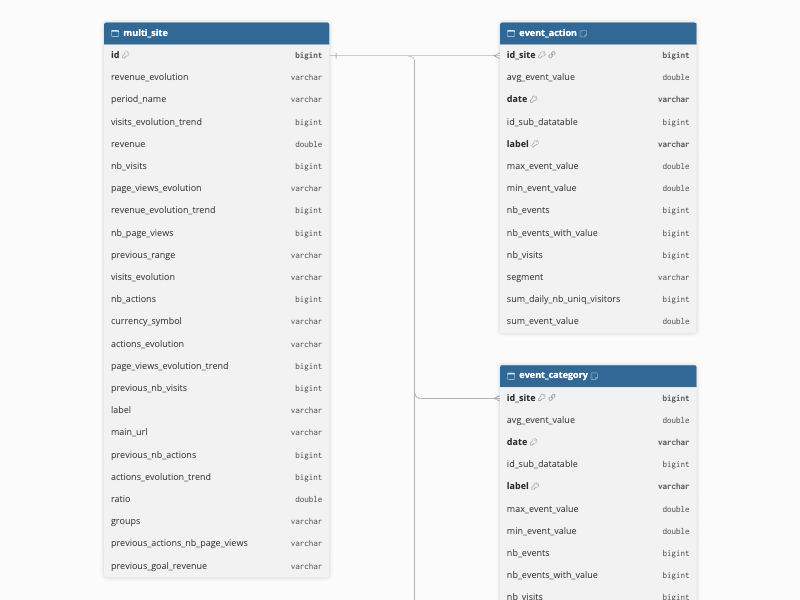
Data Model
The following is the list of tables (objects) that are created at the Destination when you run the Pipeline:
| Object | Description |
|---|---|
| Event Action | Contains the daily event statistics of each site grouped by event action, such as the number of events, the number of visits with events, and the minimum, maximum, average, and total event values. Each record is linked to the Multi Site object through the id_site field. |
| Event Category | Contains the daily event statistics of each site grouped by event category, such as the number of events, the number of visits with events, and the minimum, maximum, average, and total event values. Each record is linked to the Multi Site object through the id_site field. |
| Event Name | Contains the daily event statistics of each site grouped by event name, such as the number of events, the number of visits with events, and the maximum, average, and total event values. Each record is linked to the Multi Site object through the id_site field. |
| Insight Overview | Contains the insights of each site for a date range, which compare the visits in the range with the previous period, such as the new and previous values, the difference, the growth percentage, and whether an item is new, has disappeared, or is a mover. Each record is linked to the Multi Site object through the multi_site_id field. |
| Multi Site | Contains an overview of each site in your Matomo account that has data in the last 365 days, such as the site name, main URL, and currency, and the number of visits, actions, and page views, and the revenue in this period, along with their values for the previous period and the change between the periods. |
| Visit Time | Contains the visit statistics of each site for a date range grouped by day of the week, such as the number of visits, actions, unique visitors, users, converted visits, and bounces, and the total visit length. Each record is linked to the Multi Site object through the multi_site_id field. |
| Visitor Interest | Contains the daily number of visits of each site grouped by the number of pages viewed in a visit. Each record is linked to the Multi Site object through the multi_site_id field. |
Additional Information
Read the detailed Hevo documentation for the following related topics:
Handling of Deletes
Hevo captures deletes only for the Multi Site object. As Hevo ingests the entire data of this object in each run, it compares the data fetched from the Source with the data present in the Destination table. If a site exists in the Destination but is no longer returned by the Source, Hevo marks the record as deleted by setting the value of the metadata column __hevo__marked_deleted to True. A site is not returned by the Source if it is deleted from your Matomo account, if the Auth Token can no longer access it, or if it has no data in the last 365 days.
The following objects do not support capturing deletes:
-
Event Action
-
Event Category
-
Event Name
-
Insight Overview
-
Visit Time
-
Visitor Interest
Source Considerations
-
Hevo ingests data only for the sites that have data in the last 365 days. A site without any visits in this period is not added to the Multi Site object, and no reports are ingested for it. If a site that Hevo ingested earlier has no visits in the last 365 days, Hevo marks it as deleted in the Multi Site object.
-
Matomo includes tracked visits and events in its reports only after it processes them. Hence, recent visits are ingested in the run after Matomo has processed them.
-
By default, a Matomo Auth Token expires 180 days after it is created. Once the token expires, the Pipeline fails. To avoid this, create a token without an expiry date, or update the Auth Token in the Pipeline before it expires.
Limitations
-
Hevo supports only Matomo Cloud accounts. You cannot ingest data from a self-hosted Matomo (Matomo On-Premise) instance.
-
Hevo ingests the reports of only the last 365 days during the first run of the Pipeline. Older reports are not ingested.
Revision History
Refer to the following table for the list of key updates made to this page:
| Date | Release | Description of Change |
|---|---|---|
| Nov-06-2026 | 2.54 | New document. |