On This Page
PagerDuty is an incident management platform that engineering and operations teams use to detect and respond to incidents, manage on-call schedules and escalations, and analyze how their teams respond to incidents.
Hevo uses the PagerDuty REST API to replicate the incidents, services, on-call schedules, escalation policies, teams, users, audit records, and incident analytics of your PagerDuty account to the Destination of your choice. To ingest data, you must provide Hevo with an API key of your PagerDuty account.
Supported Features
| Feature Name | Supported |
|---|---|
| Capture deletes | Yes |
| History mode | No |
| Custom data (user-configured tables & fields) | No |
| Data blocking (skip objects and fields) | Yes |
| Resync (objects and Pipelines) | Yes |
| API configurable | Yes |
Prerequisites
-
An active PagerDuty account from which data is to be ingested.
-
The Admin or Account Owner role in your PagerDuty account to create an API key.
-
An API key of your PagerDuty account is available.
Obtain the API Key
Hevo connects to your PagerDuty account using a REST API key, also called an API access key. A read-only API key is sufficient for Hevo to ingest all the objects except User Delegation. To ingest the User Delegation object, you must create an API key with full access. PagerDuty displays the API key only once, when you create it.
Perform the following steps to obtain the API key:
-
Log in to your PagerDuty account.
-
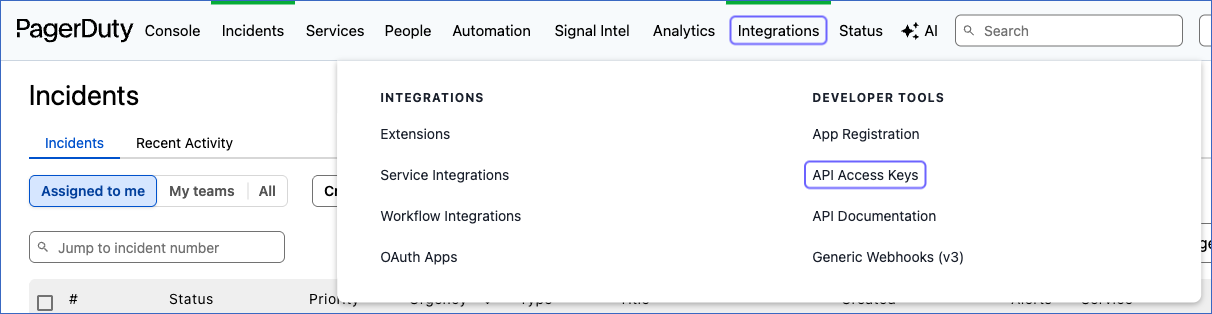
In the top navigation bar, click Integrations, and then under DEVELOPER TOOLS, click API Access Keys.
-
On the API Access Keys page, click + Create New API Key.

-
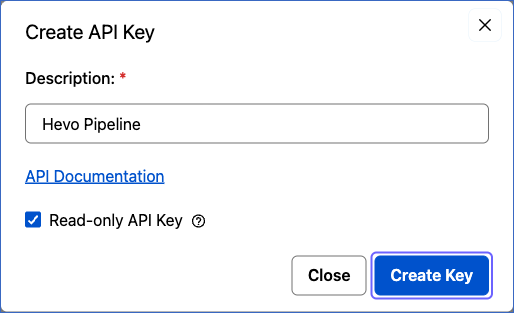
In the Create API Key dialog, do the following:
-
Specify a Description for the API key. For example, Hevo Pipeline.
-
Select the Read-only API Key check box. If you want to ingest the User Delegation object, do not select this check box.
-
Click Create Key.
-
-
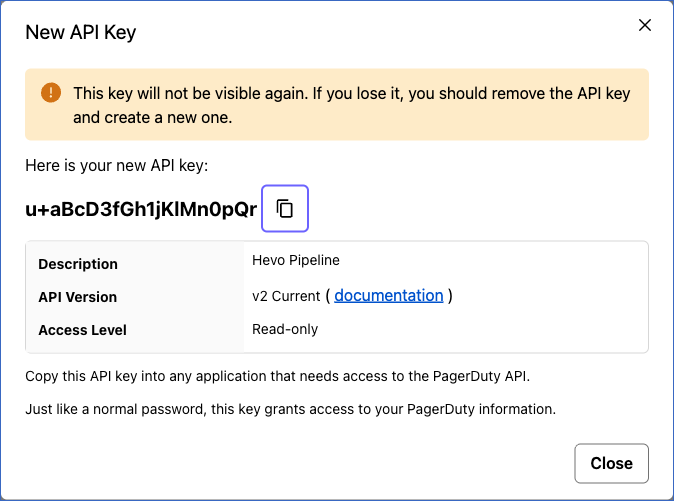
In the New API Key dialog, click the copy icon next to the API key to copy it, save it securely like any other password, and then click Close.
Configure PagerDuty as a Source in your Pipeline
Perform the following steps to configure your PagerDuty Source:
-
Click Pipelines in the Navigation Bar.
-
Click + Create Pipeline in the Pipelines List View.
-
On the Select Source Type page, select PagerDuty.
-
On the Select Destination Type page, select the type of Destination you want to use.
-
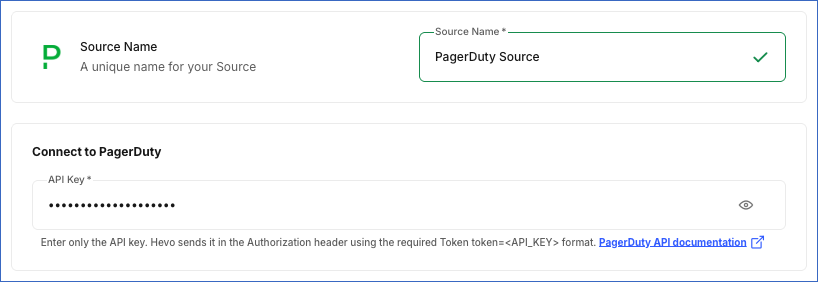
In the Configure Source screen, specify the following:
-
Source Name: A unique name for your Source, not exceeding 255 characters. For example, PagerDuty Source.
-
In the Connect to PagerDuty section, specify the following:
- API Key: The API key that you obtained from PagerDuty.
-
-
Click Test & Continue to test the connection to your PagerDuty Source. Once the test is successful, you can proceed to set up your Destination.
Data Replication
Hevo replicates data for all the objects selected on the Configure Objects page during Pipeline creation. By default, all supported objects and their available fields are selected. However, you can modify this selection while creating or editing the Pipeline. To ingest a child object, you must also select its parent object. For example, to ingest the Incident Notes object, you must also select the Incidents object. The Data Model lists the child objects of each parent object.
Hevo replicates data in the following ways:
-
Historical data: In the first run of the Pipeline, Hevo ingests the existing data of the selected objects. For the following objects, PagerDuty returns only recent data, so Hevo ingests the data of a limited period:
Object Period of Historical Data Analytics All Services Metrics The last 364 days Audit Records The last 30 days Oncalls The last 89 days Paused Incident Report Alerts The last 179 days -
Incremental data: In each subsequent run, as per the sync frequency:
-
For the Incidents object, Hevo ingests the incidents created since the last run. To capture the changes made to recent incidents, such as acknowledgements and resolutions, Hevo also re-ingests the incidents created in the last seven days.
-
For the Analytics Raw Incidents object, Hevo ingests the incidents updated since the last run and re-ingests the incidents updated in the last day.
-
For the Change Events, Log Entries, and Notifications objects, Hevo ingests the records created since the last run and re-ingests the records of the last day.
-
For the Analytics All Services Metrics object, Hevo ingests the daily metrics since the last run and re-ingests the metrics of the last ingested day.
-
For the Audit Records, Oncalls, and Paused Incident Report Alerts objects, Hevo ingests the records since the last run.
-
For all other objects, Hevo ingests the entire data of the object.
-
You can resync all the objects except the child objects. Resyncing a parent object also resyncs its child objects.
PagerDuty limits each API key to 960 REST API requests per minute. Requests that exceed this limit are rejected by PagerDuty with an error. Read Rate Limits — REST API.
Note: You can create a Pipeline with this Source only using the Merge load mode. The Append mode is not supported for this Source.
Schema and Primary Keys
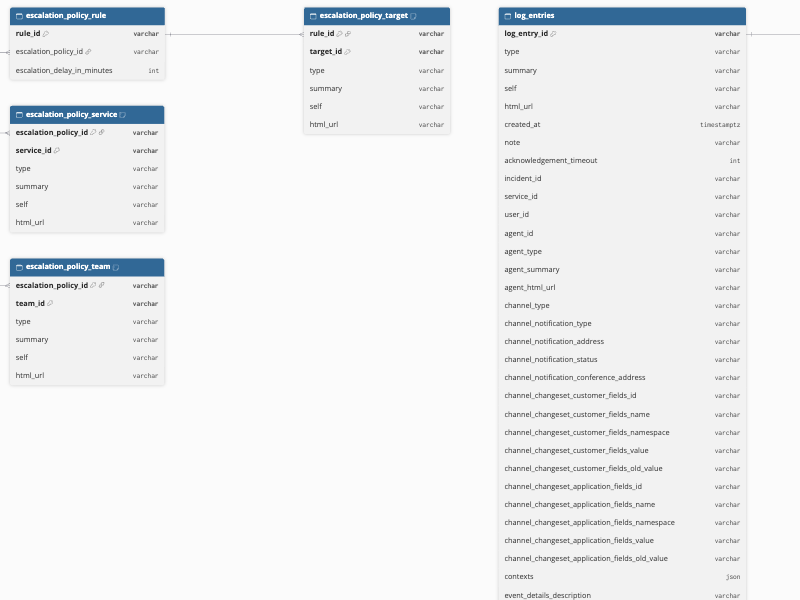
Hevo uses the following schema to upload the records in the Destination. For a detailed view of the objects, fields, and relationships, click the ERD.
Data Model
The following is the list of tables (objects) that are created at the Destination when you run the Pipeline:
| Object | Description |
|---|---|
| Action Input | Contains the input parameters of the action of each incident workflow step, including the name, type, and value of each parameter. |
| Action Output | Contains the output parameters of the action of each incident workflow step. |
| Addons | Contains the add-ons installed in your PagerDuty account, including the name, source URL, and services of each add-on. |
| Analytics All Services Metrics | Contains the daily incident metrics for all your services, including the number of incidents, escalations, and interruptions, and the mean time to acknowledge, engage, mobilize, and resolve incidents. |
| Analytics Raw Incidents | Contains the analytics data of each incident, including the service, team, escalation policy, priority, urgency, and the time taken to acknowledge, engage, and resolve the incident. It includes the child objects, Raw Incident Acknowledged User ID, Raw Incident Acknowledged User Name, Raw Incident Assigned User ID, Raw Incident Assigned User Name, Raw Incident Joined User ID, and Raw Incident Joined User Name. |
| Audit Record Actors | Contains the users, API keys, or apps that performed each change. |
| Audit Record Field | Contains the fields changed by each change, including the values of the field before and after the change. |
| Audit Records | Contains the changes made to the resources of your account, such as users, teams, services, schedules, and escalation policies, including the action, actor, resource, method, and time of each change. It includes the child objects, Audit Record Actors, Audit Record Field, and Reference. |
| Business Service Subscribers | Contains the users and teams that are subscribed to the updates of each business service. |
| Business Services | Contains your business services, including the name, description, point of contact, and team of each business service. It includes a child object, Business Service Subscribers. |
| Change Event Service | Contains the services affected by each change event. |
| Change Events | Contains the change events sent to your services, such as deployments and configuration changes, including the summary, source, time, integration, and links of each change event. It includes a child object, Change Event Service. |
| Escalation Policies | Contains your escalation policies, including the name, description, number of loops, and on-call handoff notification setting of each policy. It includes the child objects, Escalation Policy Rule, Escalation Policy Service, and Escalation Policy Team. |
| Escalation Policy Rule | Contains the escalation rules of each escalation policy, including the escalation delay in minutes. It includes a child object, Escalation Policy Target. |
| Escalation Policy Service | Contains the services that use each escalation policy. |
| Escalation Policy Target | Contains the users and schedules that are notified by each escalation rule. |
| Escalation Policy Team | Contains the teams associated with each escalation policy. |
| Event Orchestrations | Contains your global event orchestrations, including the name, description, team, number of routes, and the creation and update details of each orchestration. |
| Extension Feature | Contains the features supported by each extension schema. |
| Extension Objects | Contains the services to which each extension is attached. |
| Extension Schema Option | Contains the synchronization options of each extension schema. |
| Extension Schema Send Type | Contains the types of messages that each extension schema can send. |
| Extension Schemas | Contains the extension schemas (extension vendors) available in PagerDuty, including the label, description, key, URL, and configuration of each schema. It includes the child objects, Extension Feature, Extension Schema Send Type, and Extension Schema Option. |
| Extensions | Contains the extensions configured in your account, such as webhooks, including the name, endpoint URL, extension schema, and status of each extension. It includes a child object, Extension Objects. |
| Incident Custom Field Values | Contains the values of the custom fields of each incident. |
| Incident Notes | Contains the notes added to each incident, including the content, author, and creation time of each note. |
| Incident Teams | Contains the teams associated with each incident. |
| Incident Workflow Action | Contains the action performed by each incident workflow step. |
| Incident Workflow Step | Contains the steps of each incident workflow, including the name and description of each step. It includes the child objects, Incident Workflow Action, Action Input, and Action Output. |
| Incident Workflow Team | Contains the team that owns each incident workflow. |
| Incident Workflows | Contains your incident workflows, including the name, description, status, and the creation and publication dates of each workflow. It includes the child objects, Incident Workflow Step and Incident Workflow Team. |
| Incidents | Contains your incidents, including the number, title, status, urgency, priority, service, escalation policy, assignments, and the creation, update, and resolution times of each incident. It includes the child objects, Incident Teams, Incident Custom Field Values, and Incident Notes. |
| License Valid Role | Contains the user roles that each license supports. |
| Licenses | Contains the licenses of your account, including the name, description, role group, and the number of allocations used and available of each license. It includes a child object, License Valid Role. |
| Log Entries | Contains the log entries of your incidents, such as triggers, acknowledgements, assignments, escalations, notifications, and resolutions, including the type, agent, channel, and time of each entry. It includes the child objects, Log Entry Team and Log Entry Assignee. |
| Log Entry Assignee | Contains the users assigned to the incident by each log entry. |
| Log Entry Team | Contains the teams associated with each log entry. |
| Maintenance Window Service | Contains the services covered by each maintenance window. |
| Maintenance Window Team | Contains the teams associated with each maintenance window. |
| Maintenance Windows | Contains your maintenance windows, including the description, the start and end times, and the user who created each window. It includes the child objects, Maintenance Window Service and Maintenance Window Team. |
| Notifications | Contains the notifications sent to your users, including the user, type, address, and start time of each notification. |
| Oncalls | Contains the on-call shifts of your users, including the user, schedule, escalation policy, escalation level, and the start and end times of each shift. |
| Paused Incident Report Alerts | Contains the reporting periods of the paused incident notifications of your account. It includes the child objects, Paused Incident Triggered After Pause Alert and Paused Incident Resolved After Pause Alert. |
| Paused Incident Resolved After Pause Alert | Contains the alerts that were resolved while their notifications were paused. |
| Paused Incident Triggered After Pause Alert | Contains the alerts that triggered an incident after their notifications were paused. |
| Raw Incident Acknowledged User ID | Contains the IDs of the users who acknowledged each incident. |
| Raw Incident Acknowledged User Name | Contains the names of the users who acknowledged each incident. |
| Raw Incident Assigned User ID | Contains the IDs of the users who were assigned to each incident. |
| Raw Incident Assigned User Name | Contains the names of the users who were assigned to each incident. |
| Raw Incident Joined User ID | Contains the IDs of the users who joined the response to each incident. |
| Raw Incident Joined User Name | Contains the names of the users who joined the response to each incident. |
| Reference | Contains the references of each change to other resources, such as the teams of a user. It includes the child objects, Reference Added and Reference Removed. |
| Reference Added | Contains the resources that were added to each reference. |
| Reference Removed | Contains the resources that were removed from each reference. |
| Schedule Escalation Policies | Contains the escalation policies that use each schedule. |
| Schedule Layers | Contains the layers of each schedule, including the name, the start and end times, the rotation start time, the rotation length, and the coverage of each layer. |
| Schedule Users | Contains the users in each schedule. |
| Schedules | Contains your on-call schedules, including the name, description, and time zone of each schedule. It includes the child objects, Schedule Escalation Policies, Schedule Users, and Schedule Layers. |
| Service Days Of Week | Contains the days of the week in the support hours of each service. |
| Service Integrations | Contains the integrations configured on each service. |
| Service Scheduled Actions | Contains the scheduled actions of each service, such as changing the urgency of incidents when support hours start. |
| Service Teams | Contains the teams associated with each service. |
| Services | Contains your services, including the name, description, status, escalation policy, alert creation and grouping settings, support hours, and the acknowledgement and auto-resolve timeouts of each service. It includes the child objects, Service Integrations, Service Teams, Service Scheduled Actions, and Service Days Of Week. |
| Tag Teams | Contains the teams to which each tag is assigned. |
| Tags | Contains the tags created in your account, including the label of each tag. It includes a child object, Tag Teams. |
| Teams | Contains your teams, including the name, description, and default role of each team. |
| Templates | Contains your status update templates, including the name, description, type, email subject and body, message, and the creation and update details of each template. |
| User Delegation | Contains the OAuth delegations of each user, including the client, scope, status, and the creation and expiry times of each delegation. |
| User Notification Subscriptions | Contains the business services and teams to whose updates each user is subscribed. |
| User Oncall Handoff Notification Rules | Contains the on-call handoff notification rules of each user, including the handoff type, contact method, and how many minutes in advance the user is notified. |
| Users | Contains the users of your account, including the name, email address, role, job title, time zone, and locale of each user. It includes the child objects, User Notification Subscriptions, User Oncall Handoff Notification Rules, Users Team, Users Notification Rule, Users Contact Method, and User Delegation. |
| Users Contact Method | Contains the contact methods of each user, such as email, phone, SMS, and push notification, including the label, address, and country code of each method. |
| Users Notification Rule | Contains the notification rules of each user. |
| Users Team | Contains the teams of each user. |
| Vendors | Contains the vendors (integration types) available in PagerDuty, including the name, description, website, and integration guide of each vendor. |
Additional Information
Read the detailed Hevo documentation for the following related topics:
Handling of Deletes
Hevo captures deletes by comparing the data ingested from the Source with the data present in the Destination in each run. How Hevo handles a deleted record depends on the object:
-
Addons, Business Services, Escalation Policies, Event Orchestrations, Extension Schemas, Extensions, Incident Workflows, Licenses, Maintenance Windows, Schedules, Services, Tags, Teams, Templates, Users, Vendors, and their child objects, except Service Scheduled Actions: If a record exists in the Destination but is no longer returned by the Source, Hevo marks it as deleted by setting the value of the metadata column __hevo__marked_deleted to True. The record remains in the Destination with all its data.
-
Service Scheduled Actions: Hevo replaces the scheduled actions of each service in every run. A scheduled action that is no longer returned by the Source is removed from the Destination.
-
Child objects of Analytics Raw Incidents, Change Events, Incidents, and Log Entries: Each time Hevo ingests a parent record, it replaces the child records of that parent record. A child record that is no longer returned by the Source, such as a team removed from an incident, is removed from the Destination.
-
All other objects: Hevo does not capture deletes for these objects.
Source Considerations
-
PagerDuty displays the API key only once, when you create it. If you lose the API key, you must create a new one in PagerDuty and update it in the configuration of your Source.
-
PagerDuty does not allow read-only API keys to access the OAuth delegations of users. If you use a read-only API key, Hevo does not ingest any data for the User Delegation object. To ingest this object, use an API key with full access.
-
PagerDuty processes the data of the Analytics All Services Metrics and Analytics Raw Incidents objects periodically, and makes it available generally within 24 hours of an incident. Hence, recent incidents may not be present in these objects until PagerDuty processes them.
-
Hevo re-ingests only the incidents created in the last seven days. If an incident that was created earlier is updated, for example, if it is resolved, Hevo does not ingest the update. To ingest the latest data of such incidents, resync the Incidents object.
Limitations
- Hevo does not ingest the alerts, priorities, rulesets, status pages, status dashboards, or webhook subscriptions of your PagerDuty account.
Revision History
Refer to the following table for the list of key updates made to this page:
| Date | Release | Description of Change |
|---|---|---|
| Nov-03-2026 | 2.54 | New document. |