On This Page
Recharge is a subscription management platform that enables e-commerce brands to build, manage, and scale recurring revenue programs. It stores data related to subscriptions, customers, charges, orders, addresses, payment methods, and discounts, which businesses can use to analyze recurring revenue and customer behavior.
Hevo uses the Recharge Merchant API and Recharge webhooks to replicate data from your Recharge account to the Destination of your choice. To connect to your Recharge account, you must provide Hevo with an API token. Hevo uses this token to authenticate API requests and to automatically register the webhooks it needs to capture deleted records, Payment Method changes, and Checkout data.
Supported Features
| Feature Name | Supported |
|---|---|
| Capture deletes | Yes |
| History mode | No |
| Custom data (user-configured tables & fields) | No |
| Data blocking (skip objects and fields) | Yes |
| Resync (objects and Pipelines) | Yes (child objects are resynced through their parent object; the Checkout object cannot be resynced) |
| API configurable | No |
Prerequisites
-
An active Recharge account from which data is to be ingested.
-
An API token with the required scopes is available to provide Hevo access to your Recharge account data.
-
Your Recharge plan and store platform support the objects you want to ingest. Read Source Considerations.
Obtain the API Token
Hevo requires an API token to authenticate with the Recharge Merchant API. By default, only the store owner can create and manage API tokens. The store owner can grant other staff accounts access to the API tokens page.
Perform the following steps to create the API token:
-
Log in to your Recharge merchant portal as a user with permissions to create an API token.
-
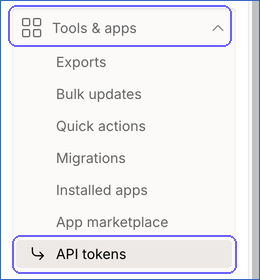
In the left navigation pane, click Tools & apps, and then click API tokens.
-
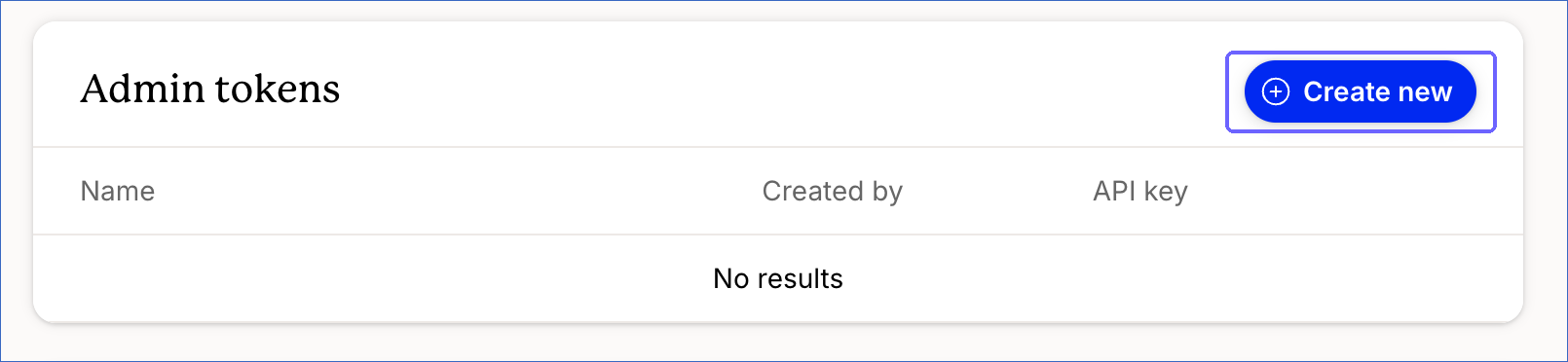
On the API tokens page, in the Admin tokens section, click + Create new.
-
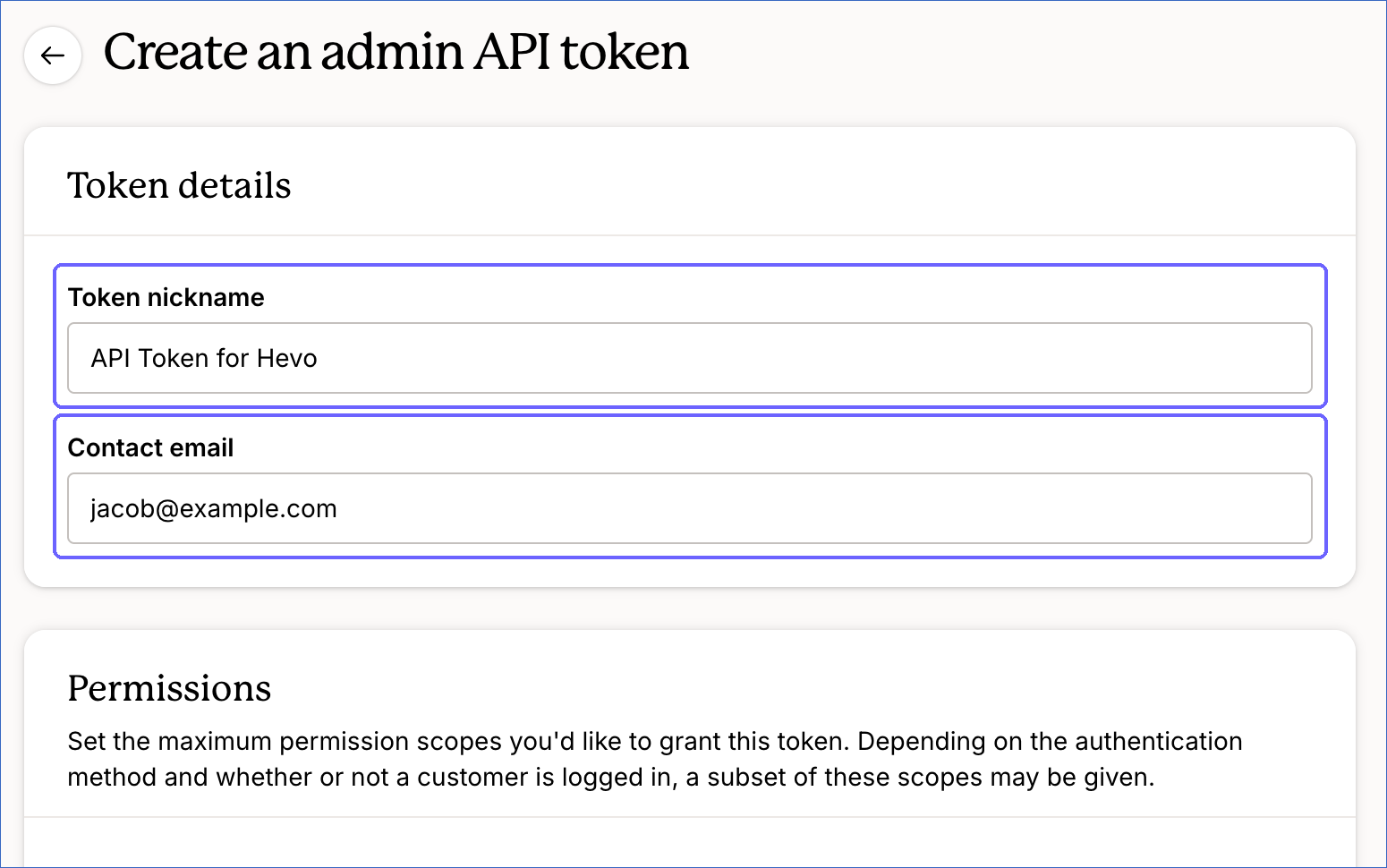
On the Create an admin API token page, do the following:
-
Specify a Token nickname to identify this token, for example, API Token for Hevo.
-
Specify a Contact email so Recharge can contact you if there are any updates regarding the token.
-
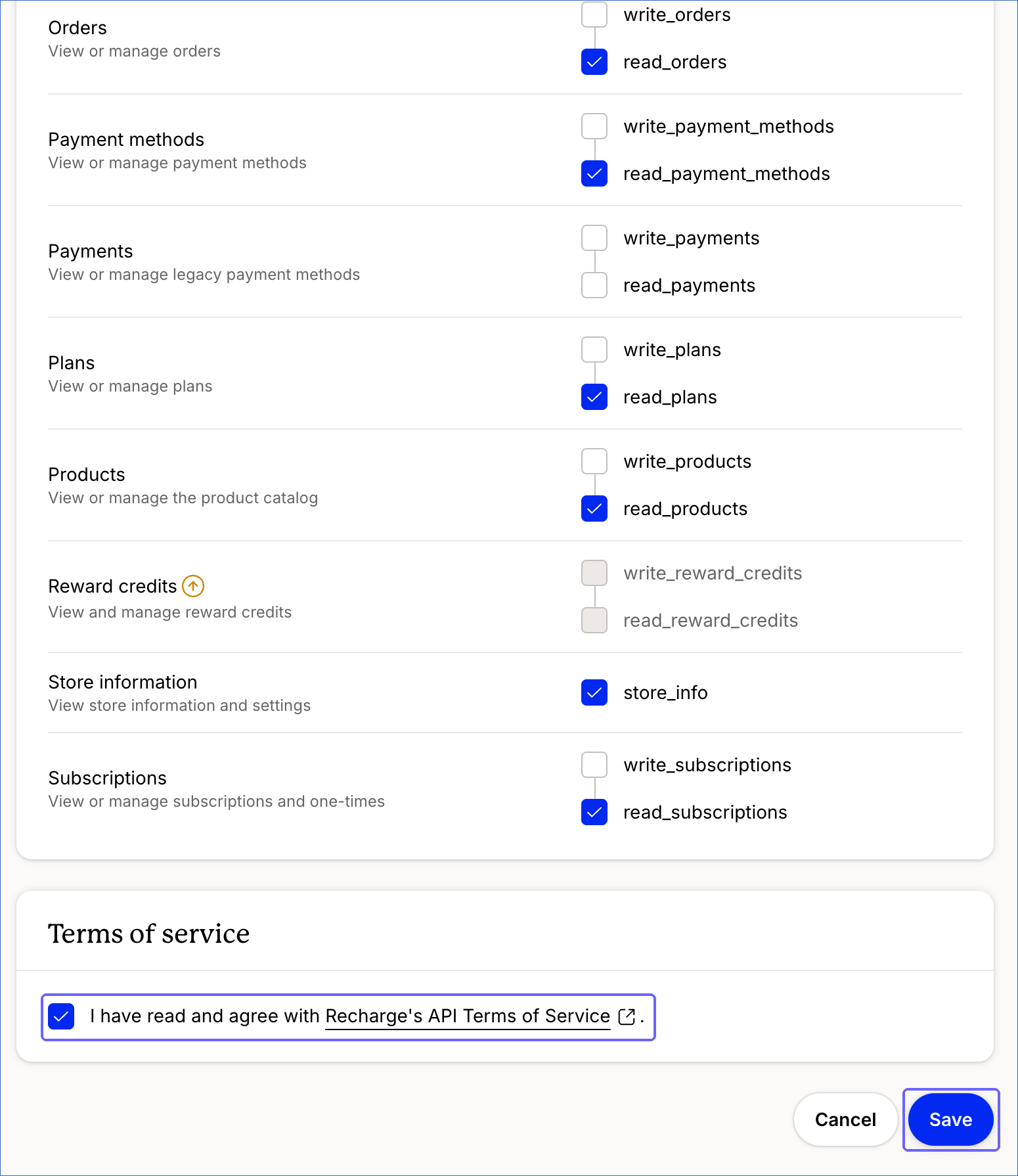
In the Permissions section, select the check boxes for the following scopes required to replicate the objects supported by Hevo:
Scope Objects read_credit_accountsCredit Account read_credit_adjustmentsCredit Adjustment read_customersAddress, Customer, and Metafield read_discountsDiscount read_eventsEvent read_ordersCharge, Checkout, Metafield, and Order read_payment_methodsPayment Method read_plansPlan read_productsCollection, Collection Product, and Product read_subscriptionsBundle Selection, Metafield, One-Time Product, and Subscription store_infoEvent and Metafield Note: The
read_credit_accounts,read_credit_adjustments, andread_eventsscopes are available only if your Recharge plan supports the related objects. Read Source Considerations. -
Select the I have read and agree with Recharge’s API Terms of Service check box.
-
Click Save.
-
-
In the Admin tokens section, hover over the API key of the token that you created, click the copy icon, and save the key securely like any other password. Use this key while configuring your Recharge Source in the Hevo Pipeline.

If the API token configured in the Pipeline is revoked manually from your Recharge account, Hevo cannot authenticate with the Source. As a result, all active jobs for the Pipeline fail, and no data is replicated. To resume data replication, modify the Source configuration in the Pipeline with a valid API token. Once the updated token is saved, Hevo re-authenticates the Source, and data ingestion resumes from the last saved offset.
Configure Recharge as a Source in your Pipeline
Perform the following steps to configure your Recharge Source:
-
Click Pipelines in the Navigation Bar.
-
Click + Create Pipeline in the Pipelines List View.
-
On the Select Source Type page, select Recharge.
-
On the Select Destination Type page, select the type of Destination you want to use.
-
On the Select Pipeline Type page, click Edge, and then click Continue.
This page appears only if the selected Destination type is supported in Edge and your Team has an existing Recharge Pipeline with the same Destination type. Otherwise, you can proceed to create an Edge Pipeline.
-
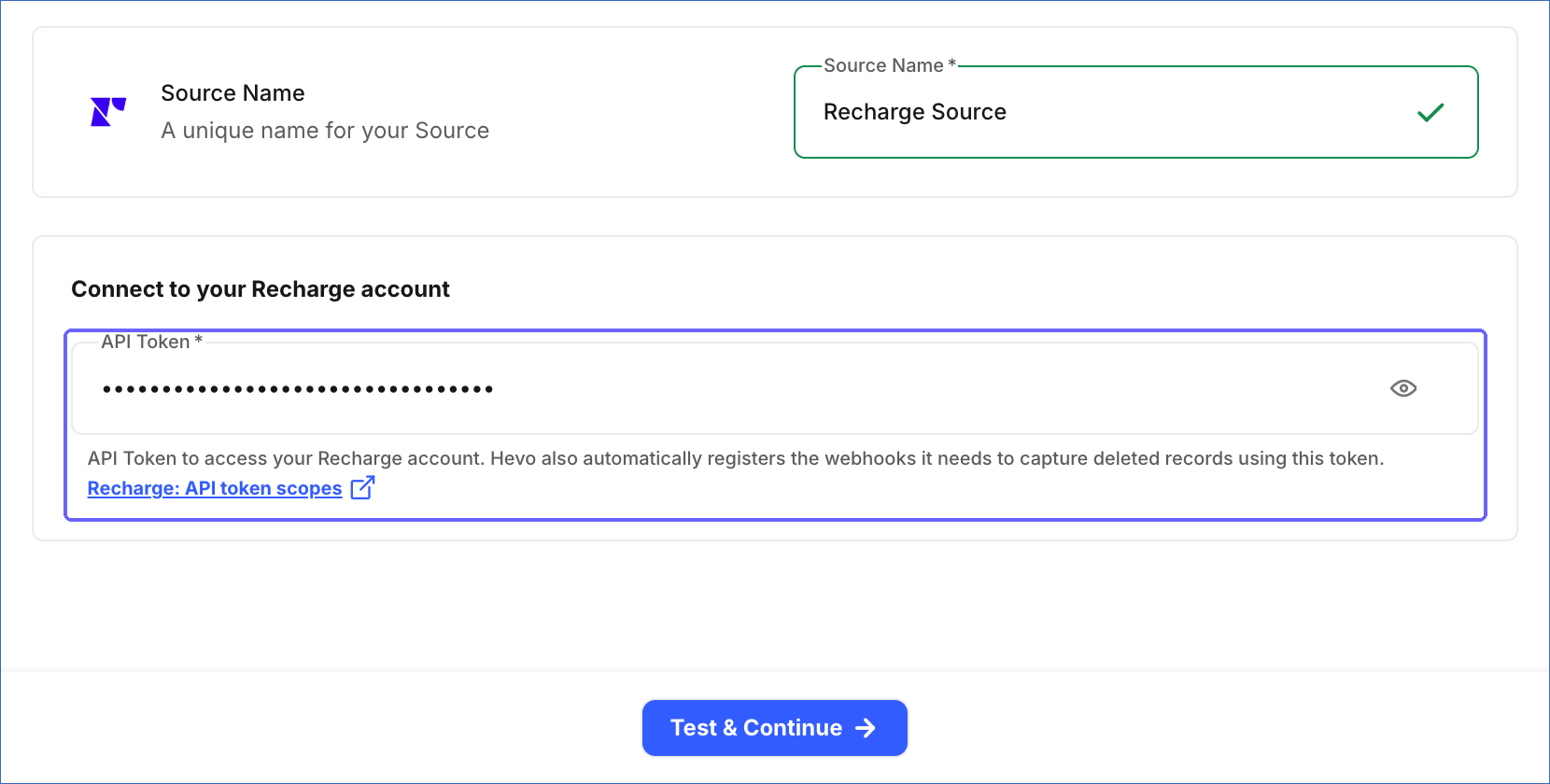
In the Configure Source screen, specify the following:
-
Source Name: A unique name for your Source, not exceeding 255 characters. For example, Recharge Source.
-
In the Connect to your Recharge account section, specify the following:
- API Token: The API token that you obtained from your Recharge account. Hevo uses this token to authenticate requests to the Recharge Merchant API and to automatically register the webhooks it needs to capture deleted records, Payment Method changes, and Checkout data.
-
-
Click Test & Continue to test the connection to your Recharge Source. Once the test is successful, you can proceed to set up your Destination.
Note: If the API token does not have the scope for some objects, the test succeeds with a warning, and those objects are shown as inaccessible on the Configure Objects page. If the token has none of the required scopes, the test fails.
Data Replication
Hevo replicates data for all the objects selected on the Configure Objects page during Pipeline creation. By default, all supported objects and their available fields are selected. However, you can modify this selection while creating or editing the Pipeline.
Selecting a parent object automatically includes all its associated child objects for replication. However, you can select or deselect the child objects individually.
Hevo ingests the following types of data from your Source objects:
-
Historical Data: The first run of the Pipeline ingests all available historical data for the selected objects and loads it into the Destination.
-
Incremental Data: Once the historical load is complete, new and updated records for objects are ingested as per the sync frequency.
For the following objects, Hevo ingests the entire data during each Pipeline run:
-
Collection
-
Collection Product
-
Credit Account
-
Metafield
-
Product
For all other objects, Hevo ingests only the incremental data in subsequent Pipeline runs.
Note:
-
For the Payment Method object, incremental data is captured through Recharge webhooks. Hevo registers these webhooks automatically when the Pipeline runs. After Hevo registers a webhook, it sends a test event from Recharge to confirm that the webhook can reach Hevo. If the test event does not reach Hevo within 240 seconds, the Pipeline run fails, and Hevo tries again in the next run.
-
For the Checkout object, Hevo ingests data only through Recharge webhooks, because Recharge does not provide an API to list checkouts. As a result, Hevo does not ingest historical data for this object. It ingests only the checkouts that are created or updated after it registers the webhooks. If Hevo does not read a checkout event within 24 hours, for example, because the Pipeline is paused, the event is lost, and a resync cannot recover it.
-
For the Charge and Customer objects, Hevo also ingests the data of the previous day once every 24 hours, to capture updates that Recharge makes with a delay.
-
For the Customer Delivery Schedule Order and Customer Delivery Schedule Order Line Item objects, Hevo ingests the delivery schedules of all customers once every 24 hours. In the other Pipeline runs, Hevo ingests the delivery schedules of only the customers whose data has changed.
-
Hevo ingests the Subscription, Subscription History, and Subscription UTM Tag objects using the same API call. As a result, if the ingestion of one of these objects fails, for example, because of a rate limit or server error that persists after retries, all three objects fail in that run. The other objects continue to be ingested, and the next Pipeline run ingests these objects from their last saved offset.
Recharge enforces a rate limit on the number of requests that can be made to its API in a given period of time. A store can make up to 40 requests at once, after which requests are allowed at a rate of 2 per second. This limit is shared by all the Pipelines and apps that use the store. Hevo paces its requests to stay within the limit and leaves room for the requests of other apps. As a result, a large sync proceeds at about 2 requests per second, and more slowly when other apps or Pipelines use the same store. If the limit is exceeded, a rate limit exception occurs. To understand how Hevo handles such scenarios, read Handling Rate Limit Exceptions.
Note: You can create a Pipeline with this Source using either the Merge or the Append load mode. Merge is the default load mode, and you can change the load mode for each object. If an object uses the Append load mode, its Destination table can contain duplicate records because of the following:
-
Each incremental Pipeline run starts 5 minutes before the end of the previous run, so the records updated in those 5 minutes are ingested again. For the objects ingested based on the update or creation time of records, the records with the latest timestamp of the previous run, and their child records, are also ingested again in each run.
-
For the Charge and Customer objects, the data of the previous day is ingested again once every 24 hours.
-
For the Collection, Collection Product, Credit Account, Metafield, and Product objects, and the child objects of Product, the entire data is ingested in each Pipeline run.
-
For the Customer Delivery Schedule Order and Customer Delivery Schedule Order Line Item objects, the delivery schedules of all customers are ingested again at least once every 24 hours.
-
Recharge can send a webhook event more than once. Each event is added as a separate record. For example, a deleted record can have two or more delete records.
-
Each resync of an object ingests its data again. For the Event object, a resync ingests the events of the last 7 days again.
If you change an object from Append to Merge, resync the object with Drop and Load to remove the duplicate records. However, you cannot do this for the Checkout object and the Charge object and its child objects, because the Checkout object cannot be resynced, and a resync of the Charge object permanently removes the charges older than 90 days. For these objects, remove the duplicate records in the Destination instead. For the Checkout object, keep the latest record of each checkout token. For the child objects of the Charge object, keep the records of the latest load of each charge. Read Source Considerations.
Schema and Primary Keys
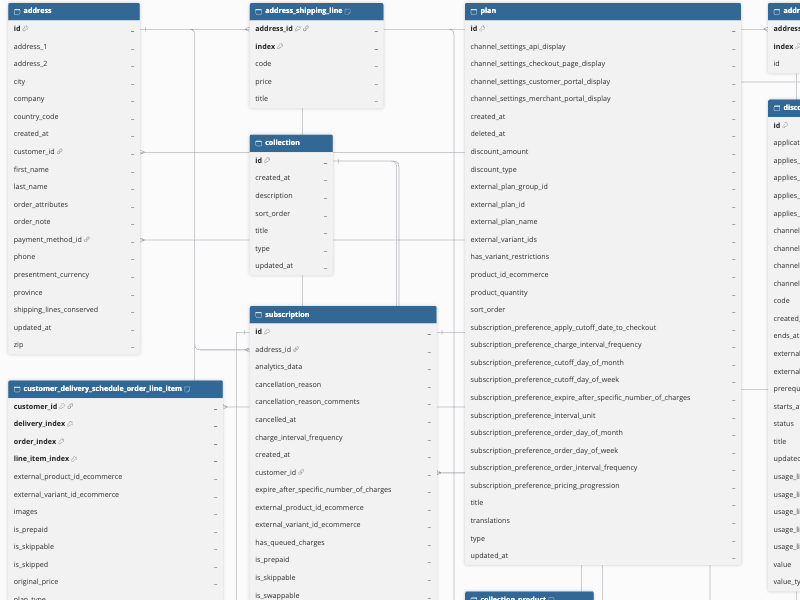
Hevo uses the following schema to upload the records to the Destination. For a detailed view of the objects, fields, and relationships, click the ERD.
Data Model
The following is the list of tables (objects) that are created at the Destination when you run the Pipeline:
| Object | Description |
|---|---|
| Address | Contains the shipping addresses associated with customers, including contact details and the payment method used. It includes the following child objects: - Address Discounts - Address Shipping Line |
| Bundle Selection | Contains the product selections that customers make for bundle subscriptions. It includes a child object, Bundle Selection Item. |
| Charge | Contains the charges created for subscriptions and one-time products, including status, totals, taxes, billing and shipping details, and processing information. It includes the following child objects: - Charge Activity - Charge Activity Payment Method Info - Charge Discount - Charge Line Item - Charge Order Attribute - Charge Shipping Line - Charge Tax Line - Charge UTM Tag |
| Checkout | Contains the checkouts created in your store, including the customer, shipping, and totals information. It includes the following child objects: - Checkout Line Item - Checkout UTM Tag |
| Collection | Contains the collections used to group products, including title, description, type, and sort order. |
| Collection Product | Contains details of the products in each collection. |
| Credit Account | Contains the store credit accounts of customers, including the balance and the currency of each account. |
| Credit Adjustment | Contains the adjustments that add to or deduct from the balance of a store credit account. |
| Customer | Contains customer profiles, including contact details, payment method status, and subscription counts. It includes the following child objects: - Customer Delivery Schedule Order - Customer Delivery Schedule Order Line Item - Customer UTM Tag |
| Discount | Contains the discounts that can be applied to subscriptions and charges, including code, value, application method, validity period, and usage limits. |
| Event | Contains the events that Recharge records for actions taken in your store, such as changes to subscriptions or customers. It includes a child object, Event Updated Attribute. |
| Metafield | Contains custom metadata attached to Recharge resources, including the owner resource, namespace, key, and value. |
| One-Time Product | Contains one-time products added to an upcoming charge, including product and variant details, price, quantity, and next scheduled charge date. |
| Order | Contains the orders generated from the charges, including the status, totals, and shipping details of each order. It includes a child object, Order Line Item. |
| Payment Method | Contains the payment methods stored for customers, including payment type, status, processor details, billing address, and card or PayPal details. |
| Plan | Contains the subscription plans defined for products, including discount settings, channel display settings, and subscription preferences such as charge and order intervals. |
| Product | Contains the products that are available for subscription in your store. It includes the following child objects: - Product Option - Product Option Value - Product Variant |
| Subscription | Contains subscriptions, including status, product, variant details, price, quantity, order, next charge date, and cancellation details. It includes the following child objects: - Subscription History - Subscription UTM Tag The Subscription History object contains each state of a subscription that Hevo ingests, identified by the subscription ID and the time of the update. If a subscription changes more than once between two Pipeline runs, only its latest state is recorded. To reload the Subscription History object, resync the Subscription object. |
Additional Information
Read the detailed Hevo documentation for the following related topics:
Handling of Deletes
Hevo handles deleted records differently based on how data is ingested for an object.
For the following objects, Hevo captures delete events using Recharge webhooks. Hevo registers the required webhooks in your Recharge account automatically using the API token you provided, so you do not need to configure webhooks manually. When a record is deleted in Recharge, Hevo marks the corresponding record in your Destination by setting the value of the metadata column __hevo__marked_deleted to True.
-
Address
-
Bundle Selection
-
Charge
-
Customer
-
One-Time Product
-
Order
-
Payment Method
-
Plan
-
Subscription
For the Address, Bundle Selection, One-Time Product, Payment Method, and Plan objects, Hevo also marks records as deleted when you resync the object. This captures the deletes whose webhook events Hevo did not receive.
Note: Hevo retains the webhook events that it receives from Recharge for 24 hours. If the Pipeline is paused or its runs fail for more than 24 hours, the delete events sent during that time are lost. If the events of an object are not read for more than 12 hours, Hevo displays a warning for the object. After 20 hours, the warning states that the object’s deletes and updates are about to be lost. To capture these deletes for the Address, Bundle Selection, One-Time Product, Payment Method, and Plan objects, resync the objects. For the Charge, Customer, Order, and Subscription objects, these deletes cannot be recovered.
Hevo also uses a full data refresh approach to capture delete actions for the following objects. During each Pipeline run, Hevo compares the data fetched from the Source object with the data present in the Destination table. If a record exists in the Destination but is no longer returned by the Source, the record is marked as deleted by setting the value of the metadata column __hevo__marked_deleted to True. This applies to the following objects:
-
Collection
-
Collection Product
-
Credit Account
-
Metafield
-
Product, and its child objects
For the Discount object, Hevo captures deleted records only when the object is resynced. For the Subscription History object, Hevo marks the earlier states of subscriptions and the deleted subscriptions as deleted only when you resync the Subscription object.
Hevo does not capture deletes for the Checkout, Credit Adjustment, and Event objects. Recharge does not send delete events for checkouts, and it does not delete credit adjustments and events.
For child objects, Hevo captures deletes as follows:
| Child Objects | Handling of Deletes |
|---|---|
| Child objects of the Charge and Order objects, Customer UTM Tag, and Subscription UTM Tag | Records that are no longer returned with their parent record are removed from the Destination. The records are also removed when their parent record is deleted. |
| Address Discounts, Address Shipping Line, and Bundle Selection Item | Records that are no longer returned with their parent record are removed from the Destination. The records are also removed when their parent record is deleted. If the parent record is not ingested again, the records are marked as deleted when you resync the parent object. |
| Customer Delivery Schedule Order and Customer Delivery Schedule Order Line Item | Records that are no longer returned in the customer’s delivery schedule are removed from the Destination. If the delivery schedule is not ingested again, the records are marked as deleted when you resync the Customer object. The records are not removed when the customer is deleted. |
| Checkout Line Item and Checkout UTM Tag | The records are replaced each time Hevo receives a newer version of the checkout. |
| Event Updated Attribute | Not applicable. Events are not deleted in Recharge. |
Note: If an object uses the Append load mode, Hevo does not update or remove the existing records. A delete captured through a webhook is added as a new record that contains only the record ID, with __hevo__marked_deleted set to True. Deletes inferred through a full data refresh or a resync are not captured.
Source Considerations
-
Some objects are available only on specific Recharge plans or store platforms. If your store does not support an object, the object is shown as inaccessible on the Configure Objects page:
-
Bundle Selection and Event: Available only on the Recharge Plus plan.
-
Credit Account and Credit Adjustment: Available only on the Recharge Plus plan with the Retain add-on.
-
Product: Available only for stores on the Recharge Custom platform. It is not available for Shopify and BigCommerce stores.
-
Checkout: Available only for stores on the BigCommerce and Recharge Custom platforms. It is not available for Shopify stores.
-
-
Recharge returns only the charges processed in the last 90 days. As a result, Hevo does not ingest older charges. If you resync the Charge object with Drop and Load, the charges older than 90 days, and their child records, are permanently removed from the Destination. If the Pipeline does not run for more than 90 days, the changes to charges processed before then cannot be ingested, and Hevo displays a warning for the Charge object.
-
Recharge retains events for only 7 days. As a result, the first run of the Pipeline and any resync of the Event object ingest the events from the last 7 days only. A resync does not change the older events in the Destination. However, if you resync the Event object with Drop and Load, the events older than 7 days are permanently removed from the Destination. If the Pipeline is paused for more than 7 days, the events created during that time are not ingested.
-
Hevo ingests the delivery schedules of only the customers who have an active subscription, a queued one-time product, or a prepaid subscription.
-
Recharge allows a maximum of 10 webhooks for each webhook topic per API token. Each Pipeline registers its own webhooks, so if you use the same API token in more than 10 Pipelines, the limit is reached. Hevo then skips the topic and displays a warning for the affected objects, and their deletes and updates are not captured. To free up a slot, delete the webhooks that the token no longer needs using the Recharge API (list webhooks and delete a webhook). Recharge does not provide a screen to manage webhooks.
-
Hevo does not remove the Recharge webhooks of a Pipeline when you delete the Pipeline. These webhooks count toward the webhook limit until you delete them using the Recharge API. Recharge removes a webhook only after 20 failed deliveries, so the webhooks of topics that rarely send events can remain indefinitely.
-
If all the records of an object are deleted in Recharge, Hevo does not mark the existing records of that object as deleted in the Destination, because the full data refresh returns no records.
Revision History
Refer to the following table for the list of key updates made to this page:
| Date | Release | Description of Change |
|---|---|---|
| Oct-14-2026 | NA | New document. |