Salesloft (Edge)
On This Page
Salesloft is a revenue orchestration platform that sales teams use to engage prospects through cadences of emails, calls, and tasks, and to track meetings, opportunities, and deals.
Hevo uses the Salesloft API to replicate the people, accounts, cadences, sales activities, meetings, opportunities, templates, and team data of your Salesloft account to the Destination of your choice. To ingest data, you must provide Hevo with an API key of your Salesloft account.
Supported Features
| Feature Name | Supported |
|---|---|
| Capture deletes | Yes, for the objects whose records Hevo ingests in each run |
| History mode | No |
| Custom data (user-configured tables & fields) | No |
| Data blocking (skip objects and fields) | Yes |
| Resync (objects and Pipelines) | Yes |
| API configurable | Yes |
Prerequisites
-
An active Salesloft account from which data is to be ingested.
-
A Salesloft user who can access all the data that you want to replicate, to create the API key. Read Data access of the API key.
-
An API key of your Salesloft account. Read Create an API Key.
Create an API Key
Hevo connects to your Salesloft account using an API key. The API key is linked to the Salesloft user who creates it, and Hevo reads the data that this user can access.
Perform the following steps to create an API key:
-
Log in to your Salesloft account.
-
Go to https://accounts.salesloft.com/oauth/applications, and in the API Keys section, click Create New.
-
Specify a name for the API key. For example, Hevo.
-
Select the scopes required by Hevo, and then click Save.
-
Copy the API key that is displayed, and save it securely like any other password.
If the API key is deleted in Salesloft, Hevo cannot connect to your account, and the Pipeline fails. To resume data ingestion, create a new API key and modify the Source configuration with it.
Scopes Required by Hevo
Your API key must have the scopes that allow Hevo to read data from your Salesloft account. Hevo requires the following types of scopes:
-
Mandatory scopes: Allow Hevo to connect to your Salesloft account.
-
Optional scopes: Allow Hevo to ingest data from the corresponding objects in your Salesloft account.
Mandatory Scopes
Your API key must have the following scope for Hevo to connect to your Salesloft account. If the API key does not have this scope, the connection test fails when you click Test & Continue while configuring your Source.
| Scope | Objects |
|---|---|
team:read |
- Groups - Team - Team Tag - Team Templates - Team Template Tags - Users |
Optional Scopes
Select the following scopes based on the objects that you want Hevo to ingest. If the API key does not have a scope, the connection test succeeds, but the objects associated with the scope fail during ingestion. Hevo continues to ingest the other objects.
| Scope | Objects |
|---|---|
accounts:read |
- Account Stage - Account Tiers - Accounts - Account Tag |
activities:read |
- Activity History |
cadences:read |
- Actions - Cadence - Cadence Tag - Cadence Memberships - Steps |
calls:read |
- Call Data Records - Call Disposition - Call Instructions - Call Sentiments - Calls - Call Recording - Phone Number Assignment |
conversations:read |
- Conversation - Transcription - Transcription Sentence |
crm:read |
- CRM Activities - CRM Activity Fields - CRM Users |
emails:read |
- Email Template Attachments - Email Templates - Email Template Tags - Emails - Team Template Attachment |
meetings:read |
- Calendar Event - Calendar Event Attendee - Meetings - Meeting Guests |
meetings:write |
- Meeting Settings - Meeting Setting Times Available |
notes:read |
- Notes |
opportunities:read |
- Opportunities - Opportunity Tag |
people:read |
- People - People Tag - People Contact Restriction - Person Stages - Successes |
tasks:read |
- Tasks |
workflow:read |
- Imports |
Note: To ingest the subjects and bodies of emails, the API key must also have the email_contents:read scope. Salesloft classifies this scope as privileged.
Configure Salesloft as a Source in your Pipeline
Perform the following steps to configure your Salesloft Source:
-
Click Pipelines in the Navigation Bar.
-
Click + Create Pipeline in the Pipelines List View.
-
On the Select Source Type page, select Salesloft.
-
On the Select Destination Type page, select the type of Destination you want to use.
-
On the Select Pipeline Type page, click Edge, and then click Continue.
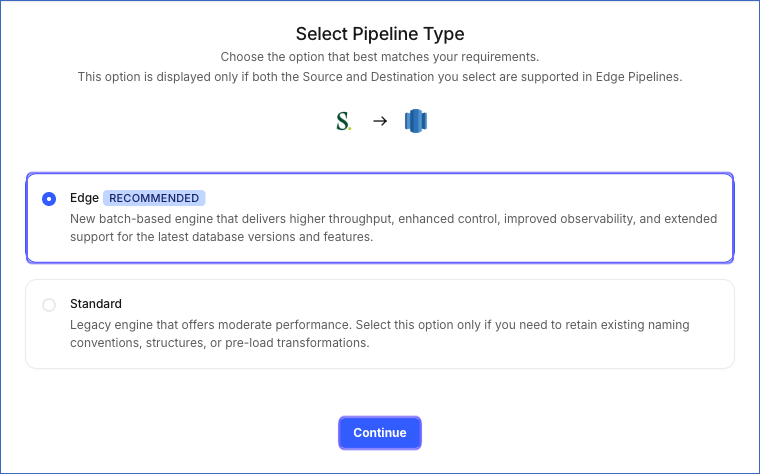
Note: This page appears only if the selected Destination type is supported in Edge. Otherwise, you can proceed to create an Edge Pipeline.
-
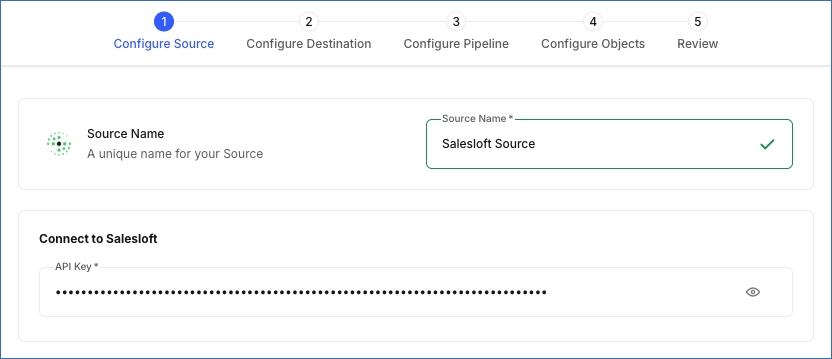
On the Configure Source page, specify the following:
-
Source Name: A unique name for your Source, not exceeding 255 characters. For example, Salesloft Source.
-
In the Connect to Salesloft section:
- API Key: The API key that you created in Salesloft.
-
-
Click Test & Continue to test the connection to your Salesloft Source. Hevo checks that it can read the details of your Salesloft team with the API key. Once the test is successful, you can proceed to set up your Destination.
Data Replication
Hevo replicates data for all the objects selected on the Configure Objects page during Pipeline creation. By default, all supported objects and their available fields are selected. However, you can modify this selection while creating or editing the Pipeline.
The first run of the Pipeline ingests all the data of the selected objects. In the subsequent runs, as per the sync frequency, Hevo ingests data as follows:
| Ingestion | Objects |
|---|---|
| New and updated records, based on the time each record was last updated |
Accounts, Actions, Activity History, Cadence Memberships, Call Data Records, Calls, CRM Activities, Emails, Notes, Opportunities, People, Successes, and Tasks. For the Accounts, Calls, Opportunities, and People objects, Hevo also ingests the child objects of each new or updated record. |
| All the records, in each run | All other objects |
For each transcription, Hevo reads the sentences of the transcription with a separate API request. As a result, the number of API requests increases with the number of transcriptions. If your Salesloft account has many recorded conversations, ingestion can take longer and reach the Salesloft API rate limit.
You can resync any object except the child objects.
Note: You can create a Pipeline with this Source only using the Merge load mode. The Append mode is not supported for this Source.
Schema and Primary Keys
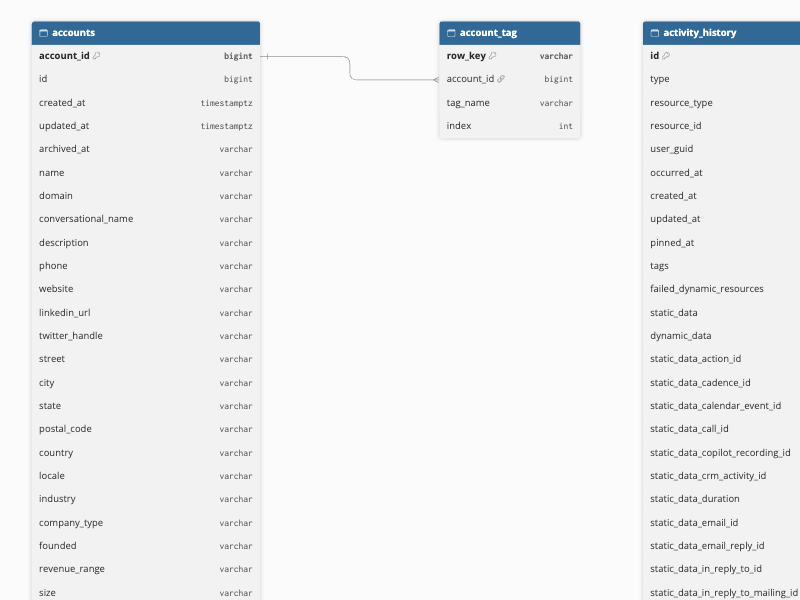
Hevo uses the following schema to upload the records in the Destination. For a detailed view of the objects, fields, and relationships, click the ERD.
Data Model
The following is the list of tables (objects) that are created at the Destination when you run the Pipeline:
| Object | Description |
|---|---|
| Account Stage | Contains the stages that you define for accounts in Salesloft, including the name, order, and status of each stage. |
| Account Tiers | Contains the tiers that you define for accounts in Salesloft, including the name, order, and status of each tier. |
| Accounts | Contains the companies that you engage in Salesloft, including the name, domain, industry, size, revenue range, address, owner, stage, tier, CRM details, and last contact details of each account. It includes a child object, Account Tag, which contains the tags of each account. |
| Actions | Contains the steps that are due for your users in cadences, including the type, status, due date, user, person, cadence, and step of each action. |
| Activity History | Contains the history of the activities recorded in Salesloft, such as emails, calls, notes, and meetings, including the type, resource, user, time, and the related records of each activity. |
| Cadence | Contains the cadences of your team, including the name, owner, stages, settings, status, and whether each cadence is shared or archived. It includes a child object, Cadence Tag, which contains the tags of each cadence. |
| Cadence Memberships | Contains the people added to each cadence, including the cadence, person, user, current step, state, and the counts of emails, calls, clicks, replies, and bounces of each membership. |
| Cadence Priority | Contains the priorities that you can assign to cadences, including the name and priority level of each priority. |
| Calendar Event | Contains the events in the calendars connected to Salesloft, including the title, start and end times, location, organizer, status, and provider of each event. It includes a child object, Calendar Event Attendee, which contains the attendees of each event. |
| Call Data Records | Contains the records of the calls placed and received through Salesloft, including the direction, duration, status, caller and called numbers, user, person, and recording status of each call. |
| Call Disposition | Contains the call dispositions that your users can log for calls, including the name and CRM value of each disposition. |
| Call Instructions | Contains the instructions of the call steps in your cadences. |
| Call Sentiments | Contains the call sentiments that your users can log for calls, including the name of each sentiment. |
| Calls | Contains the calls logged in Salesloft, including the person called, user, duration, disposition, sentiment, cadence, step, and related note and task of each call. It includes a child object, Call Recording, which contains the recordings of each call. |
| Conversation | Contains the recorded conversations in Salesloft, including the title, platform, duration, start and end dates, owner, person, account, and transcription of each conversation. |
| CRM Activities | Contains the activities that Salesloft logs to your CRM, including the subject, description, activity type, CRM ID, person, user, and custom CRM fields of each activity. |
| CRM Activity Fields | Contains the fields that Salesloft maps to CRM activities, including the title, field, field type, CRM object type, and value of each field. |
| CRM Users | Contains the CRM users linked to your Salesloft users, including the name, CRM ID, CRM username, and Salesloft user of each CRM user. |
| Email Detail | Contains the details of the email steps in your cadences, including the email template of each step. |
| Email Template Attachments | Contains the files attached to email templates, including the name, size, content type, and email template of each attachment. |
| Email Templates | Contains the email templates of your team, including the title, subject, body, owner, tracking settings, groups, and usage counts of each template. It includes a child object, Email Template Tags, which contains the tags of each template. |
| Emails | Contains the emails sent through Salesloft, including the recipient, status, sent time, tracking settings, user, cadence, step, template, and the counts of views, clicks, and replies of each email. |
| Groups | Contains the groups of your team, including the name, parent group, and accessible groups of each group. |
| Imports | Contains the imports of people into Salesloft, including the name, type, user, and the counts of imported and current people of each import. |
| Integration Detail | Contains the details of the integration steps in your cadences, including the instructions, integration, and step type of each step. |
| Meeting Settings | Contains the meeting scheduling settings of your users, including the calendar, title, default meeting length, buffer time, and booking options of each user. It includes a child object, Meeting Setting Times Available, which contains the available hours of each day. |
| Meetings | Contains the meetings booked through Salesloft, including the title, start and end times, recipient, location, status, cadence, step, and person of each meeting. It includes the child objects, Meeting Attendees and Meeting Guests, which contain the attendees and guests of each meeting. |
| Notes | Contains the notes added in Salesloft, including the content, user, call, and the record with which each note is associated. |
| Opportunities | Contains the opportunities synced from your CRM, including the name, amount, stage, probability, close date, owner, account, and whether each opportunity is closed or won. It includes a child object, Opportunity Tag, which contains the tags of each opportunity. |
| Other Detail | Contains the details of the other (generic) steps in your cadences, including the instructions of each step. |
| People | Contains the people (prospects) in Salesloft, including the name, email addresses, phone numbers, title, location, account, owner, stage, CRM details, and last contact and reply details of each person. It includes the child objects, People Tag and People Contact Restriction, which contain the tags and contact restrictions of each person. |
| Person Stages | Contains the stages that you define for people in Salesloft, including the name, order, and status of each stage. |
| Phone Number Assignment | Contains the phone numbers assigned to your users, including the number and user of each assignment. |
| Steps | Contains the steps of your cadences, including the name, type, day, step number, cadence, and settings of each step. |
| Successes | Contains the successes recorded for people, including the time of the success, person, user, latest cadence, step, email, and call, and the counts of the touches before each success. |
| Tasks | Contains the tasks of your users, including the subject, description, type, state, due date, reminder, person, user, and completion time of each task. |
| Team | Contains the details of your Salesloft team, including the name, plan, license limit, email limit, and the recording, tracking, and privacy settings of the team. |
| Team Tag | Contains the tags used in your team, including the name of each tag. |
| Team Template Attachment | Contains the files attached to team templates, including the name, size, and team template of each attachment. |
| Team Templates | Contains the templates shared with your team, including the title, subject, body, tracking settings, groups, last modified user, and usage counts of each template. It includes a child object, Team Template Tags, which contains the tags of each template. |
| Transcription | Contains the transcriptions of your recorded conversations, including the conversation and language of each transcription. It includes a child object, Transcription Sentence, which contains the sentences of each transcription, with the start and end times and text of each sentence. |
| Users | Contains the users of your Salesloft team, including the name, email addresses, role, time zone, group, team, and status of each user. |
Additional Information
Read the detailed Hevo documentation for the following related topics:
Handling of Deletes
Hevo captures the deletes of the Salesloft objects as follows:
| Deletes Captured | Objects |
|---|---|
| In each run, by comparing the data |
Account Stage, Account Tiers, Cadence, Cadence Priority, Calendar Event, Call Disposition, Call Instructions, Call Sentiments, Conversation, CRM Activity Fields, CRM Users, Email Detail, Email Template Attachments, Email Templates, Groups, Imports, Integration Detail, Meeting Settings, Meetings, Other Detail, Person Stages, Phone Number Assignment, Steps, Team, Team Tag, Team Template Attachment, Team Templates, Transcription, and Users. Hevo ingests all the records of these objects in each run, and marks the records that are no longer returned by Salesloft as deleted by setting the value of the metadata column _hevo_marked_deleted to True. For example, if you delete an import in Salesloft, the record is marked as deleted in the Imports table in the next run. |
| In each run, by replacing the data |
Cadence Tag, Email Template Tags, and Team Template Tags. Hevo replaces the data of these objects in each run. As a result, the Destination contains only the tags that are currently assigned to each cadence and template. |
| Not captured | All other objects. A record that you delete in Salesloft, such as a person or a note, remains in the Destination. Similarly, a tag or contact restriction that you remove from a person, account, or opportunity remains in the People Tag, Account Tag, Opportunity Tag, or People Contact Restriction object. |
Source Considerations
-
The API key is linked to the Salesloft user who created it. Create the API key as a user who can access all the records that you want to replicate.
-
Salesloft limits the number of API requests that each team can make in a minute. If the limit is reached or Salesloft returns a temporary server error, Hevo waits for the time that Salesloft specifies, or 60 seconds if no time is specified, and then retries the request. Hevo makes up to four attempts for each request. If all the attempts fail, the ingestion of the object fails.
Revision History
Refer to the following table for the list of key updates made to this page:
| Date | Release | Description of Change |
|---|---|---|
| Nov-25-2026 | 2.55 | New document. |