Shortcut (Edge)
On This Page
Shortcut is a project management platform that software teams use to plan, track, and deliver work through stories, epics, iterations, and objectives.
Hevo uses the Shortcut REST API to replicate the data of your Shortcut workspace, such as its stories, epics, iterations, objectives, teams, and members, to the Destination of your choice. To ingest data, you must provide Hevo with an API token of your Shortcut account.
Supported Features
| Feature Name | Supported |
|---|---|
| Capture deletes | Yes |
| History mode | No |
| Custom data (user-configured tables & fields) | No |
| Data blocking (skip objects and fields) | Yes |
| Resync (objects and Pipelines) | Yes |
| API configurable | Yes |
Prerequisites
-
An active Shortcut account from which data is to be ingested.
-
An API token with at least the Read permission is available.
Generate an API Token
Hevo connects to your Shortcut workspace using an API token. The token has the same access as the Shortcut user who creates it, so Hevo can read the data that the user can access in the workspace. Hevo only reads data from Shortcut, so a token with the Read permission is sufficient.
Perform the following steps to generate an API token:
-
Log in to your Shortcut account.
-
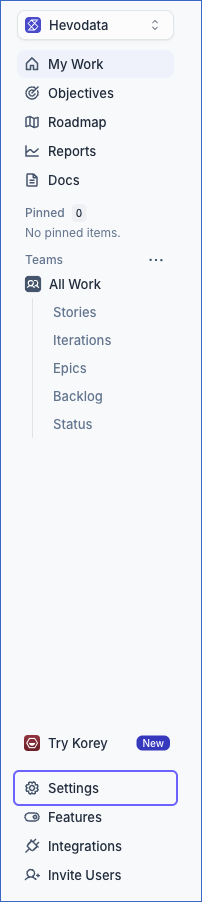
In the left navigation pane, click Settings.
-
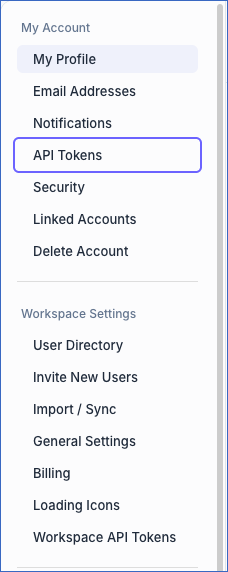
Under My Account, click API Tokens.
-
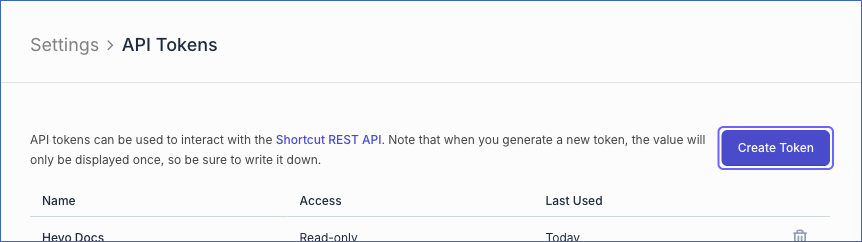
On the API Tokens page, click Create Token.
-
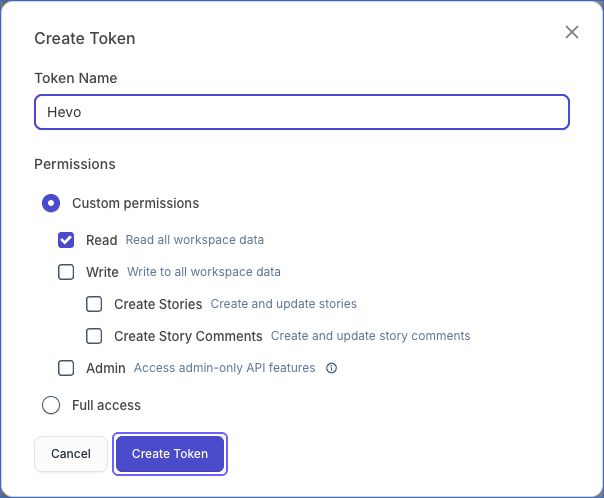
In the Create Token dialog, do the following:
-
Specify a Token Name. For example, Hevo.
-
Under Permissions, select Custom permissions, and ensure that Read is selected.
-
Click Create Token.
-
-
Copy the generated token and save it securely like any other password. Shortcut displays the token only once.
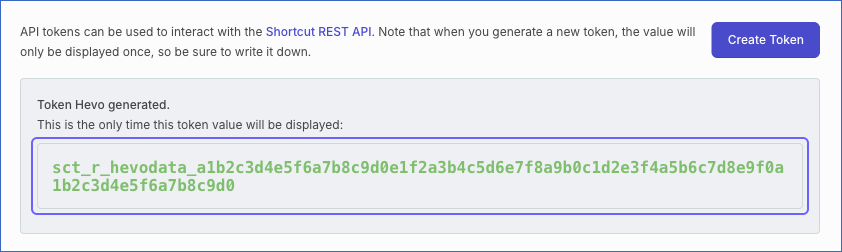
Read Authentication for more information about API tokens.
If the API token is deleted, or the user who created it is removed from your Shortcut workspace, Hevo cannot connect to your workspace, and the Pipeline fails. To resume data ingestion, generate a new token and modify the Source configuration with it.
Configure Shortcut as a Source in your Pipeline
Perform the following steps to configure your Shortcut Source:
-
Click Pipelines in the Navigation Bar.
-
Click + Create Pipeline in the Pipelines List View.
-
On the Select Source Type page, select Shortcut.
-
On the Select Destination Type page, select the type of Destination you want to use.
-
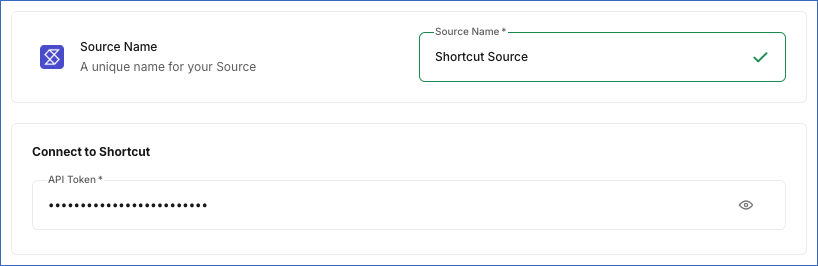
In the Configure Source screen, specify the following:
-
Source Name: A unique name for your Source, not exceeding 255 characters. For example, Shortcut Source.
-
In the Connect to Shortcut section, specify the following:
- API Token: The API token that you generated in Shortcut.
-
-
Click Test & Continue to test the connection to your Shortcut Source. Hevo checks the connection by reading the details of the user who created the API token. The test fails if Shortcut rejects the API token. Once the test is successful, you can proceed to set up your Destination.
Data Replication
Hevo replicates data for all the objects selected on the Configure Objects page during Pipeline creation. By default, all supported objects and their available fields are selected. However, you can modify this selection while creating or editing the Pipeline. To ingest a child object, you must also select its parent object.
Hevo ingests data for the objects as follows:
-
Story: In the first run, Hevo ingests all the stories in your workspace, including archived stories. In subsequent runs, Hevo ingests only the stories that were created or updated since the last run, based on the updated_at field. For each of these stories, Hevo also ingests its child objects, such as comments, checklist tasks, branches, and commits.
-
All other objects: Hevo ingests the entire data of these objects in each run, as per the sync frequency.
You can resync the parent objects. To resync a child object, resync its parent object.
Shortcut allows 200 API requests per minute for each workspace. As Hevo reads the details of each story individually, the first run can take longer for workspaces with many stories. Read Rate Limiting.
Note: You can create a Pipeline with this Source only using the Merge load mode. The Append mode is not supported for this Source.
Schema and Primary Keys
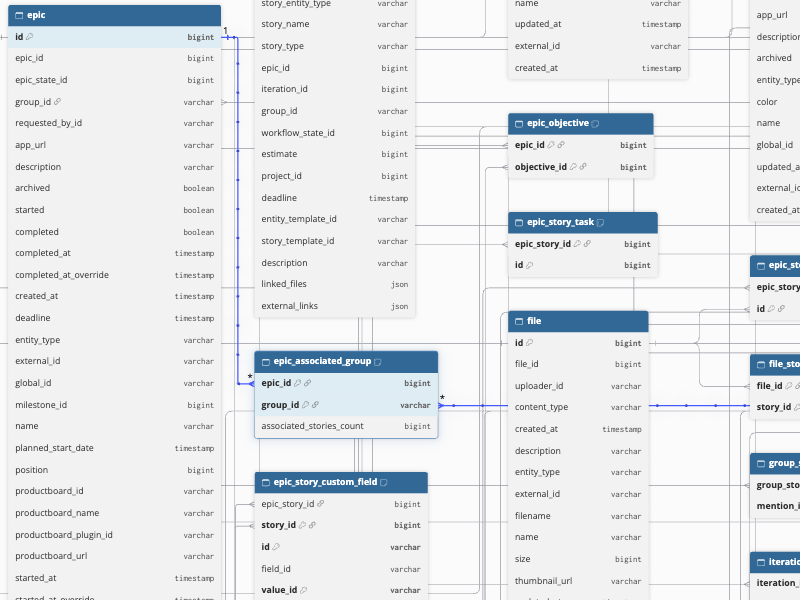
Hevo uses the following schema to upload the records in the Destination. For a detailed view of the objects, fields, and relationships, click the ERD.
Data Model
The following is the list of tables (objects) that are created at the Destination when you run the Pipeline:
| Object | Description |
|---|---|
| Authenticated Member | Contains the details of the member who generated the API token, such as the name, role, and workspace. |
| Category | Contains the categories used to group milestones and objectives, including the name, color, and type of each category. It includes the following child objects: - Category Milestones - Category Objectives |
| Category Milestones | Contains the milestones in each category. |
| Category Objectives | Contains the objectives in each category. |
| Custom Field | Contains the custom fields of your workspace, including the name, type, and status of each field. It includes a child object, Custom Field Value. |
| Custom Field Value | Contains the values that you can select for each custom field. |
| Entity Template | Contains the story templates of your workspace, including the name, author, and default story contents of each template. It includes the following child objects: - Entity Template Label - Entity Template Custom Field - Entity Template Linked File - Entity Template External - Entity Template Task - Entity Template Label ID - Entity Template Follower - Entity Template Owner - Entity Template File - External Link Stories |
| Entity Template Label | Contains the default labels of each story template. |
| Entity Template Custom Field | Contains the default custom field values of each story template. |
| Entity Template Linked File | Contains the default linked files of each story template. |
| Entity Template External | Contains the default external links of each story template. |
| Entity Template Task | Contains the default checklist tasks of each story template. |
| Entity Template Label ID | Contains the IDs of the default labels of each story template. |
| Entity Template Follower | Contains the IDs of the default followers of each story template. |
| Entity Template Owner | Contains the IDs of the default owners of each story template. |
| Entity Template File | Contains the default files of each story template. |
| External Link Stories | Contains the stories that use the first external link of each story template. It includes a child object, External Story Link. |
| External Story Link | Contains the relationships between each story and other stories, such as blocks, duplicates, and relates to. |
| Epic Workflow | Contains the epic workflow of your workspace, including its default state. It includes a child object, Epic Workflow State. |
| Epic Workflow State | Contains the states of the epic workflow, such as the name, type, and position of each state. |
| Epic | Contains the epics of your workspace, including the name, state, owners, dates, and statistics of each epic. It includes the following child objects: - Epic Associated Group - Epic Objective - Epic Label - Epic Project - Epic Owner - Epic Follower - Epic Group - Epic Comment - Epic Story |
| Epic Associated Group | Contains the teams associated with each epic. |
| Epic Objective | Contains the IDs of the objectives of each epic. |
| Epic Label | Contains the labels of each epic, such as the name and color of each label. |
| Epic Project | Contains the IDs of the projects of each epic. |
| Epic Owner | Contains the IDs of the owners of each epic. |
| Epic Follower | Contains the IDs of the followers of each epic. |
| Epic Group | Contains the IDs of the teams of each epic. |
| Epic Comment | Contains the comments on each epic. It includes the following child objects: - Epic Comment Reply - Epic Comment Mention - Epic Comment Member Mention - Epic Comment Group Mention |
| Epic Comment Reply | Contains the replies to each epic comment. |
| Epic Comment Mention | Contains the IDs of the members mentioned in each epic comment, from the deprecated mention_ids field of the API. |
| Epic Comment Member Mention | Contains the IDs of the members mentioned in each epic comment. |
| Epic Comment Group Mention | Contains the IDs of the teams mentioned in each epic comment. |
| Epic Story | Contains the stories in each epic. It includes the following child objects: - Epic Story Custom Field - Epic Story Task - Epic Story File - Epic Story Label - Epic Story Follower - Epic Story Owner - Epic Story Comment - Epic Story Linked File - Epic Story Mention - Epic Story Member Mention - Epic Story Group Mention - Epic Story Link - Epic Story Previous Iteration - Epic Story External Link |
| Epic Story Custom Field | Contains the custom field values of each story. |
| Epic Story Task | Contains the IDs of the checklist tasks of each story. |
| Epic Story File | Contains the IDs of the files attached to each story. |
| Epic Story Label | Contains the labels of each story, such as the name and color of each label. |
| Epic Story Follower | Contains the IDs of the followers of each story. |
| Epic Story Owner | Contains the IDs of the owners of each story. |
| Epic Story Comment | Contains the IDs of the comments on each story. |
| Epic Story Linked File | Contains the IDs of the linked files of each story. |
| Epic Story Mention | Contains the IDs of the members mentioned in each story, from the deprecated mention_ids field of the API. |
| Epic Story Member Mention | Contains the IDs of the members mentioned in each story. |
| Epic Story Group Mention | Contains the IDs of the teams mentioned in each story. |
| Epic Story Link | Contains the relationships between each story and other stories, such as blocks, duplicates, and relates to. |
| Epic Story Previous Iteration | Contains the IDs of the iterations that each story was previously part of. |
| Epic Story External Link | Contains the external links of each story. |
| File | Contains the files uploaded to your workspace, including the name, size, uploader, and URL of each file. It includes the following child objects: - File Story - File Mention - File Member Mention - File Group Mention |
| File Story | Contains the IDs of the stories that use each file. |
| File Mention | Contains the IDs of the members mentioned in each file, from the deprecated mention_ids field of the API. |
| File Member Mention | Contains the IDs of the members mentioned in each file. |
| File Group Mention | Contains the IDs of the teams mentioned in each file. |
| Groups | Contains the teams of your workspace, including the name, members, and workflows of each team. Shortcut calls teams groups in its API. It includes the following child objects: - Group Workspace Member - Group Workflow - Group Story |
| Group Workspace Member | Contains the IDs of the members of each team. |
| Group Workflow | Contains the IDs of the workflows of each team. |
| Group Story | Contains the stories assigned to each team. It includes the following child objects: - Group Story Story Link - Group Story Label - Group Story Task - Group Story Mention - Group Story Member Mention - Group Story Custom Field - Group Story File - Group Story External Link - Group Story Sub Task Story - Group Story Label ID - Group Story Follower - Group Story Owner - Group Story Linked File - Group Story Comment |
| Group Story Story Link | Contains the relationships between each story and other stories, such as blocks, duplicates, and relates to. |
| Group Story Label | Contains the labels of each story, such as the name and color of each label. |
| Group Story Task | Contains the IDs of the checklist tasks of each story. |
| Group Story Mention | Contains the IDs of the members mentioned in each story, from the deprecated mention_ids field of the API. |
| Group Story Member Mention | Contains the IDs of the members mentioned in each story. |
| Group Story Custom Field | Contains the custom field values of each story. |
| Group Story File | Contains the IDs of the files attached to each story. |
| Group Story External Link | Contains the external links of each story. |
| Group Story Sub Task Story | Contains the IDs of the sub-task stories of each story. |
| Group Story Label ID | Contains the IDs of the labels of each story. |
| Group Story Follower | Contains the IDs of the followers of each story. |
| Group Story Owner | Contains the IDs of the owners of each story. |
| Group Story Linked File | Contains the IDs of the linked files of each story. |
| Group Story Comment | Contains the IDs of the comments on each story. |
| Iteration | Contains the iterations of your workspace, including the name, status, dates, and statistics of each iteration. It includes the following child objects: - Iteration Associated Group - Iteration Group - Iteration Label - Iteration Follower - Iteration Mention - Iteration Member Mention - Iteration Story |
| Iteration Associated Group | Contains the teams associated with each iteration. |
| Iteration Group | Contains the IDs of the teams of each iteration. |
| Iteration Label | Contains the IDs of the labels of each iteration. |
| Iteration Follower | Contains the IDs of the followers of each iteration. |
| Iteration Mention | Contains the IDs of the members mentioned in each iteration, from the deprecated mention_ids field of the API. |
| Iteration Member Mention | Contains the IDs of the members mentioned in each iteration. |
| Iteration Story | Contains the stories in each iteration. It includes the following child objects: - Iteration Story Link - Iteration Story Label - Iteration Story Task - Iteration Story Mention - Iteration Story Member Mention - Iteration Story Custom Field - Iteration Story File - Iteration Story External Link - Iteration Story Sub Task - Iteration Story Follower - Iteration Story Owner - Iteration Story Linked File - Iteration Story Comment |
| Iteration Story Link | Contains the relationships between each story and other stories, such as blocks, duplicates, and relates to. |
| Iteration Story Label | Contains the IDs of the labels of each story. |
| Iteration Story Task | Contains the IDs of the checklist tasks of each story. |
| Iteration Story Mention | Contains the IDs of the members mentioned in each story, from the deprecated mention_ids field of the API. |
| Iteration Story Member Mention | Contains the IDs of the members mentioned in each story. |
| Iteration Story Custom Field | Contains the custom field values of each story. |
| Iteration Story File | Contains the IDs of the files attached to each story. |
| Iteration Story External Link | Contains the external links of each story. |
| Iteration Story Sub Task | Contains the IDs of the sub-task stories of each story. |
| Iteration Story Follower | Contains the IDs of the followers of each story. |
| Iteration Story Owner | Contains the IDs of the owners of each story. |
| Iteration Story Linked File | Contains the IDs of the linked files of each story. |
| Iteration Story Comment | Contains the IDs of the comments on each story. |
| Label | Contains the labels of your workspace, including the name, color, and statistics of each label. It includes the following child objects: - Label Epic - Label Story |
| Label Epic | Contains the epics that have each label. It includes the following child objects: - Label Epic Labels - Label Epic Mention IDs - Label Epic Member Mention IDs - Label Epic Associated Groups - Label Epic Project IDs - Label Epic Objective IDs - Label Epic Label IDs - Label Epic Follower IDs - Label Epic Group IDs - Label Epic Owner IDs |
| Label Epic Labels | Contains the labels of each epic, such as the name and color of each label. |
| Label Epic Mention IDs | Contains the IDs of the members mentioned in each epic, from the deprecated mention_ids field of the API. |
| Label Epic Member Mention IDs | Contains the IDs of the members mentioned in each epic. |
| Label Epic Associated Groups | Contains the teams associated with each epic. |
| Label Epic Project IDs | Contains the IDs of the projects of each epic. |
| Label Epic Objective IDs | Contains the IDs of the objectives of each epic. |
| Label Epic Label IDs | Contains the IDs of the labels of each epic. |
| Label Epic Follower IDs | Contains the IDs of the followers of each epic. |
| Label Epic Group IDs | Contains the IDs of the teams of each epic. |
| Label Epic Owner IDs | Contains the IDs of the owners of each epic. |
| Label Story | Contains the stories that have each label. It includes the following child objects: - Label Story Story Links - Label Story Labels - Label Story Task IDs - Label Story Mention IDs - Label Story Member Mention IDs - Label Story Custom Fields - Label Story File IDs - Label Story External Links - Label Story Sub Task Story IDs - Label Story Label IDs - Label Story Follower IDs - Label Story Owner IDs - Label Story Linked File IDs - Label Story Comment IDs |
| Label Story Story Links | Contains the relationships between each story and other stories, such as blocks, duplicates, and relates to. |
| Label Story Labels | Contains the labels of each story, such as the name and color of each label. |
| Label Story Task IDs | Contains the IDs of the checklist tasks of each story. |
| Label Story Mention IDs | Contains the IDs of the members mentioned in each story, from the deprecated mention_ids field of the API. |
| Label Story Member Mention IDs | Contains the IDs of the members mentioned in each story. |
| Label Story Custom Fields | Contains the custom field values of each story. |
| Label Story File IDs | Contains the IDs of the files attached to each story. |
| Label Story External Links | Contains the external links of each story. |
| Label Story Sub Task Story IDs | Contains the IDs of the sub-task stories of each story. |
| Label Story Label IDs | Contains the IDs of the labels of each story. |
| Label Story Follower IDs | Contains the IDs of the followers of each story. |
| Label Story Owner IDs | Contains the IDs of the owners of each story. |
| Label Story Linked File IDs | Contains the IDs of the linked files of each story. |
| Label Story Comment IDs | Contains the IDs of the comments on each story. |
| Linked File | Contains the files linked to your workspace from external storage services, such as Google Drive and Dropbox. It includes the following child objects: - Linked File Group Mention - Linked File Mention - Linked File Member Mention - Linked File Story |
| Linked File Group Mention | Contains the IDs of the teams mentioned in each linked file. |
| Linked File Mention | Contains the IDs of the members mentioned in each linked file, from the deprecated mention_ids field of the API. |
| Linked File Member Mention | Contains the IDs of the members mentioned in each linked file. |
| Linked File Story | Contains the IDs of the stories that use each linked file. |
| Milestones | Contains the milestones of your workspace, including the name, state, and dates of each milestone. It includes the following child objects: - Milestone Categories - Milestone Key Results - Milestone Epics |
| Milestone Categories | Contains the categories of each milestone. |
| Milestone Key Results | Contains the IDs of the key results of each milestone. |
| Milestone Epics | Contains the epics in each milestone. It includes the following child objects: - Milestone Epic Labels - Milestone Epic Mention IDs - Milestone Epic Member Mention IDs - Milestone Epic Associated Groups - Milestone Epic Project IDs - Milestone Epic Objective IDs - Milestone Epic Label IDs - Milestone Epic Follower IDs - Milestone Epic Group IDs - Milestone Epic Owner IDs |
| Milestone Epic Labels | Contains the labels of each epic, such as the name and color of each label. |
| Milestone Epic Mention IDs | Contains the IDs of the members mentioned in each epic, from the deprecated mention_ids field of the API. |
| Milestone Epic Member Mention IDs | Contains the IDs of the members mentioned in each epic. |
| Milestone Epic Associated Groups | Contains the teams associated with each epic. |
| Milestone Epic Project IDs | Contains the IDs of the projects of each epic. |
| Milestone Epic Objective IDs | Contains the IDs of the objectives of each epic. |
| Milestone Epic Label IDs | Contains the IDs of the labels of each epic. |
| Milestone Epic Follower IDs | Contains the IDs of the followers of each epic. |
| Milestone Epic Group IDs | Contains the IDs of the teams of each epic. |
| Milestone Epic Owner IDs | Contains the IDs of the owners of each epic. |
| Objective | Contains the objectives of your workspace, including the name, state, and dates of each objective. It includes the following child objects: - Objective Category - Objective Key Result - Objective Epic |
| Objective Category | Contains the categories of each objective. |
| Objective Key Result | Contains the IDs of the key results of each objective. It includes a child object, Key Result. |
| Key Result | Contains the details of each key result, such as the name, type, and the initial, current, and target values. |
| Objective Epic | Contains the epics linked to each objective. |
| Project | Contains the projects of your workspace, including the name, team, and statistics of each project. It includes the following child objects: - Project Follower - Project Story |
| Project Follower | Contains the IDs of the followers of each project. |
| Project Story | Contains the stories in each project. It includes the following child objects: - Project Story Story Link - Project Story Label - Project Story Task - Project Story Mention - Project Story Member Mention - Project Story Custom Field - Project Story File - Project Story External Link - Project Story Sub Task Story - Project Story Label ID - Project Story Follower - Project Story Owner - Project Story Linked File - Project Story Comment |
| Project Story Story Link | Contains the relationships between each story and other stories, such as blocks, duplicates, and relates to. |
| Project Story Label | Contains the labels of each story, such as the name and color of each label. |
| Project Story Task | Contains the IDs of the checklist tasks of each story. |
| Project Story Mention | Contains the IDs of the members mentioned in each story, from the deprecated mention_ids field of the API. |
| Project Story Member Mention | Contains the IDs of the members mentioned in each story. |
| Project Story Custom Field | Contains the custom field values of each story. |
| Project Story File | Contains the IDs of the files attached to each story. |
| Project Story External Link | Contains the external links of each story. |
| Project Story Sub Task Story | Contains the IDs of the sub-task stories of each story. |
| Project Story Label ID | Contains the IDs of the labels of each story. |
| Project Story Follower | Contains the IDs of the followers of each story. |
| Project Story Owner | Contains the IDs of the owners of each story. |
| Project Story Linked File | Contains the IDs of the linked files of each story. |
| Project Story Comment | Contains the IDs of the comments on each story. |
| Repository | Contains the version control system (VCS) repositories connected to your workspace. |
| Story | Contains the stories of your workspace, including the name, type, state, estimate, owners, and dates of each story. It includes the following child objects: - Story Comment - Story Task - Story Branch - Story Branch PR - Story Commit - Story Link - Story Custom Field - Story File - Story Label - Story Linked File - Story Owner |
| Story Comment | Contains the comments on each story. It includes the following child objects: - Story Comment Mention - Story Comment Member Mention - Story Comment Group Mention |
| Story Comment Mention | Contains the IDs of the members mentioned in each story comment, from the deprecated mention_ids field of the API. |
| Story Comment Member Mention | Contains the IDs of the members mentioned in each story comment. |
| Story Comment Group Mention | Contains the IDs of the teams mentioned in each story comment. |
| Story Task | Contains the checklist tasks of each story. It includes the following child objects: - Story Task Owner - Story Task Mention - Story Task Member Mention - Story Task Group Mention |
| Story Task Owner | Contains the IDs of the owners of each story task. |
| Story Task Mention | Contains the IDs of the members mentioned in each story task, from the deprecated mention_ids field of the API. |
| Story Task Member Mention | Contains the IDs of the members mentioned in each story task. |
| Story Task Group Mention | Contains the IDs of the teams mentioned in each story task. |
| Story Branch | Contains the VCS branches linked to each story. |
| Story Branch PR | Contains the pull requests of the branches linked to each story. It includes a child object, Story Branch PR VCS Label. |
| Story Branch PR VCS Label | Contains the VCS labels of each pull request. |
| Story Commit | Contains the VCS commits linked to each story. |
| Story Link | Contains the relationships between each story and other stories, such as blocks, duplicates, and relates to. |
| Story Custom Field | Contains the custom field values of each story. |
| Story File | Contains the files attached to each story. |
| Story Label | Contains the IDs of the labels of each story. |
| Story Linked File | Contains the linked files of each story. |
| Story Owner | Contains the IDs of the owners of each story. |
| Workflow | Contains the story workflows of your workspace, including the name, team, and default state of each workflow. It includes the following child objects: - Workflow State - Workflow Project |
| Workflow State | Contains the states of each workflow, such as the name, type, and position of each state. |
| Workflow Project | Contains the IDs of the projects that use each workflow. |
| Workspace Member | Contains the members of your workspace, including the profile, role, and status of each member. It includes a child object, Workspace Member Group. |
| Workspace Member Group | Contains the IDs of the teams that each member belongs to. |
Additional Information
Read the detailed Hevo documentation for the following related topics:
Handling of Deletes
Hevo captures deletes for the Shortcut objects as follows:
-
Story and its child objects:
-
Shortcut returns deleted comments with the deleted field set to True and an empty text field. Hevo marks such comments as deleted in the Story Comment and Epic Comment objects by setting the value of the metadata column __hevo__marked_deleted to True.
-
Shortcut does not return deleted stories and checklist tasks. Hence, Hevo does not capture these deletes, and the records remain in the Destination.
-
For the Story Label, Story Owner, Story Custom Field, Story Link, and mention child objects of a story, Hevo replaces the records of the story each time it ingests the story.
-
-
All other objects: Hevo captures deletes by comparing the data ingested from the Source with the data present in the Destination in each run. If a record exists in the Destination but is no longer returned by the Source, Hevo marks it as deleted by setting the value of the metadata column __hevo__marked_deleted to True. The record remains in the Destination with all its data.
Source Considerations
-
Hevo ingests the data that the user who created the API token can access in the workspace.
-
Hevo ingests stories in multiple objects. The Story object contains all the stories of your workspace. The Epic Story, Group Story, Iteration Story, Label Story, and Project Story objects contain the same stories, grouped by the epic, team, iteration, label, or project that they belong to. A story can appear in more than one of these objects.
-
Hevo loads the custom field values of each story as rows in the Story Custom Field object, and not as columns in the Story object.
-
Shortcut calls teams groups in its API. Hence, objects that contain team data, such as Groups and Group Story, use the term group.
-
Fields such as mention_ids are deprecated in the Shortcut API. Hevo still ingests them into the Mention child objects, such as Story Comment Mention. Use the Member Mention child objects to identify the members mentioned in a record.
Limitations
- Hevo does not ingest Shortcut Docs, story history, or workspace reports.
Revision History
Refer to the following table for the list of key updates made to this page:
| Date | Release | Description of Change |
|---|---|---|
| Nov-02-2026 | 2.54 | New document. |