On This Page
TikTok Ads is TikTok’s advertising platform that enables businesses to create, manage, and measure ad campaigns across the TikTok app. It allows advertisers to structure campaigns around objectives such as awareness, consideration, and conversions, run ads through ad groups and creatives, target audiences using demographic and geographic filters, and track performance and conversions using the TikTok Pixel.
Hevo uses the TikTok Business API to replicate data from your TikTok Ads account to the Destination of your choice. To ingest data, you must authenticate your TikTok Ads account with Hevo using Open Authorization (OAuth).
If you reside in a country that has blocked TikTok, such as India, you need to use a VPN to access your TikTok Ads account and create the Pipeline. Alternatively, set up your Hevo account in any of the following instances: US, EU, or AU. Refer to Selecting your Hevo Region for the app URLs.
Supported Features
| Feature Name | Supported |
|---|---|
| Capture deletes | No |
| History mode | No |
| Custom data (user-configured tables & fields) | Yes |
| Data blocking (skip objects and fields) | Yes |
| Resync (objects and Pipelines) | Yes |
| API configurable | No |
Prerequisites
-
An active TikTok Ads account exists from which data is to be ingested.
-
You are connected via a VPN if the country you are in has blocked TikTok.
Configure TikTok Ads as a Source in your Pipeline
Perform the following steps to configure your TikTok Ads Source:
-
Click Pipelines in the Navigation Bar.
-
Click + Create Pipeline in the Pipelines List View.
-
On the Select Source Type page, select TikTok Ads.
-
On the Select Destination Type page, select the type of Destination you want to use.
-
On the Select Pipeline Type page, click Edge, and then click Continue.
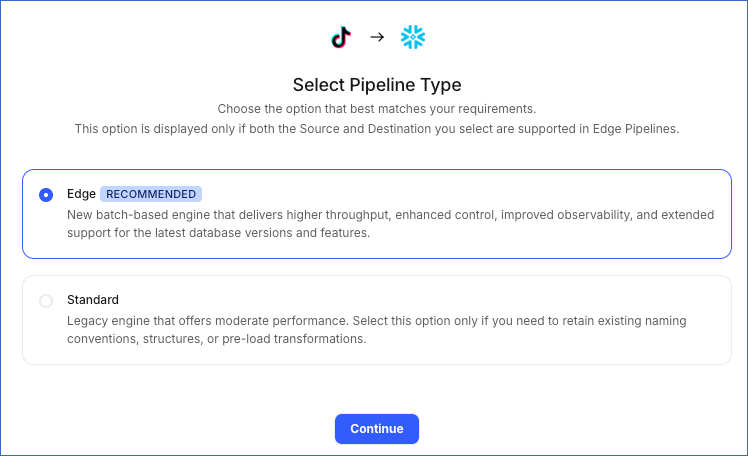
This page appears only if the selected Destination type is supported in Edge and your Team has an existing TikTok Ads Pipeline with the same Destination type. Otherwise, you can proceed to create an Edge Pipeline.
-
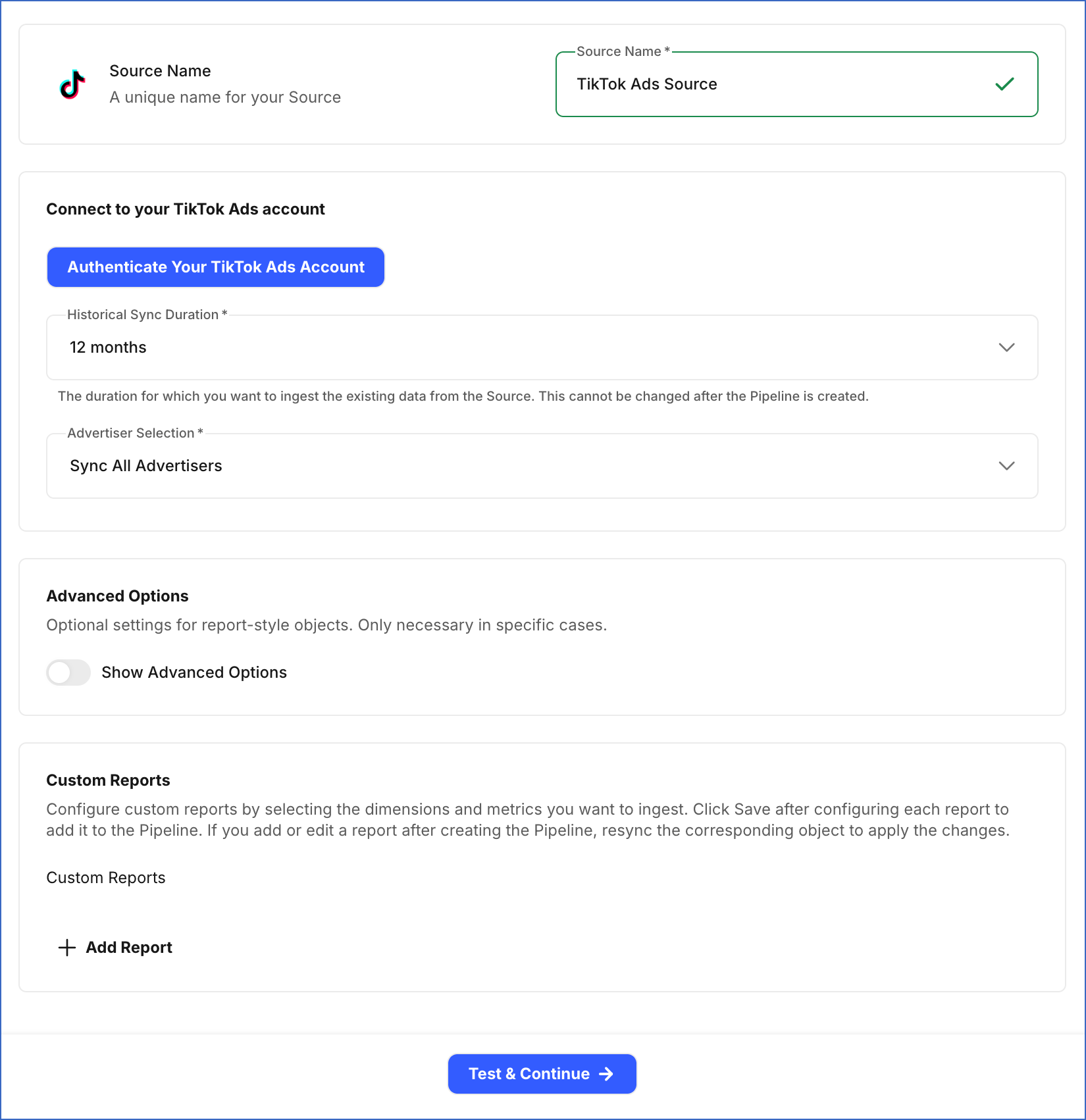
In the Configure Source screen, specify the following:
-
In the Connect to your TikTok Ads account section, do the following:
-
Click Authenticate Your TikTok Ads Account, log in to your TikTok Ads account, grant Hevo the following permissions to access your account data, and click Confirm:
- Ad Account Management
- Ad Account Information
- Read Ad Account Information
- Ad Account Information
- Ads Management
- Campaign
- Read Campaigns
- Ad Group
- Read Ad Groups
- Ad
- Read Ads
- Campaign
- Creative Management
- Image Management
- Read Image Library
- Video Management
- Read Video Library
- Image Management
- Pixel Management
- Pixel Management
- Read Pixels
- Pixel Level Reporting
- Pixel Management
- Reporting
- Consolidated Report
- Ad Account Management
-
Historical Sync Duration: From the drop-down, select the duration for which you want to ingest existing data from the Source. This cannot be changed after the Pipeline is created. Default: 12 months.
-
Advertiser Selection: From the drop-down, select whether you want Hevo to sync all advertiser accounts, or only specific ones:
-
Sync All Advertisers: Syncs data for all advertiser accounts that Hevo has access to.
-
Sync Specific Advertisers: Syncs data only for specific advertiser accounts you select. If you select this option, in the Advertisers to sync section, select the specific TikTok advertiser accounts whose data you want to sync.

-
-
-
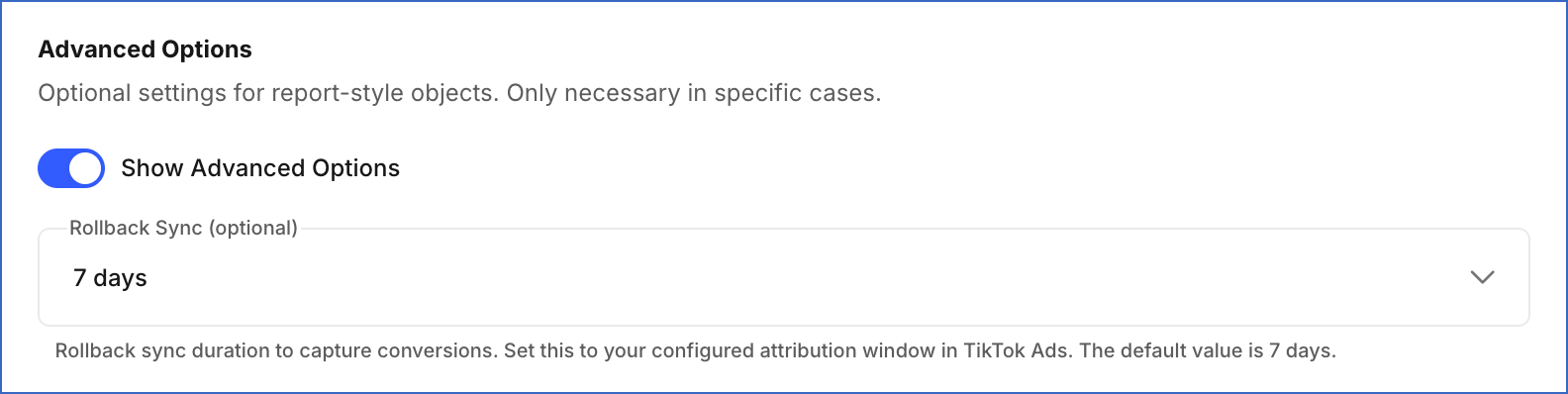
(Optional) In the Advanced Options section, do the following:
-
Show Advanced Options: Enable this option to configure the following:
- Rollback Sync: From the drop-down, select the number of days for which Hevo re-fetches previously ingested data to capture delayed conversions. Default: 7 days.
-
-
(Optional) In the Custom Reports section, click + Add Report to create custom Basic or Audience reports by choosing a valid combination of metrics and dimensions. Report Level values follow the
auction_<report_type>_<data_level>_reportnaming format. For Audience reports,<report_type>isaudience. For Basic reports,<report_type>isbasic. You can define up to 50 reports per Pipeline. Each report syncs to its own Destination table. For each report, specify the following: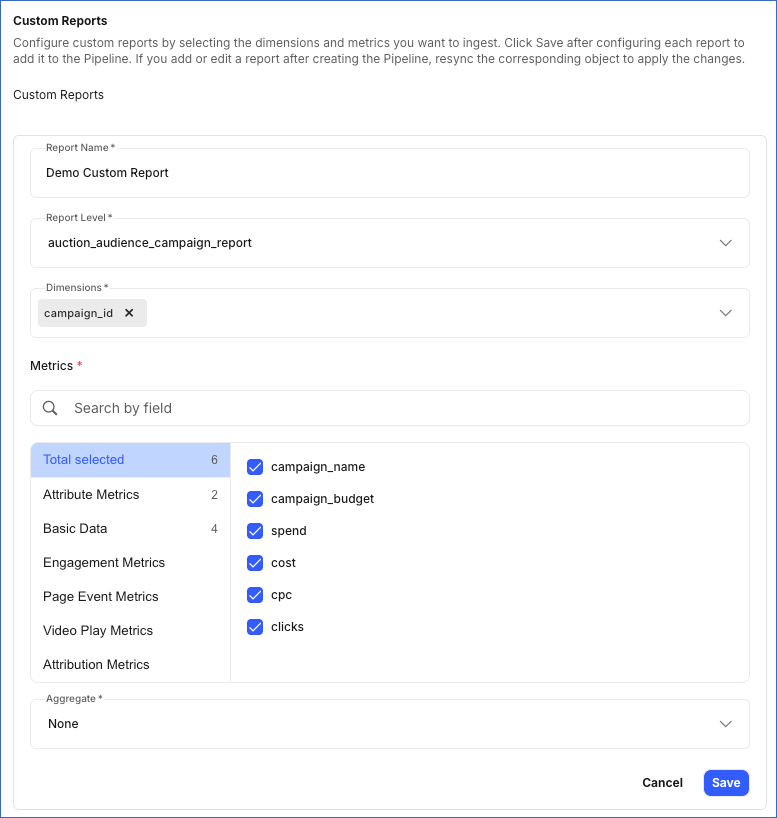
-
Report Name: A unique name for the Destination table where Hevo loads the data for this report.
-
Report Level: The type of TikTok Ads data to include in the report. The Dimensions, Metrics, and Aggregate field values available for the report are based on the value in this field.
-
Dimensions: Fields that determine how the report data is grouped. For example, selecting campaign_id groups the data by campaign. The available dimensions depend on the selected Report Level.
-
Metrics: Fields that measure the performance of your report. You can search for a specific metric using the Search by field bar, or select the metric you need from the metric categories. The available metrics and categories depend on the selected Report Level.
-
Aggregate: The time period by which the report data is grouped. The available values depend on the selected Report Level. Default value: None.
Note:
-
Click Save after configuring each report. Reports that are not saved before you click Test & Continue are not included in the Pipeline.
-
If you add a new custom report or edit an existing one after the Pipeline is created, resync the corresponding object to apply the changes and load the data using the updated configuration.
-
-
-
Click Test & Continue to test the connection to your TikTok Ads Source. Once the test is successful, you can proceed to set up your Destination.
Note: If any custom report is configured incorrectly, such as with an unsupported dimensions and metrics combination, an invalid aggregation, or a duplicate table name, clicking Test & Continue fails the Source configuration. Hevo lists all configuration issues in your custom reports. Fix these issues by editing the reports before retrying.
Data Replication
Hevo replicates data for all the objects selected on the Configure Objects page during Pipeline creation. By default, all supported objects and their available fields are selected. However, you can modify this selection while creating or editing the Pipeline.
Hevo ingests the following types of data from your Source objects:
-
Historical Data: The first run of the Pipeline ingests historical data for the selected objects, based on the Historical Sync Duration specified when configuring the Source, and loads it into the Destination.
-
Incremental Data: Once the historical load is complete, new and updated records for objects are ingested as per the sync frequency.
For the following objects, Hevo ingests only the incremental data in subsequent Pipeline runs:
- Ad Report (Lifetime)
- Ad Group
- Ad Group Report (Lifetime)
- Ad Group Search Keyword
- Advertiser
- Campaign
- Campaign Report (Lifetime)
- GMV Max Campaign
- Image
- Location
- Pixel
- Pixel Event
- Pixel Event Rule
- Pixel Statistic
- Smart Creative Material Ad Title
- Smart Creative Material
- Smart Creative Material Media Info
- Smart Plus Ad Creative Info
- Smart Plus Ad Deeplink UTM Param
- Smart Plus Ad
- Smart Plus Ad UTM Param
- Video
For Reports, Hevo also re-fetches data from the number of days specified in the Rollback Sync field during each sync. This captures any updates made to previously ingested report data and keeps your Destination up to date. Events ingested through a rollback window are not billable.
For all other objects, Hevo ingests the entire data during each Pipeline run.
Note: You can create a Pipeline with this Source only using the Merge load mode. The Append mode is not supported for this Source.
TikTok’s Business API enforces rate limits on the number of calls that can be made to its APIs in a given time period. If this limit is exceeded, a rate limit exception occurs. To understand how Hevo handles such scenarios, read Handling Rate Limit Exceptions.
Schema and Primary Keys
Hevo uses the following schema to upload the records to the Destination. For a detailed view of the objects, fields, and relationships, click the ERD.
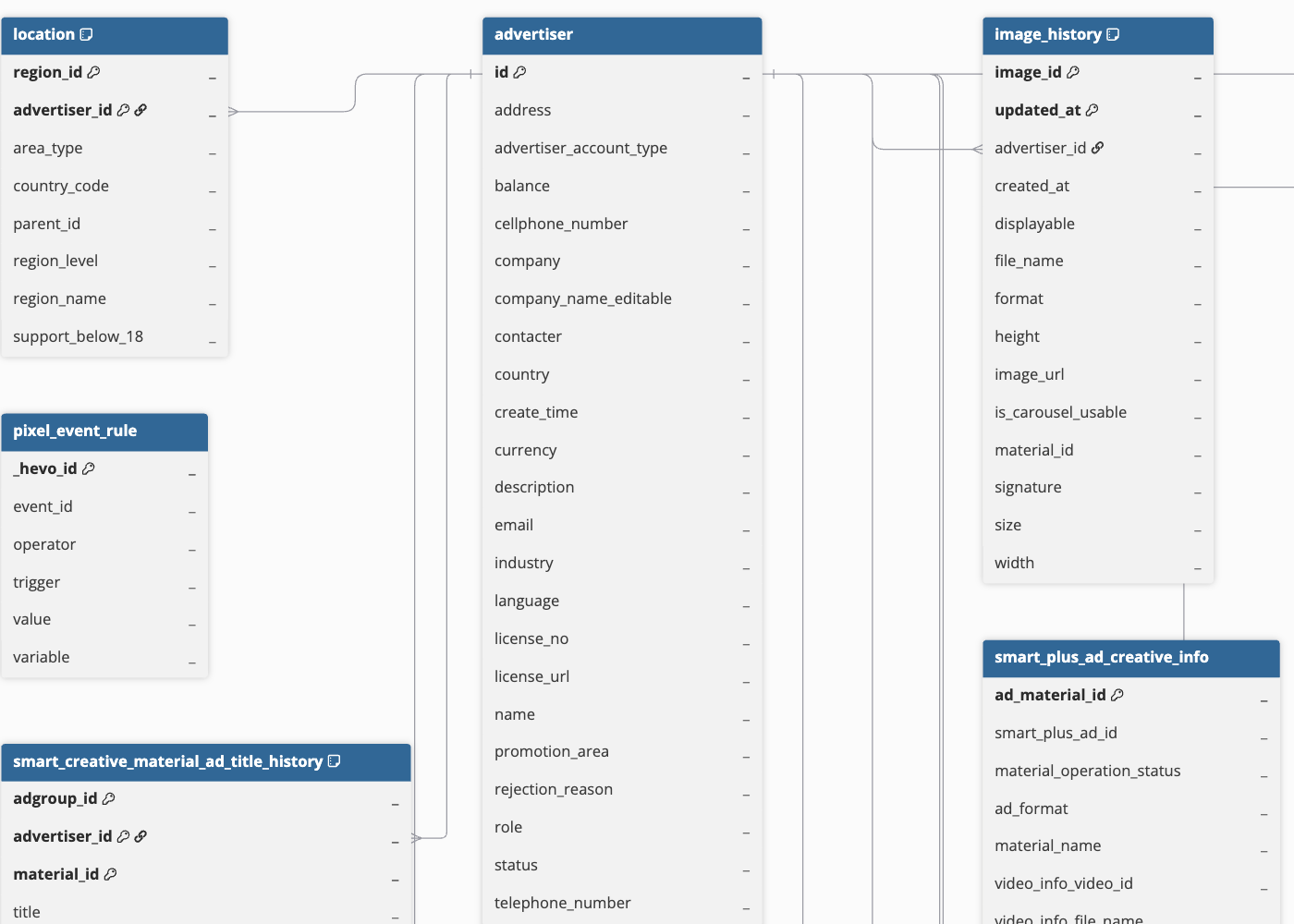
Data Model
The following is the list of tables (objects) that are created at the Destination when you run the Pipeline:
| Object | Description |
|---|---|
| Ad | Contains details about a single ad, such as its format, the content shown, the linked page, and its status. |
| Ad Age and Gender Report | Contains ad performance metrics broken down by audience age group and gender. |
| Ad Country Report | Contains ad performance metrics broken down by country. |
| Ad Group | Contains settings for a group of ads within a campaign, such as the target audience, budget, and ad placement details. |
| Ad Group Report (Daily) | Contains daily performance metrics for ad groups. |
| Ad Group Report (Hourly) | Contains hourly performance metrics for ad groups. |
| Ad Group Report (Lifetime) | Contains lifetime performance metrics for ad groups. |
| Ad Group Search Keyword | Contains the search words for targeting within an ad group, along with their review status. |
| Ad Language Report | Contains ad performance metrics broken down by audience language. |
| Ad Platform Report | Contains ad performance metrics broken down by delivery platform. |
| Ad Report (Daily) | Contains daily performance metrics for ads. |
| Ad Report (Hourly) | Contains hourly performance metrics for ads. |
| Ad Report (Lifetime) | Contains lifetime performance metrics for ads. |
| Advertiser | Contains details about the ad account, such as its name, currency, time zone, industry, and whether it is active. |
| Campaign | Contains details about a campaign, such as its goal, campaign budget, and its current status. |
| Campaign Age and Gender Report | Contains campaign performance metrics broken down by audience age group and gender. |
| Campaign Country Report | Contains campaign performance metrics broken down by country. |
| Campaign Language Report | Contains campaign performance metrics broken down by audience language. |
| Campaign Platform Report | Contains campaign performance metrics broken down by delivery platform. |
| Campaign Report (Daily) | Contains daily performance metrics, such as impressions, clicks, and spend, for campaigns. |
| Campaign Report (Hourly) | Contains hourly performance metrics for campaigns. |
| Campaign Report (Lifetime) | Contains lifetime (cumulative) performance metrics for campaigns. |
| Creative | Contains information about the content used in an ad, such as the ad text and status. |
| Gross Merchandise Value (GMV) Max Campaign | Contains details about campaigns designed to maximize total sales value, including their goals, promotion types, and statuses. |
| GMV Max Advertiser Country Report (Daily) | Contains daily sales results for an account, broken down by country. |
| GMV Max Campaign Country Report (Daily) | Contains daily sales results for a campaign, broken down by country. |
| Image | Contains information about images uploaded to the media library, including dimensions, file size, and format. |
| Location | Contains the list of countries, states, and provinces that can be selected when targeting an audience for ads. |
| Pixel | Contains details about the tracking tool set up for an account, such as its code, the ad accounts it is linked to, and its ownership status. |
| Pixel Event | Contains details about the actions, such as a purchase or sign-up, that the tracking tool is set up to record, along with the results they are linked to. |
| Pixel Event Rule | Contains the rules for determining when a tracked action counts as a match, along with their review status. |
| Pixel Statistic | Contains the numbers and results collected by the tracking tool. |
| Smart Plus Ad | Contains details about TikTok’s automated ad type, such as its status and hidden-post settings. |
| Smart Plus Ad Creative Info | Contains details about the content used in an automated ad, including its status. |
| Smart Plus Ad Deeplink UTM Param | Contains codes added to app links (deep links) used in Smart+ ads (ads that TikTok builds and manages automatically). These codes show which ad a person clicked to get there. App links open directly to a screen within an app, such as a product page, instead of opening a website. |
| Smart Plus Ad UTM Param | Contains codes added to regular links used in Smart+ ads (ads that TikTok builds and manages automatically). These codes show which ad a person clicked to get there. Unlike app links, these open a page on a website instead of a screen inside an app. |
| Smart Creative Material | Contains the content used in an automatically generated ad within an ad group. |
| Smart Creative Material Ad Title | Contains the title options used for an automatically generated ad. |
| Smart Creative Material Media Info | Contains the image or video details used in an automatically generated ad, including its status. |
| UTM Param | Contains tracking information added to links in your campaigns, ad groups, and ads. This helps you identify where your website traffic or conversions are coming from in analytics tools, such as Google Analytics. |
| Video | Contains details about video files uploaded to the media library, such as their length, size, dimensions, and format. |
Additional Information
Read the detailed Hevo documentation for the following related topics:
Handling of Deletes
For Campaign, Ad Group, Ad, Creative, Smart Plus Ad, and GMV Max Campaign objects, TikTok Ads does not remove deleted records from its API responses. Instead, it updates the secondary_status field to indicate that a record has been deleted.
Hevo ingests these records with their updated secondary_status value but does not set the __hevo__marked_deleted metadata column to True. To identify deleted records in the Destination, check the secondary_status field. For example, a deleted campaign has CAMPAIGN_STATUS_DELETE, while a deleted ad group can have ADGROUP_STATUS_DELETE or ADGROUP_STATUS_CAMPAIGN_DELETE. Similarly, a deleted ad can have AD_STATUS_DELETE, AD_STATUS_CAMPAIGN_DELETE, or AD_STATUS_ADGROUP_DELETE, depending on whether the ad itself, its parent campaign, or its parent ad group was deleted.
Source Considerations
-
TikTok is blocked by regulators or internet service providers (ISPs) in some countries, such as India. If your Hevo account is in an affected region, use a VPN or create your account in an unaffected region, such as US, EU, or AU. For app URLs, refer to Selecting your Hevo Region.
-
TikTok has announced the deprecation of its dedicated GMV Max Campaign reporting endpoint in the next API version. After the endpoint is deprecated, Hevo will use an alternative TikTok endpoint to continue fetching GMV Max Campaign data.
-
TikTok Ads reports may not always display the latest information. Some metrics are updated in real time, while others take longer to update, so reported values may change after they are initially displayed. For more information, see Data latency for reports.
Revision History
Refer to the following table for the list of key updates made to this page:
| Date | Release | Description of Change |
|---|---|---|
| Aug-24-2026 | NA | Updated the section, Configure TikTok Ads as a Source in your Pipeline, to add information about custom reports. |
| Aug-18-2026 | NA | New document. |