On This Page
Xero is a cloud-based accounting platform used by small and medium-sized businesses to manage their finances online. It enables you to send and track invoices, reconcile bank transactions, manage fixed assets, run payroll, and track projects, connecting your business with a network of accountants, bookkeepers, and banks.
Hevo uses the Xero Accounting, Assets, Files, Projects, Payroll AU, and Payroll NZ REST APIs to replicate data from your Xero organization to the Destination of your choice. Hevo supports the following authentication methods to connect to your Xero organization:
-
Custom Connection: Uses the client credentials of a Xero Custom Connection app you create. It is available only for Xero organizations in Australia, New Zealand, the United Kingdom, and the United States.
-
Web App: Uses your own Xero OAuth app and the Open Authorization (OAuth) 2.0, so you can choose which Xero organization the connection can access.
Supported Features
| Feature Name | Supported |
|---|---|
| Capture deletes | Yes |
| History mode | No |
| Custom data (user-configured tables & fields) | No |
| Data blocking (skip objects and fields) | Yes |
| Resync (objects and Pipelines) | Yes |
| API configurable | No |
Prerequisites
-
An active Xero organization exists from which data is to be ingested.
-
You have access to a Xero user with Administrator permissions to create the required app in the Xero Developer portal and authorize the connection.
-
The required credentials are available to provide Hevo access to your Xero organization data.
-
If you want to connect using Custom Connection, your Xero organization is based in Australia, New Zealand, the United Kingdom, or the United States, and has an active Custom Connections subscription.
Obtain the Xero Credentials
To connect Hevo to your Xero organization, you must create an app in the Xero Developer portal and obtain its Client ID and Client Secret. The steps depend on the connection method you want to use:
-
Custom Connection: Create a Custom Connection app that authenticates using the client credentials.
-
Web App: Create a Web app that authenticates using client credentials and OAuth 2.0.
Note: If the client credentials configured in the Pipeline is revoked manually from your Xero account, Hevo cannot authenticate with the Source. As a result, all active jobs for the Pipeline fail, and no data is replicated. To resume data replication, modify the Source configuration in the Pipeline with valid client credentials. Once the updated credentials are saved, Hevo re-authenticates the Source, and data ingestion resumes from the last saved offset.
Create a Custom Connection App
A Custom Connection allows Hevo to connect to Xero using the credentials of a Custom Connection app that you create in Xero. Custom Connections are available only for Xero organizations in Australia, New Zealand, the United Kingdom, and the United States, and require an active Custom Connections subscription in your Xero account.
Perform the following steps to create a Custom Connection app and obtain its credentials:
-
Log in to My Apps in the Xero Developer portal.
-
Click New app.

-
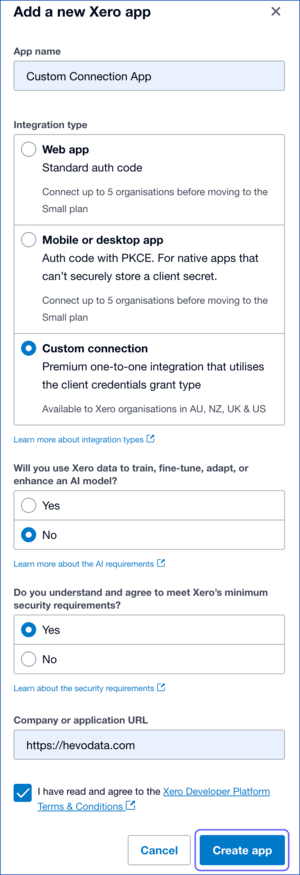
In the Add a new Xero app pop-up window, do the following:
-
App name: Specify a unique name for the custom connection app.
-
Integration type: Select Custom connection.
-
Will you use Xero data to train…: Select an option as per your requirement.
-
Do you understand and agree…: Select Yes.
-
Company or application URL: Specify the URL of your organization.
-
Select the acknowledgment check box, and then click Create app.
-
-
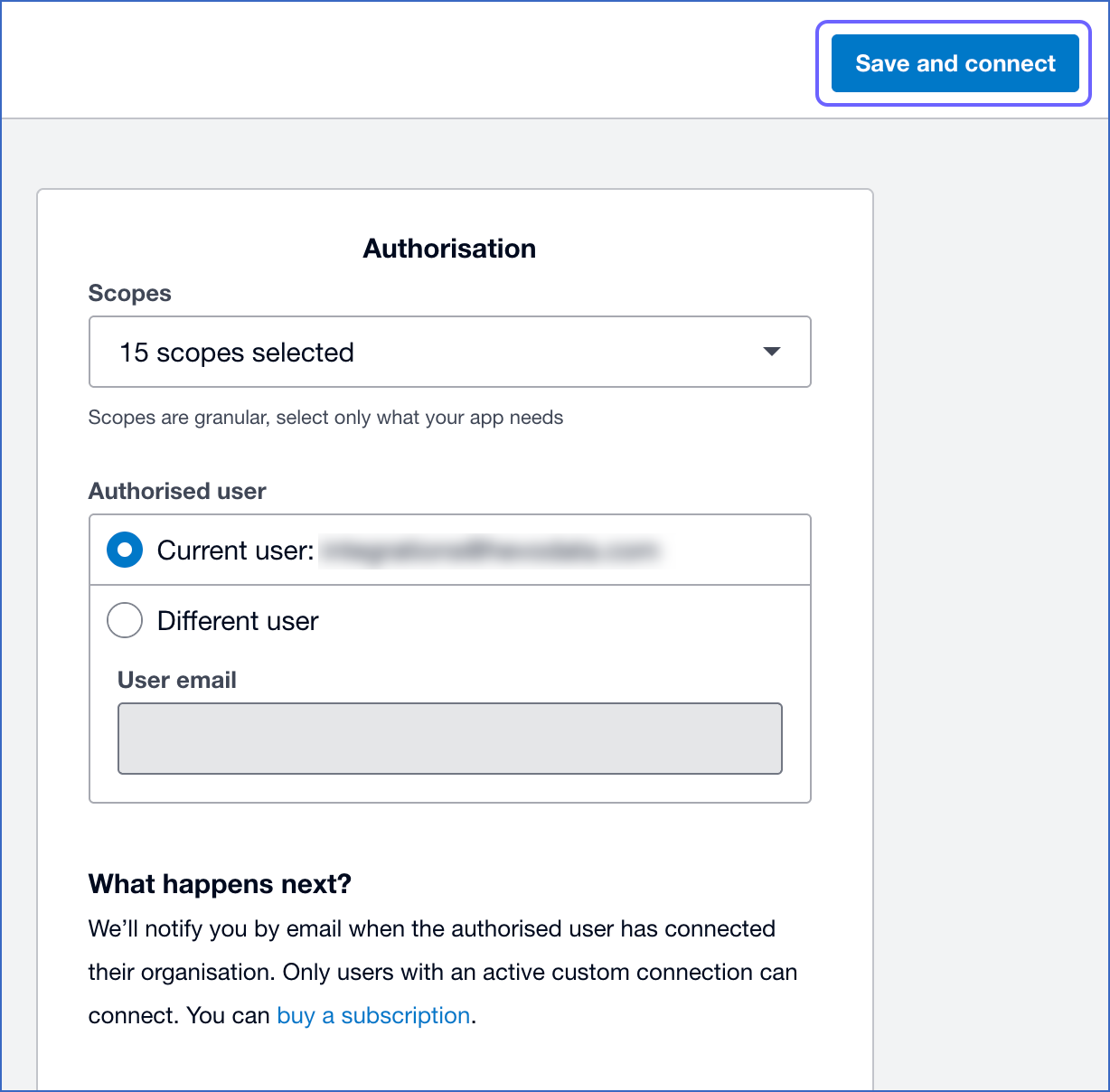
On the Authorisation page, do the following:
-
From the Scopes drop-down, select the following API scopes:
-
accounting.settings.read
-
accounting.contacts.read
-
accounting.invoices.read
-
accounting.banktransactions.read
-
accounting.payments.read
-
accounting.manualjournals.read
-
accounting.attachments.read
-
assets.read
-
payroll.employees.read
-
payroll.payruns.read
-
payroll.payslip.read
-
payroll.timesheets.read
-
payroll.settings.read
-
projects.read
-
files.read
Note: Custom Connections created on or after April 29, 2026 do not have access to the accounting.journals.read scope. As a result, the Journal and Journal Cash objects are not available in Custom Connection mode. Use Web App mode to sync these objects instead.
-
-
In the Authorised user section, select the Xero user who will authorize the connection. This user must have Administrator access to the organization. The selected user receives an email to complete the authorization.
-
Click Save and connect.
-
-
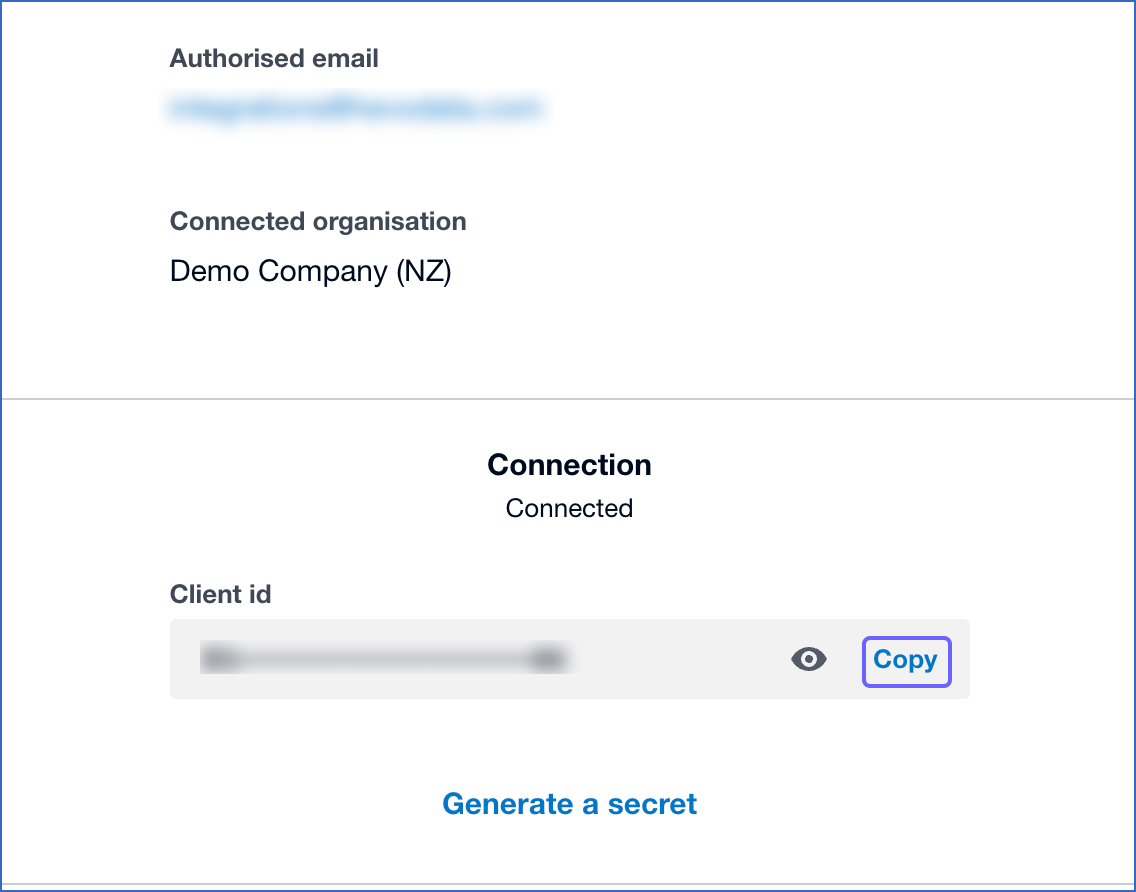
Once the user completes the authorization, open the app’s Configuration page to view its Client id. Click Copy to copy the Client ID and save it securely, like any other password.
-
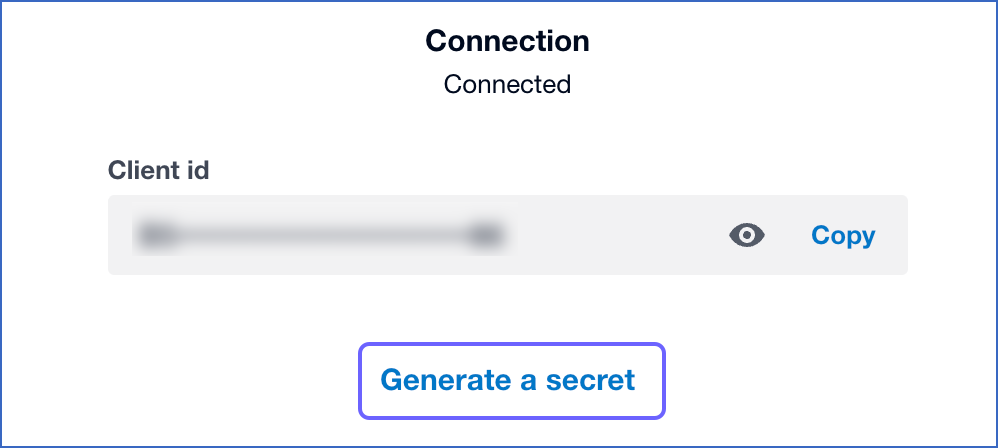
Click Generate a secret to generate the Client Secret.
-
Click Copy to copy the Client secret 1, and save it securely like any other password.
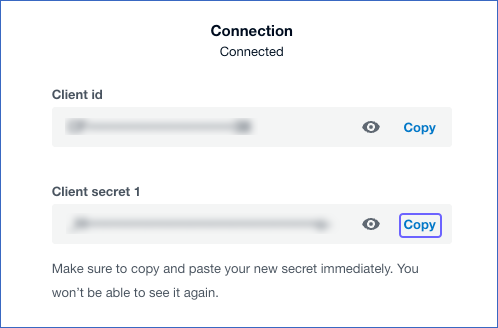
Note: The Client Secret is displayed only once. Copy and store it securely, as it cannot be retrieved later.
Use the Client ID and Client Secret while configuring your Xero Source in Hevo.
Create a Web App
A Web app uses the standard OAuth 2.0 authorization. You create the app, provide its Client ID and Client Secret to Hevo, and then authorize the connection by signing in to Xero during Source configuration.
Perform the following steps to create a Web app and obtain its credentials:
-
Log in to My Apps in the Xero Developer portal.
-
Click New app.
-
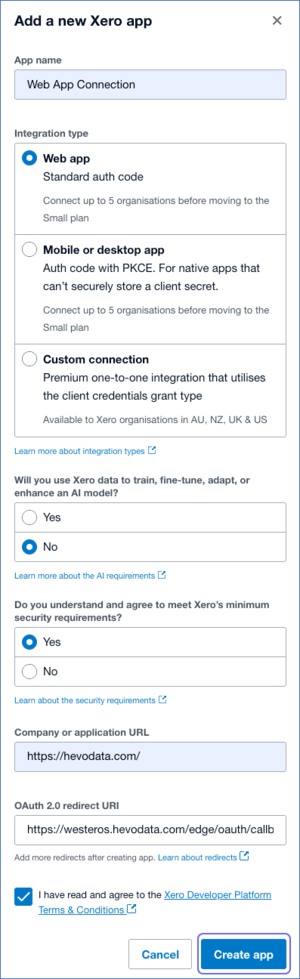
In the Add a new Xero app pop-up window, do the following:
-
App name: Specify a unique name for the Web app.
-
Integration type: Select Web app.
-
Will you use Xero data to train…: Select an option as per your requirement.
-
Do you understand and agree…: Select Yes.
-
Company or application URL: Specify the URL of your organization.
-
OAuth 2.0 redirect URI: Specify
https://westeros.hevodata.com/edge/oauth/callbackas the redirect URI. -
Select the acknowledgment check box, and then click Create app.
-
-
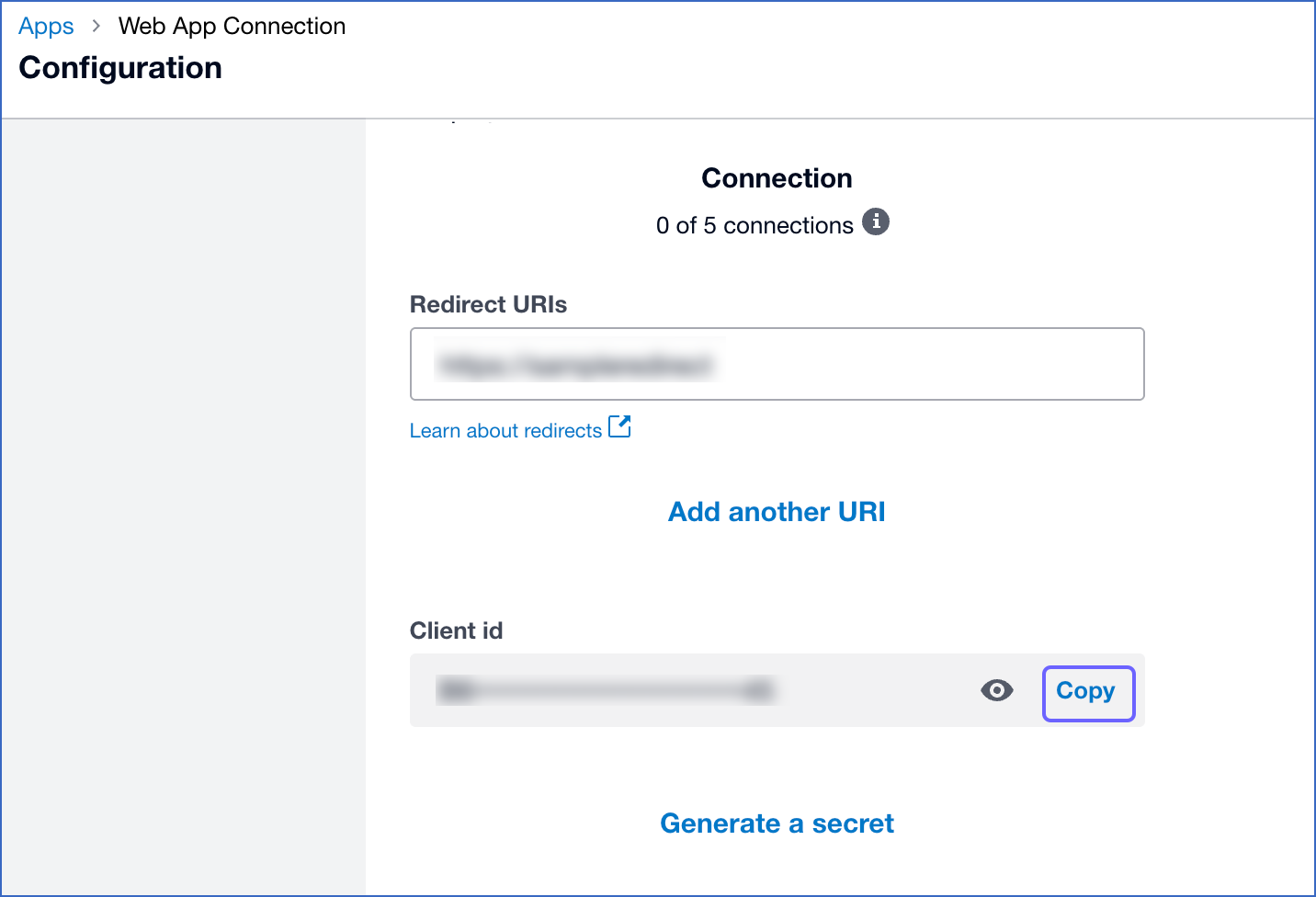
Once the app is created, copy the Client id displayed on the app’s Configuration page, and save it securely like any other password.
-
Click Generate a secret to generate the Client Secret.
-
Click Copy to copy the Client secret 1, and save it securely like any other password.
Note: The Client Secret is displayed only once. Copy and store it securely, as it cannot be retrieved later.
Use the Client ID and Client Secret while configuring your Xero Source in Hevo. Once you obtain these credentials, complete the authorization for the specific Xero organization you want to sync during Source configuration.
Configure Xero as a Source in your Pipeline
Perform the following steps to configure your Xero Source:
-
Click Pipelines in the Navigation Bar.
-
Click + Create Pipeline in the Pipelines List View.
-
On the Select Source Type page, select Xero.
-
On the Select Destination Type page, select the type of Destination you want to use.
-
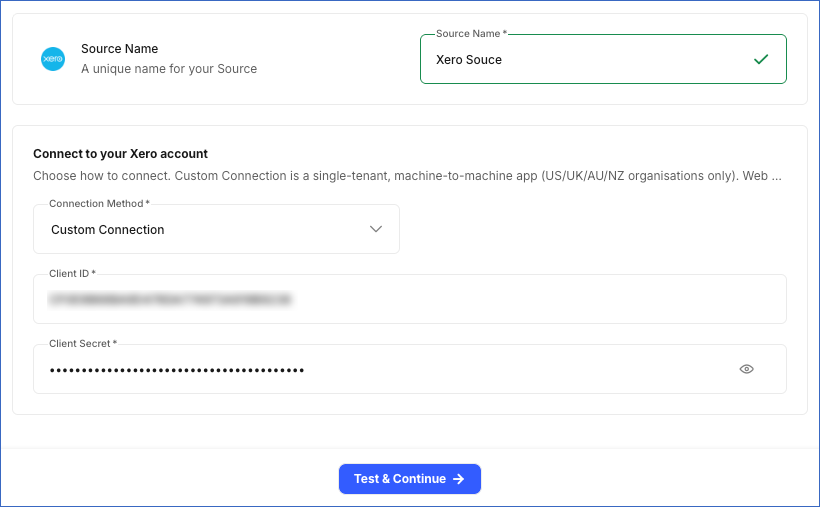
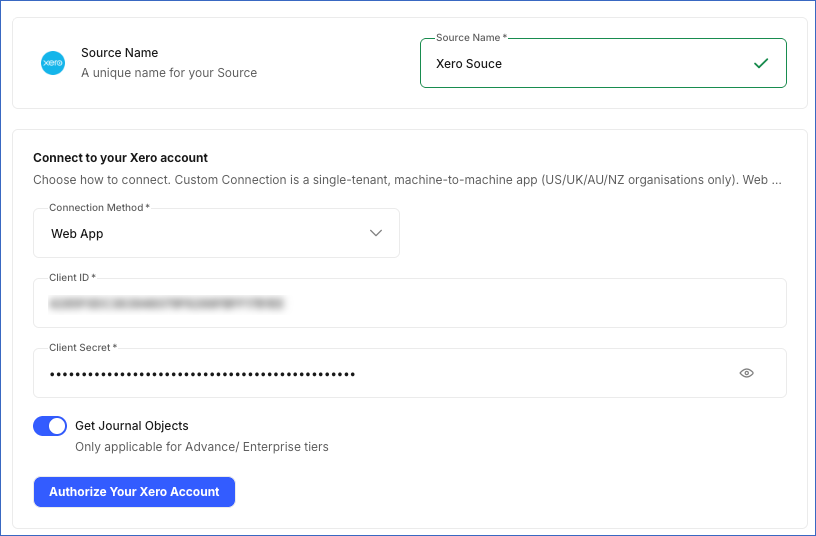
In the Configure Source screen, specify the following:
-
Source Name: A unique name for your Source, not exceeding 255 characters. For example, Xero Source.
-
In the Connect to your Xero account section, specify the following:
-
From the Connection Method drop-down, select how Hevo authenticates with Xero:
-
Custom Connection: Connect using a Xero Custom Connection app. This is the default option.
-
Client ID: The Client ID of your Xero Custom Connection app.
-
Client Secret: The Client Secret of your Xero Custom Connection app.
-
-
Web App: Connect using your Xero Web app and the standard OAuth 2.0 authorization.
-
Client ID: The Client ID of your Xero Web app.
-
Client Secret: The Client Secret of your Xero Web app.
-
Get Journal Objects: Enable this option to sync the Journal and Journal Cash objects. This is applicable only if your connected Xero organization is on an Advanced or Enterprise plan, and your Web app has been approved by Xero for the accounting.journals.read scope.
Note: Enabling this option for an organization or app that does not meet these requirements causes the authorization to fail.
-
Click Authorize your Xero account, sign in to Xero, and grant Hevo access to your account.
-
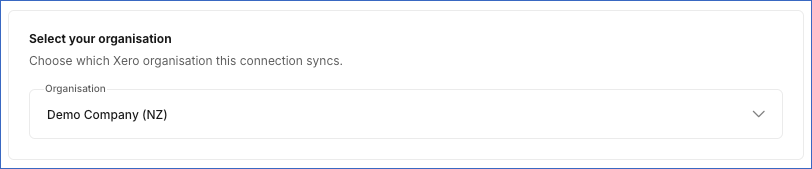
In the Select your organisation section, from the Organisation drop-down, select the Xero organization from which you want to sync data.
-
-
-
-
-
Click Test & Continue to test the connection to your Xero Source.
Data Replication
Hevo replicates data for all the objects selected on the Configure Objects page during Pipeline creation. By default, all supported objects and their available fields are selected. However, you can modify this selection while creating or editing the Pipeline.
You can select parent and child objects independently for replication. Selecting or deselecting a parent object does not automatically select or deselect its associated child objects.
Hevo ingests the following types of data from your Source objects:
-
Historical Data: The first run of the Pipeline ingests all available historical data for the selected objects and loads it into the Destination.
-
Incremental Data: Once the historical load is complete, new and updated records for objects are ingested as per the sync frequency.
For the following objects, Hevo ingests only the incremental data in subsequent Pipeline runs:
-
Account
-
Bank Account
-
Bank Linked Transaction
-
Bank Transaction
-
Credit Note
-
Invoice
-
Item
-
Journal
-
Journal Cash
-
Manual Journal
-
Overpayment
-
Payment
-
Prepayment
-
Purchase Order
-
User
-
AU Payroll Calendar
-
AU Payroll Employee
-
AU Payroll Leave Application
-
AU Payroll Pay Run
-
AU Payroll Superfund
-
AU Payroll Timesheet
Incremental changes are detected using the updated_date_utc field. For the Journal and Journal Cash objects, Hevo detects new records using the journal_number field.
For the Contact, Contact Address, Contact Phone, and Contact Group Member objects, Hevo ingests the entire data once a day, regardless of the Pipeline sync frequency.
For all other objects, Hevo ingests the entire data during each Pipeline run.
Xero currently enforces rate limits on the number of calls that can be made to its APIs in a given time period. If this limit is exceeded, a rate limit exception occurs. To understand how Hevo handles such scenarios, read Handling Rate Limit Exceptions.
Note: You can create a Pipeline with this Source only using the Merge load mode. The Append mode is not supported for this Source.
Schema and Primary Keys
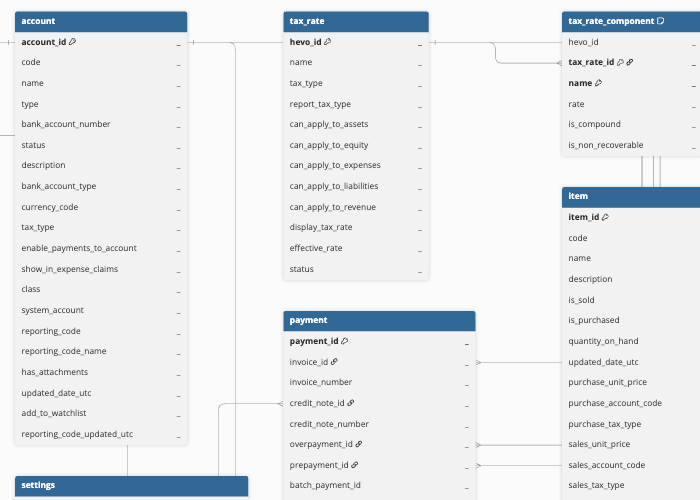
Hevo uses the following schema to upload the records to the Destination. For a detailed view of the objects, fields, and relationships, click the ERD.
Data Model
Hevo supports the following Xero APIs for ingesting data from your Xero organization:
Accounting API
Hevo ingests the following objects using the Xero Accounting API:
| Object | Description |
|---|---|
| Currency | Contains the currencies configured in your Xero organization, including the currency code and description. |
| Account | Contains details about all types of accounts set up in your Xero organization, including their account name, code, type, and tax settings. |
| Bank Account | Contains details about the accounts set up in your Xero organization with the account type BANK, including their name, code, and bank account ID. |
| Tax Rate | Contains the tax rates configured in your Xero organization, including the rate percentage, tax type, and the accounts to which each rate applies. This object has a child object, Tax Rate Component. |
| Organization | Contains details about your Xero organization, including its legal name, base currency, financial year end, and organization type. |
| Branding Theme | Contains the invoice branding themes configured in your Xero organization, such as theme name, logo, and sort order. |
| Tracking Category | Contains the tracking categories configured in your Xero organization, used to track transactions by department, region, or other custom dimensions. This object has the following child objects: - Tracking Category Option - Tracking Category Has Option |
| Payment | Contains payments applied to invoices, credit notes, overpayments, and prepayments, including the amount, payment date, and associated bank account. |
| Item | Contains the products and services (inventory and non-inventory items) sold or purchased in your Xero organization, including pricing and account codes. |
| User | Contains the users who have access to your Xero organization, including their name, email address, and organization role. |
| Bank Transfer | Contains transfers of funds between bank accounts in your Xero organization. |
| Invoice | Contains sales and purchase invoices raised in your Xero organization, including amounts, due dates, and payment status. This object has the following child objects: - Invoice Line Item - Invoice Line Item Has Tracking Category |
| Credit Note | Contains credit notes issued in your Xero organization, including amounts and allocation status. This object has the following child objects: - Credit Note Line Item - Credit Note Line Item Has Tracking Category |
| Bank Transaction | Contains money received or spent through bank accounts in your Xero organization, such as spend money and receive money transactions. This object has the following child objects: - Bank Transaction Line Item - Bank Transaction Line Item Has Tracking Category |
| Purchase Order | Contains purchase orders raised in your Xero organization. This object has the following child objects: - Purchase Order Line Item - Purchase Order Line Item Has Tracking Category |
| Manual Journal | Contains manual journal entries posted directly to the general ledger in your Xero organization. This object has the following child objects: - Manual Journal Line - Manual Journal Line Has Tracking Category |
| Overpayment | Contains overpayments recorded against invoices in your Xero organization. This object has the following child objects: - Overpayment Line Item - Overpayment Line Item Has Tracking Category |
| Prepayment | Contains prepayments recorded against invoices in your Xero organization. This object has the following child objects: - Prepayment Line Item - Prepayment Line Item Has Tracking Category |
| Allocation | Contains the allocation of credit notes, overpayments, and prepayments against invoices in your Xero organization. This is a part of the Credit Notes, Overpayments, and Prepayments endpoints in the Xero Accounting API. |
| Contact | Contains the customers and suppliers in your Xero organization, including contact details, tax information, and outstanding balances. This object has the following child objects: - Contact Address - Contact Phone - Contact Group Member |
| Contact Group | Contains the groups used to organize contacts in your Xero organization. |
| Repeating Invoice | Contains invoice templates configured in your Xero organization to automatically generate invoices on a recurring schedule. This object has the following child objects: - Repeating Invoice Line Item - Repeating Invoice Line Item Has Tracking Category |
| Journal | Contains the accrual-basis general ledger journals generated for every transaction in your Xero organization, in the order they were created. This object has the following child objects: - Journal Line - Journal Line Has Tracking Category Note: This object is not available when connecting via a Custom Connection created on or after April 29, 2026. Use Web App mode instead to ingest this object. |
| Journal Cash | Contains the cash-basis general ledger journals generated for every transaction in your Xero organization, in the order they were created. This object has the following child objects: - Journal Cash Line - Journal Cash Line Has Tracking Category Note: This object is not available when connecting via a Custom Connection created on or after April 29, 2026. Use Web App mode instead to ingest this object. |
| Bank Linked Transaction | Contains links between billable expense transactions (such as bills) and the sales invoices to which the costs are recharged in your Xero organization. This object has a child object, Invoice Linked Transaction. |
Assets API
Hevo ingests the following objects using the Xero Assets API:
| Object | Description |
|---|---|
| Asset Type | Contains the asset types configured in your Xero organization, including the associated fixed asset, depreciation expense, and accumulated depreciation accounts. |
| Asset | Contains the fixed assets recorded in your Xero organization, including purchase details, depreciation settings, and current book value. |
| Asset Settings | Contains the fixed asset settings configured for your Xero organization, such as the asset number prefix and default disposal accounts. |
Files API
Hevo ingests the following objects using the Xero Files API:
| Object | Description |
|---|---|
| File | Contains the files uploaded to your Xero organization’s file library, including file name, type, size, and the folder to which it belongs. |
| Folder | Contains the folders used to organize files in your Xero organization’s file library. |
| Inbox | Contains the default Inbox folder used to store files uploaded to your Xero organization before they are filed into other folders. |
Projects API
Hevo ingests the following objects using the Xero Projects API:
| Object | Description |
|---|---|
| Project | Contains the projects created in your Xero organization, including the associated contact, currency, invoiced amounts, and status. |
| Project User | Contains the users assigned to projects in your Xero organization. |
Payroll AU API
Hevo ingests the following objects using the Xero Payroll AU API. These objects are available only for Xero organizations based in Australia with Xero Payroll enabled.
| Object | Description |
|---|---|
| AU Payroll Employee | Contains employee records from your Xero Payroll (AU) organization, including personal details, start date, and payroll calendar assignment. |
| AU Payroll Timesheet | Contains employee timesheets recorded in your Xero Payroll (AU) organization. This object has a child object, AU Payroll Timesheet Line. |
| AU Payroll Leave Application | Contains employee leave applications recorded in your Xero Payroll (AU) organization. This object has a child object, AU Payroll Leave Period. |
| AU Payroll Pay Run | Contains the pay runs processed in your Xero Payroll (AU) organization, including the pay period, payment date, and totals for wages, tax, and superannuation. |
| AU Payroll Calendar | Contains the payroll calendars configured in your Xero Payroll (AU) organization, defining the pay run frequency and reference dates. |
| AU Payroll Superfund | Contains the superannuation funds configured in your Xero Payroll (AU) organization. This object has a child object, AU Payroll Superfund Product. |
| AU Payroll Pay Item | Contains the pay items configured in your Xero Payroll (AU) organization, including earnings rates, deduction types, leave types, and reimbursement types. |
| AU Payroll Setting | Contains the payroll settings configured for your Xero Payroll (AU) organization, including the accounts and tracking categories used for payroll transactions. |
Payroll NZ API
Hevo ingests the following objects using the Xero Payroll NZ API. These objects are available only for Xero organizations based in New Zealand with Xero Payroll enabled.
| Object | Description |
|---|---|
| NZ Deduction | Contains the deduction types configured in your Xero Payroll (NZ) organization. |
| NZ Earning Rate | Contains the earnings rates configured in your Xero Payroll (NZ) organization. |
| NZ Reimbursement | Contains the reimbursement types configured in your Xero Payroll (NZ) organization. |
| NZ Statutory Deduction | Contains the statutory deduction types, such as student loan repayments, configured in your Xero Payroll (NZ) organization. |
| NZ Superannuation | Contains the superannuation (KiwiSaver) contribution types configured in your Xero Payroll (NZ) organization. |
| NZ Leave Type | Contains the leave types configured in your Xero Payroll (NZ) organization. |
| NZ Pay Run Calendar | Contains the payroll calendars configured in your Xero Payroll (NZ) organization, defining the pay run frequency and reference dates. |
| NZ Payroll Setting | Contains the payroll settings, such as the accounts, configured for your Xero Payroll (NZ) organization. |
| NZ Employee | Contains employee records from your Xero Payroll (NZ) organization, including personal details and payroll calendar assignment. |
| NZ Timesheet | Contains employee timesheets recorded in your Xero Payroll (NZ) organization. |
| NZ Pay Run | Contains the pay runs processed in your Xero Payroll (NZ) organization. This object has a child object, NZ Pay Slip. |
Additional Information
Read the detailed Hevo documentation for the following related topics:
Handling of Deletes
Hevo handles deleted records differently based on how data is ingested for each object. For most objects, Xero does not permanently delete records. Instead, it updates the object’s status field to a value such as DELETED, VOIDED, or ARCHIVED. Hevo captures this updated status but does not set the __hevo__marked_deleted metadata column to true. To identify deleted records in the Source, use the object’s status field.
For the Contact object, Xero does not permanently delete contact records. Instead, Xero marks an archived or GDPR-erased contact by setting the ContactStatus field to ARCHIVED or GDPRREQUEST. Hevo ingests these records and marks them as deleted in the Destination by updating the value of the metadata column __hevo__marked_deleted to True.
For the child object Contact Group Member, Hevo ingests the entire data during each sync. If a contact is removed from a group in Xero, the corresponding record is no longer present in the Destination after the next Pipeline run.
Source Considerations
-
The AU Payroll and NZ Payroll objects are available only for Xero organizations based in Australia and New Zealand, respectively, that have completed Xero’s Payroll setup process.
-
Xero does not update the updated_date_utc field on every change to a record. For example, some field-level changes do not update this timestamp. As a result, such changes may not be captured during incremental Pipeline runs. To retrieve the latest values for these fields in your Destination, you can resync the corresponding objects at regular intervals.
Limitations
-
Hevo does not support ingestion of Xero Payroll UK objects. Only the Payroll AU and Payroll NZ objects are supported.
-
Hevo supports connecting to only one Xero organization per Pipeline. To ingest data from multiple Xero organizations, create a separate Pipeline for each organization.
Revision History
Refer to the following table for the list of key updates made to this page:
| Date | Release | Description of Change |
|---|---|---|
| Aug-11-2026 | NA | New document. |