Zoho Desk (Edge)
On This Page
Zoho Desk is a customer service application from Zoho. Support teams use it to manage the tickets raised by customers across channels such as email, phone, chat, and social media, along with the related contacts, accounts, tasks, calls, and contracts.
Hevo uses the Zoho Desk API to replicate data from your Zoho Desk portal to the Destination of your choice. Hevo connects to your portal using OAuth 2.0 through a client that you create in the Zoho API Console. To ingest data, you must provide Hevo with the client ID and client secret of this client and the data center of your Zoho account, and then authorize Hevo to read the data of your portal.
Supported Features
| Feature Name | Supported |
|---|---|
| Capture deletes | Yes (for some objects) |
| History mode | No |
| Custom data (user-configured tables & fields) | Yes (custom fields of the Account, Call, Contact, Contract, Product, Task, and Ticket objects) |
| Data blocking (skip objects and fields) | Yes |
| Resync (objects and Pipelines) | Yes (for some objects) |
| API configurable | Yes |
Prerequisites
-
An active Zoho Desk portal from which data is to be ingested.
-
A Zoho Desk user who can authorize Hevo to read the data of the portal. Hevo ingests only the objects that the profile of this user can access, and marks the other objects as Inaccessible on the Configure Objects page. To ingest all the objects, authorize Hevo as a user with the Administrator profile.
-
A client created in the Zoho API Console of the data center of your Zoho account, and its client ID and client secret.
Create a Zoho API Console Client
Hevo connects to your Zoho Desk portal through a client that you create in the Zoho API Console. The client must be of the Server-based Applications type, and Hevo’s redirect URI must be added to it. You can use the same client for more than one Pipeline.
Perform the following steps to create a client and obtain its client ID and client secret:
-
Log in to the Zoho API Console of the data center of your Zoho account. For example, if you log in to Zoho at accounts.zoho.com, use api-console.zoho.com. If you log in at accounts.zoho.eu, use api-console.zoho.eu.
-
Click ADD CLIENT.

-
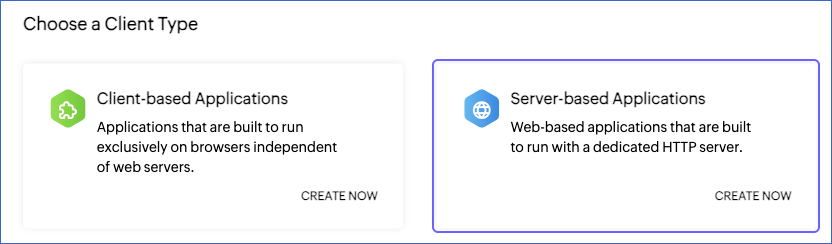
Under Server-based Applications, click CREATE NOW.
-
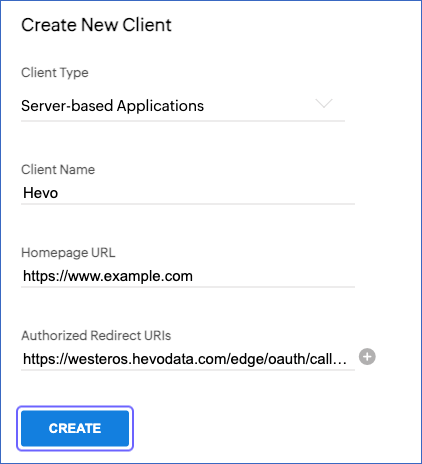
On the Create New Client page, specify the following, and then click CREATE:
-
Client Name: A name for the client. For example, Hevo.
-
Homepage URL: The URL of your company’s website. For example, https://www.example.com.
-
Authorized Redirect URIs: https://westeros.hevodata.com/edge/oauth/callback. This URI is the same for all Hevo regions.
-
-
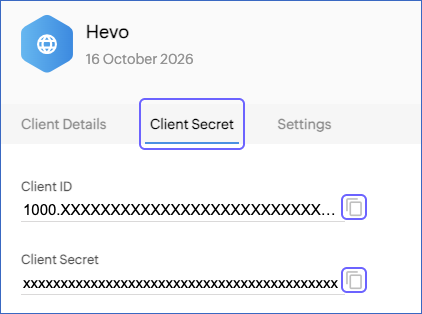
On the Client Secret tab, copy the Client ID and Client Secret, and save them securely like any other password.
Read Register your application for more information about creating a client.
If you delete the client or regenerate its client secret in the Zoho API Console, Hevo cannot connect to your portal, and the Pipeline fails. To resume data ingestion, modify the Source configuration with the new credentials, and authorize Hevo again.
Configure Zoho Desk as a Source in your Pipeline
Perform the following steps to configure your Zoho Desk Source:
-
Click Pipelines in the Navigation Bar.
-
Click + Create Pipeline in the Pipelines List View.
-
On the Select Source Type page, select Zoho Desk.
-
On the Select Destination Type page, select the type of Destination you want to use.
-
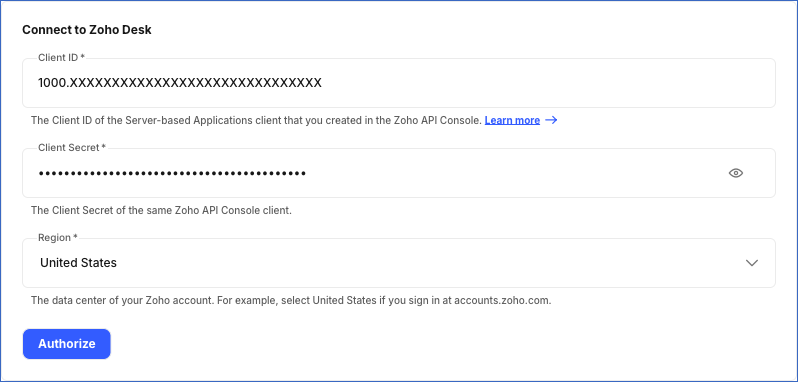
In the Configure Source screen, specify the following:
-
Source Name: A unique name for your Source, not exceeding 255 characters. For example, Zoho Desk Source.
-
In the Connect to Zoho Desk section, specify the following:
-
Client ID: The client ID of the client that you created in the Zoho API Console.
-
Client Secret: The client secret of the client.
-
Region: From the drop-down, select the data center of your Zoho account. For example, select United States if you log in to Zoho at accounts.zoho.com. Default value: United States. The following data centers are supported:
Region Zoho Accounts URL United States accounts.zoho.com Europe accounts.zoho.eu India accounts.zoho.in Australia accounts.zoho.com.au Japan accounts.zoho.jp Canada accounts.zohocloud.ca Saudi Arabia accounts.zoho.sa Singapore accounts.zoho.sg United Arab Emirates accounts.zoho.ae China accounts.zoho.com.cn
-
-
-
Click Authorize, and then do the following in the window that opens:
-
Log in to your Zoho account. To ingest all the objects, log in as a user with the Administrator profile in Zoho Desk.
-
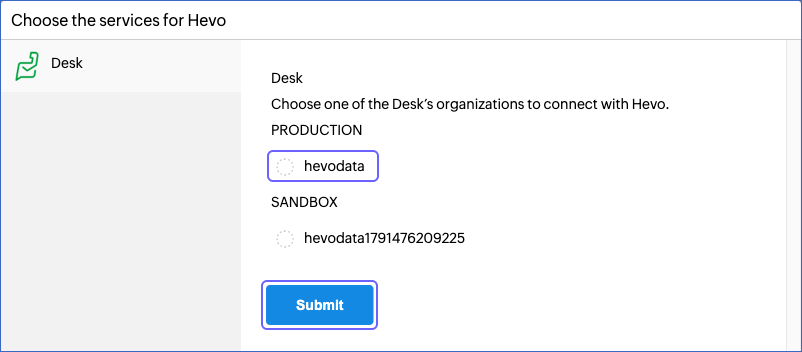
If you belong to more than one Zoho Desk portal, select the portal whose data you want to replicate, and click Submit.
-
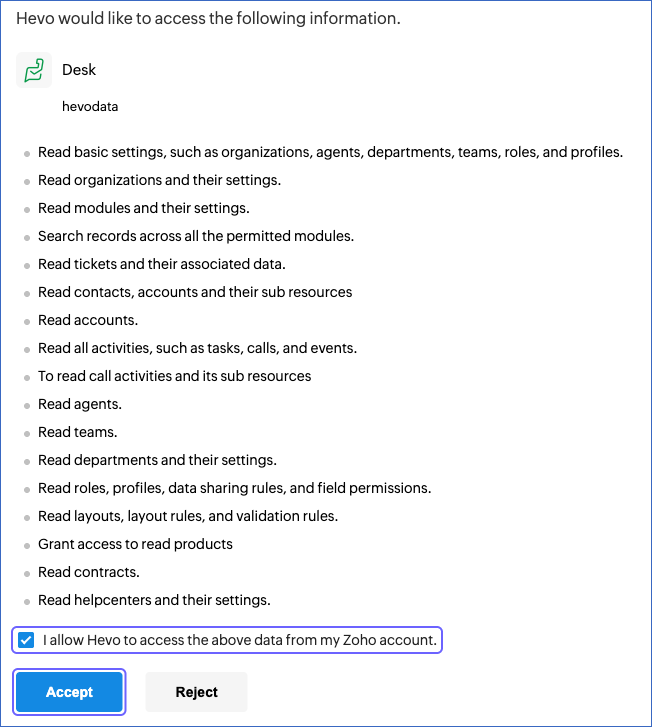
Select the I allow Hevo to access the above data from my Zoho account check box, and click Accept.
Once the authorization is successful, you are redirected to the Configure Source screen.
-
-
Click Test & Continue to test the connection to your Zoho Desk Source. Once the test is successful, you can proceed to set up your Destination.
Data Replication
Hevo replicates data for all the objects selected on the Configure Objects page during Pipeline creation. By default, all supported objects and their available fields are selected. However, you can modify this selection while creating or editing the Pipeline.
Hevo ingests the following types of data from your Source objects:
-
Historical Data: The first run of the Pipeline ingests all the data of the selected objects.
-
Incremental Data: Once the historical load is complete, Hevo ingests data as per the sync frequency as follows:
-
For the Account, Contact, Task, and Ticket objects, Hevo ingests the records that were created or updated since the previous run. For each ticket or task that is ingested, Hevo also ingests its child records, such as comments and time entries, and replaces the existing child records of that ticket or task in the Destination.
-
For all the other objects, Hevo ingests the entire data in each run.
-
You can resync only the Groups, Label, Organization, Profile, and Role objects.
Zoho Desk limits the number of API calls that a portal can make in a day, as per its edition, and the number of calls that can run at the same time. Read API credits. These limits are shared by all the applications that read data from the portal. If Zoho Desk returns a server error, or a rate limit error that asks Hevo to wait for 10 minutes or less, Hevo retries the request up to four times, at an interval of five seconds. If the daily API credits of your portal are used up, Hevo stops ingesting the affected objects in that run, and resumes in the next run as follows:
-
For the Account and Contact objects, Hevo continues from the record at which the ingestion stopped.
-
For the Task and Ticket objects, Hevo ingests the records that were created or updated since the last completed run.
-
For all the other objects, the object fails in that run, and Hevo ingests its entire data in the next run.
Note: You can create a Pipeline with this Source only using the Merge load mode. The Append mode is not supported for this Source.
Schema and Primary Keys
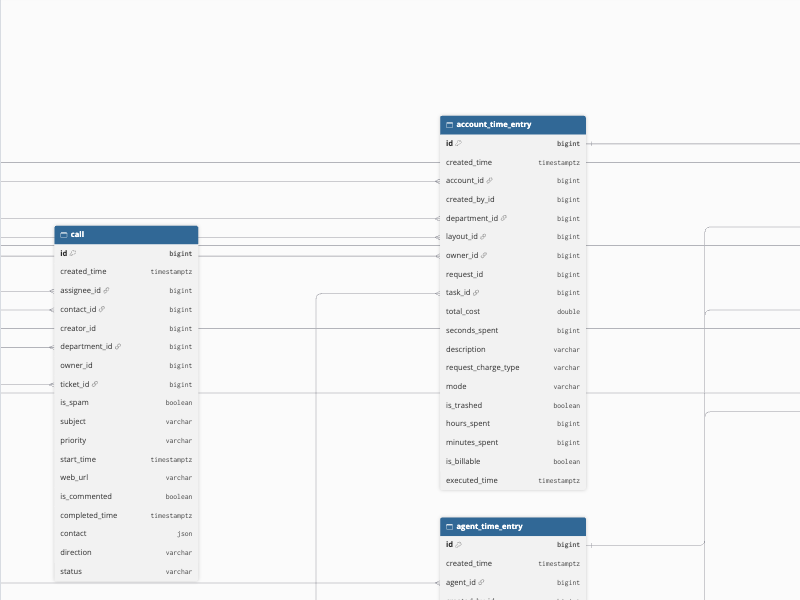
Hevo uses the following schema to upload the records in the Destination. For a detailed view of the objects, fields, and relationships, click the ERD.
Data Model
The following is the list of tables (objects) that are created at the Destination when you run the Pipeline:
| Object | Description |
|---|---|
| Account | Contains the accounts, which are the organizations of your customers, including their contact details and owner. It includes a child object, Account Time Entry. |
| Account Time Entry | Contains the time entries recorded against each account, such as the time spent, cost, and billing status. It includes a child object, Account Time Entry Owner. |
| Account Time Entry Owner | Contains the owner of each account time entry. |
| Agent | Contains the agents that Zoho Desk returns for your portal, including their role, profile, and status. It includes the following child objects: - Agent Associated Department - Agent Channel - Agent Time Entry |
| Agent Associated Department | Contains the departments that each agent is associated with. |
| Agent Channel | Contains the channels in which each agent is an expert. |
| Agent Time Entry | Contains the time entries recorded by each agent. It includes a child object, Agent Time Entry Owner. |
| Agent Time Entry Owner | Contains the owner of each agent time entry. |
| Call | Contains the call activities logged in your portal, with their contact, ticket, and assignee. |
| Channel | Contains the channels configured in your portal, such as email, phone, and social channels. It includes a child object, Channel Content Type. |
| Channel Content Type | Contains the content types that each channel supports for replies. |
| Contact | Contains the contacts, which are the customers who raise tickets, including their account and contact details. It includes a child object, Contact Time Entry. |
| Contact Time Entry | Contains the time entries recorded against each contact. It includes a child object, Contact Time Entry Owner. |
| Contact Time Entry Owner | Contains the owner of each contact time entry. |
| Contract | Contains the support contracts of your accounts, with their start and end dates and owner. It includes a child object, Contract Notification Agent. |
| Contract Notification Agent | Contains the agents notified about each contract. |
| Department | Contains the departments in your portal. |
| Groups | Contains the user groups of your help center, which is the customer portal of your Zoho Desk portal. |
| Immediate Sub Role | Contains the roles that report directly to each role. |
| Label | Contains the labels used to sort the users of your help center. |
| Layout | Contains the layouts of your portal for the tickets, contacts, accounts, calls, events, tasks, time entries, products, and contracts modules. It includes a child object, Layout Profile. |
| Layout Profile | Contains the profiles that can use each layout, with one record for each layout and profile. |
| Module | Contains the modules of your portal, such as tickets, contacts, and accounts, with their labels and whether they are enabled. |
| Organization | Contains the Zoho Desk portals that the authorizing user belongs to, with their settings. |
| Product | Contains the products of your portal. It includes a child object, Product Department. |
| Product Department | Contains the departments that each product is associated with. |
| Profile | Contains the profiles that define the permissions of agents. |
| Role | Contains the roles that define the data access of agents. It includes a child object, Immediate Sub Role. |
| Task | Contains the tasks created in your portal, with their owner, due date, and status. It includes a child object, Task Time Entry. |
| Task Time Entry | Contains the time entries recorded against each task. It includes a child object, Task Time Entry Owner. |
| Task Time Entry Owner | Contains the owner of each task time entry. |
| Team | Contains the teams of agents in each department. It includes the following child objects: - Team Agent - Team Derived Agent - Team Role - Team Role With Subordinate - Team Sub Team |
| Team Agent | Contains the agents added directly to each team. |
| Team Derived Agent | Contains the agents who are members of each team through its roles or sub-teams. |
| Team Role | Contains the roles added to each team. |
| Team Role With Subordinate | Contains the roles added to each team along with their subordinate roles. |
| Team Sub Team | Contains the sub-teams of each team. |
| Ticket | Contains the tickets raised in your portal, with their contact, account, department, assignee, status, and priority. It includes the following child objects: - Ticket Approval - Ticket Comment - Ticket Comment Attachment - Ticket Comment Mention - Ticket Entity Skill - Ticket Follower - Ticket Secondary Contact - Ticket Shared Department - Ticket Time Entry - Ticket Time Entry Owner |
| Ticket Approval | Contains the approval requests raised for each ticket, with their approver and status. |
| Ticket Comment | Contains the comments added to each ticket. |
| Ticket Comment Attachment | Contains the files attached to each ticket comment. |
| Ticket Comment Mention | Contains the agents mentioned in each ticket comment. |
| Ticket Entity Skill | Contains the skills associated with each ticket. |
| Ticket Follower | Contains the agents who follow each ticket. |
| Ticket Secondary Contact | Contains the secondary contacts of each ticket. |
| Ticket Shared Department | Contains the departments that each ticket is shared with. |
| Ticket Time Entry | Contains the time entries recorded against each ticket. |
| Ticket Time Entry Owner | Contains the owner of each ticket time entry. |
| Users | Contains the users of your help center, who are the customers who sign in to your customer portal. |
Additional Information
Read the detailed Hevo documentation for the following related topics:
Handling of Deletes
Hevo marks a record as deleted by setting the value of the metadata column __hevo__marked_deleted to True. The record remains in the Destination with all its data. Hevo captures deletes as follows:
-
For the objects whose entire data is ingested in each run, such as Agent, Call, Contract, Department, Product, and Team, Hevo marks a record as deleted if it is no longer returned by Zoho Desk. For example, if an agent is disabled or deleted and Zoho Desk no longer returns the agent, Hevo marks the agent as deleted. The tickets, comments, and time entries of the agent still contain the agent’s ID.
-
For the Account, Contact, Task, and Ticket objects and the time entry objects, Hevo does not capture deletes. Records deleted in Zoho Desk, including the records in its recycle bin, remain in the Destination.
-
For child objects, when Hevo ingests a parent record, it replaces the existing child records of the parent in the Destination. Child records removed from the parent record are marked as deleted.
Source Considerations
-
Hevo ingests data from one Zoho Desk portal in a Pipeline. The portal is the one that you select while authorizing Hevo. To ingest data from more than one portal, create a Pipeline for each portal.
-
The Organization object contains all the portals that the authorizing user belongs to, and not only the portal selected for the Pipeline.
-
Hevo ingests the custom fields of the Account, Call, Contact, Contract, Product, Task, and Ticket objects. Each custom field is loaded as a column whose name is the API name of the field prefixed with
custom_, for example,custom_cf_priority_level. -
Hevo does not ingest the tickets marked as spam or the archived tickets in Zoho Desk.
-
Hevo reads the Account, Contact, Task, and Ticket objects through the search APIs of Zoho Desk. Zoho Desk takes some time to add new and updated records to its search index. As a result, a record that is created or updated just before a Pipeline run may be missed if it is not yet in the search index. Hevo ingests such a record the next time it is updated.
-
The Groups, Label, and Users objects contain the data of your help center. If your portal does not have help center users, these objects do not contain any records.
-
Each Pipeline run makes API calls for all the agents, accounts, contacts, products, layouts, and other objects whose entire data is ingested. Hevo also reads the time entries of each account, contact, and agent in each run. If your Zoho Desk edition provides a low number of API credits, deselect the objects that you do not need.
-
The Layout Profile object contains one record for each layout and each profile that can use it, so it can contain a large number of records. For example, a portal with about 1,800 layouts and 50 profiles has more than 90,000 records. Hevo ingests the entire data of this object in each run. If you do not need it, deselect the object to reduce the number of Events that are ingested.
Revision History
Refer to the following table for the list of key updates made to this page:
| Date | Release | Description of Change |
|---|---|---|
| Oct-28-2026 | NA | New document. |