Upgrading Pipeline from Standard to Edge
On This Page
Edge Pipeline is now available for Public Review. You can explore and evaluate its features and share your feedback.
A Standard Pipeline can be upgraded to an Edge Pipeline. Hevo assesses Pipelines and contacts customers to start the upgrade. The entire process is managed by Hevo and requires no action on your part.
Edge Pipelines run on Hevo’s latest architecture, providing:
-
Higher reliability and better handling of schema changes
-
Faster and more efficient data replication
-
Improved monitoring and visibility across the data flow
If your Standard Pipeline uses Transformations, the upgrade changes the point at which your data is transformed. Standard Pipelines follow the ETL (Extract, Transform, Load) approach, where the data is transformed before it is loaded, and your Destination receives only the transformed data. Edge Pipelines follow the ELT (Extract, Load, Transform) approach, where the data is loaded into your Destination first and transformed there.
ELT has become the preferred approach across much of the data integration industry, and it offers the following advantages:
-
Your data continues to be replicated even while your transformation logic is being updated.
-
Your transformation logic is written as dbt models in SQL, which your team can read, review, and version control.
-
Transformations run on your data warehouse, which is built to process large volumes of data efficiently.
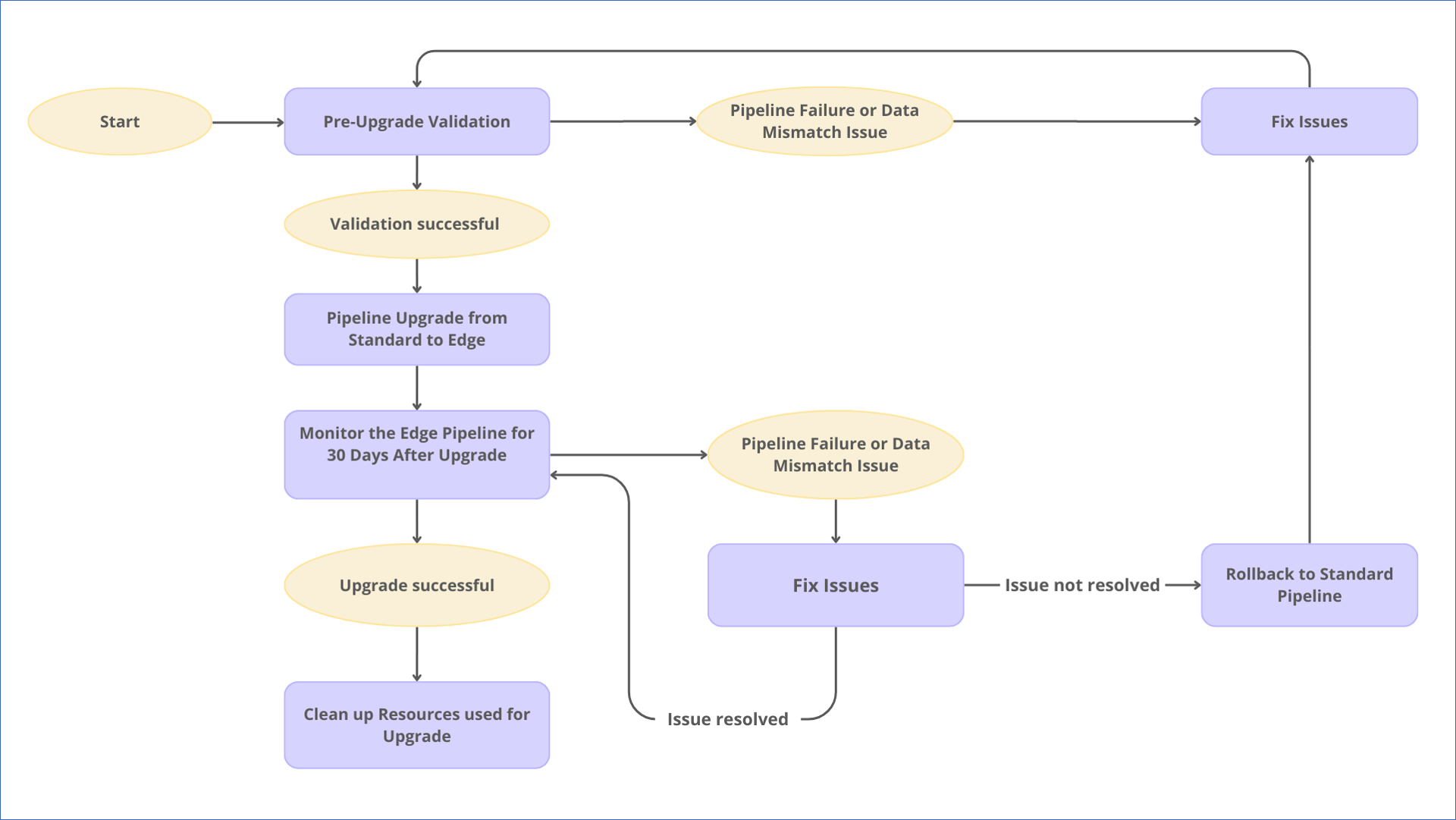
The diagram below outlines the upgrade workflow. Each stage is described in the following sections.
Pre-Upgrade Validation
Hevo requests temporary access to your Source and Destination systems to validate your Standard Pipeline for upgrade. To begin the validation:
-
A snapshot of Destination tables is created as a reference for validation.
Note: For Snowflake Destinations, if any tables are transient, the corresponding snapshots are also created as transient.
-
A temporary Edge Pipeline with the same configuration as your Standard Pipeline is created and runs in parallel.
-
The schema evolution policy for the Edge Pipeline depends on your Standard Pipeline configuration:
-
If Auto Mapping is disabled, the policy is Block all changes.
-
If Auto Mapping is enabled and:
-
Include New Tables in the Pipeline option is enabled, the policy is Allow all changes.
-
Include New Tables in the Pipeline option is disabled, the policy is Allow column-level changes only.
-
-
-
The Edge Pipeline’s sync frequency is determined by your Standard Pipeline’s ingestion and loading frequency. Between these two, Hevo sets the sync frequency to whichever is higher. For instance, if your Standard Pipeline ingests data every 15 minutes but loads every 30 minutes, the Edge Pipeline syncs data every 30 minutes.
-
-
If your Standard Pipeline has Transformations, Hevo converts them to dbt models and configures them to run with the temporary Edge Pipeline, so that your transformation logic can later be validated against the replicated data.
During the pre-upgrade validation process:
-
The Edge Pipeline ingests data from your Source using the last saved offset of the Standard Pipeline and loads it into the snapshot of the corresponding Destination tables. Meanwhile, your Standard Pipeline continues ingesting and loading data into the live Destination tables, ensuring that your production data flow remains uninterrupted.
-
Hevo runs the Edge Pipeline for at least six hours, observing two to three ingestion and loading cycles.
-
If the Standard Pipeline loads more frequently than every six hours, data comparison between the snapshot and the live Destination can begin soon after the first six hours.
-
If the Standard Pipeline loads less frequently, for example, every 12 hours, Hevo extends the observation to 24–36 hours.
-
After observation, Hevo disables the Edge Pipeline and compares data between the snapshot and the live Destination. If your Standard Pipeline has Transformations, the data written by the dbt models is compared with the data loaded by your Standard Pipeline, to confirm that the converted transformation logic produces the same result.
-
If data matches, the snapshot is deleted, and the process moves to the upgrade process.
-
If mismatches occur, the upgrade is paused, the Edge Pipeline and snapshot are deleted, and the process shifts to the issue-fixing phase.
Fixing issues to validate your Standard Pipeline for Upgrade
If any issues are detected during pre-upgrade validation, Hevo identifies the root cause and updates the Edge Pipeline so it meets the upgrade requirements.
For instance, if your Standard Pipeline uses a datetime format not supported in Edge Pipelines, Hevo adjusts the Edge Pipeline configuration to handle the format correctly. Similarly, if the data written by a dbt model does not match the data produced by the corresponding Transformation in your Standard Pipeline, Hevo updates the dbt model. Once the issues are resolved, the Pre-Upgrade Validation step is repeated to confirm that the Standard Pipeline is ready for upgrade.
Upgrading the Pipeline from Standard to Edge
Once validation is successful, Hevo initiates the upgrade. The Edge Pipeline created for validation is deleted, and a new Edge Pipeline is created with the same configuration as your Standard Pipeline. The Schema Evolution Policy and the sync frequency of your Edge Pipeline remain the same as during validation.
At the start of the upgrade, Hevo creates a snapshot of your Destination tables to capture their exact state at that point in time. This snapshot can be used later to restore the Destination tables to their pre-upgrade state if a rollback to the Standard Pipeline is required.
If your Standard Pipeline has Transformations, the Edge Pipeline does not load the data directly into your Destination tables. Instead, Hevo loads the untransformed data into a separate schema in your Destination, and dbt models then transform this data and load it to your Destination tables. Read Handling Transformations During the Upgrade for more information.
If your Source has multiple schemas, you must select a naming strategy for your Destination tables before proceeding. This is because Standard and Edge Pipelines handle table naming differently, and using the same naming convention as the Standard Pipeline can cause conflicts.
In the Standard Pipeline, Destination tables are named without including the Source schema name, using the format <destination_prefix>_<object_name>. This works correctly when all object names are unique across your Source schemas. However, in Edge Pipelines, if two or more objects across different Source schemas have the same name, they would be mapped to the same table name at the Destination, leading to naming conflicts. In such cases, Hevo skips loading Events for the conflicting objects. The failed Events are displayed in the Objects section of the Jobs list in the Edge Pipeline. These objects will not sync until the conflict is resolved.
To prevent such conflicts, you must select an appropriate naming strategy for your Destination tables:
Note: The naming strategy cannot be changed after it is configured. Review both options carefully before proceeding.
-
With Source schema prefix: Destination tables are named as <destination_prefix>_<source_schema_name>_<object_name>. Use this approach when multiple objects may have the same name across Source schemas. The schema name in the table name ensures that each object is uniquely identified in the Destination, preventing naming conflicts.
-
Without Source schema prefix: Destination tables are named using the standard naming convention as <destination_prefix>_<object_name>. Use this approach only when object names are unique across all Source schemas, and you want to maintain the same table naming structure as your Standard Pipeline.
If you are unsure whether object names are unique across Source schemas, choose the With Source schema prefix naming strategy to avoid conflicts.
Note: The upgrade setup can take 15 to 60 minutes. If your Standard Pipeline’s loading frequency is less than 60 minutes, there may be a short delay before the Edge Pipeline begins loading data into the Destination tables.
Handling Transformations During the Upgrade
In a Standard Pipeline, Transformations are applied to your data before it is loaded, and therefore, your Destination tables only receive transformed data. In an Edge Pipeline, the data is loaded first and transformed afterwards using the Transformations feature. To retain your existing transformation logic, Hevo converts it to dbt models that run in your Destination after every sync.
As a result, your data reaches your Destination tables in two steps:
-
The Edge Pipeline loads the raw, untransformed data into a separate schema in your Destination, called the pre-transformation schema.
-
The dbt models read the data from the pre-transformation schema, apply your transformation logic as SQL, and write the result to your Destination tables.
Your Destination tables and the data already present in them remain unchanged.
Pre-transformation Schema
At the start of the upgrade, Hevo creates an additional schema in your Destination to hold the untransformed data. This schema is created with the same structure as your existing Destination schema, and is named in the format <schema_name>_BRONZE_<XYZ>, where XYZ is a three-digit number that keeps the schema name unique. For example, if your Destination schema is named sales and the unique identifier assigned to the schema is 001, the pre-transformation schema is named sales_BRONZE_001.
The pre-transformation schema is retained after the upgrade, as the dbt models read from it on every run.
Note: The pre-transformation schema holds a copy of your untransformed data, and the dbt models run queries in your Destination after every sync. As a result, the upgrade may incur additional cost in your Destination.
How Your Transformations Are Converted
Hevo analyzes the Transformations configured in your Standard Pipeline and generates dbt models that reproduce the same logic in SQL. The following table describes how the common Transformation types are handled:
| Transformation | How it is applied in the Edge Pipeline |
|---|---|
| Dropping a field | The column is excluded from the dbt model, and therefore, it is not written to your Destination table. The column is still loaded into the pre-transformation schema. |
| Filtering Events | The filter is applied as a condition in the dbt model, and therefore, the excluded Events are not written to your Destination table. All Events, including the excluded ones, are loaded into the pre-transformation schema. |
| Adding a computed or derived field | The field is derived in the dbt model and written to your Destination table. |
| Flattening JSON or nested fields | The pre-transformation schema holds the original JSON column, and the dbt model flattens it into separate columns in your Destination table. |
| Setting a field value to null conditionally | The condition is applied in the dbt model. The complete field value is loaded into the pre-transformation schema before it is set to null. |
Other Transformations, such as renaming a field, replacing text within a value, adding a constant field, parsing a JSON string, and converting data types, are converted to their equivalent SQL expressions.
Note: Not every Transformation can be expressed as a dbt model. For example, Transformations that split one Event into multiple Events cannot be converted.
How Hevo Sets Up the Transformation
Hevo uses the Transformations feature to run your converted transformation logic. As part of the upgrade, Hevo creates the following for you:
-
dbt models: Each Transformation in your Standard Pipeline is converted to a dbt model, and the models are stored in a GitHub repository.
-
Transformation project: A dbt-based Transformation project is created to connect the GitHub repository to Hevo.
-
Environment: An environment is created within the Transformation project. It identifies the Destination in which your dbt models run, and the branch of the repository from which they are read.
-
Deploy job: A deploy job is created within the environment, and is configured to run each time your Edge Pipeline completes a sync.
After the upgrade, this deploy job runs automatically at the end of every sync. On each run, it reads the newly loaded data from the pre-transformation schema, applies your transformation logic, and writes the result to your Destination tables.
To view the job, open your Edge Pipeline in the Detailed View and click the Transformation Jobs tab. You can open the Transformation project to see the history of all its runs. Each run displays its status, its step-by-step logs, and the lineage of the dbt models that it ran. Read Monitoring and Managing Runs for more information.
Note: The transformed data is loaded to your Destination tables only after the deploy job has finished running. Therefore, there may be a short delay after each sync before the data is available in your Destination tables.
Managing dbt Models
The dbt models generated for your Pipeline are stored in a GitHub repository. You can choose one of the following options:
-
Hevo hosts the repository. The dbt models are stored in Hevo’s GitHub organization, and access is provided to the users you nominate. You can review the models and commit changes to them.
-
You host the repository. Hevo shares the generated dbt models with you, and you store and maintain them in your own GitHub repository.
If Hevo hosts the repository, its ownership is handed over to you once the upgrade is complete. Read Transformations to know more about how dbt models are run in your Edge Pipeline.
Handling Schema Changes After the Upgrade
Your Source schema may change after the upgrade. The following table describes how each type of change is applied to the pre-transformation schema and your Destination tables:
| Change in the Source | How it is handled |
|---|---|
| A column is added | The column is added to the pre-transformation schema, and to your Destination table on the next run of the deploy job. The existing rows have a null value in the new column. |
| A column is deleted | Hevo stops replicating the column. The column is retained in your Destination table along with its historical values, and the new rows have a null value in it. |
| The data type of a column changes | Hevo converts the column in your Destination table to the new data type. Any value that cannot be converted to the new data type is set to null. |
| A table is added | The table is loaded into the pre-transformation schema. It is not written to your Destination until a dbt model is created for it. |
| A table is deleted | Hevo stops loading the table. The table is retained in your Destination along with all its historical data. |
Monitoring the Edge Pipeline for 30 Days After Upgrade
After the upgrade, Hevo manages data replication as follows:
-
All data previously replicated by the Standard Pipeline remains in the Destination tables.
-
The Standard Pipeline continues to ingest data, but stops loading it to the Destination. Ingested data is securely staged within Hevo, ensuring recovery without data loss if any issue arises in the Edge Pipeline.
-
The Edge Pipeline begins ingesting data from your Source using the last saved offset of the Standard Pipeline and loads the data into the Destination tables. It processes both historical and incremental jobs and follows the configured naming strategy for any new fields or objects included for replication.
-
If your Pipeline has Transformations, the deploy job runs after each sync and writes the transformed data from the pre-transformation schema to your Destination tables.
-
Both Pipelines run in parallel for up to 30 days, giving you time to verify data replication and monitor Pipeline stability.
After the Standard Pipeline is upgraded, you need to monitor the Edge Pipeline for 30 days to confirm that the schema and Events are replicated accurately to your Destination tables. If your Pipeline has Transformations, you must also confirm that the transformed data in your Destination tables matches the data that your Standard Pipeline was loading. If you notice any issues, such as schema mismatches, data inconsistencies, or ingestion failures, contact Hevo Support. Once the monitoring period ends without issues, the upgrade proceeds to the Cleaning Up Upgrade Resources step, and you can continue using the Edge Pipeline for data replication.
Fixing issues in the Edge Pipeline after Upgrade
If a data mismatch or Pipeline failure occurs after the upgrade, Hevo identifies the root cause and resolves the issue to ensure accurate data replication in your Edge Pipeline. Once resolved, the Edge Pipeline resumes data replication.
If the issue persists, Hevo rolls back to the Standard Pipeline to maintain data consistency.
Rolling Back to the Standard Pipeline
If issues are detected in your Edge Pipeline during the 30-day monitoring period that cannot be resolved immediately, Hevo initiates a rollback to the Standard Pipeline. This ensures data consistency and uninterrupted data replication.
During rollback, Hevo disables the Edge Pipeline and uses the snapshot of your Destination tables, along with the data staged internally during the monitoring period, to restore the Standard Pipeline. The rollback process ensures that no data is lost and maintains data consistency, allowing your Standard Pipeline to continue replicating data as before. If your Pipeline has Transformations, the Transformation project is deleted, and your Standard Pipeline resumes applying them as before.
Note: As the Edge Pipeline handled loading during the upgrade, the Standard Pipeline may take some time to synchronize after rollback.
After the rollback is complete, Hevo deletes the snapshot, and the upgrade process moves back to the issue-fixing phase. Once the issues are resolved, the upgrade restarts from the Pre-Upgrade Validation step.
Cleaning Up Upgrade Resources
After 30 days of stable data replication, the upgrade is considered successful. At this stage, Hevo performs the following actions:
-
Deletes the snapshot and staged data.
-
Pauses the Standard Pipeline.
-
Cleans up any resources created for the upgrade.
-
Hands over the ownership of the dbt repository to you, if the repository was hosted by Hevo.
Your Edge Pipeline is now fully active and handles all ingestion and loading tasks.
Read Working with Edge Pipelines to learn more about how your Edge Pipeline functions.
Revision History
Refer to the following table for the list of key updates made to this page:
| Date | Release | Description of Change |
|---|---|---|
| Aug-06-2026 | NA | Updated the page to add information about how Transformations in your Standard Pipeline are handled during the upgrade. |
| Mar-31-2026 | NA | Updated sections, Upgrading the Pipeline from Standard to Edge and Monitoring the Edge Pipeline for 30 Days After Upgrade to add information about choosing the naming strategy for Edge Pipelines. |