- Introduction
-
Getting Started
- Creating an Account in Hevo
- Subscribing to Hevo via AWS Marketplace
- Subscribing to Hevo via Snowflake Marketplace
- Connection Options
- Familiarizing with the UI
- Creating your First Pipeline
- Data Loss Prevention and Recovery
-
Data Ingestion
- Types of Data Synchronization
- Ingestion Modes and Query Modes for Database Sources
- Ingestion and Loading Frequency
- Data Ingestion Statuses
- Deferred Data Ingestion
- Handling of Primary Keys
- Handling of Updates
- Handling of Deletes
- Hevo-generated Metadata
- Best Practices to Avoid Reaching Source API Rate Limits
-
Edge
- Getting Started
- Data Ingestion
- Core Concepts
-
Pipelines
- Familiarizing with the Pipelines UI (Edge)
- Creating an Edge Pipeline
- Working with Edge Pipelines
- Pipeline Job History
- Object and Schema Management
- Activity Log
-
Sources
- PostgreSQL
- Oracle
- MySQL
- SQL Server
- CockroachDB
- Troubleshooting Database Sources
- Salesforce Bulk API V2
- Ordergroove
- BambooHR
- Stripe
- NetSuite SuiteAnalytics
- Shopify
- Slack
- ClickUp
- Monday.com
- Pipedrive
- Workable
- HubSpot
- Naming Conventions for Source Data Entities
- Destinations
- Alerts
- Custom Connectors
-
Releases
- Edge Release Notes - June 03, 2026
- Edge Release Notes - May 25, 2026
- Edge Release Notes - April 20, 2026
- Edge Release Notes - April 09, 2026
- Edge Release Notes - March 31, 2026
- Edge Release Notes - March 26, 2026
- Edge Release Notes - March 16, 2026
- Edge Release Notes - February 18, 2026
- Edge Release Notes - February 10, 2026
- Edge Release Notes - February 03, 2026
- Edge Release Notes - January 20, 2026
- Edge Release Notes - December 08, 2025
- Edge Release Notes - December 01, 2025
- Edge Release Notes - November 05, 2025
- Edge Release Notes - October 30, 2025
- Edge Release Notes - September 22, 2025
- Edge Release Notes - August 11, 2025
- Edge Release Notes - July 09, 2025
- Edge Release Notes - November 21, 2024
-
Data Loading
- Loading Data in a Database Destination
- Loading Data to a Data Warehouse
- Optimizing Data Loading for a Destination Warehouse
- Deduplicating Data in a Data Warehouse Destination
- Manually Triggering the Loading of Events
- Scheduling Data Load for a Destination
- Loading Events in Batches
- Data Loading Statuses
- Data Spike Alerts
- Name Sanitization
- Table and Column Name Compression
- Parsing Nested JSON Fields in Events
-
Pipelines
- Data Flow in a Pipeline
- Familiarizing with the Pipelines UI
- Working with Pipelines
- Managing Objects in Pipelines
- Pipeline Jobs
-
Transformations
-
Python Code-Based Transformations
- Supported Python Modules and Functions
-
Transformation Methods in the Event Class
- Create an Event
- Retrieve the Event Name
- Rename an Event
- Retrieve the Properties of an Event
- Modify the Properties for an Event
- Fetch the Primary Keys of an Event
- Modify the Primary Keys of an Event
- Fetch the Data Type of a Field
- Check if the Field is a String
- Check if the Field is a Number
- Check if the Field is Boolean
- Check if the Field is a Date
- Check if the Field is a Time Value
- Check if the Field is a Timestamp
-
TimeUtils
- Convert Date String to Required Format
- Convert Date to Required Format
- Convert Datetime String to Required Format
- Convert Epoch Time to a Date
- Convert Epoch Time to a Datetime
- Convert Epoch to Required Format
- Convert Epoch to a Time
- Get Time Difference
- Parse Date String to Date
- Parse Date String to Datetime Format
- Parse Date String to Time
- Utils
- Examples of Python Code-based Transformations
-
Drag and Drop Transformations
- Special Keywords
-
Transformation Blocks and Properties
- Add a Field
- Change Datetime Field Values
- Change Field Values
- Drop Events
- Drop Fields
- Find & Replace
- Flatten JSON
- Format Date to String
- Format Number to String
- Hash Fields
- If-Else
- Mask Fields
- Modify Text Casing
- Parse Date from String
- Parse JSON from String
- Parse Number from String
- Rename Events
- Rename Fields
- Round-off Decimal Fields
- Split Fields
- Examples of Drag and Drop Transformations
- Effect of Transformations on the Destination Table Structure
- Transformation Reference
- Transformation FAQs
-
Python Code-Based Transformations
-
Schema Mapper
- Using Schema Mapper
- Mapping Statuses
- Auto Mapping Event Types
- Manually Mapping Event Types
- Modifying Schema Mapping for Event Types
- Schema Mapper Actions
- Fixing Unmapped Fields
- Resolving Incompatible Schema Mappings
- Resizing String Columns in the Destination
- Changing the Data Type of a Destination Table Column
- Schema Mapper Compatibility Table
- Limits on the Number of Destination Columns
- File Log
- Troubleshooting Failed Events in a Pipeline
- Mismatch in Events Count in Source and Destination
- Audit Tables
- Activity Log
-
Pipeline FAQs
- Can multiple Sources connect to one Destination?
- What happens if I re-create a deleted Pipeline?
- Why is there a delay in my Pipeline?
- Can I change the Destination post-Pipeline creation?
- Why is my billable Events high with Delta Timestamp mode?
- Can I drop multiple Destination tables in a Pipeline at once?
- How does Run Now affect scheduled ingestion frequency?
- Will pausing some objects increase the ingestion speed?
- Can I see the historical load progress?
- Why is my Historical Load Progress still at 0%?
- Why is historical data not getting ingested?
- How do I set a field as a primary key?
- How do I ensure that records are loaded only once?
- Why can't I see my Pipelines after logging in?
- Events Usage
-
Sources
- Free Sources
-
Databases and File Systems
- Data Warehouses
-
Databases
- Connecting to a Local Database
- Amazon DocumentDB
- Amazon DynamoDB
- Elasticsearch
-
MongoDB
- Generic MongoDB
- MongoDB Atlas
- Support for Multiple Data Types for the _id Field
- Example - Merge Collections Feature
-
Troubleshooting MongoDB
-
Errors During Pipeline Creation
- Error 1001 - Incorrect credentials
- Error 1005 - Connection timeout
- Error 1006 - Invalid database hostname
- Error 1007 - SSH connection failed
- Error 1008 - Database unreachable
- Error 1011 - Insufficient access
- Error 1028 - Primary/Master host needed for OpLog
- Error 1029 - Version not supported for Change Streams
- SSL 1009 - SSL Connection Failure
- Troubleshooting MongoDB Change Streams Connection
- Troubleshooting MongoDB OpLog Connection
-
Errors During Pipeline Creation
- SQL Server
-
MySQL
- Amazon Aurora MySQL
- Amazon RDS MySQL
- Azure MySQL
- Generic MySQL
- Google Cloud MySQL
- MariaDB MySQL
-
Troubleshooting MySQL
-
Errors During Pipeline Creation
- Error 1003 - Connection to host failed
- Error 1006 - Connection to host failed
- Error 1007 - SSH connection failed
- Error 1011 - Access denied
- Error 1012 - Replication access denied
- Error 1017 - Connection to host failed
- Error 1026 - Failed to connect to database
- Error 1027 - Unsupported BinLog format
- Failed to determine binlog filename/position
- Schema 'xyz' is not tracked via bin logs
- Errors Post-Pipeline Creation
-
Errors During Pipeline Creation
- MySQL FAQs
- Oracle
-
PostgreSQL
- Amazon Aurora PostgreSQL
- Amazon RDS PostgreSQL
- Azure PostgreSQL
- Generic PostgreSQL
- Google Cloud PostgreSQL
- Heroku PostgreSQL
- Upgrading Pipelines with PostgreSQL Sources to Use the pgoutput Plugin
-
Troubleshooting PostgreSQL
-
Errors during Pipeline creation
- Error 1003 - Authentication failure
- Error 1006 - Connection settings errors
- Error 1011 - Access role issue for logical replication
- Error 1012 - Access role issue for logical replication
- Error 1014 - Database does not exist
- Error 1017 - Connection settings errors
- Error 1023 - No pg_hba.conf entry
- Error 1024 - Number of requested standby connections
- Errors Post-Pipeline Creation
-
Errors during Pipeline creation
-
PostgreSQL FAQs
- Can I track updates to existing records in PostgreSQL?
- How can I migrate a Pipeline created with one PostgreSQL Source variant to another variant?
- How can I prevent data loss when migrating or upgrading my PostgreSQL database?
- Why do FLOAT4 and FLOAT8 values in PostgreSQL show additional decimal places when loaded to BigQuery?
- Why is data not being ingested from PostgreSQL Source objects?
- Troubleshooting Database Sources
- Database Source FAQs
- File Storage
- Engineering Analytics
- Finance & Accounting Analytics
-
Marketing Analytics
- ActiveCampaign
- AdRoll
- Amazon Ads
- Apple Search Ads
- AppsFlyer
- CleverTap
- Criteo
- Drip
- Facebook Ads
- Facebook Page Insights
- Firebase Analytics
- Freshsales
- Google Ads
- Google Analytics 4
- Google Analytics 360
- Google Play Console
- Google Search Console
- HubSpot
- Instagram Business
- Klaviyo v2
- Lemlist
- LinkedIn Ads
- Mailchimp
- Mailshake
- Marketo
- Microsoft Ads
- Onfleet
- Outbrain
- Pardot
- Pinterest Ads
- Pipedrive
- Recharge
- Segment
- SendGrid Webhook
- SendGrid
- Salesforce Marketing Cloud
- Snapchat Ads
- SurveyMonkey
- Taboola
- TikTok Ads
- Twitter Ads
- Typeform
- YouTube Analytics
- Product Analytics
- Sales & Support Analytics
- Source FAQs
-
Destinations
- Familiarizing with the Destinations UI
- Cloud Storage-Based
- Databases
-
Data Warehouses
- Amazon Redshift
- Amazon Redshift Serverless
- Azure Synapse Analytics
- Databricks
- Google BigQuery
- Hevo Managed Google BigQuery
- Snowflake
- Troubleshooting Data Warehouse Destinations
-
Destination FAQs
- Can I change the primary key in my Destination table?
- Can I change the Destination table name after creating the Pipeline?
- How can I change or delete the Destination table prefix?
- Why does my Destination have deleted Source records?
- How do I filter deleted Events from the Destination?
- Does a data load regenerate deleted Hevo metadata columns?
- How do I filter out specific fields before loading data?
- Transform
- Alerts
- Account Management
- Activate
- Glossary
-
Releases- 2026 Releases
-
2025 Releases
- Release 2.44 (Dec 01, 2025-Jan 12, 2026)
- Release 2.43 (Nov 03-Dec 01, 2025)
- Release 2.42 (Oct 06-Nov 03, 2025)
- Release 2.41 (Sep 08-Oct 06, 2025)
- Release 2.40 (Aug 11-Sep 08, 2025)
- Release 2.39 (Jul 07-Aug 11, 2025)
- Release 2.38 (Jun 09-Jul 07, 2025)
- Release 2.37 (May 12-Jun 09, 2025)
- Release 2.36 (Apr 14-May 12, 2025)
- Release 2.35 (Mar 17-Apr 14, 2025)
- Release 2.34 (Feb 17-Mar 17, 2025)
- Release 2.33 (Jan 20-Feb 17, 2025)
-
2024 Releases
- Release 2.32 (Dec 16 2024-Jan 20, 2025)
- Release 2.31 (Nov 18-Dec 16, 2024)
- Release 2.30 (Oct 21-Nov 18, 2024)
- Release 2.29 (Sep 30-Oct 22, 2024)
- Release 2.28 (Sep 02-30, 2024)
- Release 2.27 (Aug 05-Sep 02, 2024)
- Release 2.26 (Jul 08-Aug 05, 2024)
- Release 2.25 (Jun 10-Jul 08, 2024)
- Release 2.24 (May 06-Jun 10, 2024)
- Release 2.23 (Apr 08-May 06, 2024)
- Release 2.22 (Mar 11-Apr 08, 2024)
- Release 2.21 (Feb 12-Mar 11, 2024)
- Release 2.20 (Jan 15-Feb 12, 2024)
-
2023 Releases
- Release 2.19 (Dec 04, 2023-Jan 15, 2024)
- Release Version 2.18
- Release Version 2.17
- Release Version 2.16 (with breaking changes)
- Release Version 2.15 (with breaking changes)
- Release Version 2.14
- Release Version 2.13
- Release Version 2.12
- Release Version 2.11
- Release Version 2.10
- Release Version 2.09
- Release Version 2.08
- Release Version 2.07
- Release Version 2.06
-
2022 Releases
- Release Version 2.05
- Release Version 2.04
- Release Version 2.03
- Release Version 2.02
- Release Version 2.01
- Release Version 2.00
- Release Version 1.99
- Release Version 1.98
- Release Version 1.97
- Release Version 1.96
- Release Version 1.95
- Release Version 1.93 & 1.94
- Release Version 1.92
- Release Version 1.91
- Release Version 1.90
- Release Version 1.89
- Release Version 1.88
- Release Version 1.87
- Release Version 1.86
- Release Version 1.84 & 1.85
- Release Version 1.83
- Release Version 1.82
- Release Version 1.81
- Release Version 1.80 (Jan-24-2022)
- Release Version 1.79 (Jan-03-2022)
-
2021 Releases
- Release Version 1.78 (Dec-20-2021)
- Release Version 1.77 (Dec-06-2021)
- Release Version 1.76 (Nov-22-2021)
- Release Version 1.75 (Nov-09-2021)
- Release Version 1.74 (Oct-25-2021)
- Release Version 1.73 (Oct-04-2021)
- Release Version 1.72 (Sep-20-2021)
- Release Version 1.71 (Sep-09-2021)
- Release Version 1.70 (Aug-23-2021)
- Release Version 1.69 (Aug-09-2021)
- Release Version 1.68 (Jul-26-2021)
- Release Version 1.67 (Jul-12-2021)
- Release Version 1.66 (Jun-28-2021)
- Release Version 1.65 (Jun-14-2021)
- Release Version 1.64 (Jun-01-2021)
- Release Version 1.63 (May-19-2021)
- Release Version 1.62 (May-05-2021)
- Release Version 1.61 (Apr-20-2021)
- Release Version 1.60 (Apr-06-2021)
- Release Version 1.59 (Mar-23-2021)
- Release Version 1.58 (Mar-09-2021)
- Release Version 1.57 (Feb-22-2021)
- Release Version 1.56 (Feb-09-2021)
- Release Version 1.55 (Jan-25-2021)
- Release Version 1.54 (Jan-12-2021)
-
2020 Releases
- Release Version 1.53 (Dec-22-2020)
- Release Version 1.52 (Dec-03-2020)
- Release Version 1.51 (Nov-10-2020)
- Release Version 1.50 (Oct-19-2020)
- Release Version 1.49 (Sep-28-2020)
- Release Version 1.48 (Sep-01-2020)
- Release Version 1.47 (Aug-06-2020)
- Release Version 1.46 (Jul-21-2020)
- Release Version 1.45 (Jul-02-2020)
- Release Version 1.44 (Jun-11-2020)
- Release Version 1.43 (May-15-2020)
- Release Version 1.42 (Apr-30-2020)
- Release Version 1.41 (Apr-2020)
- Release Version 1.40 (Mar-2020)
- Release Version 1.39 (Feb-2020)
- Release Version 1.38 (Jan-2020)
- Early Access New
CockroachDB (Edge)
On This Page
- Supported Configurations
- Supported Features
- Prerequisites
- Verify Changefeed and Configure Garbage Collection
- Create a Database User and Grant Privileges
- Retrieve the Database Hostname and Port Number (Optional)
- Configure CockroachDB as a Source in your Pipeline
- Data Type Mapping
- Handling of Deletes
- Source Considerations
- Limitations
- Revision History
Edge Pipeline is now available for Public Review. You can explore and evaluate its features and share your feedback.
CockroachDB is a distributed SQL database designed for horizontal scalability, high availability, and fault tolerance. It automatically distributes data across multiple nodes to ensure continuous operation, even in the event of node failures.
You can use Hevo Pipelines to replicate data from your CockroachDB database to a Destination of your choice.
Supported Configurations
| Category | Supported Values |
|---|---|
| Database versions | 22.1.0 - 25.3.0 |
| Connection limit per database | No limit |
| Transport Layer Security (TLS) | 1.3 |
Supported Features
| Feature Name | Supported |
|---|---|
| Capture deletes | Yes |
| Custom data (user-configured tables & fields) | No |
| Data blocking (skip objects and fields) | Yes |
| Resync (objects and Pipelines) | Yes |
| API configurable | Yes |
Prerequisites
-
The CockroachDB cluster version is 22.1.0 or higher, up to 25.3.0.
-
Changefeed is enabled for the CockroachDB cluster.
-
The required privileges are granted to the database user. We recommend creating a database user for configuring your CockroachDB Source in Hevo. If you already have a database user, grant the required privileges.
-
The database hostname and port number of the Source instance are available.
Verify Changefeed and Configure Garbage Collection
Hevo uses CockroachDB’s sinkless changefeed mechanism to capture and replicate incremental data changes to your Destination.
Before connecting your CockroachDB database to Hevo, ensure that:
-
Changefeeds are enabled on your cluster.
-
The garbage collection period for the database is configured appropriately.
1. Verify that Changefeed is Enabled
Perform the following steps to verify that changefeed is enabled on your cluster:
-
Connect to your CockroachDB cluster as an admin user using an SQL client tool, such as cockroach sql, and run the following commands:
SHOW CLUSTER SETTING kv.rangefeed.enabled; SHOW CLUSTER SETTING feature.changefeed.enabled; -
Both commands must return true. If either value is false, run the following commands to enable changefeed on your cluster:
SET CLUSTER SETTING kv.rangefeed.enabled = true; SET CLUSTER SETTING feature.changefeed.enabled = true;
If you are not able to execute any of these commands, contact CockroachDB support.
2. Configure the garbage collection period for your database
CockroachDB periodically removes older row-level changes based on a configurable retention period called the Garbage Collection (GC) period.
Hevo uses these changes to replicate incremental updates from your CockroachDB database. If a Pipeline remains paused longer than the configured GC period, the required changes may no longer be available. As a result, Hevo may be unable to continue incremental replication and may require a full resync of the affected tables.
Hence, Hevo recommends setting the garbage collection period to at least 72 hours (259,200 seconds).
Perform the following steps to configure the GC period:
-
Run the following command to view the current GC period (in seconds):
SHOW ZONE CONFIGURATION FROM DATABASE <database_name>; -
If the value of the gc.ttlseconds field is less than 259200, run the following commands to update it:
ALTER DATABASE <database_name> CONFIGURE ZONE USING gc.ttlseconds = 259200; ALTER DATABASE system CONFIGURE ZONE USING gc.ttlseconds = 259200;
Note: Replace <database_name> with the name of your database. For example, defaultdb.
Create a Database User and Grant Privileges
1. Create a database user (Optional)
Perform the following steps to create a user in your CockroachDB database:
-
Connect to your CockroachDB database as an admin user using an SQL client tool, such as cockroach sql.
-
Run the appropriate command based on your CockroachDB version to create a user.
-
For CockroachDB version 22.1.0:
CREATE USER <database_username> WITH LOGIN PASSWORD '<password>' CONTROLCHANGEFEED VIEWCLUSTERSETTING; -
For CockroachDB versions 22.1.0 and above:
CREATE USER <database_username> WITH LOGIN PASSWORD '<password>' VIEWCLUSTERSETTING;
-
Note: Replace the placeholder values in the commands above with your own. For example, <database_username> with hevouser.
2. Grant privileges to the user
The following table lists the privileges that the database user for Hevo requires to connect to and ingest data from your CockroachDB database:
| Privilege Name | Allows Hevo to |
|---|---|
| USAGE | Access the objects in the specified schema. |
| SELECT | Select rows from the database tables. |
Perform the following steps to grant privileges to the database user:
-
Connect to your CockroachDB instance as an admin user using an SQL client tool, such as cockroach sql.
-
Run the following commands to grant privileges to your database user:
GRANT USAGE ON SCHEMA <schema_name> TO <database_username>; GRANT SELECT ON ALL TABLES IN SCHEMA <schema_name> TO <database_username>; ALTER DEFAULT PRIVILEGES IN SCHEMA <schema_name> GRANT SELECT ON TABLES TO <database_username>;Note: Replace the placeholder values in the commands above with your own. For example, <database_username> with hevouser and <schema_name> with public.
Retrieve the Database Hostname and Port Number (Optional)
Perform the following steps to retrieve the hostname and port number of your CockroachDB database:
-
Log in to the CockroachDB Cloud console.
-
On the Clusters page, click the cluster you want to connect to Hevo.
-
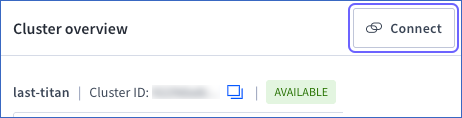
On the Cluster overview page, click Connect.
-
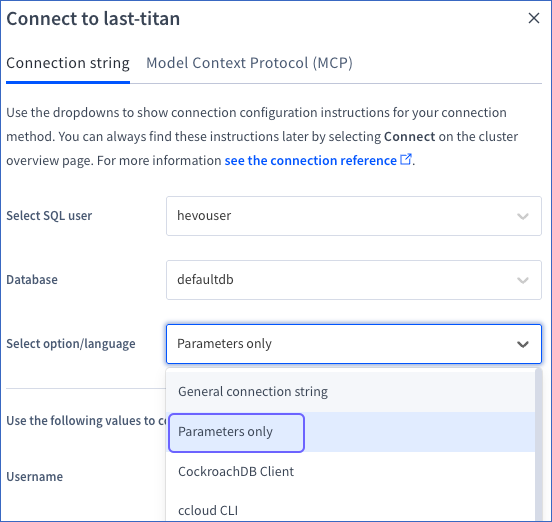
In the Connect to <Cluster name> pop-up window, choose Parameters only from the Select option/language drop down.
-
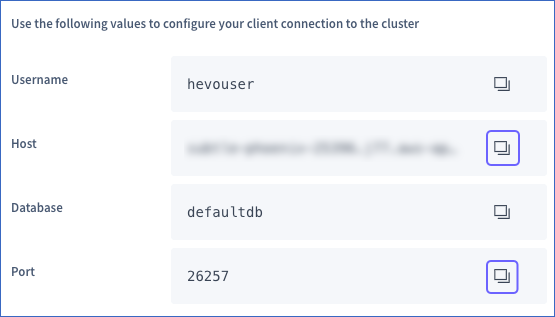
Click the copy icon to copy the Host and Port values. Use these values as your Database Host and Database Port, respectively, while configuring your CockroachDB Source in Hevo.
Configure CockroachDB as a Source in your Pipeline
Perform the following steps to configure your CockroachDB Source:
-
Click Pipelines in the Navigation Bar.
-
Click + Create Pipeline in the Pipelines List View.
-
On the Select Source Type page, select CockroachDB.
-
On the Select Destination Type page, select the type of Destination you want to use.
-
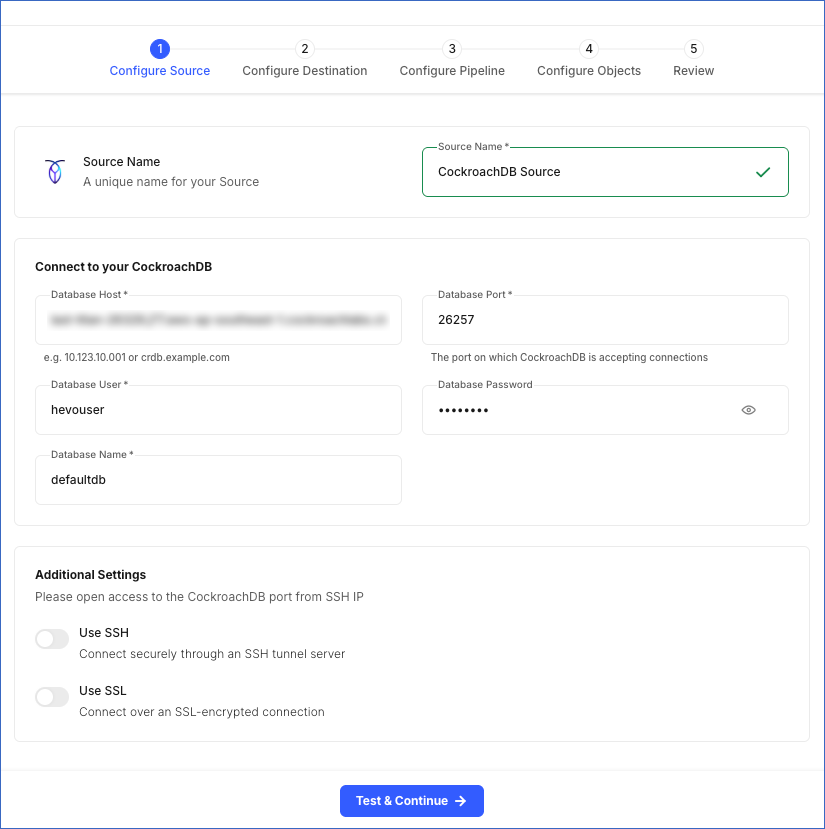
In the Configure Source screen, specify the following:
-
Source Name: A unique name for your Source, not exceeding 255 characters. For example, CockroachDB Source.
-
In the Connect to your CockroachDB section:
-
Database Host: The IP address or hostname of your CockroachDB database. This is the hostname that you obtained in the Retrieve the Database Hostname and Port Number section.
-
Database Port: The port on which your CockroachDB instance listens for connections. This is the port number that you obtained in the Retrieve the Database Hostname and Port Number section. Default value: 26257.
-
Database User: The user who has permission to read data from your database. This user can be the one you created in the Create a database user section or an existing user. For example, hevouser.
-
Database Password: The password for your database user.
-
Database Name: The database from which you want to replicate data. For example, defaultdb.
-
-
Additional Settings
-
Use SSH: Enable this option to connect to Hevo using an SSH tunnel instead of directly connecting your CockroachDB host to Hevo. This provides an additional level of security to your database by not exposing your CockroachDB setup to the public.
-
Use SSL: Enable this option to use an SSL-encrypted connection. Specify the following:
-
CA File: The file containing the SSL server certificate authority (CA).
-
Client Certificate: The client’s public key certificate file.
-
Client Key: The client’s private key file.
-
-
-
-
Click Test & Continue to test the connection to your CockroachDB Source. Once the test is successful, you can proceed to set up your Destination.
Additional Information
Read the detailed Hevo documentation for the following related topics:
Data Type Mapping
Hevo maps the CockroachDB Source data type internally to a unified data type, referred to as the Hevo Data Type, in the table below. This data type is used to represent the Source data from all supported data types in a lossless manner.
The following table lists the supported CockroachDB data types and the corresponding Hevo data type to which they are mapped:
| CockroachDB Data Type | Hevo Data Type |
|---|---|
| - INT2 - SMALLINT |
SHORT |
| - INT4 | INTEGER |
| - INT - INT8 - INT64 - BIGINT - INTEGER - OID |
LONG |
| - BOOL | BOOLEAN |
| - FLOAT - FLOAT8 - DOUBLE PRECISION |
DOUBLE |
| - REAL - FLOAT4 |
FLOAT |
| - DECIMAL | DECIMAL Note: Based on the Destination, Hevo maps DECIMAL values to either DECIMAL (NUMERIC) or VARCHAR. The mapping is determined by: P – the total number of significant digits, and S – the number of digits to the right of the decimal point. |
| - STRING - TEXT - VARCHAR - CHAR - CHARACTER - CITEXT - COLLATE - BIT - INTERVAL - UUID - INET - LTREE - ENUM |
VARCHAR |
| - BYTES | BYTEARRAY |
| - DATE | DATE |
| - TIME | TIME |
| - TIMETZ | TIMETZ |
| - TIMESTAMP | TIMESTAMP |
| - TIMESTAMPTZ | TIMESTAMPTZ |
| - VECTOR - JSONB - JSON - ARRAY |
JSON |
At this time, the following CockroachDB data types are not supported by Hevo:
-
TSQUERY
-
TSVECTOR
-
GEOMETRY
-
GEOGRAPHY
-
BOX2D
-
Any other data type not listed in the table above.
Note: If any of the Source objects contain data types that are not supported by Hevo, the corresponding fields are marked as unsupported during object configuration in the Pipeline.
Handling of Deletes
Hevo uses CockroachDB’s changefeed mechanism to capture data changes, including insert, update, and delete operations. Hevo replicates delete actions captured by the changefeed to the Destination table by setting the value of the metadata column, __hevo__marked_deleted, to True for the corresponding row.
Source Considerations
-
If a table does not have a primary key defined, CockroachDB automatically assigns rowid as the primary key. Hevo uses this column to track changes for such tables.
-
If you add a new column with a default value to a table already included in the Pipeline, the default value is replicated only for rows inserted or updated after the column is added. Existing rows already replicated to the Destination are not updated. This means historical data in the Destination will not reflect the new column’s default value until those rows are updated at the Source.
-
Hevo supports tables that use hash-sharded primary keys. However, data replication for such tables may be slower than for tables with standard primary keys. This is because hash sharding spreads data across multiple nodes to improve write performance. This makes reading the data less efficient, which can increase sync time. If sync time is a concern, consider using standard primary keys where possible.
Limitations
-
Hevo does not support data replication from tables that use multiple column families.
-
Hevo does not support ingesting data from computed columns in CockroachDB.
Revision History
Refer to the following table for the list of key updates made to this page:
| Date | Release | Description of Change |
|---|---|---|
| Jun-04-2026 | NA | New document. |