On This Page
LinkedIn is the world’s largest professional network, and LinkedIn Ads is its self-serve advertising platform that lets businesses reach and engage professional audiences at scale. It provides ad formats such as Sponsored Content, Sponsored Messaging, Text Ads, and Dynamic Ads, along with tools to create Lead Gen Forms, target audiences by professional attributes, and measure campaign performance and conversions.
Hevo uses the LinkedIn Marketing API to replicate data from your LinkedIn Ads account to the Destination of your choice.
Hevo supports the following authentication methods to connect to your LinkedIn Ads account:
-
Open Authorization (OAuth): Allows Hevo to connect to your account through an authorization flow, where you sign in to LinkedIn and grant Hevo access to your account data.
-
OAuth app: Allows Hevo to connect to your account using the client ID, client secret, and refresh token of an OAuth app that you create in LinkedIn.
Note: To create a Pipeline with LinkedIn Ads as the Source using an OAuth app, you must use the Create a Pipeline endpoint through the Hevo API. This method is not available in the Hevo UI. Read Creating a Pipeline with Hevo API for the steps to create the Pipeline.
Supported Features
| Feature Name | Supported |
|---|---|
| Capture deletes | No |
| History mode | No |
| Custom data (user-configured tables & fields) | No |
| Data blocking (skip objects and fields) | Yes |
| Resync (objects and Pipelines) | Yes |
| API configurable | Yes |
Prerequisites
-
An active LinkedIn Ads account exists, with at least one ad account, from which data is to be ingested.
-
You have the required user role on the LinkedIn ad account(s) you want to sync.
-
To sync the Follower Statistics, Page Statistics, and Share Statistics objects, the authorized account must have Administrator access to the LinkedIn Company Page(s) associated with your ad accounts.
Configure Linkedin Ads as a Source in your Pipeline
Perform the following steps to configure your Linkedin Ads Source:
-
Click Pipelines in the Navigation Bar.
-
Click + Create Pipeline in the Pipelines List View.
-
On the Select Source Type page, select Linkedin Ads.
-
On the Select Destination Type page, select the type of Destination you want to use.
-
On the Select Pipeline Type page, click Edge, and then click Continue.
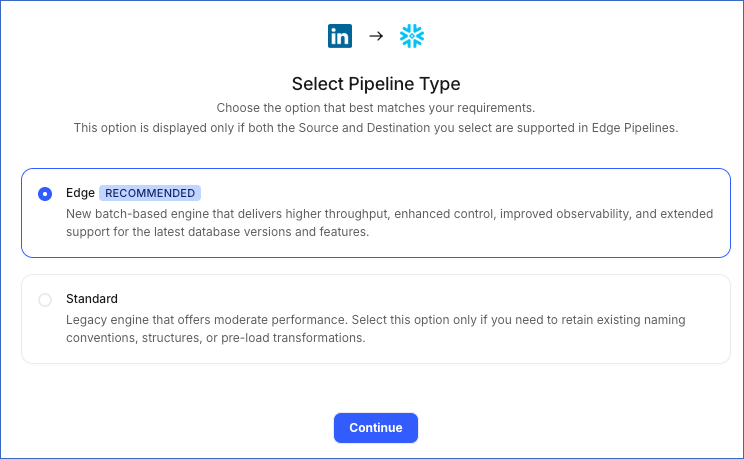
This page appears only if the selected Destination type is supported in Edge and your Team has an existing Linkedin Ads Pipeline with the same Destination type. Otherwise, you can proceed to create an Edge Pipeline.
-
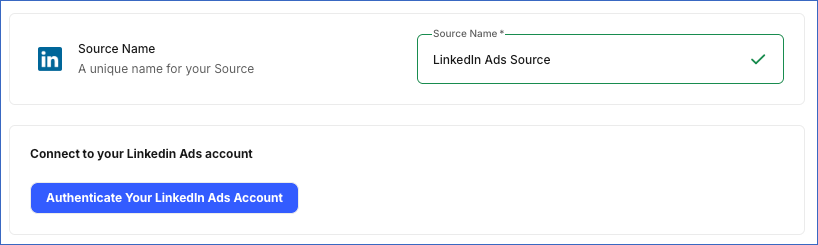
In the Connect to your LinkedIn Ads account section, click Authenticate Your LinkedIn Ads Account, log in to your LinkedIn Ads account, and click Allow to grant Hevo access to your account.
-
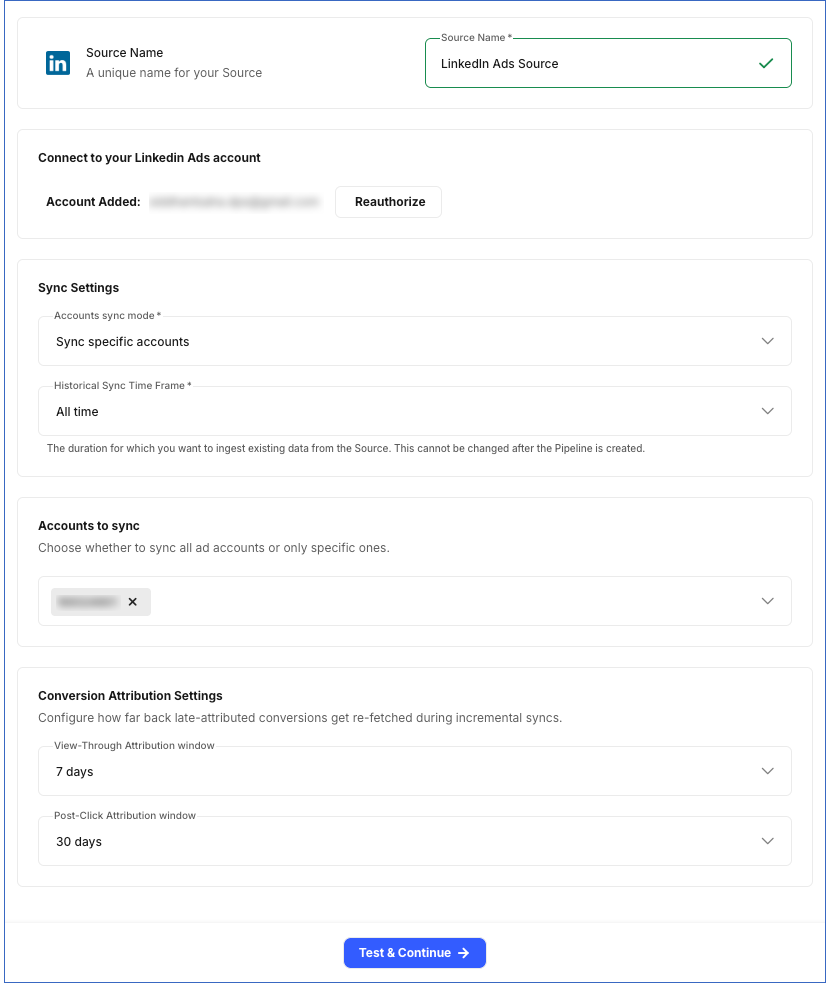
In the Configure Source screen, specify the following:
-
In the Sync Settings section:
-
Accounts sync mode: Choose whether to sync data from all accessible accounts or only specific accounts.
-
Sync all accounts: Hevo syncs data for all ad accounts accessible to your authorized LinkedIn Ads account, including any accounts added later.
-
Sync specific accounts: Hevo ingests data only for the accounts you select from the Accounts to sync drop-down.
-
-
Historical Sync Time Frame: The duration for which you want to ingest existing data from the Source. This cannot be changed after the Pipeline is created.
-
-
In the Conversion Attribution Settings section:
-
View-Through Attribution window: The number of days between a person viewing your ad and completing a conversion. Default value: 7 days.
-
Post-Click Attribution window: The number of days between a person clicking your ad and completing a conversion. Default value: 30 days.
-
-
-
Click Test & Continue to test the connection to your Linkedin Ads Source.
Configure LinkedIn Ads as a Source Using the Hevo API
You can connect Hevo to your LinkedIn Ads account with an OAuth app created in the LinkedIn Developer Portal. This method is available only through the Hevo API. Specify the credentials of the app in the request that creates the Pipeline, and Hevo uses them to authenticate with your account.
The following credentials from your OAuth app are required to authenticate the connection:
-
Client ID: The unique identifier of your app. LinkedIn displays it with the client secret.
-
Client Secret: The private key of your app. Hevo sends it with the client ID to authenticate the request.
-
Refresh Token: A long-lived token that your app receives the first time a LinkedIn user authorizes it. Hevo exchanges this token for a short-lived access token when the Pipeline is created, and refreshes that token automatically, so the connection keeps working without anyone signing in again. Read Refresh Tokens with OAuth 2.0 for the steps to generate it.
Create the app in the LinkedIn Developer Portal and request the following scopes:
| Scope | Allows Hevo to |
|---|---|
openid |
Identify the LinkedIn account that authorizes the app. |
email |
Read the email address of that account, which Hevo shows as the account that the Source is connected with. |
r_ads |
Read your ad accounts, campaigns, creatives, and other advertising data. |
r_ads_reporting |
Read the performance data of your ads, which Hevo replicates in the Ad Analytics by Campaign, Ad Analytics by Creative, and Ad Analytics by Creative with Conversion Breakdown objects, and in the Monthly Ad Analytics by Member objects. |
r_organization_social |
Read the details, posts, and followers of your LinkedIn Pages, which Hevo replicates in the Organization, Follower Statistics, and Share Statistics objects. |
r_organization_admin |
Read the statistics of your LinkedIn Pages, which Hevo replicates in the Follower Statistics, Page Statistics, and Share Statistics objects. |
r_marketing_leadgen_automation |
Read the responses to your lead forms, which Hevo replicates in the Lead Form Response object. |
Read Configure Your Application for the steps to create the app, and Getting Access to LinkedIn APIs for the access that each scope requires.
Note: LinkedIn grants most permissions only on approval. Ensure that your app has access to the required scopes before you create the Pipeline.
Prepare the Source Configuration
Before you build your request, retrieve the settings that the LinkedIn Ads connector currently accepts. Refer to Read the Connector Configuration for the steps to retrieve them, and Using your own OAuth app for the keys that this method accepts.
In the response, the auth object describes the credentials of your own OAuth app. In the connector configuration response, Hevo returns the auth object under data.schema.properties.auth, and the connector settings under data.schema.properties.config. Only a connector that accepts an OAuth app has an auth property. Each credential carries "type": "string". Every credential except client_id also carries "format": "password" and "writeOnly": true. The following example shows part of the auth object:
{
  "auth": {
    "required": [
      "client_access"
    ],
    "properties": {
      "client_access": {
        "required": [
          "client_id",
          "client_secret"
        ],
        "properties": {
          "client_id": {
            "title": "Client ID"
          },
          "client_secret": {
            "title": "Client Secret"
          }
        }
      },
      "refresh_token": {
        "title": "Refresh Token"
      },
      "access_token": {
        "title": "Access Token"
      }
    },
    "anyOf": [
      {
        "required": [
          "refresh_token"
        ]
      },
      {
        "required": [
          "access_token"
        ]
      }
    ]
  }
}
The anyOf block in the schema accepts either refresh_token or access_token, because that part of the schema is the same for every connector. For a LinkedIn Ads Source, send refresh_token. Hevo needs the refresh token to keep the Source authorized, so a request that sends only an access token fails while the Pipeline is being created.
A LinkedIn refresh token expires 365 days after it is issued, and refreshing the access token does not extend it. Generate a new refresh token before then. LinkedIn issues refresh tokens only to the applications it has enabled for them, such as those approved for the Marketing Developer Platform.
By default Hevo syncs every ad account, because config.account_sync_mode defaults to ALL_ACCOUNTS. To sync only some of them, set it to SPECIFIC_ACCOUNTS and list the account IDs as strings in config.selected_accounts. The selected_accounts key does not appear in the connector configuration response.
Specify the credentials of your app in the auth object. The following example shows the source object for a LinkedIn Ads Source:
{
  "name": "<source_name>",
  "connector_id": "linkedin_ads",
  "type": "LINKEDIN_ADS",
  "config": {
    "historical_sync_time_frame": "ALL_TIME"
  },
  "auth": {
    "client_access": {
      "client_id": "<client_id>",
      "client_secret": "<client_secret>"
    },
    "refresh_token": "<refresh_token>"
  }
}
Note: Replace the placeholder values in the example with your own. For example, <source_name> with My LinkedIn Ads Account.
Specify this source object in the request that creates your Pipeline. Read Creating a Pipeline with Hevo API for the complete request and the remaining steps.
Hevo validates the credentials and tests the Source and Destination connections before it saves anything. To test the Source connection, Hevo uses the credentials in the auth object to generate an access token. If a credential is rejected or a test fails, the request returns an error, and no Pipeline is created. Hevo also deletes the access token that it generated.
Note: Hevo does not store these credentials in the Source configuration. It exchanges them for a token when the Pipeline is created and refreshes that token from then on. Hevo does not return them if you retrieve the Source configuration later. If the refresh token expires or is revoked, Hevo cannot authenticate with the Source. As a result, all active jobs for the Pipeline fail, and no data is replicated. To resume data replication, send the new credentials using the Modify Source Configuration in a Pipeline endpoint. Read Modifying the Source Configuration for the steps to send them.
Data Replication
Hevo replicates data for all the objects selected on the Configure Objects page during Pipeline creation. By default, all supported objects and their available fields are selected. However, you can modify this selection while creating or editing the Pipeline.
Hevo ingests the following types of data from your Source objects:
-
Historical Data: The first run of the Pipeline ingests historical data for the selected objects, based on the Historical Sync Time Frame specified when creating the Pipeline, and loads it into the Destination.
-
Incremental Data: Once the historical load is complete, new and updated records for objects are ingested as per the sync frequency.
For the following objects, Hevo ingests only the incremental data in subsequent Pipeline runs:
| Object Category | Objects |
|---|---|
| Ad Analytics Reports | Ad Analytics by Campaign, Ad Analytics by Creative, Ad Analytics by Creative with Conversion Breakdown, Monthly Ad Analytics by Member Country, Monthly Ad Analytics by Member Region, Monthly Ad Analytics by Member Company, Monthly Ad Analytics by Member Company Size, Monthly Ad Analytics by Member Industry, Monthly Ad Analytics by Member Seniority, Monthly Ad Analytics by Member Job Function, Monthly Ad Analytics by Member Job Title |
| Company Page Analytics | Follower Statistics, Page Statistics |
| Reference Data | Organization |
For the Ad Analytics objects, Hevo uses the day field for daily reports and the month field for monthly reports to fetch incremental data.
For Follower Statistics and Page Statistics objects, Hevo fetches incremental data using the date field.
To capture delayed conversion updates, Hevo also re-fetches data within the configured View-Through Attribution or Post-Click Attribution window, depending on which is longer, during every Pipeline run.
For all other objects, Hevo ingests the entire data during each Pipeline run.
Linkedin Ads currently enforces a rate limit on the ad analytics reporting endpoint. If this limit is exceeded, a rate limit exception occurs. To understand how Hevo handles such scenarios, read Handling Rate Limit Exceptions.
Note: You can create a Pipeline with this Source only using the Merge load mode. The Append mode is not supported for this Source.
Schema and Primary Keys
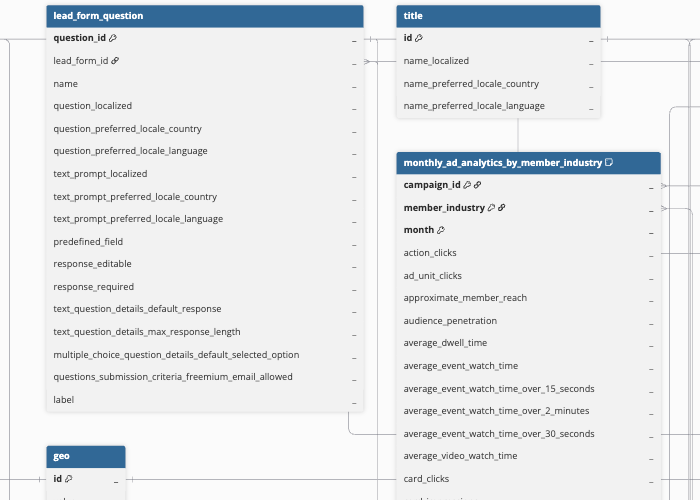
Hevo uses the following schema to upload the records to the Destination. For a detailed view of the objects, fields, and relationships, click the ERD.
Data Model
The following is the list of tables (objects) that are created at the Destination when you run the Pipeline:
| Object | Description |
|---|---|
| Account | Contains basic details about a LinkedIn ad account, including its name, currency, linked organization, and status. This object has a child object, Account Serving Status. |
| Account User | Contains details of which LinkedIn members have access to an ad account and what role each one holds, such as Account Manager or Viewer. |
| Ad Analytics by Campaign | Contains daily performance metrics for each campaign, including impressions, clicks, spend, conversions, and engagement. |
| Ad Analytics by Creative | Contains daily performance metrics for each ad creative. |
| Ad Analytics by Creative with Conversion Breakdown | Contains daily performance metrics for each ad creative, split out by conversion rule. |
| Campaign | Contains details of each campaign, including its objective, budget, bid strategy, and status. This object has the following child objects: - Campaign Serving Status - Targeting Criteria Include - Targeting Criteria Exclude |
| Campaign Group | Contains details of campaign groups that organize related campaigns, including budget, run schedule, and status. This object has the following child objects: - Campaign Group Serving Status - Campaign Group Allowed Campaign Type |
| Conversion | Contains details of conversion rules set up in the account, including how conversions are tracked, the time window used to count them, and the value assigned. This object has a child object, Conversion Associated Campaign. |
| Creative | Contains details of each ad creative, including its type (Sponsored Content, Text Ad, Spotlight, Follower, Jobs, Document, or Event ad), review status, and associated campaign. This object has a child object, Creative Serving Status. |
| Distribution Target Industry | Contains the industry-based targeting rules set for a Post’s distribution. |
| Distribution Target Interface Locale | Contains the language-based targeting rules set for a Post’s distribution. |
| Distribution Target Job Function | Contains the job-function-based targeting rules set for a Post’s distribution. |
| Distribution Target Location | Contains the location-based targeting rules set for a Post’s distribution. |
| Distribution Target Seniority | Contains the seniority-based targeting rules set for a Post’s distribution. |
| Distribution Target Staff Count Range | Contains the company-size-based targeting rules set for a Post’s distribution. |
| Document | Contains details of document files uploaded for use in Document Ads and document posts. |
| Follower Statistics | Contains the daily count of new organic and paid followers gained by an organization’s LinkedIn Page. |
| Function | Contains LinkedIn’s standard list of job functions, used across targeting and reporting. |
| Geo | Contains LinkedIn’s standard list of geographic locations, used across targeting and reporting. |
| Image | Contains details of image files uploaded for use in creatives and posts. |
| Industry | Contains LinkedIn’s standard list of industries, used across targeting and reporting. |
| InMail Content | Contains the message content for Sponsored InMail and Conversation Ads creatives, including the subject line, body, sender, and call-to-action. |
| Lead Form | Contains details of Lead Gen Forms, including the headline, privacy policy consent text, and the message shown after submission. This object has the following child objects: - Lead Form Question - Lead Form Consent - Lead Form Hidden Field - Lead Form Rejection Reason |
| Lead Form Response | Contains individual lead submissions collected through a Lead Form. This object has the following child objects: - Lead Form Response Answer - Lead Form Response Multiple Choice Answers - Lead Form Response Consent |
| Monthly Ad Analytics by Member Company | Contains monthly campaign performance metrics, broken down by the company of the members reached. |
| Monthly Ad Analytics by Member Company Size | Contains monthly campaign performance metrics, broken down by the company size of the members reached. |
| Monthly Ad Analytics by Member Country | Contains monthly campaign performance metrics, broken down by the country of the members reached. |
| Monthly Ad Analytics by Member Industry | Contains monthly campaign performance metrics, broken down by the industry of the members reached. |
| Monthly Ad Analytics by Member Job Function | Contains monthly campaign performance metrics, broken down by the job function of the members reached. |
| Monthly Ad Analytics by Member Job Title | Contains monthly campaign performance metrics, broken down by the job title of the members reached. |
| Monthly Ad Analytics by Member Region | Contains monthly campaign performance metrics, broken down by the region of the members reached. |
| Monthly Ad Analytics by Member Seniority | Contains monthly campaign performance metrics, broken down by the seniority of the members reached. |
| Multi Image | Contains the individual images that make up a multi-image Post. |
| Organization | Contains details of LinkedIn Company Pages referenced across your campaigns, ad accounts, and analytics data, including the name, description, and logo. |
| Page Statistics | Contains daily view statistics for an organization’s LinkedIn Company Page, broken down by device and page tab. |
| Poll | Contains the question, options, and vote counts of a poll Post. |
| Post | Contains details of organic and sponsored posts (shares) published from your LinkedIn Company Page, including the author, commentary, visibility, and lifecycle state. This object has the following child objects: - Content - Carousel Card |
| Seniority | Contains LinkedIn’s standard list of job seniority levels, used across targeting and reporting. |
| Share Statistics | Contains engagement statistics, such as impressions, clicks, likes, comments, and shares, for posts published from an organization’s LinkedIn Company Page. |
| Sponsored Message Content | Contains the message body, sender, and call-to-action content of a Conversation Ads (sponsored message) campaign. This object has a child object, Sponsored Message Option. |
| Sponsored Message Option | Contains the reply options and follow-up content configured for a Sponsored Message Content. |
| Title | Contains LinkedIn’s standard list of job titles, used across targeting and reporting. |
Additional Information
Read the detailed Hevo documentation for the following related topics:
Source Considerations
-
LinkedIn retains most ad performance data, such as account, campaign, and creative analytics, for up to 10 years, while professional demographic data, such as Monthly Ad Analytics by Member, is retained for only 2 years. Hevo cannot ingest data older than these retention periods.
-
Some metrics are not available immediately through the LinkedIn API. Metrics based on professional demographics, such as company size and job function, can be delayed by 12–24 hours, while the videoWatchTime and averageVideoWatchTime metrics can take up to 48 hours to become available.
Revision History
Refer to the following table for the list of key updates made to this page:
| Date | Release | Description of Change |
|---|---|---|
| Oct-19-2026 | 2.54 | Added section, Configure LinkedIn Ads as a Source Using the Hevo API. |
| Aug-04-2026 | NA | New document. |